1. Matulview
The Fanvil V61W is a professional IP phone designed for modern business communication. It features an elegant design with a 2.4-inch HD color screen, offering a clear and intuitive user interface. This device supports 4 SIP lines, 6-way audio conferencing, and HD audio for superior call quality. With dual Gigabit Ethernet ports, Wi-Fi 6 (2.4G/5G), and Bluetooth 5.4 connectivity, the V61W provides versatile and reliable communication options for various professional application scenarios and instant communication services.
2. Gwida ta' Setup
Follow these steps to set up your Fanvil V61W IP Phone:
- Iftaħ it-Telefon mill-pakkett: Carefully remove all components from the packaging, including the phone unit, handset, handset cord, Ethernet cable, and power adapter.
- Qabbad il-Handset: Ipplaggja tarf wieħed tal-korda mkebba tal-handset fil-handset u t-tarf l-ieħor fil-port tal-handset fuq il-bażi tat-telefon.
- Qabbad man-Netwerk:
- Konnessjoni bil-fili: Qabbad tarf wieħed tal-kejbil Ethernet mal-port LAN fuq it-telefon u t-tarf l-ieħor mas-swiċċ jew ir-router tan-netwerk tiegħek.
- Konnessjoni Wi-Fi: If using Wi-Fi, you will configure this after powering on the device.
- Qabbad l-Enerġija: Plug the power adapter into the power port on the phone and then into a power outlet. The phone will automatically power on.
- Konfigurazzjoni Inizjali: Once powered on, the phone will boot up. Follow the on-screen prompts to configure network settings (if using Wi-Fi) and SIP account details provided by your service provider.

Figura 2.1: Quddiem view of the Fanvil V61W IP Phone, illustrating the main components including the HD color screen, numeric keypad, and handset cradle.
3. Istruzzjonijiet Operattivi
3.1 Funzjonijiet Bażiċi tas-Sejħiet
- Tagħmel Sejħa:
- Aqbad l-idejn jew agħfas il-buttuna tal-Ispeaker.
- Ċempel in-numru mixtieq billi tuża t-tastiera.
- Press the Dial/Send button (usually a green phone icon).
- Tweġiba għal Sejħa: Meta jdoqq it-telefon, erfa’ l-handset jew agħfas il-buttuna tal-Ispeaker.
- Tmiem Sejħa: Hang up the handset or press the End Call button (usually a red phone icon).
- Żomm: During a call, press the Hold button to place the call on hold. Press it again to resume.
- Trasferiment: During a call, press the Transfer button, dial the new number, and then press Transfer again (consult your system administrator for specific transfer types).
3.2 SIP Line Management
The V61W supports up to 4 SIP lines. You can switch between lines using the dedicated line keys on the screen or physical buttons (if available). Each line can be configured independently through the phone's web interface or menu.
3.3 Konferenzi bl-Awdjo
The phone supports 6-way audio conferencing:
- Initiate a call with the first participant.
- Press the Conference button (or equivalent soft key). The first call will be put on hold.
- Dial the second participant's number and establish the call.
- Press the Conference button again to join all participants into a conference call.
- Repeat steps 2-4 for additional participants up to 6.
3.4 Network Connectivity (Wi-Fi 6, Bluetooth 5.4, Gigabit)
- Konfigurazzjoni Wi-Fi:
- Innaviga lejn il-menù tat-telefon: Settings > Netwerk > Wi-Fi.
- Ippermetti l-Wi-Fi u agħżel in-netwerk mixtieq tiegħek mil-lista.
- Daħħal il-password tal-Wi-Fi jekk tintalab.
- Tqabbil Bluetooth:
- Innaviga lejn il-menù tat-telefon: Settings > Bluetooth.
- Enable Bluetooth and put your Bluetooth device (e.g., headset) into pairing mode.
- Select your device from the list of available devices on the phone's screen and confirm pairing.
- Gigabit-Ethernet: The phone is equipped with two Gigabit Ethernet ports (LAN and PC). The LAN port connects to your network, and the PC port allows you to connect a computer through the phone, acting as a pass-through switch.
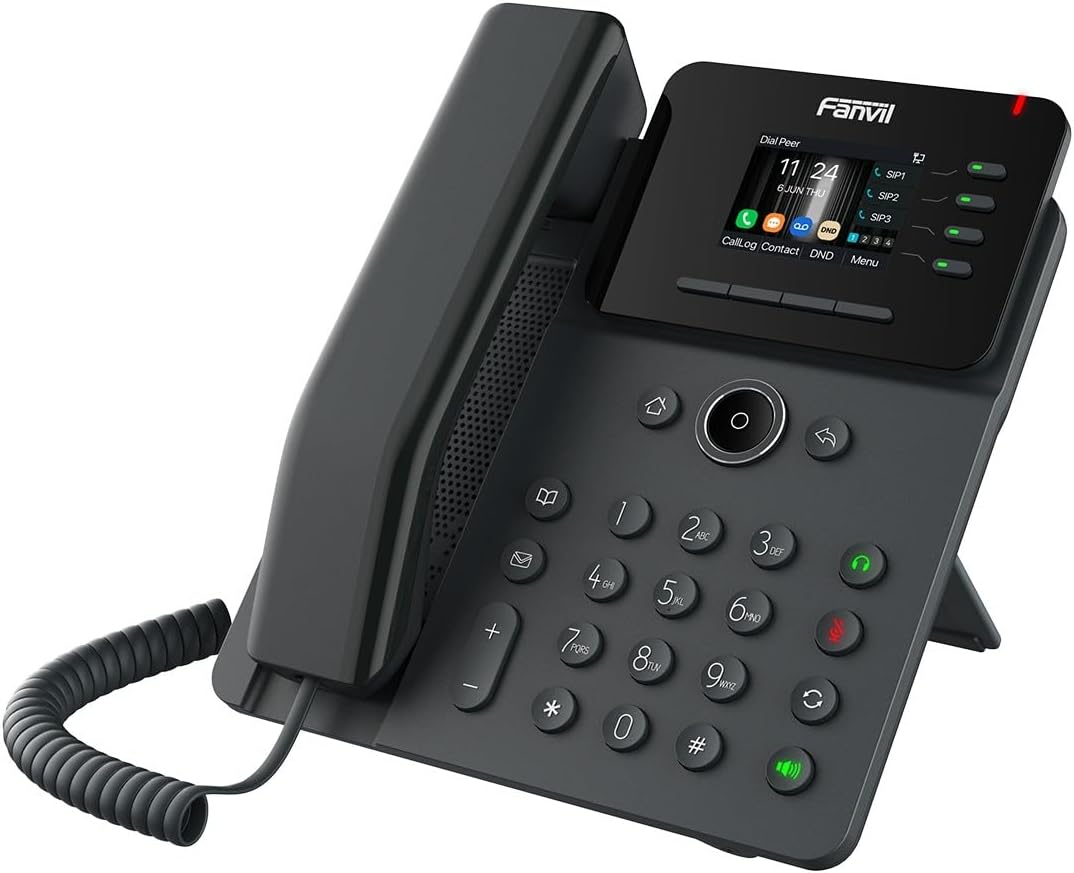
Figura 3.1: Angolat view of the Fanvil V61W IP Phone, highlighting its ergonomic design and connectivity ports on the rear (not visible in this view).
4. Manutenzjoni u Kura
To ensure the longevity and optimal performance of your Fanvil V61W IP Phone, follow these maintenance guidelines:
- Tindif: Use a soft, dry, lint-free cloth to clean the phone's surface and screen. For stubborn marks, slightly dampLaħlaħ id-drapp bl-ilma. Evita li tuża kimiċi ħarxa, prodotti tat-tindif li joborxu, jew sprejs tal-ajrusol.
- Ambjent: Keep the phone in a cool, dry place, away from direct sunlight, excessive heat, humidity, and dust. Do not expose it to liquids.
- Kejbils: Periodically check all connected cables (handset, Ethernet, power) for any signs of wear or damage. Replace them if necessary.
- Aġġornamenti tas-Software: Regularly check for and install firmware updates provided by Fanvil or your service provider. Updates often include performance improvements and security patches.
5 Issolvi l-problemi
This section addresses common issues you might encounter with your Fanvil V61W IP Phone.
| Problema | Kawża Possibbli | Soluzzjoni |
|---|---|---|
| It-telefon ma jixgħelx. | L-adapter tal-enerġija mhux imqabbad jew difettuż; problema bis-sokit tal-enerġija. | Ensure power adapter is securely connected to the phone and a working power outlet. Try a different outlet. |
| L-ebda ton tal-arloġġ. | Network cable loose; SIP account not registered; network issue. | Check Ethernet cable connection. Verify SIP account registration status on the phone's screen. Restart the phone and network equipment. |
| Ma nistax nagħmel jew nirċievi telefonati. | SIP account not registered; incorrect network settings; firewall blocking VoIP traffic. | Confirm SIP account status. Check IP address and network settings. Contact your network administrator or VoIP service provider. |
| Kwalità ħażina tas-sejħa (eku, statiku). | Network congestion; faulty handset/headset; acoustic echo cancellation (AEC) issues. | Check network bandwidth. Try a different handset or headset. Adjust AEC settings if available, or consult your service provider. |
| Il-konnessjoni tal-Wi-Fi mhix stabbli. | Weak signal; interference; incorrect Wi-Fi settings. | Move the phone closer to the Wi-Fi router. Check for interference from other devices. Re-enter Wi-Fi password. Ensure router firmware is updated. |

Figura 5.1: Angolat view of the Fanvil V61W IP Phone, demonstrating its compact form factor suitable for various desk setups.
6. Speċifikazzjonijiet Tekniċi
| Karatteristika | Speċifikazzjoni |
|---|---|
| Brand | Fanvil |
| Numru tal-Mudell | V61W |
| Wiri | 2.4-inch HD Color Screen (320 x 240) |
| Linji SIP | 4 |
| Konferenzi Awdjo | 6-mod |
| Karatteristiċi Awdjo | Awdjo HD |
| Portijiet Ethernet | 2 x Gigabit Ethernet |
| Wi-Fi | Wi-Fi 6 (2.4G/5G) |
| Bluetooth | Bluetooth 5.4 |
| Manifattur | Fanvil |
| ASIN | B0DNFKQMX4 |
7. Garanzija u Appoġġ
For information regarding the product warranty, please refer to the warranty card included with your purchase or visit the official Fanvil websit. It-termini u l-kundizzjonijiet tal-garanzija jistgħu jvarjaw skont ir-reġjun.
For technical support, troubleshooting assistance beyond this manual, or service inquiries, please contact your authorized Fanvil dealer or your VoIP service provider. You may also find additional resources and FAQs on the official Fanvil support portal.
Note: Spare parts availability and software update guarantees are subject to manufacturer policies and may not be available indefinitely. Please check the latest information from Fanvil.


