Introduzzjoni
Thank you for choosing the Vormooi V71 Digital Voice Recorder. This device is designed for high-fidelity audio recording, offering advanced features such as voice activation, noise reduction, and extensive storage capacity. This manual provides detailed instructions to help you set up, operate, and maintain your recorder, ensuring optimal performance and longevity.
X'hemm fil-Kaxxa
Malli tiftaħ il-pakkett, jekk jogħġbok ivverifika li l-oġġetti kollha li ġejjin huma inklużi:
- 1 x Reġistratur tal-Vuċi Diġitali Vormooi V71
- 1 x Mikrofonu Estern ta' 3.5mm
- 1 x Kejbil tad-Dejta USB-C
- 1 x 64GB TF Memory Card (pre-installed or separate)
- 1 x 3.5mm Transcription Cable
- 1 x Lanyard
- 1 x Manwal tal-Utent (dan id-dokument)

Immaġni: The Vormooi V71 Digital Voice Recorder and its included accessories, such as the external microphone, USB-C cable, 64GB TF card, transcription cable, and lanyard.
Prodott Overview
Familiarize yourself with the physical components and controls of your Vormooi V71 recorder.

Immaġni: The Vormooi V71 Digital Voice Recorder, highlighting its compact design, color screen, and main control buttons. An external microphone and a 64GB memory card are also shown.
Tqassim u Kontrolli tal-Apparat
- Skrin bil-Kulur ta' 2.15": Displays menus, recording status, and file informazzjoni.
- Mikrofoni integrati: Located at the top of the device for omni-directional recording.
- Kelliem inkorporat: Located at the bottom front for audio playback.
- Record/Save Switch: A red slider on the right side for quick recording and saving.
- Buttuni tal-Volum (+/-): On the right side, below the record switch, to adjust volume.
- Port USB-C: Għall-iċċarġjar u l-konnessjoni ma' kompjuter.
- 3.5mm Headphone/Mic Jack: For connecting headphones or the external microphone.
- Slott tal-Karta TF: For inserting the 64GB TF (microSD) memory card.
- Buttuna tal-Enerġija/Daqq: Central button for powering on/off, playing, and pausing.
- Buttuna tal-Menù (M): Accesses device settings and options.
- Prev/Next Buttons: For navigation and fast-forward/rewind during playback.
- Buttuna DEL/BACK: Għat-tħassir files or returning to the previous screen.
Setup
1. Iċċarġjar Inizjali
Qabel l-ewwel użu, iċċarġja l-apparat kompletament.
- Connect the supplied USB-C cable to the recorder's USB-C port.
- Qabbad it-tarf l-ieħor tal-kejbil ma' adapter tal-enerġija USB (mhux inkluż) jew mal-port USB tal-kompjuter.
- L-indikatur tal-batterija fuq l-iskrin se juri l-istatus tal-iċċarġjar. Iċċarġjar sħiħ jieħu madwar sagħtejn.

Immaġni: The Vormooi V71 Digital Voice Recorder displaying its battery charging status, indicating a 1100mAh battery and up to 110 hours of continuous recording.
2. Inserting the TF (MicroSD) Card
The recorder comes with a 64GB TF card, providing ample storage in addition to the built-in 32GB memory.
- Locate the TF card slot on the side of the recorder.
- Gently insert the 64GB TF card into the slot until it clicks into place. Ensure the card's gold contacts face downwards.
- To remove, push the card inwards until it clicks, then release to eject.
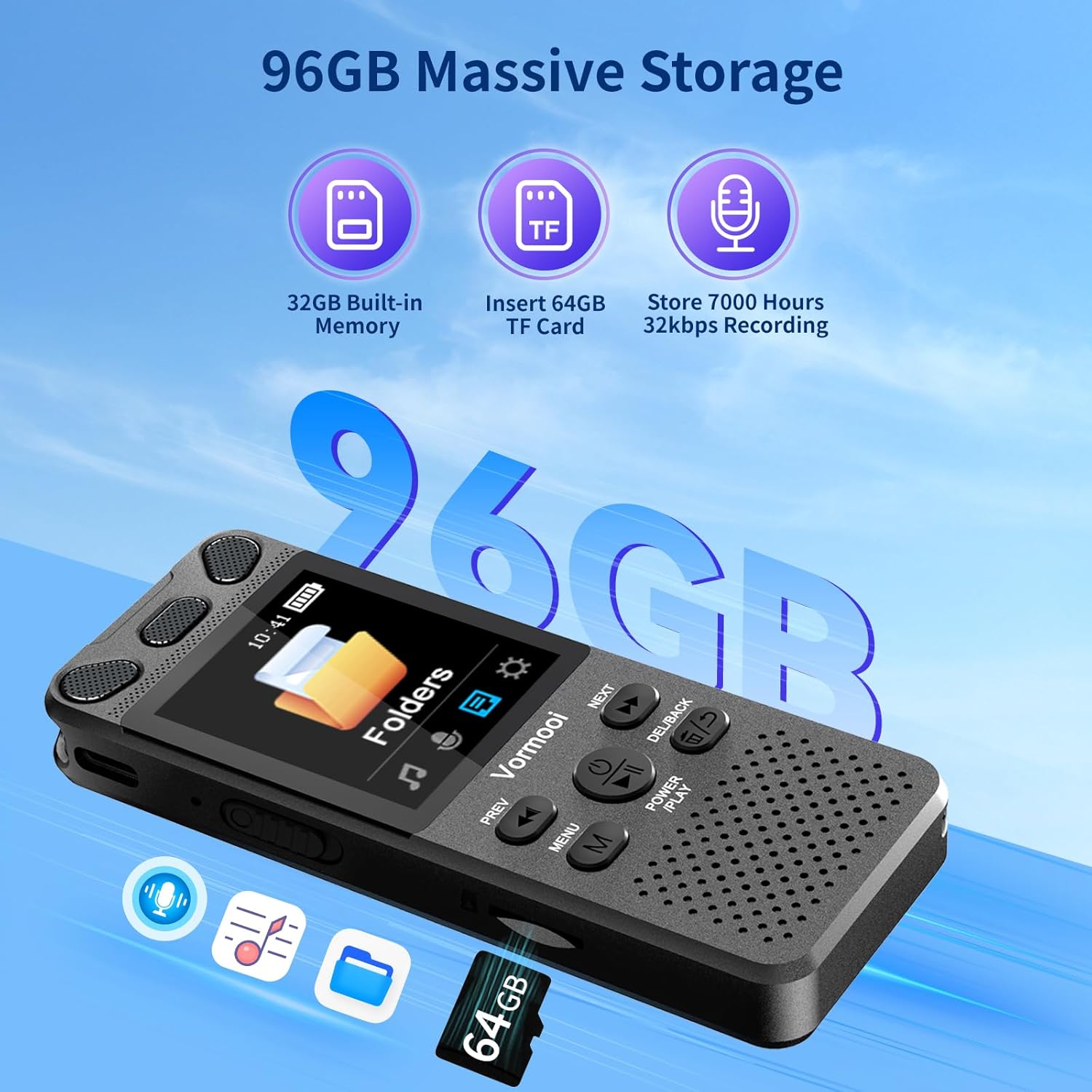
Immaġni: The Vormooi V71 Digital Voice Recorder highlighting its 96GB massive storage capacity, composed of 32GB built-in memory and an additional 64GB TF card, capable of storing up to 7000 hours of 32kbps recordings.
3. Tixgħil / Mitfi
- Biex Tixgħel: Press and hold the central QAWWA/LOGĦOB button for approximately 2 seconds until the screen lights up.
- Biex Tifi: Press and hold the central QAWWA/LOGĦOB button for approximately 2 seconds until the screen turns off.
Operazzjoni Bażika
1. Reġistrazzjoni
The V71 offers multiple recording methods for various situations.
- One-Touch Recording (Internal Microphone):
- To start recording, slide the red RECORD/SAVE switch on the right side of the device upwards. The recording will begin automatically.
- To save the recording and stop, slide the RECORD/SAVE switch downwards. The file se jiġu ffrankati awtomatikament.
- Using the External Microphone:
- Connect the supplied 3.5mm external microphone to the recorder's 3.5mm jack.
- Once connected, the recorder will automatically switch to external microphone input. Proceed with recording as described above.
- Reġistrazzjoni Line-in:
- Use the 3.5mm transcription cable to connect the recorder's 3.5mm jack to the audio output of another device (e.g., smartphone, computer, MP3 player).
- Ensure the audio output level of the source device is appropriate to avoid distortion.
- Start recording using the RECORD/SAVE swiċċ.

Immaġni: The Vormooi V71 Digital Voice Recorder demonstrating its 360-degree omni-directional recording capability with 1536Kbps clear sound quality, powered by a 2159 intelligent noise cancellation chip. The one-touch record/save slider is also highlighted.
2. Daqq
- Aċċess għal Reġistrazzjonijiet: From the main menu, navigate to "Recordings" or "Folders" to browse your saved files.
- Playing a File: Agħżel a file bl-użu tal- QABEL / JMISS buttons and press the central QAWWA/LOGĦOB buttuna biex tibda d-daqq.
- Pawża/Tkomplija: Agħfas il- QAWWA/LOGĦOB buttuna waqt daqq.
- Aġġusta tal-Volum: Uża l- +/- buttons on the right side of the device.
- 'l quddiem/rewind malajr: Agħfas u żomm il- QABEL / JMISS buttuni waqt il-plejbek.
- Tħassir Files: Agħżel a file u agħfas il- DEL/LURA button. Confirm deletion when prompted.
Karatteristiċi Avvanzati
The Vormooi V71 includes several advanced functions to enhance your recording experience. Access these features through the MENU buttuna.

Immaġni: The Vormooi V71 Digital Voice Recorder showcasing its versatile features, including Voice Activation, Variable Speed Playback, Line-in Microphone Recording, Password Protection, Built-in Speaker, and A-B Repeat functionality.
- Reġistrazzjoni Attivata bil-Vuċi (VOR):
- Enable VOR in the settings menu. The recorder will automatically start recording when sound is detected and pause when there is no sound, saving memory and battery.
- Adjust VOR sensitivity levels to suit your environment.
- Noise Reduction (DSP Technology):
- The V71 utilizes an advanced 2159 professional recording chip and DSP noise reduction technology to filter background noise and enhance recording clarity. This feature is typically active by default.
- Protezzjoni bil-Password:
- Set a 6-digit password in the settings to protect your recordings and privacy. Only users with the correct password can access the device's content.
- Irrepeti AB:
- Waqt id-daqq, agħfas il- MENU button to set the start point (A) and end point (B) of a section you wish to repeat. This is useful for transcribing or studying specific audio segments.
- Daqq ta' Veloċità Varjabbli:
- Adjust the playback speed of recordings in the settings menu. This feature helps in reviewing content faster or slower for better comprehension.
Konnessjoni ma' Kompjuter
Tista 'faċilment tittrasferixxi rreġistrati files għall-kompjuter tiegħek.
- Connect the Vormooi V71 recorder to your computer using the supplied USB-C data cable.
- The recorder will be recognized as a removable disk drive.
- Navigate to the appropriate folder (e.g., "RECORD") to access your audio files (MP3 or WAV format).
- You can copy, paste, or delete files as you would with any other external storage device.
Manutenzjoni
Kura tal-batterija
- Biex ittawwal il-ħajja tal-batterija, evita li tiċċarġja kompletament il-batterija ta' spiss.
- Iċċarġja l-apparat regolarment, anke jekk ma jkunx qed jintuża għal perjodi twal.
- Aħżen l-apparat f'post frisk u niexef meta ma jkunx qed jintuża.
Tindif
- Uża drapp ratba u niexfa biex tnaddaf in-naħa ta 'barra tal-apparat.
- Tużax prodotti tat-tindif likwidi jew materjali li joborxu, għax jistgħu jagħmlu ħsara lill-apparat.
Issolvi l-problemi
| Problema | Kawża Possibbli | Soluzzjoni |
|---|---|---|
| L-apparat mhux se jixgħel. | Batterija baxxa; apparat iffriżat. | Charge the device for at least 30 minutes. If still unresponsive, press and hold the Power/Play button for 10-15 seconds to force a restart. |
| Kwalità fqira tar-reġistrazzjoni. | Microphone obstructed; high background noise; incorrect settings. | Ensure microphones are clear. Use the external microphone if needed. Check noise reduction settings. Record in a quieter environment. |
| Ma jistax jittrasferixxi files għall-kompjuter. | Kejbil USB difettuż; konnessjoni mhux korretta; problema bis-sewwieq. | Try a different USB-C cable. Ensure the cable is securely connected to both the recorder and the computer. Try a different USB port on your computer. |
| L-iskrin ma jirrispondix. | Apparat iffriżat. | Force restart the device by holding the Power/Play button for 10-15 seconds. |
Speċifikazzjonijiet
| Karatteristika | Dettall |
|---|---|
| Brand | Vormooi |
| Numru tal-Mudell | V71 |
| Kapaċità tal-Memorja | 96 GB (32 GB Built-in + 64 GB TF Card) |
| Daqs tal-Iskrin | 2.15 Pulzier |
| Tip ta 'batterija | Lithium-ion (1100 mAh) |
| Ħin ta' Reġistrazzjoni Kontinwu | Up to 110 hours (at 512 kbps) |
| Dimensjonijiet (L x W x H) | 100 x 39 x 13 mm (3.94 x 1.54 x 0.50 pulzieri) |
| Piż | 98 Gramma (3.46 oz) |
| Formati Awdjo | MP3, WAV |
| Irrekordjar Bitrate | 32-1536 Kbps (PCM) |
| Tip ta 'mikrofonu | Built-in Dual Microphones, supports External 3.5mm Microphone |
| Konnettività | USB tat-Tip Ċ, Jack tal-Headphone ta' 3.5mm |
| Apparati Kompatibbli | Personal Computer, MP3 Player, Smartphone |
Garanzija u Appoġġ
The Vormooi V71 Digital Voice Recorder comes with a Garanzija ta' 2 snin mill-manifattur.
If you encounter any issues with your device that are not covered in the troubleshooting section, or if you require further assistance, please contact Vormooi customer support. You can typically reach them via the internal messaging system on the platform where you purchased the product or through their official after-sales email address. Please refer to your purchase documentation for specific contact details.
Vormooi is committed to providing high-quality products and services. Your satisfaction is important.


