1. Introduzzjoni
The NZXT Kraken Elite 420 RGB AIO CPU Liquid Cooler (Model RL-KR42E-W2) is designed to provide efficient and quiet cooling for your CPU. It features a custom-designed NZXT Turbine pump for high flow rate and head pressure, ensuring optimal thermal performance. The cooler also includes a stunning 2.72-inch IPS LCD for extensive personalization and monitoring, along with F420 RGB Core Fans for vibrant lighting and effective airflow.

Figure 1.1: The NZXT Kraken Elite 420 RGB AIO CPU Liquid Cooler with its radiator, fans, and pump display.
2. Informazzjoni dwar is-Sigurtà
- Sigurtà Elettrika: Ensure your power supply is disconnected before installation or maintenance.
- Immaniġġjar tal-Likwidi: While the system is sealed, avoid puncturing or damaging the tubing. In case of a leak, disconnect power immediately and contact support.
- Kwittanza Statika: Take precautions against electrostatic discharge (ESD) during installation to prevent damage to components.
- Ventilazzjoni: Ensure adequate airflow within your PC case for optimal cooling performance.
- Tfal u Pets: Żomm il-materjali tal-ippakkjar u l-komponenti żgħar 'il bogħod mit-tfal u l-annimali domestiċi.
3. Kontenut tal-Pakkett
Iċċekkja li l-komponenti kollha huma preżenti qabel tibda l-installazzjoni:
- NZXT Kraken Elite 420 RGB AIO Liquid Cooler (420mm Radiator with integrated pump/block)
- F420 RGB Core Fans (Quantity: 3 for 420mm model)
- Mounting Hardware for Intel (LGA 1851/1700, 1200/115X) and AMD (AM5, AM4) sockets
- Sett ta' Kejbil ta' Tbegħid
- Pre-applied Thermal Paste (on cold plate)
- Dokumentazzjoni (Gwida ta' Bidu Mgħaġġel, Informazzjoni dwar il-Garanzija)
4. Setup u Installazzjoni
The Kraken Elite 420 RGB is designed for straightforward installation. Ensure your system is powered off and unplugged before proceeding.
4.1. Kompatibilità
This cooler is compatible with the following CPU sockets:
- AMD: AM5, AM4
- Intel: LGA 1851/1700, 1200/115X

Figure 4.1: Tool-free mounting brackets for wide CPU compatibility.
4.2. Passi ta 'qabel l-installazzjoni
- Identify your CPU socket type and select the appropriate mounting hardware.
- The cold plate comes with pre-applied thermal paste. Handle with care to avoid disturbing it.
- Plan the radiator and fan placement within your PC case. The 420mm radiator typically mounts to the top or front of larger cases.
4.3. Immuntar tal-Cooler
- Attach the F420 RGB Core Fans to the radiator using the provided screws. Ensure the fan orientation is correct for desired airflow (intake or exhaust).
- Mount the radiator and fan assembly to your chosen location in the PC case.
- Secure the pump/cold plate assembly to your CPU using the tool-free mounting brackets. Follow the instructions specific to your CPU socket type.

Figure 4.2: Quick installation with pre-applied thermal paste and a single breakout cable set.
4.4. Ġestjoni tal-Kejbil
Connect the single breakout cable from the pump to the appropriate headers on your motherboard and power supply. This simplifies cable management for a cleaner build.

Figure 4.3: RGB Core single-frame fan with simplified connectivity.

Figure 4.4: Extended rubber tubing with braided sleeving for worry-free handling and long-term leak protection.
5. Istruzzjonijiet Operattivi
Once installed, the Kraken Elite 420 RGB offers advanced control and customization through the NZXT CAM software.
5.1. NZXT CAM Software
Download and install the latest NZXT CAM software from the official NZXT websit. Dan is-softwer jippermettilek li:
- Monitoraġġ tal-Prestazzjoni tas-Sistema: View real-time CPU and GPU temperatures, pump speed, and fan RPM directly on the 2.72-inch IPS LCD.
- Ippersonalizza l-Wiri LCD: Upload your favorite GIFs or images, integrate with Google Photos, Spotify, and YouTube for dynamic content.
- Control RGB Lighting: Adjust the RGB LED ring on the pump and the F420 RGB Core Fans with various lighting effects and synchronize them with other RGB devices.
- Adjust Cooling Profiles: Create custom fan curves and pump speeds to balance performance and acoustics.

Figure 5.1: The 2.72-inch IPS LCD features 640x640 resolution and a 60 Hz refresh rate.

Figure 5.2: Display GIFs, system performance, and integrate with various platforms.

Figure 5.3: Customize the RGB ring with dynamic lighting effects and synchronize with other RGB devices.
5.2. Prestazzjoni tat-Tkessiħ
The NZXT Turbine pump and F420 RGB Core Fans work in conjunction to provide superior cooling. The pump's high flow rate and head pressure efficiently dissipate heat from the CPU, while the fans ensure optimal airflow through the 420mm radiator.
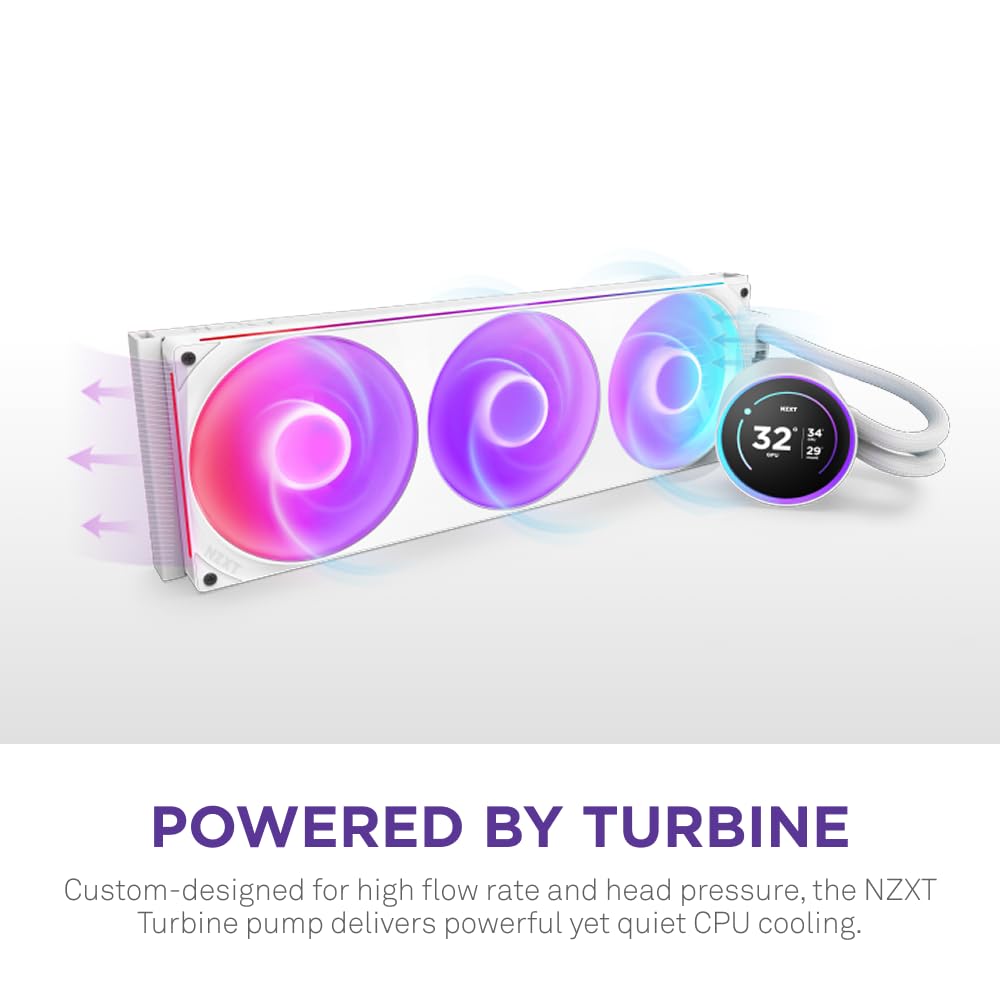
Figure 5.4: The custom-designed NZXT Turbine pump delivers powerful yet quiet CPU cooling.

Figure 5.5: The split-flow design ensures even coolant distribution across AMD® or Intel® CPUs, enhancing heat dissipation.
5.3. Vidjows Uffiċjali tal-Prodott
Video 5.1: NZXT Kraken Elite 2024 Product Showcase. This video highlights the key features and aesthetic appeal of the Kraken Elite AIO cooler.
Video 5.2: NZXT Single Frame Fan Showcase. This video demonstrates the design and lighting of the NZXT single-frame fans, which are part of the Kraken Elite cooler.
6. Manutenzjoni
- Tindif tat-Trab: Regularly clean dust from the radiator fins and fan blades using compressed air. Ensure fans are not spinning during cleaning.
- Spezzjoni tat-Tubi: Periodically check the tubing for any signs of wear, kinks, or leaks. The braided sleeving provides long-term protection.
- Aġġornamenti tas-Software: Keep your NZXT CAM software updated to ensure optimal performance and access to the latest features.
7 Issolvi l-problemi
- Bla Qawwa/RGB: Check all power connections to the pump and fans. Ensure the breakout cable is securely connected. Verify NZXT CAM software is running and detecting the device.
- Temperaturi Għolja:
- Ensure the pump is running (check NZXT CAM).
- Iċċekkja li l-fannijiet qed iduru u huma orjentati b'mod korrett għall-fluss tal-arja.
- Confirm the cold plate is making proper contact with the CPU.
- Check for dust buildup on the radiator.
- Kwistjonijiet tal-Wiri LCD: Ensure the USB connection from the pump to the motherboard is secure. Restart NZXT CAM software or your system.
- Storbju mhux tas-soltu: Check for loose fan screws or obstructions. If pump noise is excessive, ensure proper mounting and contact support if it persists.
8. Speċifikazzjonijiet
| Karatteristika | Dettall |
|---|---|
| Dimensjonijiet tal-Prodott | 20.04 x 7.87 x 6.14 pulzier; 2.77 Liri |
| Numru tal-Mudell tal-Oġġett | RL-KR42E-W2 |
| Brand | NZXT |
| Tip ta 'Konnettur tal-Enerġija | 4-Pin |
| Metodu tat-tkessiħ | Ilma |
| Apparati Kompatibbli | AMD (AM5, AM4) and Intel (LGA 1851/1700, 1200/115X) CPU sockets |
| Livell ta' Storbju | 34.5 Deċibel |
| Materjal | Acrylonitrile Butadiene Styrene, Metal, Plastic, Polyvinyl Chloride |
| UPC | 810074844307 |
| Manifattur | NZXT |
| Numru ta' Oġġetti | 1 |
9. Garanzija u Appoġġ
Għal informazzjoni dwar il-garanzija, appoġġ tekniku, jew biex tirreġistra l-prodott tiegħek, jekk jogħġbok żur is-sit uffiċjali ta' NZXT webis-sit jew ikkuntattja s-servizz tal-konsumatur tagħhom. Żomm il-prova tax-xiri tiegħek għal talbiet ta’ garanzija.
Ħanut Uffiċjali ta' NZXT: NZXT Amazon Store


