1. Introduzzjoni
This manual provides detailed instructions for the NBD 4K 48MP Vlogging Camcorder D100 Pro. Please read this manual thoroughly before using the camera to ensure proper operation and to maximize its features. Keep this manual for future reference.
2. Informazzjoni dwar is-Sigurtà
- Tesponix il-kamera għall-ilma jew l-umdità.
- Evita li twaqqa’ l-kamera jew li tissottomettiha għal impatti qawwija.
- Żomm il-kamera 'l bogħod minn kampi manjetiċi qawwija.
- Uża biss batteriji u aċċessorji speċifikati.
- Tippruvax tiżżarma jew timmodifika l-kamera.
- Naddaf il-lenti b'ċarruta ratba u niexfa.
3. Kontenut tal-Pakkett
Iċċekkja li l-oġġetti kollha elenkati hawn taħt huma inklużi fil-pakkett tiegħek:
- NBD 4K Video Camera Camcorder (D100 Pro)
- Mikrofonu
- Dawl tal-Mili LED
- 43mm Lens Hood
- Qarrej tal-Kard
- 32GB SD Card
- Cable USB
- Batteriji (x2)
- Camera Cleaning Kit (Blower, Brush)
- Drapp tat-Tindif tal-Lenti
- Manwal għall-Utent

Image: The NBD 4K Camcorder D100 Pro shown with all its included accessories, such as the microphone, LED fill light, batteries, SD card, and cleaning tools.
4. Prodott Aktarview
4.1 Komponenti tal-Kamera
Familiarize yourself with the various parts of your NBD D100 Pro camcorder.

Immaġni: A view of the NBD 4K Camcorder D100 Pro, highlighting its 270-degree flip IPS screen and the attached external microphone.
- Lenti: Jaqbad vidjows u ritratti.
- Dawl tal-Mili LED: Provides additional illumination in low-light conditions.
- Input tal-mikrofonu: Għall-konnessjoni tal-mikrofonu estern.
- 3.0" IPS 270° Flip Screen: Għal viewl-użu u n-navigazzjoni tal-menus.
- Lieva taż-Żum (T/W): Controls digital zoom.
- Dial tal-Modalità: Selects shooting modes (Photo, Video, Slow Motion, Time-lapse).
- Buttuna tar-Reġistrazzjoni/Xater: Jibda/jwaqqaf ir-reġistrazzjoni jew jieħu ritratt.
- Kompartiment tal-batterija: Iżomm il-batterija rikarikabbli.
- Slot tal-Kard SD: Għall-inserzjoni tal-karta tal-memorja.
- Port USB: Għall-iċċarġjar u t-trasferiment tad-dejta.
- Port HDMI: Għall-konnessjoni ma' display estern.
5. Setup
5.1 Iċċarġjar u Installazzjoni tal-Batteriji
- Iftaħ l-għatu tal-kompartiment tal-batterija.
- Insert a fully charged battery, ensuring correct polarity.
- Agħlaq l-għatu tal-kompartiment tal-batterija.
- To charge, connect the camera to a power source using the provided USB cable. The charging indicator will illuminate.
5.2 Id-Daħħal tal-Kard SD
- Sib l-islott tal-karta SD.
- Insert the 32GB SD card with the metal contacts facing the front of the camera until it clicks into place.
- Biex tneħħiha, agħfas il-karta bil-mod sakemm toħroġ 'il barra.
5.3 Attaching the Microphone and Fill Light
- Slide the external microphone into the hot shoe mount on top of the camera.
- Connect the microphone cable to the microphone input port on the camera.
- Attach the LED fill light to an available mount or accessory shoe if desired.
5.4 Twaħħil tal-Għatu tal-Lenti
- Align the 43mm lens hood with the front of the camera lens.
- Gently twist the lens hood clockwise until it is securely attached.
6. Istruzzjonijiet Operattivi
6.1 Power On/Off
- Qawwa Mixgħul: Open the 270° flip IPS screen. The camera will automatically power on.
- Itfi: Close the 270° flip IPS screen. The camera will automatically power off.
6.2 Basic Video Recording
- Turn the mode dial to the video camera icon.
- Frame your shot using the flip screen.
- Press the Record/Shutter button to start recording. A red indicator will typically appear on the screen.
- Press the Record/Shutter button again to stop recording.
6.3 Tieħu Ritratti
- Turn the mode dial to the camera icon.
- Agħmel qafas għax-xutt tiegħek.
- Press the Record/Shutter button halfway to focus (if applicable), then press fully to take the photo.
6.4 Using the Digital Zoom
The camera features 16X digital zoom.

Image: The NBD 4K Camcorder D100 Pro demonstrating its 16X digital zoom feature, with an inset showing the T/W zoom lever for adjustment.
- Imbotta l-lieva taż-żum lejn T (Telephoto) biex tagħmel zoom in.
- Imbotta l-lieva taż-żum lejn W (Wisa') biex tneħħi l-immaġni.
6.5 WiFi Connection and App Control
Connect your camcorder to a smartphone via Wi-Fi for remote control and file trasferiment.

Image: The NBD 4K Camcorder D100 Pro displaying a live view on its screen, while a smartphone shows the camera's app interface for remote control and social sharing options.
- Download the dedicated app (refer to the camera's on-screen instructions or included documentation for app name).
- On the camera, navigate to the Wi-Fi settings and enable Wi-Fi.
- On your smartphone, connect to the camera's Wi-Fi network (SSID and password will be displayed on the camera screen).
- Open the app to control the camera, preview footage, u trasferiment files.
6.6 Modi Speċjali ta' Reġistrazzjoni
The D100 Pro offers various modes for creative shooting.
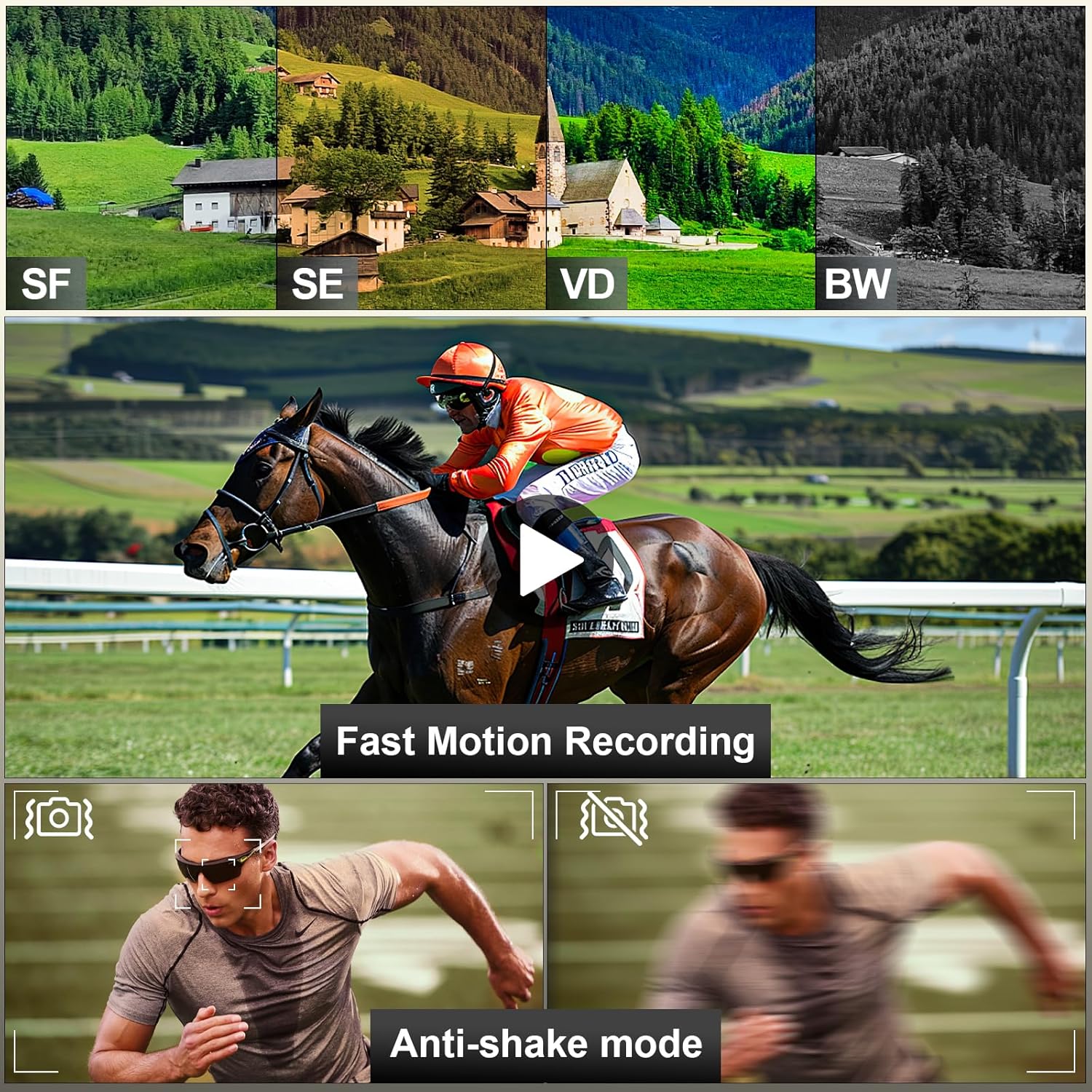
Image: A visual representation of the NBD 4K Camcorder D100 Pro's capabilities, including different color filters (SF, SE, VD, BW), fast motion recording, and anti-shake mode for stable footage.
- Mozzjoni bil-mod: Captures video at a higher frame rate for slow-motion playback. Select this mode via the mode dial.
- Time-lapse: Records images at set intervals to create a time-lapse video. Select this mode via the mode dial and configure settings in the menu.
- Anti-shake Mode: Enhances video stability. Enable this feature in the camera's settings menu.
7. Manutenzjoni
7.1 Tindif tal-Kamera
- Use the provided lens cleaning cloth to gently wipe the lens and screen.
- For dust on the lens, use the air blower to remove particles before wiping.
- Imsaħ il-korp tal-kamera b'ċarruta ratba u niexfa. Evita li tuża kimiċi ħarxa.
7.2 Ħażna
- Aħżen il-kamera f'post frisk u niexef 'il bogħod mix-xemx diretta.
- Neħħi l-batteriji jekk il-kamera ma tkunx se tintuża għal perjodu twil ta’ żmien.
8 Issolvi l-problemi
| Problema | Kawża Possibbli | Soluzzjoni |
|---|---|---|
| Il-kamera ma tixgħelx. | Il-batterija mejta jew imdaħħla ħażin. | Iċċarġja l-batterija jew erġa’ daħħalha b’mod korrett. |
| Ma nistax nirrekordja vidjow/nieħu ritratti. | SD card is full, locked, or not inserted. | Insert an SD card, unlock it, or delete files biex teħles l-ispazju. |
| Kwalità fqira tal-immaġni/vidjow. | Il-lenti hija maħmuġa; dawl insuffiċjenti; settings mhux korretti. | Clean the lens; use the fill light; adjust exposure settings. |
| Problemi bil-konnessjoni tal-Wi-Fi. | Incorrect password; camera Wi-Fi not enabled; app issues. | Verify password; ensure camera Wi-Fi is on; restart app/camera. |
9. Speċifikazzjonijiet
- Mudell: PZJ-D100-US-2411
- Riżoluzzjoni tal-vidjo: 4K (3840x2160) at 30fps, 1080p
- Riżoluzzjoni tar-Ritratti: 48 Megapixels
- Żum diġitali: 16X
- Skrin: 3.0" IPS 270° Flip Screen
- Konnettività: Wi-Fi, USB, HDMI
- Ħażna: Micro SD Card (up to 128GB, 32GB included)
- Batterija: 12V (x2 included)
- Piż: Approximately 2.33 pounds (with accessories)
- Dimensjonijiet: 8.5 x 6.46 x 4.41 pulzieri (pakkett)
- Teknoloġija tas-Sensor tar-Ritratti: CMOS
- Tul Fokali Massimu: 85 Millimetru
10. Garanzija u Appoġġ
NBD products are designed for reliability and performance. For warranty information, technical support, or service inquiries, please refer to the warranty card included in your package or visit the official NBD websit. Jekk jogħġbok żomm il-prova tax-xiri tiegħek għal talbiet ta' garanzija.
Informazzjoni ta' Kuntatt: Please refer to the contact details provided on the NBD official website or your product packaging for customer support.


