1. Introduzzjoni
This manual provides essential information for the safe and efficient operation of your VIZIO 50-inch 4K UHD LED Smart TV, model V4K50C-08. Please read this manual thoroughly before using your television and retain it for future reference.
The VIZIO V4K50C-08 Smart TV delivers vivid 4K picture quality with Dolby Vision HDR, enhancing detail, contrast, and color. It features WiFi 6 for faster streaming and gaming, and built-in VIZIO Home for instant access to applications, free channels, and on-demand titles.

Stampa 1.1: Quddiem view of the VIZIO 50-inch 4K UHD LED Smart TV.
2. Informazzjoni dwar is-Sigurtà
Always follow basic safety precautions when using this television to reduce the risk of fire, electric shock, and injury to persons. Keep this manual handy for reference.
- Tesponix dan l-apparat għax-xita jew l-umdità.
- Timblokkax il-fetħiet tal-ventilazzjoni. Installa skont l-istruzzjonijiet tal-manifattur.
- Tinstallax ħdejn xi sorsi tas-sħana bħal radjaturi, reġistri tas-sħana, stufi, jew apparat ieħor (inkluż amplifiers) li jipproduċu sħana.
- Ipproteġi l-korda tad-dawl milli timxi fuqha jew maqrusa, partikolarment fil-plakek, ir-reċipjenti tal-konvenjenza, u l-punt fejn joħorġu mill-apparat.
- Uża biss aċċessorji/aċċessorji speċifikati mill-manifattur.
- Irreferi l-manutenzjoni kollha lil persunal tas-servizz kwalifikat.
3. X'hemm fil-Kaxxa
Your VIZIO 50-inch 4K UHD LED Smart TV package includes the following items:
- VIZIO 50-inch 4K UHD LED Smart TV
- Voice Remote
- 2 batteriji AAA (għall-kontroll remot)
- Kejbil tal-Enerġija
- Stand tat-TV (2 biċċiet)

Image 3.1: Included components and TV dimensions.
4. Setup
4.1 It-twaħħil tal-Istand
- Carefully place the TV face-down on a soft, clean surface to prevent damage.
- Allinja kull biċċa tal-istand mas-slots korrispondenti fil-qiegħ tat-TV.
- Waħħal kull biċċa tal-istand bil-viti pprovduti. Kun żgur li huma ssikkati sew.
4.2 Konnessjoni tal-Periferali
Connect your external devices to the appropriate ports on the back or side of your VIZIO TV.
- HDMI: For high-definition video and audio devices (e.g., Blu-ray players, gaming consoles). Your TV features multiple HDMI ports, including HDMI 1 (eARC) for enhanced audio return channel functionality.
- USB: Għall-konnessjoni ta' apparati tal-ħażna USB.
- Antenna: Għall-konnessjoni ta' antenna over-the-air.
- Audio Out Optical (S/PDIF): Għall-konnessjoni ma' soundbar jew riċevitur tal-awdjo.
- Ethernet: Għal konnessjoni ta' netwerk bil-fili.
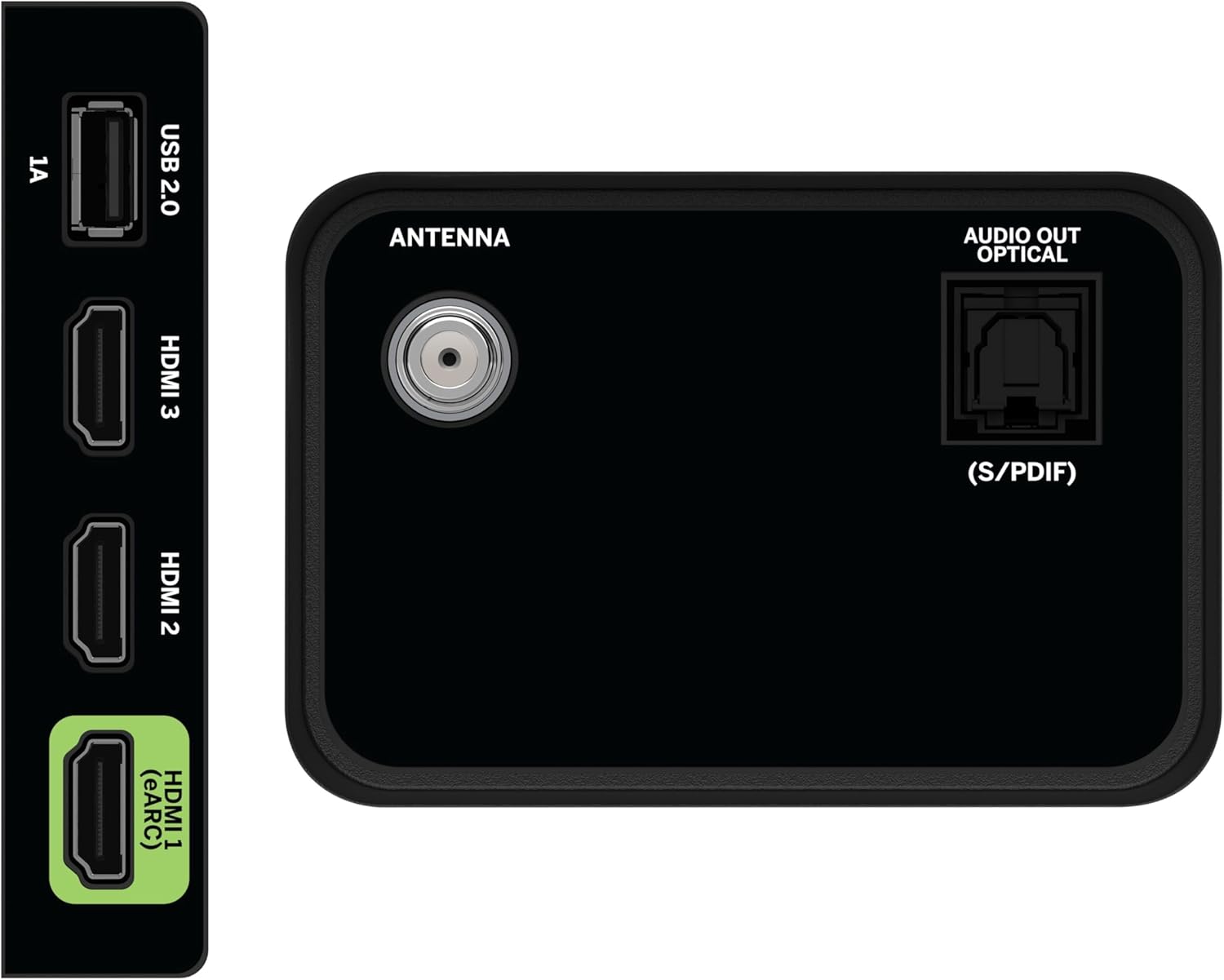
Image 4.1: Rear and side input/output ports.
4.3 L-Ewwel Xgħel u l-Konnessjoni man-Netwerk
- Plug the power cable into the TV and then into a power outlet.
- Press the Power button on the remote or on the TV.
- Follow the on-screen prompts to select your language, country, and connect to your Wi-Fi network (WiFi 6 supported for faster performance).
4.4 VIZIO Account Setup
A VIZIO Account is required for Smart TV functionality and product updates. Follow the on-screen instructions to create or log in to your VIZIO Account. This allows access to VIZIO Home, app subscriptions, and free channels.

Image 4.2: VIZIO Account setup via mobile device.
5. Tħaddem it-TV tiegħek
5.1 Kontroll mill-bogħod fuqview
The included Voice Remote provides intuitive control over your TV. It features dedicated buttons for popular streaming apps and voice assistance integration.
- Input: Switch between connected devices.
- Qawwa: Ixgħel/itfi t-TV.
- Pad tan-Navigazzjoni: Use the directional buttons and OK button to navigate menus.
- Dar: Access the VIZIO Home screen.
- AraB'Xejn+: Direct access to VIZIO's free streaming service.
- Buttuna tal-Vuċi: Attiva l-kmandi tal-vuċi.
- Volum/Kanal: Aġġusta l-volum u ibdel il-kanali.
- Shortcuts tal-App: Quick access to pre-installed streaming applications.

Image 5.1: VIZIO Voice Remote and mobile app functionality.
5.2 Navigating VIZIO Home
The VIZIO Home screen is your central hub for all entertainment. It provides quick access to:
- Applikazzjonijiet u Inputs: Browse and launch your favorite streaming apps (Netflix, Prime Video, Hulu, Disney+, etc.) and switch between connected inputs.
- Live TV: Access hundreds of free channels and thousands of free On Demand titles with the built-in WatchFree+ app.
- Trending Now: Discover popular movies and shows.

Image 5.2: The VIZIO Home screen, your destination for easy streaming.
5.3 Settings tal-Istampa
Your VIZIO TV features Dolby Vision HDR, HDR10+, HDR10, and HLG for a true-to-life picture with a wider range of color and detail. Adjust picture modes (e.g., Calibrated, Vivid, Game) in the settings menu to optimize your viewing esperjenza.

Image 5.3: Breathtaking details for a crystal-clear 4K picture with Dolby Vision.
5.4 Settings tal-awdjo
Experience immersive sound with DTS Virtual:X setting. You can also connect Bluetooth headphones for private listening.

Image 5.4: Pair your wireless Bluetooth headphones for uninterrupted audio.
5.5 Karatteristiċi Smart
The VIZIO Smart TV supports Apple AirPlay and Google Cast Built-in, allowing you to stream content directly from your compatible devices. WiFi 6 ensures better streaming and gaming performance in a congested smart home environment.
5.6 Karatteristiċi tal-Logħob
For gamers, the TV offers Dolby Vision HDR Gaming for enhanced in-game color. When a console or PC is detected, Auto Low Latency Mode is automatically enabled to reduce input lag.

Image 5.5: Venture into game realism with Dolby Vision HDR.
6. Manutenzjoni
6.1 Tindif tat-TV tiegħek
- Dejjem aqla’ t-TV qabel ma tnaddaf.
- Uża drapp artab u mingħajr suf biex timsaħ bil-mod l-iskrin u l-kabinett.
- Do not use liquid or aerosol cleaners directly on the TV.
6.2 Aġġornamenti tas-Software
Your VIZIO TV will automatically receive software updates when connected to the internet. Ensure your TV is connected to a network for optimal performance and access to the latest features.
7 Issolvi l-problemi
If you encounter issues with your VIZIO TV, try the following common solutions:
- Ebda Qawwa: Kun żgur li l-kejbil tal-enerġija huwa konness sew kemm mat-TV kif ukoll mas-sokit. Ipprova sokit differenti.
- Ebda Stampa/Ħoss: Check all cable connections (HDMI, audio). Ensure the correct input source is selected.
- Remote Mhux Taħdem: Ibdel il-batteriji. Kun żgur li m'hemm l-ebda ostaklu bejn ir-remote u t-TV.
- Kwistjonijiet ta' Konnessjoni man-Netwerk: Restart your router and modem. Reconnect the TV to the Wi-Fi network via the settings menu.
- Kwalità Fqira tal-Istampa: Check the source content resolution. Adjust picture settings in the TV menu.
For further assistance, refer to the VIZIO support websit jew ikkuntattja lis-servizz tal-konsumatur.
8. Speċifikazzjonijiet
| Karatteristika | Speċifikazzjoni |
|---|---|
| Brand | VIZIO |
| Numru tal-Mudell | V4K50C-08 |
| Daqs tal-Iskrin | 50 Pulzier |
| Teknoloġija tal-Wiri | LED |
| Riżoluzzjoni | 4K UHD |
| Appoġġ HDR | Dolby Vision HDR, HDR10+, HDR10, HLG |
| Riffriskar Rata | HDMI VRR |
| Teknoloġija tal-Konnettività | Bluetooth, HDMI, Wi-Fi (WiFi 6) |
| Karatteristiċi Speċjali | Apple AirPlay, Bluetooth Headphone compatibility, Built-in apps with VIZIO Home, Closed Captioning, Google Chromecast, Sleep Timer, Voice Assistance Integration, Voice Remote |
| Dimensjonijiet tal-Prodott | 9.68"D x 43.69"W x 27.57"H |
| Piż tal-oġġett | 28.4 liri |
| Proporzjon ta' l-aspett | 16:9 |
9. Garanzija u Appoġġ
For warranty information and customer support, please visit the official VIZIO website or refer to the warranty card included with your product. VIZIO provides award-winning customer support to assist with any questions or issues you may have.


