Introduzzjoni
Welcome to the user manual for your new GMKtec G3 Plus Mini PC. This document provides essential information for setting up, operating, maintaining, and troubleshooting your device. Please read this manual thoroughly before using the product to ensure optimal performance and longevity.

The GMKtec G3 Plus is a compact and powerful mini PC designed for various computing needs, from daily tasks to home entertainment and office work.
Kontenut tal-Pakkett
Verify that all items listed below are included in your package. If any items are missing or damaged, please contact GMKtec customer support.
- 1 x Nucbox G3 Plus Mini PC
- 1 x Power Adapter & Cable
- 1 x Cable HDMI
- 1 x Muntatura VESA bil-Viti
- 1 x Manwal tal-Utent (dan id-dokument)

This image displays the standard items included in the GMKtec G3 Plus Mini PC retail packaging, ensuring you have everything needed for initial setup.
Karatteristiċi tal-Prodott
The GMKtec G3 Plus Mini PC is engineered for efficiency and performance, offering a range of features for a seamless computing experience.
- Proċessur: Intel Twin Lake N150 (4-core/4-thread, up to 3.6 GHz, 6MB Cache), offering enhanced performance over previous generations.
- Memorja: 16GB DDR4 3200MHz RAM (expandable up to 32GB).
- Ħażna: 1TB M.2 2280 NVMe SSD (supports PCIe 3.0, expandable up to 2TB).
- Grafika: Integrated Intel Graphics (up to 1000MHz).
- Sistema Operattiva: Pre-installed Windows 11 Pro.
- Konnettività:
- WiFi 6 (802.11ax) for high-speed wireless internet.
- Bluetooth 5.2 għall-konnessjoni ta' periferali mingħajr fili.
- 2.5G Gigabit Ethernet (RJ45) for stable wired network connection.
- Portijiet:
- 4 x USB 3.2 ports (up to 5 Gbit/s).
- 2 x HDMI 2.0 ports (supports 4K @ 60Hz dual display output).
- 1 x 3.5mm Audio Jack.
- 1 x DC 12V 3A Power Input.
- 1 x Security Lock slot.
- Funzjonijiet addizzjonali: Supports Wake on LAN, PXE Boot, RTC Wake, and Auto Power On.
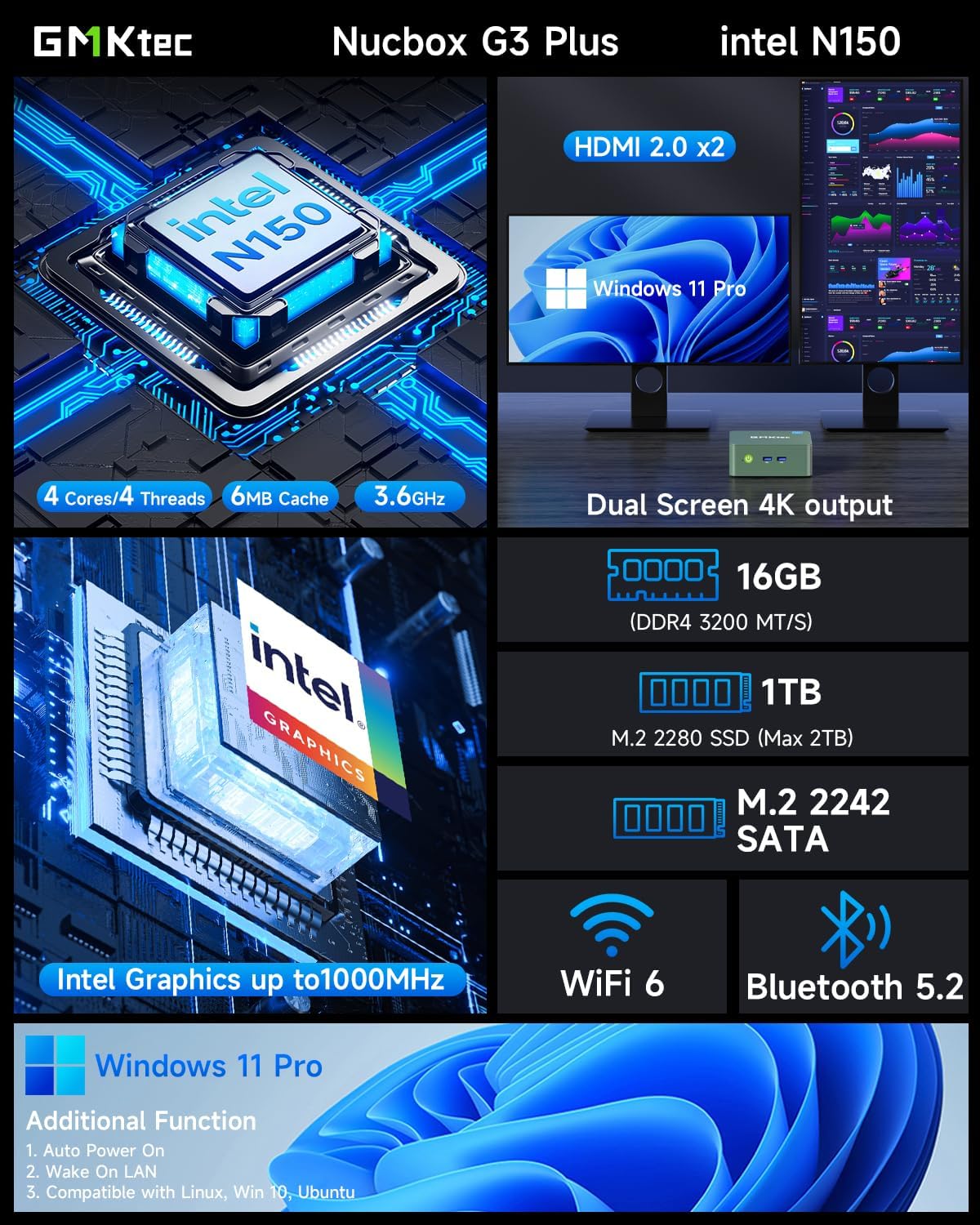
This visual summary details the core specifications and capabilities of the GMKtec G3 Plus, such as its processor, memory, storage, and display outputs.

This graph illustrates the performance advantage of the Intel Twin Lake N150 processor in the GMKtec G3 Plus, showing its improved multi-core and single-core capabilities compared to previous generation CPUs.
Gwida ta' Setup
Follow these steps to set up your GMKtec G3 Plus Mini PC.
Step 1: Connect to Display
Connect your monitor(s) to the Mini PC using the provided HDMI cable. The GMKtec G3 Plus supports dual 4K @ 60Hz displays.

This image shows the mini PC connected to two screens, illustrating its ability to support a dual 4K display setup for enhanced productivity or entertainment.
Pass 2: Ikkonnettja l-Periferali
Qabbad it-tastiera, il-maws, u apparati USB oħra tiegħek mal-portijiet USB 3.2 disponibbli.
Pass 3: Qabbad mal-Enerġija
Plug the power adapter into the DC 12V 3A port on the Mini PC, then plug the power cable into a wall outlet.
Pass 4: Ixgħel
Agħfas il-buttuna tal-qawwa li tinsab fuq quddiem tal-Mini PC. Id-dawl indikatur tal-qawwa jixgħel.

This image provides a clear layout of all available ports on the GMKtec G3 Plus, guiding users on where to connect their peripherals and displays.
Istruzzjonijiet Operattivi
Ibbutjar Inizjali u Setup tal-Windows
Upon the first boot, the system will guide you through the Windows 11 Pro setup process. Follow the on-screen instructions to configure your language, region, network, and user account.
Konnessjoni man-Netwerk
Il-Mini PC tiegħek jappoġġja kemm konnessjonijiet tan-netwerk bil-fili kif ukoll mingħajr fili.
Konnessjoni bil-fili (Ethernet)
Connect an Ethernet cable from your router or modem to the 2.5G Gigabit LAN port on the Mini PC.

This image highlights the advanced wireless capabilities of the mini PC, including the faster speeds and improved performance offered by WiFi 6 and Bluetooth 5.2.
Konnessjoni bla fili (Wi-Fi)
During Windows setup or via Windows settings, select your Wi-Fi network and enter the password. The Mini PC supports Wi-Fi 6 (802.11ax) for optimal wireless performance.
Apparati Bluetooth
To connect Bluetooth devices (e.g., keyboard, mouse, headphones), go to Windows Settings > Bluetooth & devices, turn on Bluetooth, and pair your device. The Mini PC features Bluetooth 5.2 for stable connections.
Setup tal-Wiri Doppju
The GMKtec G3 Plus supports connecting two monitors simultaneously via its two HDMI 2.0 ports. Once connected, Windows will automatically detect the displays. You can configure display settings (extend, duplicate, etc.) in Windows Display Settings.
Manutenzjoni
Manutenzjoni xierqa tiżgura l-lonġevità u l-prestazzjoni ottimali tal-Mini PC tiegħek.
- Tindif: Regularly clean the exterior of the Mini PC with a soft, dry cloth. Use compressed air to clear dust from the ventilation grilles to prevent overheating.
- Ventilazzjoni: Ensure the Mini PC is placed in a well-ventilated area and that the cooling vents are not obstructed.
- Aġġornamenti tas-Software: Żomm is-sistema operattiva u d-drivers tal-Windows tiegħek aġġornati biex tiżgura s-sigurtà u l-prestazzjoni.
- Ġestjoni tal-Ħażna: Naddaf perjodikament dak li mhux meħtieġ files and applications to maintain optimal storage performance.

This diagram provides insight into the internal design of the mini PC, highlighting key components and the cooling system, which is important for understanding maintenance needs.
Issolvi l-problemi
Din it-taqsima tindirizza kwistjonijiet komuni li tista’ tiltaqa’ magħhom.
Bla Enerġija / Is-Sistema Mhux Mixgħul
- Kun żgur li l-adapter tal-enerġija huwa konness sew kemm mal-Mini PC kif ukoll ma' sokit tal-enerġija li jaħdem.
- Ivverifika li s-sokit tal-enerġija jaħdem billi tqabbad apparat ieħor.
- Ipprova sokit tal-enerġija differenti jekk disponibbli.
L-ebda Output tal-Wiri
- Check if the HDMI cable is securely connected to both the Mini PC and the monitor.
- Kun żgur li l-monitor ikun mixgħul u ssettjat għas-sors tad-dħul korrett (HDMI 1, HDMI 2, eċċ.).
- Ipprova kejbil HDMI jew monitor differenti jekk possibbli.
Wi-Fi / Bluetooth Connectivity Issues
- Kun żgur li l-Wi-Fi/Bluetooth huwa attivat fis-settings tal-Windows.
- Erġa' ibda l-Mini PC u r-router/modem tiegħek.
- Check for updated Wi-Fi/Bluetooth drivers on the GMKtec support websit.
- Ensure the Mini PC is within range of your Wi-Fi router.
System Slow or Unresponsive
- Agħlaq l-applikazzjonijiet bla bżonn li jkunu qed jaħdmu fl-isfond.
- Iċċekkja t-Task Manager għal proċessi li jikkunsmaw ħafna CPU jew RAM.
- Kun żgur li hemm biżżejjed spazju ħieles fuq l-SSD.
- Mexxi skenn tal-virus.
- Consider updating Windows and drivers.
Speċifikazzjonijiet
| Karatteristika | Dettall |
|---|---|
| Brand | GMKtec |
| Mudell | GMKtec NUCBOX G3 Plus |
| Proċessur | Intel Twin Lake N150 (4 Cores, 4 Threads, up to 3.6 GHz, 6MB Cache) |
| Sistema Operattiva | Windows 11 Pro |
| RAM | 16GB DDR4 3200MHz (Max 32GB) |
| Ħażna | 1TB M.2 2280 NVMe SSD (PCIe 3.0, Max 2TB) |
| Grafika | Grafika Intel integrata |
| Wi-Fi | Wi-Fi 6 (802.11ax) |
| Bluetooth | Bluetooth 5.2 |
| Ethernet | 2.5G Gigabit RJ45 |
| Portijiet USB | 4 x USB 3.2 |
| Portijiet HDMI | 2 x HDMI 2.0 (4K@60Hz) |
| Awdjo | 1 x 3.5mm Audio Jack |
| Input tal-Enerġija | DC 12V 3A |
| Dimensjonijiet | 18 x 18 x 9 ċm (Pakkett) |
| Piż | 850 grammi (Pakkett) |
Garanzija u Appoġġ
GMKtec provides a limited one-year warranty for each Mini PC, effective from the date of purchase. This warranty covers defects arising from design and manufacturing faults.
For any inquiries or technical assistance, please contact GMKtec customer support.
- Appoġġ tal-Amazon: For purchase-related queries, log in to your Amazon account, navigate to "Your Orders," and select "Ask Product Question."
- Appoġġ ta' wara l-bejgħ: For technical support or warranty claims, send an email to support@gmktec.com. GMKtec offers 24/7 customer support.

This image outlines the available channels for customer support and warranty claims, including Amazon's platform and direct email contact for GMKtec's after-sales team.


