1. Introduzzjoni
Thank you for choosing the LIGE FV6 Smartwatch. This manual provides essential information for setting up, operating, and maintaining your device. Please read it carefully to ensure optimal performance and longevity of your smartwatch.

Image 1.1: The LIGE FV6 Smartwatch showcasing its main display and features.
2. Kontenut tal-Pakkett
Upon opening your LIGE FV6 Smartwatch package, please verify that all the following items are included:
- LIGE FV6 Smartwatch (1 unit)
- Manwal tal-Istruzzjonijiet (unità 1)
- Watch Box (1 unit)
- Watch Straps (3 types, 1 set)
- Kejbil tal-Iċċarġjar (unità 1)
3. Gwida ta' Setup
3.1 Iċċarġjar tal-Ismartwatch
Before initial use, fully charge your smartwatch. Connect the provided charging cable to the charging port on the back of the watch and to a USB power source. A full charge typically takes approximately 2 hours.

Image 3.1: The 730mAh battery capacity of the LIGE FV6 Smartwatch, indicating long usage times.
3.2 Installazzjoni u Tqabbil tal-App
- Niżżel il- FitcloudPro app from your smartphone's app store (available for iPhone and Android devices).
- Kun żgur li l-Bluetooth huwa attivat fuq l-ismartphone tiegħek.
- Open the FitcloudPro app and follow the on-screen instructions to create an account or log in.
- In the app, navigate to the device pairing section and select your LIGE FV6 Smartwatch from the list of available devices.
- Ikkonferma t-talba ta' tqabbil kemm fuq l-ismartphone tiegħek kif ukoll fuq l-ismartwatch.
3.3 Settings Inizjali
After successful pairing, you can configure basic settings such as language, time format, and personal profile information through the FitcloudPro app.
4. Istruzzjonijiet Operattivi
4.1 Navigazzjoni Bażika
The LIGE FV6 Smartwatch features a 1.85-inch IPS touchscreen display and physical buttons for navigation. Swipe across the screen to access different functions and menus. Press the side buttons to return to the home screen or access specific features.

Image 4.1: The smartwatch display with large, clear icons for easy navigation, suitable for all users.
4.2 Personalizzazzjoni tal-Wiri
The smartwatch offers over 150 watch faces, with more available through the FitcloudPro app. You can also create custom watch faces using your own photos. Adjust screen brightness via the watch settings or the app for optimal visibility in various lighting conditions.

Image 4.2: A selection of customizable watch faces and the app interface for personalizing your display.
4.3 Funzjoni ta' Sejħa Bluetooth
With Bluetooth 5.3 connectivity, you can make and receive calls directly from your smartwatch. Ensure your watch is connected to your phone via Bluetooth. Access the dial pad, call history, and contacts from the watch interface.
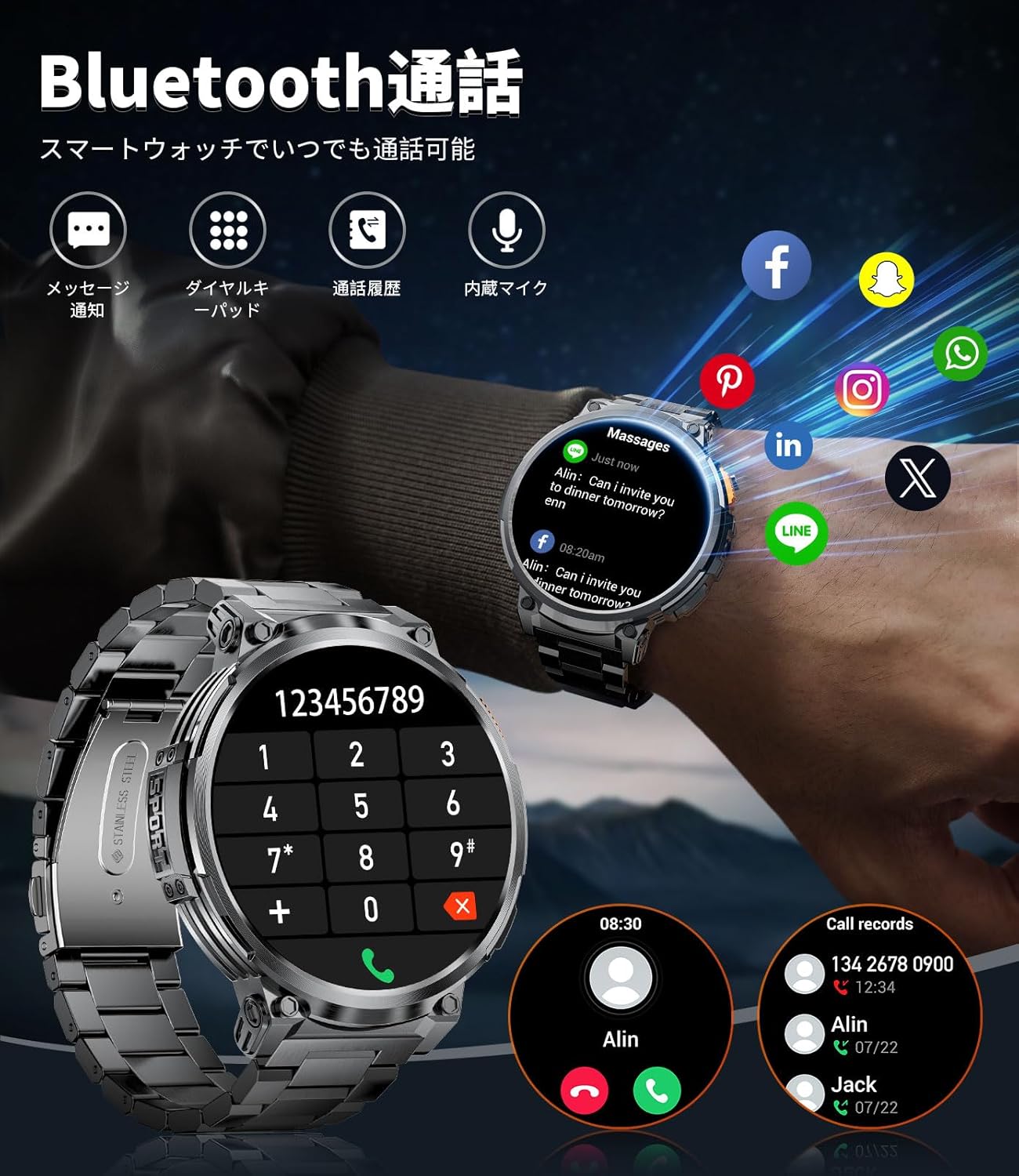
Image 4.3: The smartwatch displaying its Bluetooth call interface, including a dial pad and call logs.
4.4 Notifiki
Receive notifications for calls, messages (SMS, LINE), and other apps directly on your smartwatch. Configure which app notifications you wish to receive through the FitcloudPro app settings.

Image 4.4: The smartwatch displaying incoming message notifications and the voice assistant interface.
4.5 Modi Sportivi u Traċċar tal-Attività
The smartwatch includes over 20 built-in sports modes, with more than 100 additional modes available via the FitcloudPro app. It tracks various metrics such as calories burned, distance traveled, and steps taken in real-time.

Image 4.5: The smartwatch tracking key fitness metrics during different sports activities.
Funzjoni tal-Flashlight LED 4.6
The smartwatch is equipped with a side-mounted LED flashlight. This feature can provide illumination for over 2 hours, useful for outdoor activities at night or during emergencies. To activate, refer to the watch's quick settings or specific button functions.

Image 4.6: The smartwatch's LED flashlight in use, demonstrating its utility in various dark environments.
4.7 Funzjonijiet Oħra
The LIGE FV6 Smartwatch offers a range of additional features:
- Tbassir tat-Temp: View il-kundizzjonijiet u t-tbassir tat-temp attwali.
- Assistent tal-Vuċi: Control your watch or phone with voice commands.
- Allarm: Issettja diversi allarmi.
- Stopwatch u Timer: For precise time measurement.
- Kontroll tal-Mużika: Play, pause, skip tracks on your connected smartphone.
- Kontroll tal-Kamera: Attiva l-kamera tal-ismartphone tiegħek mill-bogħod.
- Tifkira Sedentarja: Javżak biex tiċċaqlaq wara perjodi ta' inattività.
- Tfakkira dwar l-Idrazzjoni: Prompts you to drink water.
- Sib Telefon: Helps locate your misplaced smartphone.
- Modalità bil-lejl: Adjusts display for comfortable viewing f'dawl baxx.
- Issettjar tal-Password: Enhance device security.

Image 4.7: The smartwatch's multi-functional interface, showing various features accessible to the user.
5. Manutenzjoni
5.1 Tindif tal-Apparat
Regularly clean your smartwatch with a soft, dry cloth. For stubborn dirt, slightly dampen the cloth with water. Avoid using harsh chemicals or abrasive materials, as these can damage the device's finish or screen.
5.2 Reżistenza għall-Ilma
The LIGE FV6 Smartwatch is rated IP68 for water and dust resistance. This means it can withstand immersion in water up to 1.5 meters for up to 30 minutes. It is suitable for daily use, such as hand washing or light rain. However, it is not recommended for hot showers, saunas, or deep-water diving. Avoid exposing the watch to high-pressure water or chemical liquids.

Image 5.1: The smartwatch highlighting its military-grade durability and IP68 water resistance, suitable for various environments.
5.3 Kura tal-Batterija
To prolong battery life, avoid extreme temperatures. Do not leave the watch fully discharged for extended periods. Charge the device using only the provided charging cable.
5.4 Sostituzzjoni taċ-Ċinga
The LIGE FV6 Smartwatch comes with three interchangeable straps, allowing you to customize its appearance for different occasions. To replace a strap, locate the quick-release pins on the underside of the strap and gently slide them to detach. Align the new strap and secure the pins into the watch lugs.
6 Issolvi l-problemi
If you encounter any issues with your LIGE FV6 Smartwatch, please refer to the following common solutions:
- Apparat mhux qed jixgħel: Kun żgur li l-arloġġ ikun iċċarġjat kompletament. Qabbad mal-ċarġer għal mill-inqas 30 minuti.
- Ma tistax tqabbad ma' smartphone:
- Kun żgur li l-Bluetooth huwa attivat fuq iż-żewġ apparati.
- Kun żgur li l-arloġġ jinsab fil-firxa tal-ismartphone tiegħek.
- Erġa' ibda kemm l-ismartwatch kif ukoll l-ismartphone tiegħek.
- Neħħi l-cache tal-Bluetooth fuq it-telefon tiegħek (jekk applikabbli).
- Notifiki mhux riċevuti:
- Check app notification settings in the FitcloudPro app.
- Ensure the app is running in the background on your phone.
- Verify that your phone's notification permissions are granted to the FitcloudPro app.
- Traċċar tal-attività mhux preċiż: Ensure the watch is worn snugly on your wrist. Calibrate settings in the FitcloudPro app if available.
- Ħajja qasira tal-batterija:
- Naqqas il-luminożità tal-iskrin.
- Disable unnecessary features or frequent heart rate monitoring.
- Kun żgur li l-arloġġ ikun iċċarġjat kompletament qabel l-użu.
For further assistance, please consult the FitcloudPro app's help section or contact customer support.
7. Speċifikazzjonijiet

Immaġni 7.1: Ħarsa komprensiva fuqview of the LIGE FV6 Smartwatch's key features and specifications.
| Karatteristika | Speċifikazzjoni |
|---|---|
| Brand | LIGE |
| Numru tal-Mudell | K66 |
| Daqs tal-Wiri | 1.85 pulzieri |
| Tip ta 'Wiri | Skrin IPS HD |
| Kapaċità tal-batterija | Polimer tal-Litju 730mAh |
| Ħin tal-Iċċarġjar | Appross. 2 sigħat |
| Ħin ta 'Użu | 15+ ijiem (użu tipiku) |
| Ħin ta' Standby | 45+ ijiem |
| Konnettività | Bluetooth 5.3 |
| Reżistenza għall-Ilma | IP68 |
| Kompatibilità | iPhone, Android Smartphones |
| Ħażna tal-Memorja | 256 MB |
| Dimensjonijiet | 20.5 x 9.7 x 2.5 ċm |
| Piż | 300 g |
| Karatteristiċi Speċjali | Military-grade durability, LED Flashlight, Bluetooth Call, Voice Assistant, 100+ Sports Modes, Customizable Watch Faces |
8. Garanzija u Appoġġ
8.1 Informazzjoni dwar Garanzija
Your LIGE FV6 Smartwatch is covered by a standard manufacturer's warranty against defects in materials and workmanship. The specific terms and duration of the warranty may vary by region and retailer. Please retain your proof of purchase for warranty claims.
8.2 Appoġġ għall-Klijent
For technical support, warranty inquiries, or any other questions regarding your LIGE FV6 Smartwatch, please refer to the contact information provided by your retailer or visit the official LIGE websit għal riżorsi ta' appoġġ.


