1. Prodott Aktarview
The RCA Wave-68 True Wireless Earbuds provide a high-quality audio experience with advanced features such as Hi-Res Audio, Deep Bass, Transparency Mode, and Bluetooth 5.2 connectivity. Designed for comfort and extended use, these earbuds offer up to 20 hours of battery life with the charging case, making them suitable for various activities.
Kontenut tal-Pakkett
- RCA Wave-68 True Wireless Earbuds (Left and Right)
- Kawża tal-Iċċarġjar
- Cable tal-Iċċarġjar tal-USB
- Manwal għall-Utent
- Customizable Ear Tips (various sizes)
Identifikazzjoni tal-Komponent

Figura 1.1: The RCA Wave-68 True Wireless Earbuds shown with their charging case. The earbuds feature an over-ear hook design for a secure fit, and the charging case includes a digital display for battery status.
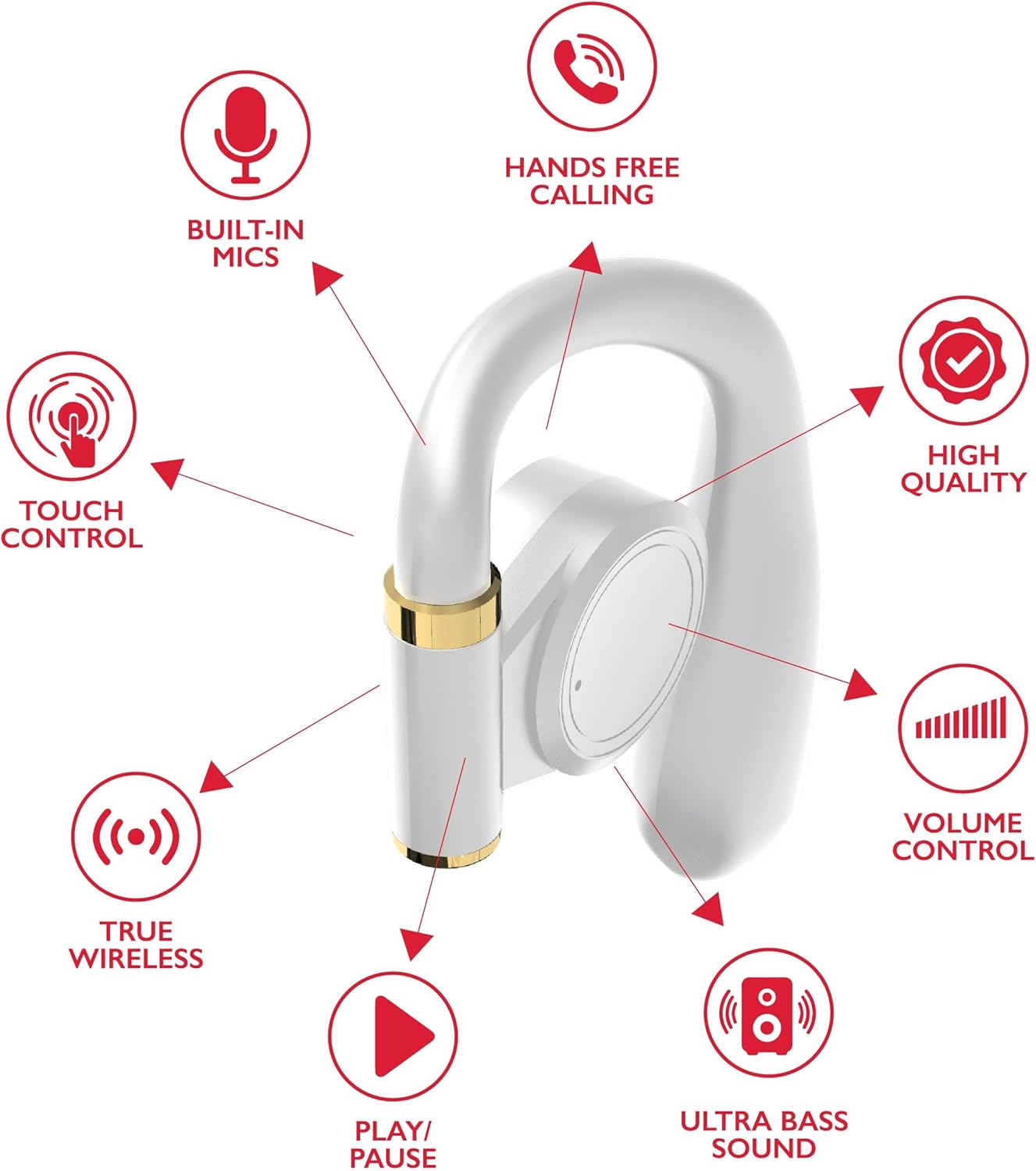
Figura 1.2: Detailed diagram highlighting key features of a single RCA Wave-68 earbud, including built-in mics, hands-free calling, touch control, true wireless connectivity, play/pause function, ultra bass sound, volume control, and high-quality audio.
2. Setup
2.1 Iċċarġjar tal-Earbuds u l-Kaxxa
Before first use, fully charge the earbuds and the charging case. The charging case provides additional power for the earbuds on the go.
- Connect the provided USB charging cable to the charging port on the case and to a USB power source (e.g., computer, wall adapter).
- The digital display on the charging case will show the battery level. Allow the case to charge until the display indicates 100%.
- Place the earbuds into their respective slots in the charging case. Ensure they are properly seated. The earbuds will begin charging automatically.
- The earbuds' indicator lights will show their charging status (refer to the indicator light section for details).

Figura 2.1: The RCA Wave-68 earbuds placed inside their charging case with the lid open, showing the digital battery display.
2.2 Tqabbil ma' Apparat Bluetooth
The earbuds will automatically enter pairing mode when removed from the charging case for the first time or when disconnected from a previously paired device.
- Ensure the earbuds are charged and removed from the charging case. They will automatically power on and enter pairing mode.
- Fuq l-apparat tiegħek (smartphone, tablet, laptop), attiva l-Bluetooth.
- Fittex għal apparati Bluetooth disponibbli.
- Agħżel "RCA Wave-68" mil-lista ta' apparati misjuba.
- Once connected, you will hear an audible confirmation, and the earbud indicator lights will change (refer to the indicator light section for details).
- Il-earbuds jerġgħu jikkonnettjaw awtomatikament mal-aħħar apparat imqabbad meta jitneħħew mill-kaxxa, jekk il-Bluetooth ikun attivat fuq l-apparat.
3. Istruzzjonijiet Operattivi
The RCA Wave-68 earbuds feature intuitive touch controls for managing audio playback, calls, and voice assistant functions.
3.1 Power On/Off
- Qawwa Mixgħul: Remove the earbuds from the charging case. They will power on automatically. Alternatively, press and hold the touch control area on both earbuds for 3 seconds.
- Itfi: Place the earbuds back into the charging case. They will power off automatically. Alternatively, press and hold the touch control area on both earbuds for 5 seconds.
3.2 Daqq tal-Mużika

Figura 3.1: Visual guide to the touch controls on the RCA Wave-68 earbuds for functions like Play/Pause, Answer Phone Call, Volume adjustment, and Voice Assistant activation.
- Play/Pawsa: Tektek wieħed fuq kull earbud.
- Track li jmiss: Tektek darbtejn fuq il-earbud tal-lemin.
- Track preċedenti: Tektek darbtejn fuq il-earbud tax-xellug.
- Volum 'il fuq: Tektek tliet darbiet fuq il-earbud tal-lemin.
- Volum 'l isfel: Tektek tliet darbiet fuq il-earbud tax-xellug.
3.3 Ġestjoni tas-Sejħiet
- Tweġiba/Tmiem Sejħa: Tektek waħda fuq kwalunkwe earbud waqt telefonata li dieħla jew telefonata attiva.
- Irrifjuta Sejħa: Press and hold the touch control area on either earbud for 2 seconds during an incoming call.
3.4 Assistent tal-Vuċi
- Attiva l-Assistent tal-Vuċi (Siri/Google Assistant): Press and hold the touch control area on the left earbud for 2 seconds.
3.5 Modalità ta' Trasparenza
Transparency Mode allows you to hear your surroundings while listening to audio, enhancing awareness in environments like commuting or exercising outdoors.
- Toggle Transparency Mode: Press and hold the touch control area on the right earbud for 2 seconds. Repeat to switch back to normal mode.
4. Manutenzjoni
4.1 Tindif
- Naddaf il-earbuds u l-kaxxa tal-iċċarġjar regolarment b'ċarruta ratba, niexfa u mingħajr suf.
- Tużax prodotti tat-tindif li joborxu, alkoħol, jew solventi kimiċi.
- Neħħi bil-mod kwalunkwe xemgħa tal-widnejn jew debris mill-ponot tal-widnejn u mill-malja tal-ispiker billi tuża pinzell żgħir u artab jew swab tal-qoton.
- Ensure charging contacts on both earbuds and the case are clean and dry.
4.2 Ħażna
- Meta ma tkunx qed tużahom, dejjem aħżen il-earbuds fil-kaxxa tal-iċċarġjar tagħhom biex tipproteġihom u żżommhom iċċarġjati.
- Aħżen f'post frisk u niexef, 'il bogħod minn temperaturi estremi u dawl tax-xemx dirett.
5 Issolvi l-problemi
| Problema | Soluzzjoni Possibbli |
|---|---|
| Il-earbuds mhux qed jixegħlu. | Ensure the earbuds are charged. Place them in the charging case for a few minutes, then remove them. |
| Ma tistax tqabbad mat-tagħmir. |
|
| L-ebda ħoss jew volum baxx. |
|
| Il-earbuds jiskonnettjaw ta' spiss. |
|
| Earbud wieħed ma jagħmel l-ebda ħoss. |
|
6. Speċifikazzjonijiet
| Karatteristika | Dettall |
|---|---|
| Isem tal-Mudell | Mewġa 68 |
| Teknoloġija tal-Konnettività | Wireless (Bluetooth) |
| Verżjoni Bluetooth | 5.3 |
| Ħajja tal-batterija | Sa 20 Siegħa (bil-kaxxa tal-iċċarġjar) |
| Tip ta' Sewwieq Awdjo | Sewwieq Dinamika |
| Medda ta' Frekwenzi | 20Hz - 20kHz |
| Livell ta 'Reżistenza għall-Ilma | Reżistenti għall-Ilma |
| Metodu ta' Kontroll | Remote (Touch Control) |
| Karatteristiċi Speċjali | Built-In Voice Assistant, Smart Button, Transparency Mode |
| Apparati Kompatibbli | Laptops, Smart Speakers, Smartphones, Tablets |
| Dimensjonijiet | 4.06 x 2.87 x 0.79 pulzieri |
| Piż tal-oġġett | 1 lira |
7. Garanzija u Appoġġ
RCA products are designed for reliability and performance. For specific warranty information regarding your RCA Wave-68 True Wireless Earbuds, please refer to the warranty card included in your product packaging or visit the official RCA websit.
For technical support, troubleshooting assistance, or to inquire about replacement parts, please contact RCA customer service through their official webis-sit jew l-informazzjoni ta' kuntatt ipprovduta fid-dokumentazzjoni tal-prodott tiegħek.
Riżorsi onlajn:
- RCA Official Store on Amazon
- RCA Official Website (General) (Note: Specific product support pages may vary)


