1. Introduzzjoni
Thank you for choosing the RCA Wave-54 Wireless Over-Ear Bluetooth Headphones. This manual provides detailed instructions to help you set up, operate, and maintain your headphones for optimal performance. Please read this manual thoroughly before use and retain it for future reference.
2. X'hemm fil-Kaxxa
- RCA Wave-54 Wireless Over-Ear Bluetooth Headphones
- Cable tal-Iċċarġjar tal-USB
- Manwal għall-Utent
3. Prodott Aktarview
The RCA Wave-54 headphones are designed for a comfortable and immersive audio experience, featuring Hi-Res Audio, deep bass, and noise-cancelling capabilities. They connect wirelessly via Bluetooth 5.3 and offer a foldable design for portability.

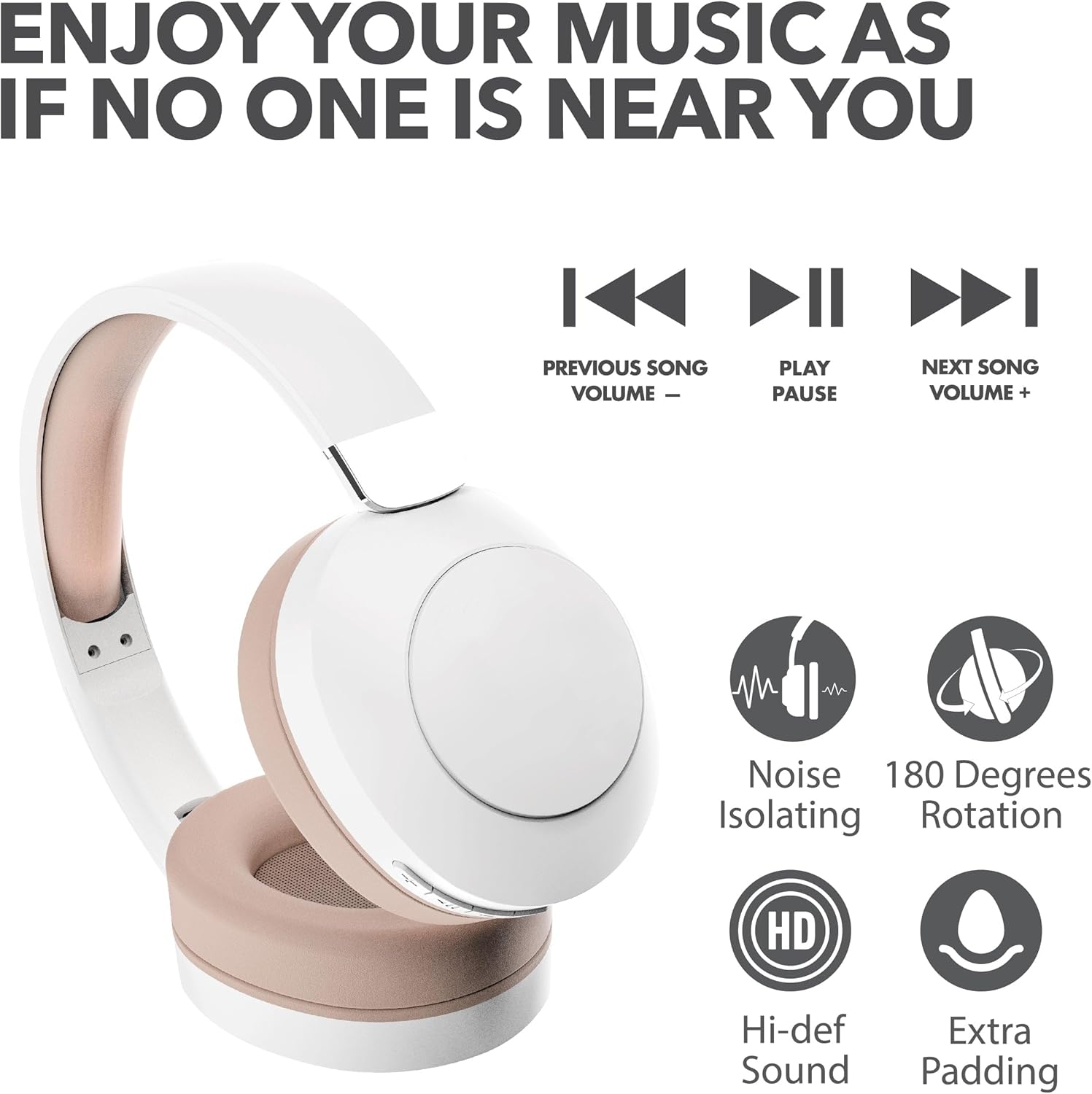
Image: RCA Wave-54 Wireless Over-Ear Bluetooth Headphones, showing the overall design and earcups.
3.1 Headphone Components
- Faxxa tar-ras aġġustabbli: Għal tajbin sigur u komdu.
- Padded Earcups: Soft cushioning for extended wear.
- Buttuni tal-Kontroll: Located on the earcup for power, volume, track control, and mode switching.
- Mikrofonu: Integrated for hands-free calls.
- Port tal-Iċċarġjar tal-USB: Għall-iċċarġjar mill-ġdid tal-batterija interna.
Immaġni: Close-up view of the control buttons located on the earcup, including power, volume, and playback controls.
4. Setup
4.1 Iċċarġjar tal-Headphones
- Connect the small end of the USB charging cable to the charging port on your headphones.
- Qabbad it-tarf l-akbar tal-kejbil tal-iċċarġjar USB ma' adapter tal-enerġija USB (mhux inkluż) jew mal-port USB tal-kompjuter.
- The LED indicator on the headphones will illuminate to show charging status. It will change color or turn off when fully charged.
Ċarġ sħiħ jipprovdi madwar 12-il siegħa ta' daqq.
4.2 Tqabbil tal-Bluetooth
- Ensure your headphones are fully charged.
- Agħfas u żomm il-buttuna tal-Power fuq il-headphones sakemm l-indikatur LED jteptep, u dan jindika l-modalità ta' tqabbil.
- Fuq l-apparat tiegħek (smartphone, tablet, laptop), attiva l-Bluetooth u fittex apparati disponibbli.
- Agħżel "RCA Wave-54" mil-lista ta' apparati misjuba.
- Once connected, the LED indicator will stop flashing and remain solid, or turn off, depending on the model.

Image: The RCA Wave-54 headphones positioned near a smartphone, demonstrating the process of Bluetooth pairing.
5. Istruzzjonijiet Operattivi
5.1 Power On/Off
- Qawwa Mixgħul: Agħfas u żomm il-buttuna tal-Enerġija għal madwar 3 sekondi.
- Itfi: Agħfas u żomm il-buttuna tal-Enerġija għal madwar 5 sekondi.
5.2 Daqq tal-Mużika

Image: A visual representation of the music control buttons on the headphones, indicating functions for previous song/volume down, play/pause, and next song/volume up.
- Play/Pawsa: Agħfas il-buttuna Play/Pause darba.
- Track li jmiss: Press the 'Next Song' button once.
- Track preċedenti: Press the 'Previous Song' button once.
- Volum 'il fuq: Press and hold the 'Next Song' button.
- Volum 'l isfel: Press and hold the 'Previous Song' button.
5.3 Ġestjoni tas-Sejħiet
- Tweġiba/Tmiem Sejħa: Agħfas il-buttuna Play/Pause darba.
- Irrifjuta Sejħa: Agħfas u żomm il-buttuna Play/Pause għal 2 sekondi.
5.4 Noise Cancelling / Transparency Mode
The RCA Wave-54 headphones feature both Noise Cancelling and Transparency modes. Refer to the specific button on your headphones (often labeled 'ANC' or a dedicated mode button) to switch between these modes.
- Kanċellazzjoni tal-Ħsejjes: Inaqqas l-istorbju ambjentali għal esperjenza ta' smigħ immersiva.
- Modalità ta' Trasparenza: Jippermettilek tisma' l-inħawi ta' madwarek waqt li xorta tgawdi l-awdjo tiegħek, utli għall-għarfien.
6. Manutenzjoni
- Clean the headphones regularly with a soft, dry cloth. Do not use harsh chemicals or abrasive materials.
- Evita li tesponi l-headphones għal temperaturi estremi, umdità, jew dawl tax-xemx dirett.
- Aħżen il-headphones f'post frisk u niexef meta ma tkunx qed tużahom. Id-disinn li jintrewa jippermetti ħażna kompatta.
- Tippruvax tiżżarma jew issewwi l-headphones int stess, għax dan jannulla l-garanzija.

Image: The RCA Wave-54 headphones shown in their folded configuration, highlighting their portable design.
7 Issolvi l-problemi
| Problema | Kawża Possibbli | Soluzzjoni |
|---|---|---|
| Il-headphones ma jixegħlux | Batterija baxxa | Iċċarġja l-headphones bis-sħiħ. |
| Ma tistax tqabbad mat-tagħmir | Bluetooth not enabled on device; headphones not in pairing mode; device too far | Ensure Bluetooth is on, headphones are in pairing mode, and within range (approx. 10 meters). Try restarting both devices. |
| L-ebda ħoss | Volume too low; headphones not connected; incorrect audio output selected | Increase volume on both headphones and device. Verify Bluetooth connection. Check device's audio output settings. |
| Kwalità tal-ħoss fqira | Interference; low battery; device too far | Move closer to the connected device. Charge headphones. Avoid environments with strong Wi-Fi or other Bluetooth signals. |
8. Speċifikazzjonijiet
| Karatteristika | Speċifikazzjoni |
|---|---|
| Isem tal-Mudell | Mewġa 54 |
| Teknoloġija tal-Konnettività | Wireless (Bluetooth) |
| Verżjoni Bluetooth | 5.3 |
| Tip ta' Sewwieq Awdjo | Sewwieq Dinamiku (40mm) |
| Medda ta' Frekwenzi | 20 Hz - 40,000 Hz |
| Ħajja tal-batterija | Sa 12 Siegħa (Ħin tal-Logħob) |
| Kontroll tal-Ħoss | Sound Isolation (Noise Cancelling + Transparency Mode) |
| Karatteristiċi Speċjali | 180 Degree Rotation, Extra Padding, Faster Charge |
| Dimensjonijiet | 7.32 x 2.17 x 7.68 pulzieri |
| UPC | 850068964307 |
9. Garanzija u Appoġġ
RCA products are manufactured to high-quality standards. For warranty information and customer support, please refer to the warranty card included with your product or visit the official RCA websit. Żomm il-prova tax-xiri tiegħek għal talbiet ta' garanzija.


