Introduzzjoni
Thank you for choosing the RCA Wave-78 True Wireless Earbuds. This manual provides essential information for setting up, operating, and maintaining your earbuds to ensure optimal performance and longevity. Please read this manual thoroughly before using the product.
Kontenut tal-Pakkett
- Earbuds True Wireless RCA Wave-78 (Xellug u Lemin)
- Kawża tal-Iċċarġjar
- Cable tal-Iċċarġjar tal-USB
- Daqsijiet Multipli ta' Ponot tal-Widnejn
- Manwal għall-Utent
Gwida ta' Setup
1. Iċċarġjar tal-Earbuds u l-Kaxxa
Before first use, fully charge the earbuds and the charging case. Connect the provided USB charging cable to the charging case and a power source. The digital display on the case will indicate the charging status.
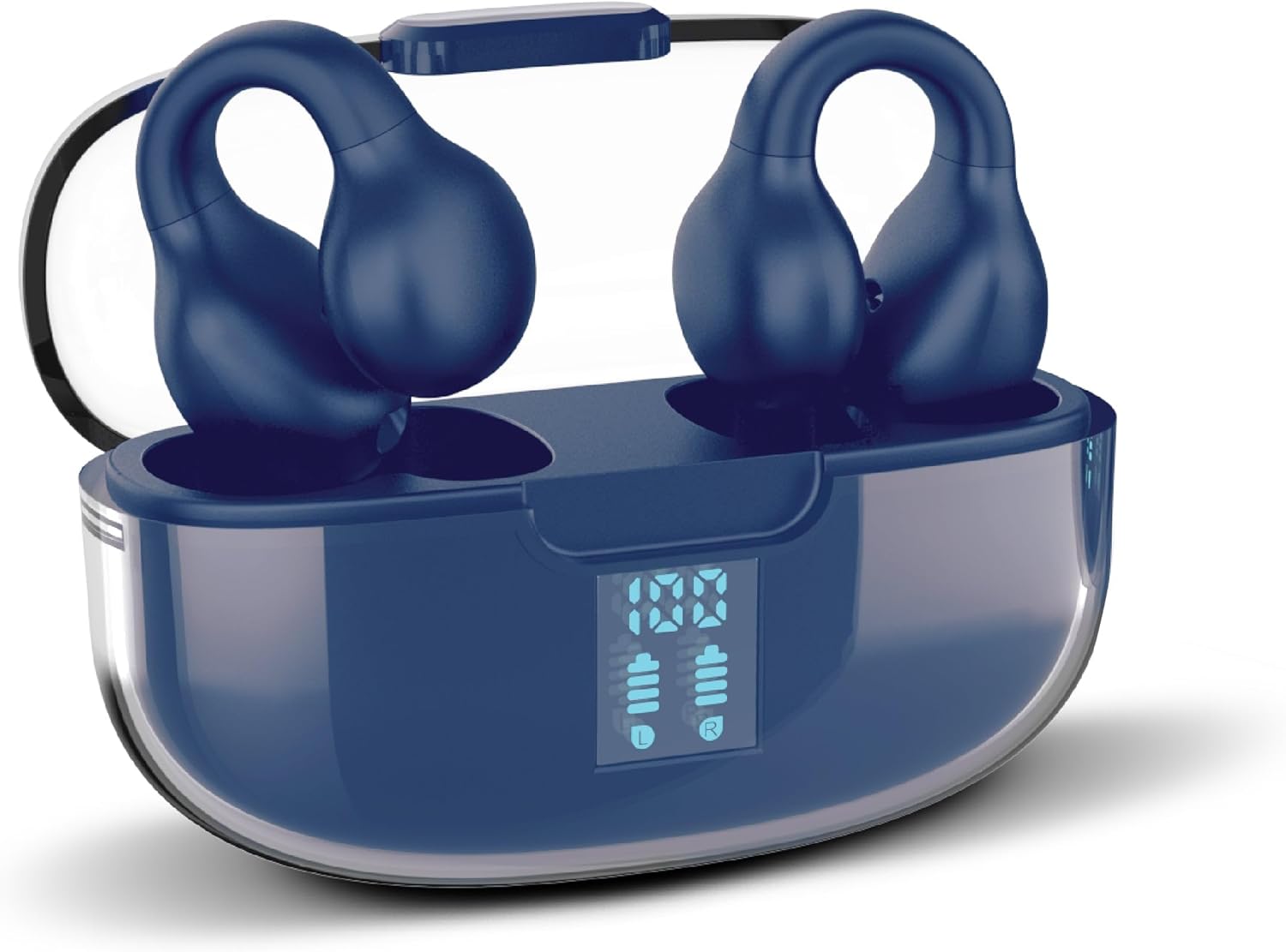
Image: RCA Wave-78 True Wireless Earbuds resting in their navy charging case, which features a clear lid and a digital display showing battery levels for both the case and individual earbuds (L and R).
The earbuds provide up to 5 hours of playback on a single charge, with the charging case offering an additional 15 hours, totaling up to 20 hours of listening time.
2. It-tqabbil mat-Tagħmir Tiegħek
- Kun żgur li l-earbuds huma ċċarġjati u mqiegħda ġewwa l-kaxxa tal-iċċarġjar.
- Iftaħ il-kaxxa tal-iċċarġjar. Il-earbuds jidħlu awtomatikament fil-modalità ta' tqabbil.
- Fuq l-apparat tiegħek (smartphone, tablet, laptop), attiva l-Bluetooth u fittex apparati disponibbli.
- Select "RCA Wave-78" from the list of found devices to connect.
- Once paired, the earbuds will automatically connect to your device when the case is opened for subsequent uses.

Image: A graphic illustrating the "One Step Pairing" feature, showing earbuds in an open charging case with a phone icon, indicating automatic connection after initial setup.
Istruzzjonijiet Operattivi
Liebes il-Earbuds
The RCA Wave-78 earbuds feature an ergonomic clip-ear design for a secure and comfortable fit. Gently place the earbud over your ear, ensuring the speaker portion is aligned with your ear canal and the clip rests comfortably on your outer ear.

Image: A diagram comparing the secure clip design of the RCA Wave-78 earbuds to traditional in-ear earbuds, highlighting how the clip design contours to the ear for comfort and stability.
Touch Kontrolli
The earbuds are equipped with intuitive touch controls for managing audio playback and calls.

Image: A detailed diagram showing an ear with the RCA Wave-78 earbud in place, highlighting various features such as built-in mics, hands-free calling, touch control, true wireless functionality, play/pause, ultra bass sound, volume control, and high-quality audio.
- Play/Pawsa: Tektek wieħed fuq kull earbud.
- Track li jmiss: Tektek darbtejn fuq il-earbud tal-lemin.
- Track preċedenti: Tektek darbtejn fuq il-earbud tax-xellug.
- Volum 'il fuq: Tektek tliet darbiet fuq il-earbud tal-lemin.
- Volum 'l isfel: Tektek tliet darbiet fuq il-earbud tax-xellug.
- Tweġiba/Tmiem Sejħa: Tektek waħda fuq kwalunkwe earbud waqt telefonata li tkun dieħla.
- Irrifjuta Sejħa: Agħfas u żomm kwalunkwe earbud għal żewġ sekondi waqt telefonata li tkun dieħla.
- Attiva l-Assistent tal-Vuċi: Agħfas u żomm kwalunkwe earbud għal 3 sekondi.

Image: A graphic demonstrating the "On-Ear Touch Control" feature, showing a finger interacting with the earbud for seamless function management.
Transparency Mode and Active Noise Cancellation (ANC)
The RCA Wave-78 earbuds offer both Transparency Mode and Active Noise Cancellation to adapt to your listening environment.
- Modalità ta' Trasparenza: Allows ambient sounds to blend with your audio, keeping you aware of your surroundings. This is ideal for urban environments or when interacting with others.
- Kanċellazzjoni Attiva tal-Ħoss (ANC): Reduces external noise, providing a more immersive listening experience. Smart ANC senses ambient sound levels and fine-tunes cancellation in real time.
To switch between modes, press and hold the touch control area on the left earbud for 2 seconds (specific gesture might vary, refer to quick start guide if provided).

Image: A man wearing the RCA Wave-78 earbuds in an outdoor setting, illustrating the Active Noise Cancellation feature which senses ambient sound and fine-tunes cancellation.

Image: A woman wearing the RCA Wave-78 earbuds during an outdoor activity, demonstrating the "Immersive Open Ear Design" which allows for environmental awareness while enjoying audio.
Manutenzjoni
Proper maintenance ensures the longevity and optimal performance of your RCA Wave-78 earbuds.
- Tindif: Regularly clean the earbuds, especially the ear tips and speaker grilles, with a soft, dry, lint-free cloth. Avoid using abrasive materials or harsh chemicals. Ensure the ear canal remains clean for hygiene and sound quality.
- Ħażna: Meta ma tkunx qed tużahom, aħżen il-earbuds fil-kaxxa tal-iċċarġjar tagħhom biex tipproteġihom mit-trab, ħsara, u biex iżżommhom iċċarġjati.
- Evita l-umdità: The earbuds are not water resistant. Avoid exposure to water, rain, or excessive moisture.
- Temperatura: Tesponix il-earbuds jew il-kaxxa tal-iċċarġjar għal temperaturi estremi (sħan jew kiesaħ).
Issolvi l-problemi
If you encounter issues with your RCA Wave-78 earbuds, refer to the following common solutions:
| Problema | Soluzzjoni |
|---|---|
| Il-earbuds mhux qed jitqabbdu/jikkonnettjaw |
|
| L-ebda ħoss minn earbud wieħed |
|
| Każ tal-iċċarġjar mhux iċċarġjar |
|
| Kwalità tal-ħoss fqira |
|
Speċifikazzjonijiet
| Karatteristika | Dettall |
|---|---|
| Isem tal-Mudell | Mewġa 78 |
| Numru tal-Mudell tal-Oġġett | Wave-66 Navy |
| Brand | RCA |
| Kulur | Navy |
| Teknoloġija tal-Konnettività | Mingħajr fili (Bluetooth 5.0) |
| Teknoloġija tal-Komunikazzjoni mingħajr Fili | Bluetooth |
| Tqegħid tal-widnejn | In Ear (Clip Ear Design) |
| Tip ta' Sewwieq Awdjo | Sewwieq Dinamika |
| Medda ta' Frekwenzi | 20 Hz - 20,000 Hz |
| Ħajja tal-Batterija (Earbuds) | Sa 5-il Siegħa |
| Ħajja Totali tal-Batterija (bil-Kaxxa tal-Iċċarġjar) | Sa 20-il Siegħa |
| Metodu ta' Kontroll | Mess, Voice |
| Kontroll tal-Ħoss | Active Noise Cancellation, Transparency Mode |
| Karatteristiċi Speċjali | Built-in Microphones, Clip Ear Design, Touch Control, Hi-Res Audio, Deep Bass |
| Livell ta 'Reżistenza għall-Ilma | Mhux Reżistenti għall-Ilma |
| Apparati Kompatibbli | Smartphones, Tablets, Laptops, Apparati li jaħdmu bil-Bluetooth |
| Dimensjonijiet tal-Prodott | 2.68 x 1.18 x 1.77 pulzieri |
| UPC | 850068964406 |
Garanzija u Appoġġ
For warranty information and customer support, please refer to the documentation included with your purchase or visit the official RCA websit. Tista' wkoll iżżur il- RCA Store on Amazon għal aktar dettalji dwar il-prodott u riżorsi ta' appoġġ.
Manifattur: RCA


