1. Prodott Aktarview
The RCA Wave-78 True Wireless Earbuds provide a high-resolution audio experience with enhanced bass and a comfortable, secure fit. Featuring Bluetooth connectivity and a Transparency Mode, these earbuds are designed for versatile use, offering up to 20 hours of playtime.

Figura 1.1: RCA Wave-78 True Wireless Earbuds and their charging case. The image displays the red earbuds detached from the case, showing their ergonomic design, and the red charging case with a battery indicator.
Karatteristiċi ewlenin:
- Kwalità tal-Ħoss b'Riżoluzzjoni Għolja: Delivers clear audio and enhanced bass.
- Ħin tal-logħob estiż: Up to 20 hours of battery life for all-day use.
- Modalità ta' Trasparenza: Allows ambient sounds to be heard for situational awareness.
- Konnettività Bluetooth: Stable wireless connection for seamless audio.
- Disinn Ergonomiku: Ensures a comfortable and secure fit.
- Kontrolli touch: Manage playback, calls, and voice assistant directly from the earbuds.
2. Setup Inizjali
2.1 Iċċarġjar tal-Earbuds u l-Kaxxa
Qabel l-ewwel użu, iċċarġja l-earbuds u l-kaxxa tal-iċċarġjar kompletament.
- Poġġi ż-żewġ earbuds fil-kaxxa tal-iċċarġjar.
- Qabbad il-każ tal-iċċarġjar ma 'sors ta' enerġija billi tuża l-kejbil USB ipprovdut.
- The indicator lights on the case will show charging status. A full charge is indicated when all lights are solid.

Figura 2.1: RCA Wave-78 True Wireless Earbuds placed inside their charging case. The image shows the red earbuds nestled in the black interior of the open charging case, with green indicator lights visible, signifying charging or battery level.
2.2 Tqabbil tal-Bluetooth
To connect your RCA Wave-78 earbuds to a device:
- Kun żgur li l-earbuds huma ċċarġjati u mqiegħda fil-kaxxa tal-iċċarġjar.
- Iftaħ il-kaxxa tal-iċċarġjar. Il-earbuds jidħlu awtomatikament fil-modalità ta' tqabbil.
- Fuq l-apparat tiegħek (smartphone, tablet, eċċ.), mur fis-settings tal-Bluetooth u attiva l-Bluetooth.
- Fittex għal "RCA Wave-78" in the list of available devices and select it to pair.
- Once paired, you will hear a confirmation tone, and the earbuds will be ready for use.

Figura 2.2: Diagram illustrating Bluetooth 5.4 pairing. The image shows a smartphone displaying a call, with icons for iOS and Windows, and a visual representation of the earbuds case opening to auto-connect and closing to auto-disconnect.
2.3 L-Ilbies tal-Earbuds
Gently insert each earbud into your ear canal. Adjust them for a snug and comfortable fit to ensure optimal sound quality and stability.
3. Istruzzjonijiet Operattivi
3.1 Power On/Off
- Qawwa Mixgħul: Iftaħ il-każ tal-iċċarġjar, u l-earbuds jinxtegħlu awtomatikament.
- Itfi: Poġġi l-earbuds lura fil-kaxxa tal-iċċarġjar u agħlaq l-għatu. Dawn jintfew awtomatikament u jibdew jiċċarġjaw.
3.2 Kontrolli touch
The RCA Wave-78 earbuds feature intuitive touch controls on each earbud.

Figura 3.1: Diagram illustrating the touch control features of an RCA Wave-78 earbud. Icons around a single red earbud indicate functions such as built-in mics, hands-free calling, high quality audio, volume control, ultra bass sound, play/pause, true wireless, and touch control.
- Play/Pawsa: Tektek wieħed fuq kull earbud.
- Tweġiba/Tmiem Sejħa: Tektek wieħed fuq kull earbud.
- Irrifjuta Sejħa: Agħfas u żomm kwalunkwe earbud għal 2 sekondi.
- Track li jmiss: Tektek darbtejn il-earbud tal-lemin.
- Track preċedenti: Tektek darbtejn il-earbud tax-xellug.
- Volum 'il fuq: Taptap trippla l-earbud tal-lemin.
- Volum 'l isfel: Ittajpja trippla fuq il-widna tax-xellug.
- Attiva l-Assistent tal-Vuċi (Siri/Google Assistant): Agħfas u żomm kwalunkwe earbud għal 3 sekondi.
- Modalità ta' Trasparenza: The control method for Transparency Mode is not explicitly detailed in the provided information. Please refer to the manufacturer's website or included quick start guide for specific instructions.
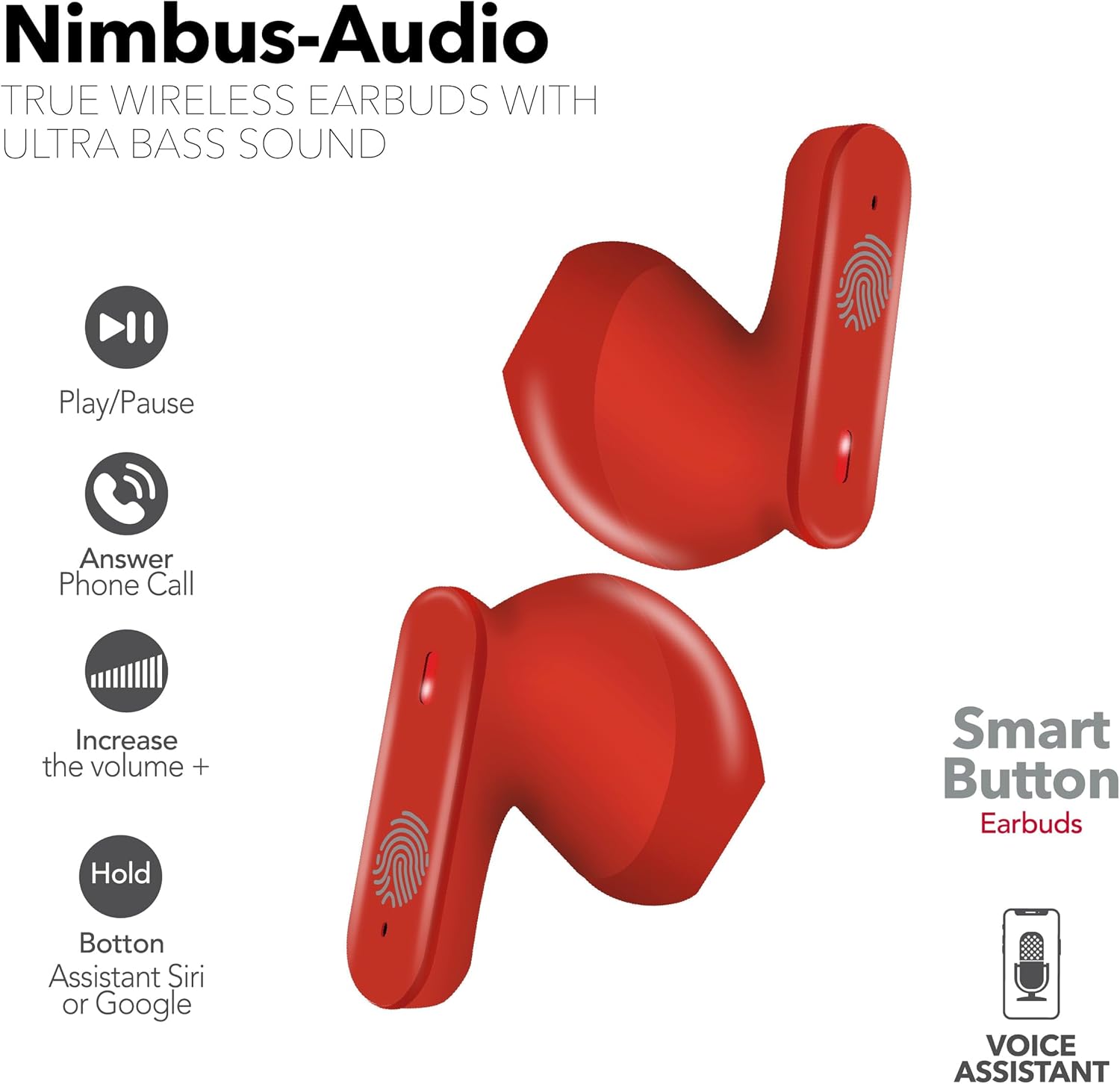
Figura 3.2: Illustration of the "Smart Button" functions on the RCA Wave-78 earbuds. The image shows two red earbuds with icons indicating functions like Play/Pause, Answer Phone Call, Increase Volume (+), and Hold for Assistant (Siri or Google).
4. Manutenzjoni
4.1 Tindif
Tindif regolari jgħin biex iżomm prestazzjoni u iġjene ottimali.
- Uża drapp artab, niexef u mingħajr suf biex timsaħ il-earbuds u l-kaxxa tal-iċċarġjar.
- Tużax prodotti tat-tindif li joborxu, alkoħol, jew solventi kimiċi.
- Naddaf bil-mod il-kuntatti tal-iċċarġjar kemm fuq il-earbuds kif ukoll fuq il-kaxxa b'tajjara tal-qoton niexfa jekk meħtieġ.
4.2 Ħażna
Meta ma tkunx qed tużahom, aħżen il-earbuds fil-kaxxa tal-iċċarġjar tagħhom biex tipproteġihom u żżommhom iċċarġjati. Aħżen f'post frisk u niexef 'il bogħod minn temperaturi estremi.
4.3 Kura tal-Batterija
Biex ittawwal il-ħajja tal-batterija:
- Evita li tiċċarġja l-batterija kompletament ta' spiss.
- Charge the earbuds regularly, even if not used for extended periods.
- Tesponix għal sħana jew kesħa estrema.
5 Issolvi l-problemi
Kwistjonijiet Komuni u Soluzzjonijiet:
- Il-earbuds mhux qed jitqabbdu:
- Kun żgur li ż-żewġ earbuds huma ċċarġjati.
- Poġġi l-earbuds lura fil-kaxxa, agħlaq l-għatu, stenna ftit sekondi, imbagħad iftaħ biex terġa' tidħol fil-modalità ta' tqabbil.
- Itfi u ixgħel il-Bluetooth fuq l-apparat tiegħek.
- Insieh "RCA Wave-78" mil-lista Bluetooth tat-tagħmir tiegħek u erġa' pprova tqabbad.
- Earbud wieħed biss jaħdem:
- Kun żgur li ż-żewġ earbuds huma ċċarġjati.
- Poġġi ż-żewġ earbuds lura fil-kaxxa tal-iċċarġjar, agħlaq l-għatu, u mbagħad iftaħha mill-ġdid.
- Try resetting the earbuds (refer to manufacturer's instructions for specific reset procedure if available, otherwise, a full charge and re-pairing often resolves this).
- L-ebda ħoss jew volum baxx:
- Iċċekkja l-livell tal-volum kemm fuq l-apparat tiegħek kif ukoll fuq il-earbuds.
- Kun żgur li l-earbuds huma mqiegħda sew f'widnejk.
- Naddaf kwalunkwe debris mill-ispikers tal-earbuds.
- Kwistjonijiet tal-iċċarġjar:
- Kun żgur li l-kejbil tal-iċċarġjar huwa konness sew kemm mal-kaxxa kif ukoll mas-sors tal-enerġija.
- Check if the charging contacts on the earbuds and case are clean.
- Ipprova kejbil USB differenti jew adapter tal-enerġija.
6. Speċifikazzjonijiet
| Isem tal-Mudell | Mewġa 78 |
| Brand | RCA |
| Teknoloġija tal-Konnettività | Wireless (Bluetooth) |
| Verżjoni Bluetooth | 5.0 |
| Ħajja tal-batterija | Sa 20-il Siegħa |
| Tip ta' Sewwieq Awdjo | Sewwieq Dinamika |
| Medda ta' Frekwenzi | 20 Hz - 20,000 Hz |
| Metodu ta' Kontroll | Remot (Kontrolli tal-Mess) |
| Tqegħid tal-widnejn | Fil-widnejn |
| Fattur tal-Formola | Fil-widnejn |
| Piż tal-oġġett | 6.4 uqija |
| Dimensjonijiet tal-Prodott | 2.17 x 1.85 x 0.47 pulzieri |
| Livell ta 'Reżistenza għall-Ilma | Mhux Reżistenti għall-Ilma |
| UPC | 850068964437 |
7. Garanzija u Appoġġ
For detailed warranty information and customer support, please refer to the official RCA webis-sit jew ikkuntattja lis-servizz tal-klijenti tagħhom direttament.
Tista 'żżur il- Ħanut RCA fuq Amazon għal aktar informazzjoni dwar il-prodott u riżorsi ta' appoġġ.


