Introduzzjoni
This manual provides detailed instructions for the proper use and maintenance of your RCA Wave-55 Wireless Over-Ear Bluetooth Headphones. Please read this manual thoroughly before using the product to ensure optimal performance and longevity. Keep this manual for future reference.
Prodott Overview
The RCA Wave-55 headphones are designed for an immersive audio experience with features like Hi-Res Audio, deep bass, and a comfortable over-ear design. Familiarize yourself with the components and controls.
Komponenti tal-headphones
- Faxxa tar-ras aġġustabbli
- Soft Over-Ear Cushions
- Control Buttons (Power, Play/Pause, Volume, Track Navigation)
- Mikrofonu inkorporat
- Port tal-iċċarġjar (USB-C)
- 3.5mm Audio Jack
Kontroll tat-Tqassim
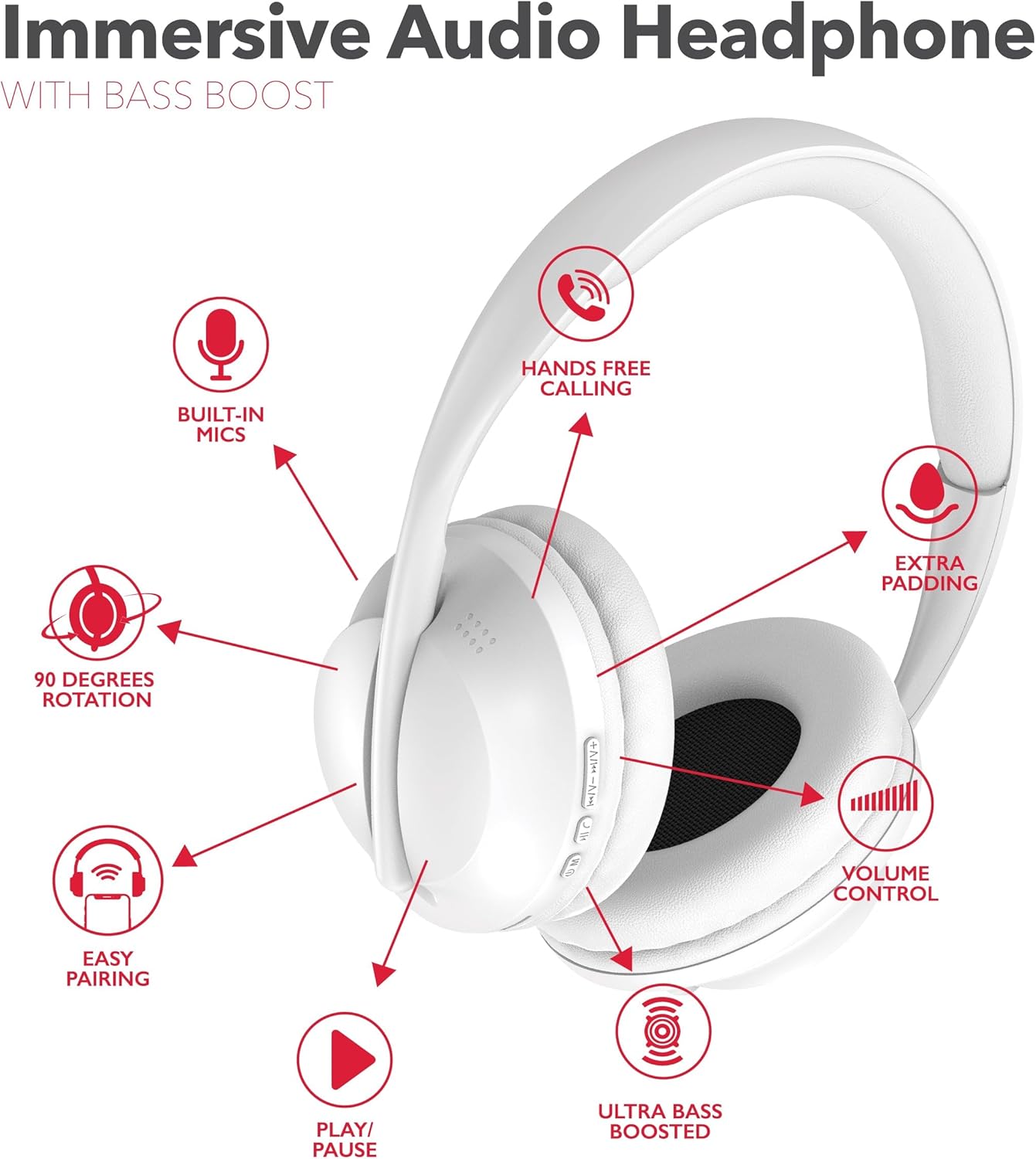
This diagram illustrates the dual-function buttons located on the earcups. These buttons control power, Bluetooth mode, play/pause, phone calls, previous/next track, and volume.

The image above provides a visual guide to the dual function buttons, allowing you to manage music and calls directly from the headphones.
Setup
Iċċarġjar tal-headphones
- Qabbad il-kejbil tal-iċċarġjar USB-C provdut mal-port tal-iċċarġjar fuq il-headphones.
- Qabbad it-tarf l-ieħor tal-kejbil ma 'sors ta' enerġija USB (eż., kompjuter, adapter tal-ħajt).
- The LED indicator will illuminate to show charging status. It will change color or turn off when fully charged.
- Ċarġ sħiħ jipprovdi sa 12 siegħa ta' ħin ta' daqq.
Note: The headphones cannot be used while charging.
Tqabbil tal-Bluetooth
- Kun żgur li l-headphones huma ċċarġjati kompletament.
- Press and hold the Power/Bluetooth button until the LED indicator flashes, indicating pairing mode.
- Fuq l-apparat tiegħek (smartphone, tablet, kompjuter), attiva l-Bluetooth u fittex apparati disponibbli.
- Select "RCA Wave-55" from the list of devices.
- Once connected, the LED indicator will stop flashing and remain solid.

The headphones offer quick Bluetooth pairing for wireless convenience and also include a 3.5mm audio jack for wired listening options.
Istruzzjonijiet Operattivi
Qawwa mixgħul/mitfi
- Qawwa Mixgħul: Agħfas u żomm il-buttuna tal-Enerġija għal madwar 3 sekondi.
- Itfi: Agħfas u żomm il-buttuna tal-Enerġija għal madwar 5 sekondi.
Daqq tal-Mużika
- Play/Pawsa: Agħfas il-buttuna Play/Pause darba.
- Volum 'il fuq: Agħfas il-buttuna '+'.
- Volum 'l isfel: Agħfas il-buttuna '-'.
- Track li jmiss: Agħfas u żomm il-buttuna '+'.
- Track preċedenti: Agħfas u żomm il-buttuna '-'.
Ġestjoni tas-Sejħiet
- Tweġiba/Tmiem Sejħa: Agħfas il-buttuna Play/Pause darba.
- Irrifjuta Sejħa: Agħfas u żomm il-buttuna Play/Pause għal 2 sekondi.
- Isemmi mill-ġdid l-Aħħar Numru: Agħfas darbtejn il-buttuna Play/Pause.
Modalità Trasparenza
The Transparency Mode allows you to hear your surroundings while listening to audio. This feature is useful for maintaining awareness in busy environments. Refer to your device's specific instructions or the headphone's control layout for activating this mode.
Assistent tal-Vuċi
Activate your device's voice assistant (e.g., Siri, Google Assistant) by pressing the dedicated Voice Assistant button or following the instructions in your device's manual.
Manutenzjoni
Tindif
- Imsaħ il-headphones b'ċarruta ratba u niexfa.
- Tużax prodotti tat-tindif li joborxu, solventi, jew kimiċi qawwija.
- Evita li tidħol l-umdità fi kwalunkwe fetħiet.
Ħażna
- Aħżen il-headphones f'post frisk u niexef 'il bogħod mix-xemx diretta u minn temperaturi estremi.
- Evita li tpoġġi oġġetti tqal fuq il-headphones.
- The earcups feature 90-degree rotation for compact storage.

The 90-degree rotating earcups and adjustable headband ensure a personalized and comfortable fit, as well as convenient storage.

The enhanced ear cushioning provides extra padding to reduce ear strain, contributing to a more enjoyable listening experience.
Issolvi l-problemi
If you encounter issues with your RCA Wave-55 headphones, refer to the following common solutions:
- Ebda Qawwa: Kun żgur li l-headphones huma ċċarġjati kompletament. Qabbadhom ma' sors tal-enerġija u ċċekkja l-indikatur tal-iċċarġjar.
- Ma tistax tqabbad: Make sure Bluetooth is enabled on your device and the headphones are in pairing mode (flashing LED). Move the headphones closer to your device. Try unpairing and re-pairing.
- Ebda Ħsejjes: Check the volume level on both the headphones and your connected device. Ensure the headphones are properly paired. If using a wired connection, ensure the 3.5mm cable is fully inserted.
- Kwalità tal-Ħoss Fqira: Move closer to your device to avoid interference. Ensure there are no obstructions between the headphones and your device. Try disconnecting and reconnecting.
- Mikrofonu Mhux Jaħdem: Ensure the headphones are properly connected and selected as the audio input device on your computer or smartphone.
Speċifikazzjonijiet
| Karatteristika | Speċifikazzjoni |
|---|---|
| Isem tal-Mudell | Mewġa 55 |
| Teknoloġija tal-Konnettività | Mingħajr fili (Bluetooth 5.3) |
| Tip ta' Sewwieq Awdjo | Sewwieq Dinamika |
| Medda ta' Frekwenzi | 20Hz - 40kHz |
| Ħajja tal-batterija | Sa 12-il Siegħa |
| Metodu ta' Kontroll | Remote (On-ear buttons) |
| Karatteristiċi Speċjali | 90 Degree Rotation, Built-in Mics, Easy Pairing, Transparency Mode |
| Livell ta 'Reżistenza għall-Ilma | Mhux Reżistenti għall-Ilma |
| Dimensjonijiet tal-Prodott | 8.66 x 1.97 x 8.07 pulzieri |
| Piż tal-oġġett | 1.1 liri |
| UPC | 850068964321 |
Garanzija u Appoġġ
For warranty information or technical support, please refer to the warranty card included with your product or visit the official RCA websit. Ikkuntattja lis-servizz tal-konsumatur għal assistenza dwar kwistjonijiet jew mistoqsijiet dwar il-prodott.


