1. Introduzzjoni
Thank you for choosing the RCA Wave-68 True Wireless Earbuds. These earbuds are designed to provide a high-quality audio experience with features such as Hi-Res Audio, deep bass, and Transparency Mode. They offer a stable Bluetooth 5.2 connection, a built-in microphone for clear calls, and up to 20 hours of battery life with the charging case. This manual will guide you through the setup, operation, and maintenance of your new earbuds.
2. Kontenut tal-Pakkett
Jekk jogħġbok ivverifika li l-oġġetti kollha huma preżenti fil-pakkett tiegħek:
- Earbuds True Wireless RCA Wave-68 (Xellug u Lemin)
- Każ tal-Iċċarġjar li jinġarr
- Cable tal-Iċċarġjar tal-USB-C
- Daqsijiet Multipli ta' Eartips
- Manwal għall-Utent
3. Prodott Aktarview

Figure 3.1: RCA Wave-68 True Wireless Earbuds and Charging Case. The earbuds are securely placed within the compact charging case, ready for use or recharging.

Figure 3.2: Key Features of a Single Earbud. This diagram highlights the various functionalities integrated into each earbud, such as built-in microphones for calls, touch-sensitive controls for playback and volume, and the true wireless design for freedom of movement. It also indicates the capability for ultra-bass sound and high-quality audio output.
Komponenti tal-Earbud:
- Żona tal-Kontroll tal-Messi: For managing playback, calls, and voice assistant.
- Mikrofonu: Għal sejħiet mingħajr idejn u kmandi tal-vuċi.
- Ganċ tal-widna: Jipprovdi tajbin sigur u komdu.
- Kuntatti tal-Iċċarġjar: For recharging the earbuds within the case.
Komponenti tal-Kaxxa tal-Iċċarġjar:
- Port tal-Iċċarġjar (USB-C): For recharging the case.
- Indikatur tal-batterija LED: Displays the charging status and battery level of the case and earbuds.
- Slots tal-Iċċarġjar tal-Earbuds: Iżomm u jiċċarġja l-earbuds b'mod sigur.
4. Setup
4.1. Iċċarġjar tal-Earbuds u l-Kaxxa
Qabel l-ewwel użu, iċċarġja kompletament kemm il-earbuds kif ukoll il-kaxxa tal-iċċarġjar.
- Poġġi l-earbuds fil-kaxxa tal-iċċarġjar. Kun żgur li huma mqiegħda sew fl-islott rispettiv tagħhom.
- Qabbad il-kejbil tal-iċċarġjar USB-C mal-port tal-iċċarġjar fuq il-kaxxa u t-tarf l-ieħor ma' adapter tal-enerġija USB (mhux inkluż) jew mal-port USB tal-kompjuter.
- The LED indicator on the charging case will show the charging status. Once fully charged, the indicator will typically show a solid light or turn off.
- A full charge provides up to 20 hours of total playtime with the charging case.

Figure 4.1: Earbuds in Open Charging Case. The image displays the earbuds inside the charging case with the lid open, revealing digital displays that indicate the battery levels of both the individual earbuds and the charging case itself.
4.2. Tqabbil ma' Apparat Bluetooth
Il-earbuds jidħlu awtomatikament fil-modalità ta' tqabbil meta jitneħħew mill-kaxxa tal-iċċarġjar.
- Kun żgur li l-earbuds huma ċċarġjati.
- Iftaħ il-kaxxa tal-iċċarġjar u neħħi ż-żewġ earbuds. Dawn jixegħlu awtomatikament u jippruvaw jingħaqdu ma' xulxin.
- Fuq l-apparat tiegħek (smartphone, tablet, laptop), attiva l-Bluetooth.
- Fittex għal new Bluetooth devices. You should see "RCA Wave-68" in the list of available devices.
- Select "RCA Wave-68" to connect. Once connected, you will hear an audio prompt, and the earbud indicator lights will change (e.g., turn off or flash slowly).
- Jekk l-akkoppjar ma jirnexxix, poġġi l-earbuds lura fil-kaxxa, agħlaq l-għatu, stenna ftit sekondi, u mbagħad erġa' rrepeti l-passi.
5. Istruzzjonijiet Operattivi
5.1. Basic Touch Controls
The RCA Wave-68 earbuds feature intuitive touch controls on each earbud. The specific functions are:
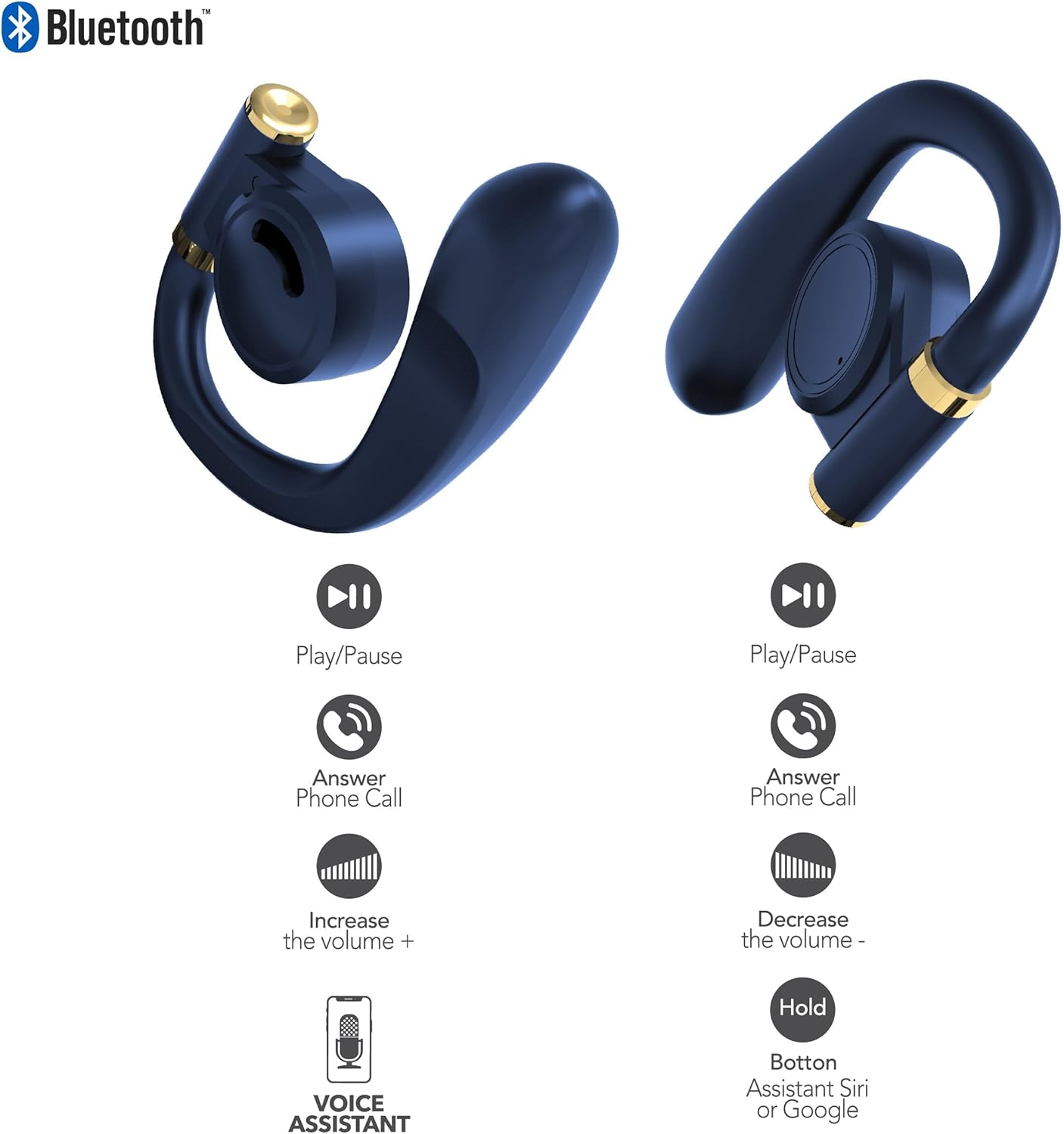
Figure 5.1: Earbud Touch Control Functions. This diagram details the touch-sensitive areas on both the left and right earbuds and their corresponding actions for media playback, call management, volume adjustment, and activating voice assistants.
| Azzjoni | Earbud tax-Xellug | Earbud tal-lemin |
|---|---|---|
| Play/Pawsa | Tektek Uniku | Tektek Uniku |
| Wieġeb Telefon | Tektek Uniku | Tektek Uniku |
| Żid il-Volum | Tektek Doppju | N/A |
| Naqqas il-Volum | N/A | Tektek Doppju |
| Activate Voice Assistant (Siri/Google) | Żomm | Żomm |
5.2. Modalità ta' Trasparenza
Transparency Mode allows you to hear your surroundings while still enjoying your audio. This feature is useful for maintaining awareness in environments like busy streets or public transport.
- Activating Transparency Mode: Refer to your specific earbud control diagram or experiment with a triple tap on either earbud. An audio prompt will confirm the mode change.
- Deactivating Transparency Mode: Repeat the activation gesture.
5.3. Power On/Off
- Qawwa Mixgħul: Il-earbuds jixegħlu awtomatikament meta jitneħħew mill-kaxxa tal-iċċarġjar.
- Itfi: Poġġi l-earbuds lura fil-kaxxa tal-iċċarġjar u agħlaq l-għatu. Dawn se jiskonnettjaw u jintfew awtomatikament.
6. Manutenzjoni
Manutenzjoni xierqa tiżgura l-lonġevità u l-prestazzjoni ottimali tal-earbuds RCA Wave-68 tiegħek.
- Tindif: Regularly clean the earbuds and charging case with a soft, dry, lint-free cloth. Do not use harsh chemicals or abrasive materials. Gently clean the charging contacts on both the earbuds and the case to ensure proper connection.
- Widnejn: Remove and clean the eartips periodically with mild soap and water. Ensure they are completely dry before reattaching them to the earbuds.
- Ħażna: When not in use, always store the earbuds in their charging case to protect them from dust, dirt, and damage. Store in a cool, dry place away from extreme temperatures.
- Espożizzjoni għall-Ilma: The earbuds are not waterproof. Avoid exposing them to excessive moisture, rain, or sweat.
7 Issolvi l-problemi
If you encounter issues with your RCA Wave-68 earbuds, try the following solutions:
| Problema | Soluzzjoni Possibbli |
|---|---|
| Il-earbuds mhux qed jitqabbdu mat-tagħmir |
|
| Earbud wieħed biss qed jaħdem |
|
| L-ebda ħoss jew volum baxx |
|
| Każ tal-iċċarġjar mhux iċċarġjar |
|
8. Speċifikazzjonijiet
The following are the technical specifications for the RCA Wave-68 True Wireless Earbuds:
| Karatteristika | Dettall |
|---|---|
| Isem tal-Mudell | Mewġa |
| Teknoloġija tal-Konnettività | Wireless |
| Teknoloġija tal-Komunikazzjoni mingħajr Fili | Bluetooth |
| Verżjoni Bluetooth | 5.3 |
| Apparati Kompatibbli | Laptops, Kelliema Intelliġenti, Smartphones, Tablets |
| Medda ta' Frekwenzi | 20 Hz - 20 kHz |
| Metodu ta' Kontroll | Remot (Kontroll tal-Mess) |
| Ħajja tal-batterija | Sa 20 Siegħa (bil-kaxxa tal-iċċarġjar) |
| Tip ta' Sewwieq Awdjo | Sewwieq Dinamika |
| Forma tal-widna | Fil-widna |
| Tqegħid tal-widnejn | Fil-widnejn |
| Fattur tal-Formola | Fil-widnejn |
| Kontroll tal-Ħoss | Adaptive Noise Cancellation (Transparency Mode) |
| Karatteristika Speċjali | Built-In Voice Assistant, Smart Button |
| Dimensjonijiet tal-Prodott | 4.06 x 2.87 x 0.79 pulzieri |
| Piż tal-oġġett | 1 lira |
| UPC | 850068964482 |
9. Garanzija u Appoġġ
9.1. Garanzija Limitata
RCA warrants this product against defects in material and workmanship for a period of one (1) year from the date of original purchase. This warranty does not cover damage caused by accident, misuse, abuse, improper installation or operation, lack of reasonable care, or unauthorized modification. For detailed warranty terms and conditions, please refer to the warranty card included with your product or visit the official RCA websit.
9.2. Appoġġ għall-Klijent
If you have any questions, require technical assistance, or need to claim warranty service, please contact RCA customer support through the following channels:
- Websit: Żur l-appoġġ uffiċjali tal-RCA website for FAQs, troubleshooting guides, and contact forms.
- Email: Refer to your product packaging or the RCA websit għal indirizzi tal-email tas-servizz tal-konsumatur.
- Telefon: Check the RCA website for regional customer support phone numbers.
Please have your product model number (Wave-68) and proof of purchase ready when contacting support.


