1. Introduzzjoni
This manual provides detailed instructions for the FREEWOLF M68 60% Wireless Gaming Keyboard. Please read this manual carefully before using the product to ensure proper operation and longevity.

Figure 1: FREEWOLF M68 Wireless Gaming Keyboard (Shimmer color variant)
2. Prodott Aktarview
Karatteristiċi ewlenin:
- Konnettività Tri-Modalità: Supports wired (USB-C), 2.4GHz wireless, and Bluetooth 5.0 connections.
- Kompatibilità ta' Multi-Tagħmir: Connects to Windows, Mac, Linux, PC, Laptop, iPad, iOS, and Android devices.
- Tqassim Kompatt ta' 60%: Features 67 keys, optimizing desktop space.
- Ċwievet tal-PBT: Durable Polybutylene Terephthalate keycaps with clear legends.
- Dawl ta' wara LED tal-qawsalla: Offers constant and breathing modes with adjustable brightness and speed.
- Batterija fit-tul: Built-in 2000mAH battery provides extended usage.
- Disinn Ergonomiku: Double leg braces allow for three adjustable typing angles.
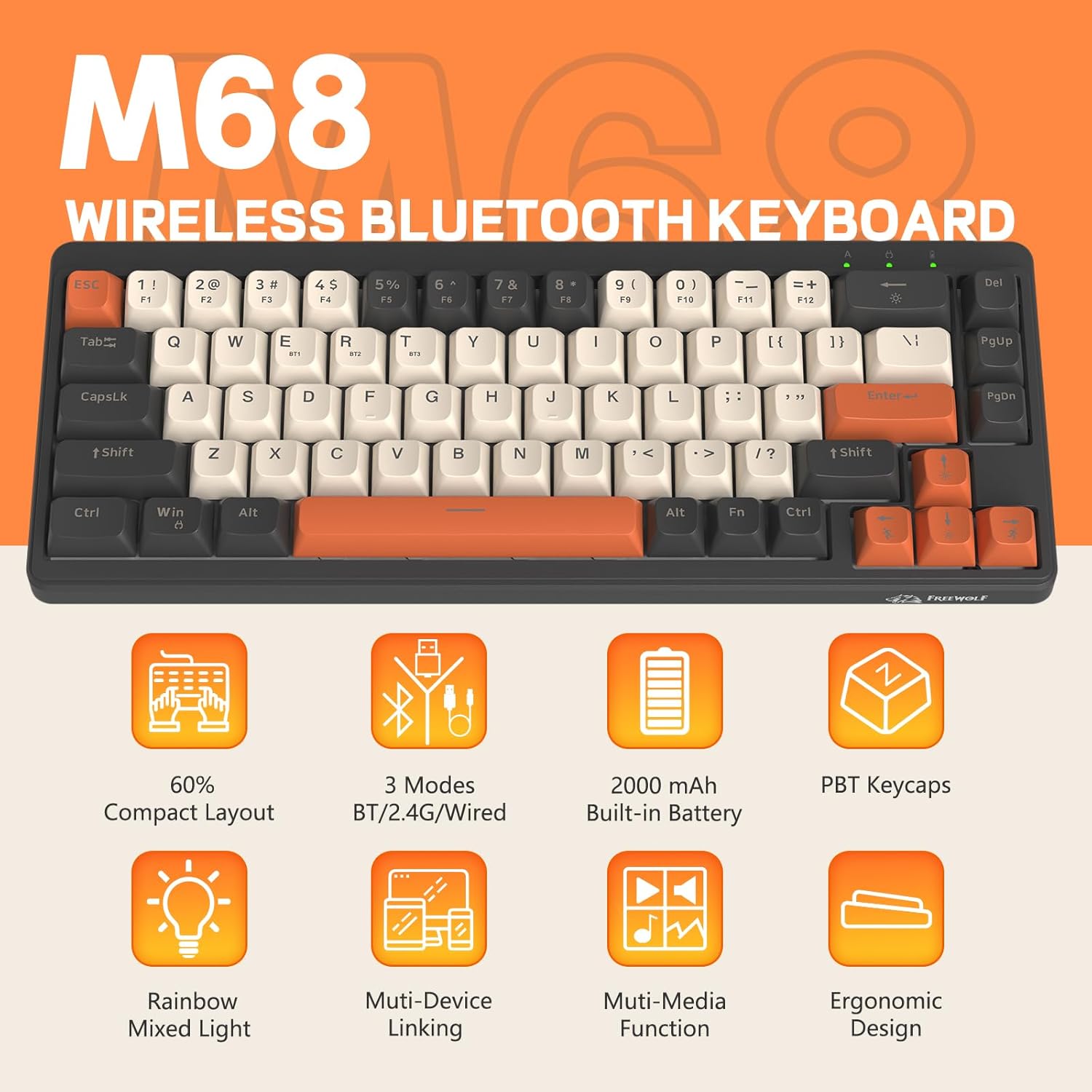
Figura 2: Aktarview of FREEWOLF M68 key features.
3. Setup u Konnessjoni
3.1. Tri-Mode Connection Overview
The M68 keyboard supports three connection methods: wired via USB-C, 2.4GHz wireless via a USB receiver, and Bluetooth 5.0. You can switch between these modes using the dedicated switch on the keyboard.

Figura 3: Dettaljat view of the 3-mode connection options.
3.2. Konnessjoni bil-fili
- Sib il-port USB-C fuq it-tastiera.
- Qabbad il-kejbil USB-C provdut mat-tastiera u t-tarf l-ieħor mal-port USB tal-kompjuter tiegħek.
- Ensure the mode switch on the keyboard is set to the wired (USB) position.
- It-tastiera tiġi rikonoxxuta awtomatikament mis-sistema tiegħek.
3.3. Konnessjoni bla fili ta' 2.4GHz
- Sib ir-riċevitur USB ta' 2.4GHz (spiss maħżun f'kompartiment fuq it-tastiera).
- Ipplaggja r-riċevitur USB f'port USB disponibbli fuq il-kompjuter tiegħek.
- Set the mode switch on the keyboard to the 2.4GHz wireless position.
- It-tastiera għandha tikkonnettja awtomatikament. Jekk le, agħfas FN + R biex tibda tqabbil.
3.4. Konnessjoni Bluetooth
The M68 can connect to up to three Bluetooth devices simultaneously.
- Set the mode switch on the keyboard to the Bluetooth position.
- To enter pairing mode for a specific channel (BT1, BT2, or BT3), press and hold FN+Q (għal BT1), FN + W (għal BT2), jew FN + E (for BT3) until the corresponding indicator light flashes rapidly.
- On your device (PC, laptop, tablet, phone), open Bluetooth settings and search for "FREEWOLF M68".
- Select the keyboard to pair. The indicator light will become solid once connected.
- Biex taqleb bejn apparati Bluetooth imqabbdin, agħfas FN + Q/W/E fil-qosor.
4. Operazzjoni
4.1. Kontroll tad-dawl ta 'wara
The M68 features customizable rainbow LED backlighting.
- FN + Backspace: Toggle backlight on/off or switch between constant and breathing modes.
- FN + Left Arrow: Naqqas il-veloċità tad-dawl ta 'wara.
- FN + Vleġġa Lemin: Żid il-veloċità tad-dawl ta' wara.
- FN + Vleġġa 'l fuq: Żid il-luminożità tad-dawl ta' wara.
- FN + Vleġġa 'l isfel: Naqqas il-luminożità tad-dawl ta' wara.

Figure 4: Backlight adjustment key combinations.
4.2. Ergonomic Adjustment
The keyboard includes double leg braces on the back to adjust the typing angle for comfort.
- Flip the keyboard over to access the leg braces.
- Adjust the two-stage leg braces to achieve your preferred typing angle (flat, one stage, or two stages).

Figure 5: Ergonomic angle adjustments.
4.3. Ġestjoni tal-batterija
The keyboard has a built-in 2000mAH rechargeable battery.
- Iċċarġjar: Connect the keyboard via the USB-C cable to a power source (computer USB port or wall adapter). The charging indicator will show status.
- Ħajja tal-batterija: Up to 60 hours with backlight on, and up to 200 hours with backlight off.
- Iffrankar tal-Enerġija: The keyboard will enter sleep mode after a period of inactivity to conserve battery. Press any key to wake it up.

Figure 6: Battery capacity information.
5. Manutenzjoni
- Tindif: Use a soft, dry cloth to clean the keyboard surface. For keycaps, you may use a slightly damp drapp. Evita umdità eċċessiva.
- Tneħħija tal-Għatu taċ-Ċwievet: If necessary, use a keycap puller to carefully remove PBT keycaps for deeper cleaning or replacement.
- Ħażna: Aħżen it-tastiera f'post frisk u niexef 'il bogħod mix-xemx diretta u minn temperaturi estremi.
- Evita Likwidi: Do not expose the keyboard to liquids to prevent damage to internal components.
6 Issolvi l-problemi
| Problema | Kawża Possibbli | Soluzzjoni |
|---|---|---|
| It-tastiera ma tirrispondix (bil-fili) | Konnessjoni tal-kejbil maħlula, modalità mhux korretta. | Ensure USB-C cable is securely connected. Check if the mode switch is set to wired. Try a different USB port. |
| Keyboard not responding (2.4GHz) | USB receiver not connected, incorrect mode, pairing issue. | Ensure USB receiver is plugged in. Set mode switch to 2.4GHz. Re-pair by pressing FN + R. Try a different USB port for the receiver. |
| It-tastiera ma tirrispondix (Bluetooth) | Not paired, incorrect mode, device Bluetooth off. | Ensure device Bluetooth is on. Set mode switch to Bluetooth. Enter pairing mode (FN + Q/W/E) and re-pair. Forget the device on your system and re-pair. |
| Id-dawl ta' wara mhux qed jaħdem jew imwaħħal | Backlight off, low battery, software glitch. | Agħfas FN + Backspace to toggle. Charge the keyboard. Try resetting the keyboard (refer to advanced functions if available, or disconnect/reconnect). |
| Iċ-ċwievet mhux qed jirreġistraw jew qed jittajpjaw darbtejn | Trab/debris taħt il-keycap, problema bis-swiċċ. | Carefully remove keycap and clean. If issue persists, contact support. |
7. Speċifikazzjonijiet
| Mudell | M68 |
| Brand | FREEWOLF |
| Konnettività | Bil-fili (USB-C), Wireless 2.4GHz, Bluetooth 5.0 |
| Tqassim Ewlenin | 60% (67 Ċwievet) |
| Materjal Keycap | PBT (Polybutylene Terefthalate) |
| Backlighting | Rainbow LED (RGB) |
| Kapaċità tal-batterija | 2000mAH |
| Apparati Kompatibbli | Laptop, PC, Tablet (Windows, Mac, Linux, iOS, Android) |
| Dimensjonijiet tal-Prodott | 32.51 x 12.5 x 3.99 ċm |
| Piż | 600 g |
| Karatteristiċi Speċjali | Ergonomic (adjustable angles), Backlit |
8. Garanzija u Appoġġ
For warranty information, technical support, or customer service inquiries, please refer to the contact information provided with your purchase or visit the official FREEWOLF websit.
Jekk jogħġbok żomm il-prova tax-xiri tiegħek għal kwalunkwe talba ta' garanzija.


