Introduzzjoni
This manual provides instructions for the assembly, operation, and maintenance of your FLEXISPOT MT137 32-inch Height Adjustable Standing Desk Converter. This product is designed to transform your existing desk into an ergonomic sit-to-stand workstation, promoting a healthier work routine.
Informazzjoni dwar is-Sigurtà
- Dejjem segwi l-istruzzjonijiet tal-assemblaġġ bir-reqqa.
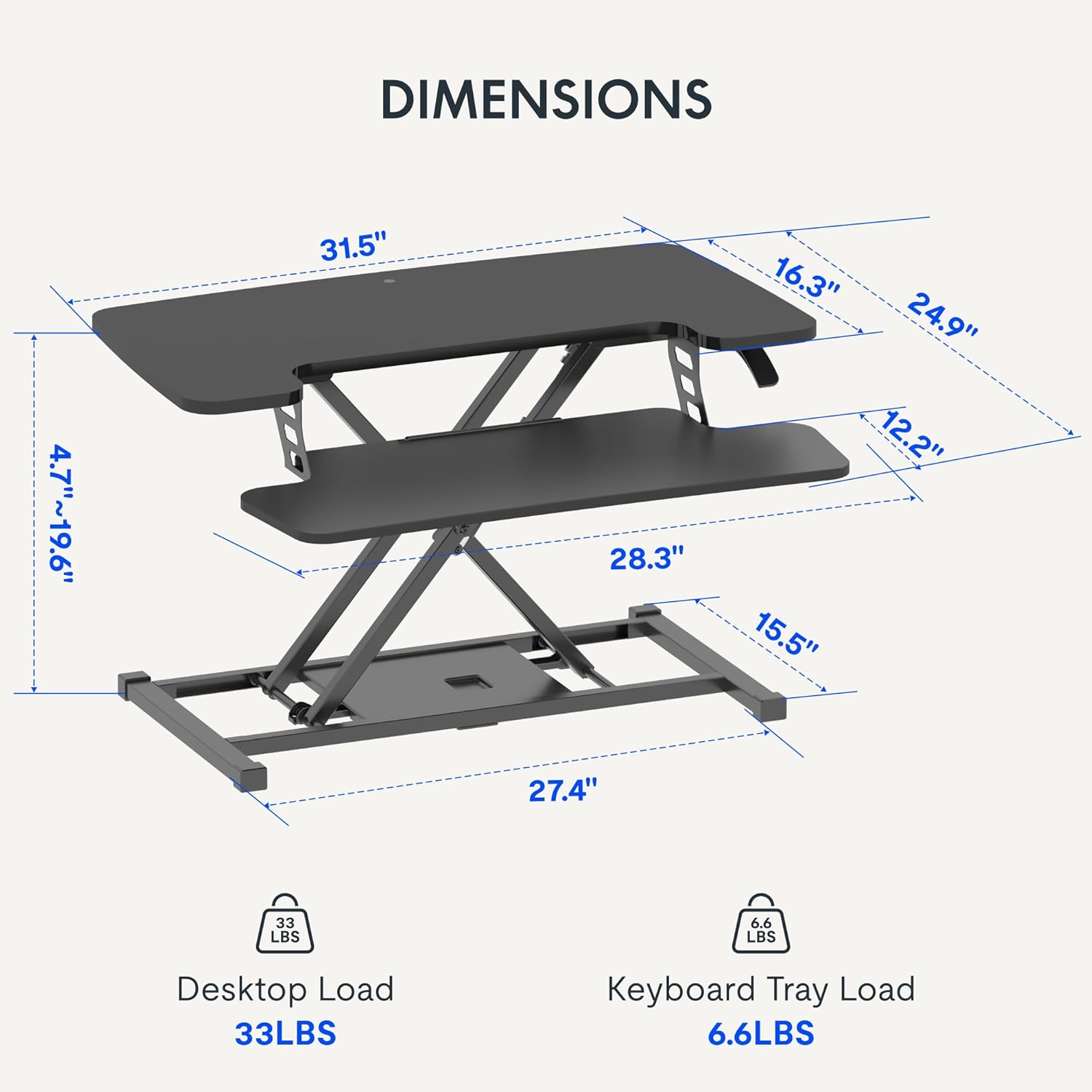
- Do not exceed the weight limit of 33 lbs (15 kg) on the upper desktop.
- Do not exceed the weight limit of 6.6 lbs (3 kg) on the keyboard tray.
- Ensure the desk converter is placed on a stable, flat surface.
- Żomm idejk u subgħajk 'il bogħod mill-partijiet li jiċċaqalqu waqt l-aġġustament tal-għoli.
Kontenut tal-Pakkett
- Pre-assembled Desk Converter Unit
- Trej tat-Tastiera
- Mounting Screws for Keyboard Tray
- Manwal ta 'Istruzzjoni (dan id-dokument)
Setup u Assemblea
- Spakkjar: Neħħi bir-reqqa l-komponenti kollha mill-imballaġġ.
- Keyboard Tray Attachment: Position the keyboard tray beneath the main desktop. Align the pre-drilled holes on the keyboard tray with the mounting points on the converter's frame. Secure the keyboard tray using the provided screws.
- Pjazzament: Place the assembled desk converter on a stable, flat desk surface.

The desk converter is largely pre-assembled, requiring only the attachment of the keyboard tray for immediate use.
Istruzzjonijiet Operattivi
- Aġġustament tal-Għoli: To adjust the height, locate the adjustment lever on the side of the upper desktop.
- Raising the Desk: Squeeze the lever and gently lift the desktop to your desired standing height. Release the lever to lock it in place. The gas spring mechanism assists in smooth elevation.
- Lowering the Desk: Squeeze the lever and apply gentle downward pressure to lower the desktop to your desired sitting height. Release the lever to lock it in place.
- Kapaċità tal-piż: The upper desktop supports up to 33 pounds (15 kg). The keyboard tray supports up to 6.6 pounds (3 kg). Do not exceed these limits.


Karatteristiċi
- Disinn Ergonomiku: Seamlessly transition between sitting and standing positions to promote a healthy work posture. The streamlined edges are designed to reduce wrist discomfort.
- Spacious Two-Tier Workstation: The upper desktop provides ample space for monitors or laptops, while the lower keyboard tray accommodates your keyboard and mouse. A U-shaped cutout on the upper deck allows for laptop placement directly on the tray, optimizing space.
- Sturdy X-Frame Construction: Built with a robust X-frame, ensuring stability and smooth, effortless height adjustments.
- Versatile Height Range: Offers a height adjustment range from 4.7 inches (12 cm) to 19.6 inches (50 cm), accommodating various user heights and work preferences.


Manutenzjoni
- Tindif: Imsaħ l-uċuħ b'artab, damp drapp. Evita cleaners li joborxu.
- Spezzjoni: Iċċekkja l-viti u l-konnessjonijiet kollha perjodikament biex tiżgura li huma mwaħħlin sew.
Issolvi l-problemi
- Diffikultà fl-Aġġustament tal-Għoli: Ensure no objects are obstructing the lifting mechanism. Verify that the weight on the desk does not exceed the specified limits.
- Tħawwad: Confirm the desk converter is placed on a flat, stable surface. Check all assembly screws for tightness.
Speċifikazzjonijiet
| Brand | FLEXISPOT |
| Isem tal-Mudell | MT137 |
| Dimensjonijiet tal-Prodott | 24"D x 32"W x 19.7"Għ (61cm D x 81cm W x 50cmGħ) |
| Kulur | Iswed |
| Materjal Bażi | Metall |
| Tip ta 'Materjal ta' Fuq | Injam |
| Piż tal-oġġett | 24 Lira (10.9 kg) |
| Maximum Upper Desktop Load | 33 Lira (15 kg) |
| Maximum Keyboard Tray Load | 6.6 Lira (3 kg) |
| Medda ta 'Aġġustament Għoli | 4.7 pulzieri (12 ċm) sa 19.6 pulzieri (50 ċm) |
| Assemblea Meħtieġa | Iva (Minimu) |
| Għodda Rakkomandata għall-Assemblaġġ | Tornavit |
| UPC | 810072862501 |
Garanzija u Appoġġ
Tip ta' Garanzija: This product comes with a Full Warranty.
For further assistance, warranty claims, or technical support, please contact FLEXISPOT customer service. Refer to the official FLEXISPOT websit għad-dettalji ta' kuntatt attwali.


