1. Introduzzjoni
Thank you for choosing the Daakro ZK-302T Bluetooth 5.3 Amplifier Board. This compact 2.0 channel audio amplifier is designed for DIY wireless speaker projects, offering 30W+30W output, precise treble and bass control, and versatile input options including Bluetooth 5.3, USB, and AUX. This manual will guide you through the installation, operation, and maintenance of your amplifier board to ensure optimal performance and longevity.
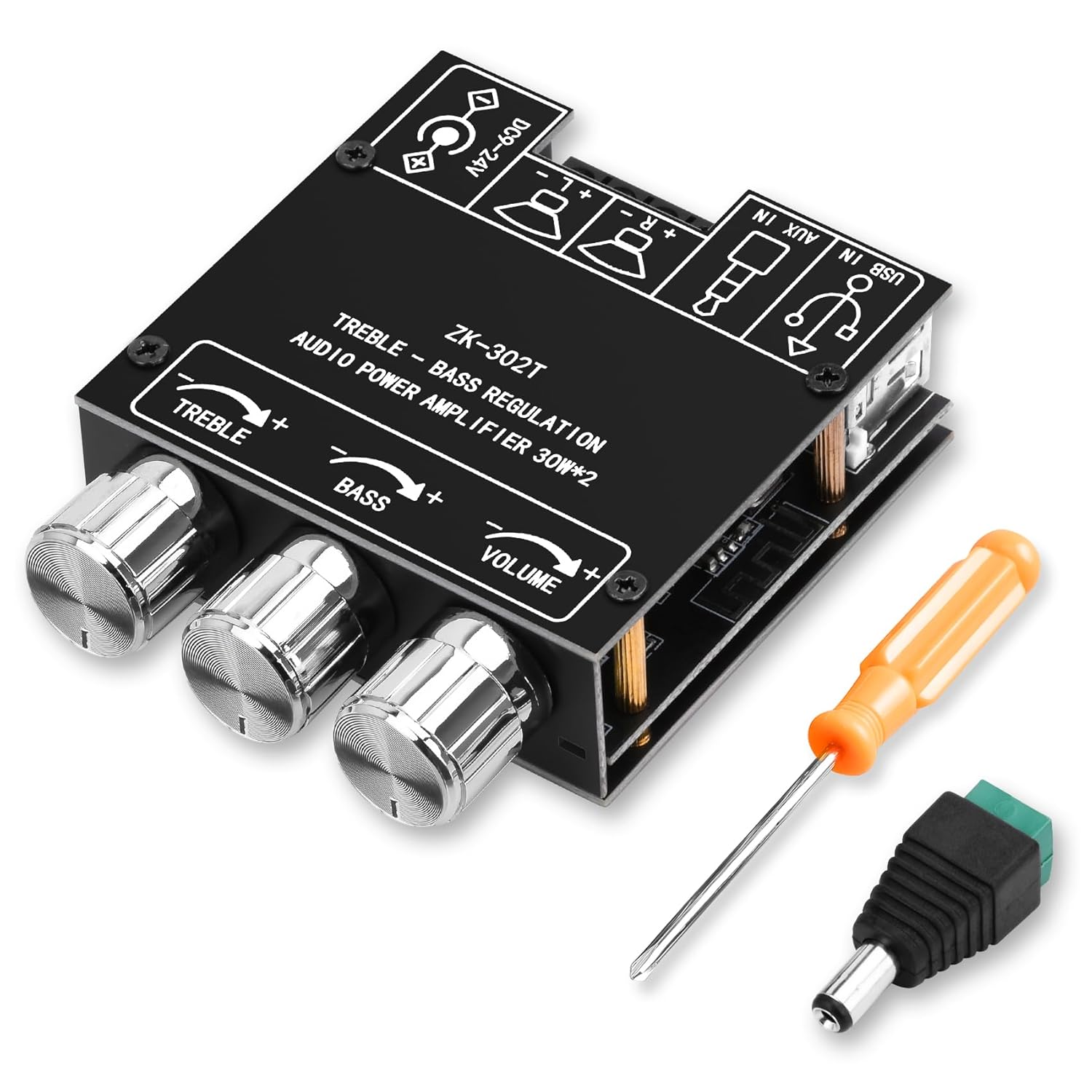
Figura 1: Daakro ZK-302T Bluetooth 5.3 Amplifier Board. This image shows the compact amplifier board with its three control knobs for treble, bass, and volume, along with the various input and output terminals.
2. Informazzjoni dwar is-Sigurtà
Jekk jogħġbok aqra u ifhem l-istruzzjonijiet kollha tas-sigurtà qabel ma tuża dan il-prodott. Jekk ma ssegwix dawn l-istruzzjonijiet, dan jista' jirriżulta f'xokk elettriku, nar, jew perikli oħra.
- Tiżgura l-provvista tal-enerġija voltage is within the specified range of DC 9-24V.
- Tesponix il- amplifier board to moisture, water, or extreme temperatures.
- Evita short-circuiting tat-terminals tal-ħruġ.
- Skonnettja l-enerġija qabel ma tagħmel xi konnessjonijiet jew skonnessjonijiet.
- Żomm fejn ma jintlaħaqx mit-tfal.
- Do not attempt to disassemble or modify the board. Refer all servicing to qualified personnel.
- Żgura ventilazzjoni xierqa biex tevita sħana żejda.
- Dan il-prodott huwa ddisinjat għall-użu fuq ġewwa biss.
3. Konfigurazzjoni u Konnessjonijiet
Follow these steps to correctly set up your Daakro ZK-302T ampbord aktar ħaj.
3.1 Kontenut tal-Pakkett
Ivverifika li l-oġġetti kollha huma preżenti fil-pakkett tiegħek:
- Daakro ZK-302T Bluetooth AmpBord aktar ħaj
- Power adapter cable (if included)
- Tornavit
- Mounting hardware (standoffs, screws)
- Heat sink (if not pre-installed)

Figura 2: What's in the Box. This image displays the amplifier board along with included accessories such as a screwdriver, power adapter cable, and mounting hardware.
3.2 Identifikazzjoni tal-Komponent
Familiarize yourself with the various ports and controls on the ampbord aktar ħaj.

Figura 3: Component Identification. This diagram highlights key components including the power input, USB input, AUX input, left and right channel outputs, and the treble, bass, and volume control knobs.
- Power Input (DC 9-24V): Connect your DC power supply here.
- Input USB: For audio input from a USB source.
- Input AUX (Ġakk ta' 3.5mm): For wired audio input from devices like phones or PCs.
- Left Channel Output (L+ L-): Connect to your left speaker.
- Right Channel Output (R+ R-): Connect to your right speaker.
- Kontroll tat-Triple: Rotate to adjust high-frequency audio.
- Kontroll tal-bass: Rotate to adjust low-frequency audio.
- Kontroll tal-Volum: Rotate to adjust overall audio output level.
3.3 Konnessjoni ta' Kelliema
- Tiżgura l- amplifier board is powered off.
- Connect your speakers (4-8Ω, 20-200W) to the corresponding Left (L+ L-) and Right (R+ R-) channel output terminals. Ensure correct polarity (+ to + and - to -).
- Tighten the terminal screws to secure the speaker wires.
3.4 Konnessjoni tal-Enerġija
- Connect a DC power supply (9-24V) to the power input terminal.
- Ensure the power supply provides sufficient current for your speakers. Refer to the "Power Output Comparison Table" in Section 4.3 for optimal power matching.
4. Istruzzjonijiet Operattivi
4.1 Powering On and Input Selection
- Once speakers and power are connected, turn on the power supply. The amplifier board will automatically enter Bluetooth pairing mode.
- The board supports three audio input modes: Bluetooth, USB, and AUX. The board will automatically switch to the last active input or prioritize a newly connected input.

Figura 4: Multiple Audio Input Modes. This image illustrates the three input options: Bluetooth, 3.5mm AUX, and USB, and shows compatible devices like mobile phones, tablets, and computers.
4.2 Tqabbil tal-Bluetooth
- Tiżgura l- amplifier board is powered on and in Bluetooth mode.
- On your mobile device (phone, tablet, etc.), enable Bluetooth and search for available devices.
- Select "ZK-302T" from the list of devices to pair. No password is required.
- Once paired, you will hear a confirmation tone, and the Bluetooth indicator light (if present) will stabilize.
- The Bluetooth connection range is approximately 16.4 feet (5 meters).

Figura 5: Bluetooth Connection. This image shows a smartphone connected via Bluetooth to the ZK-302T amplifier board, indicating a wireless range of up to 16.4 feet (5 meters).
4.3 Adjusting Audio
- Kontroll tal-Volum: Rotate the VOLUME knob to increase or decrease the overall sound level.
- Kontroll tat-Triple: Rotate the TREBLE knob to adjust the high-frequency response. Turn clockwise for more treble, counter-clockwise for less.
- Kontroll tal-bass: Rotate the BASS knob to adjust the low-frequency response. Turn clockwise for more bass, counter-clockwise for less.
4.4 Power Output Considerations
Optimal audio output requires a suitable power supply and speaker impedance. The table below illustrates the approximate output power based on input voltage and speaker impedance.

Figura 6: Power Output Comparison Table. This table details the R&L channel output power at 1KHz for various input voltages (12V, 15V, 19V, 24V) and speaker impedances (4Ω, 8Ω).
Important Note: There must be enough voltage and current input to achieve the rated power output. Higher voltage and current generally result in higher power. For the same conditions, a smaller speaker impedance will yield greater power.
5. Manutenzjoni
- Tindif: Uża drapp ratba u niexfa biex tnaddaf il- amplifier board. Do not use liquid cleaners or solvents.
- Ħażna: Aħżen l-apparat f'post frisk u niexef 'il bogħod mix-xemx diretta u minn temperaturi estremi.
- Ventilazzjoni: Ensure the board has adequate airflow to prevent overheating, especially during prolonged use at high volumes.
- Konnessjonijiet: Iċċekkja perjodikament il-konnessjonijiet kollha għal issikkar u kun żgur li l-ebda wajer ma jkun imqaxxar jew espost.
6 Issolvi l-problemi
If you encounter issues with your Daakro ZK-302T amplifier board, refer to the following common problems and solutions.
| Problema | Kawża Possibbli | Soluzzjoni |
|---|---|---|
| Ebda output tal-ħoss |
|
|
| Ħoss distort |
|
|
| Kwistjonijiet ta 'konnessjoni Bluetooth |
|
|
| Is-sħana żejda |
|
|
7. Speċifikazzjonijiet
| Karatteristika | Dettall |
|---|---|
| Numru tal-Mudell | ZK-302T |
| Qawwa tal-Ħruġ | 30W + 30W (2.0 Channel) |
| AmpĊippa lifier | Dual TPA3110D2 HiFi Chip |
| Verżjoni Bluetooth | 5.3 |
| Input Voltage | DC 9-24V |
| Inputs tal-awdjo | Bluetooth, USB, AUX (3.5mm) |
| Impedenza tal-Ispeaker | 4-8Ω |
| Recommended Speaker Power | 20-200W |
| Dimensjonijiet tal-Prodott (L x W x H) | 4.33 x 2.76 x 1.97 pulzieri |
| Piż | 3.53 uqija |
| Mekkaniżmi ta' Protezzjoni | Vol-żejjedtage, Taħt-voltage, Over-temperature, Short-circuit, Reverse connection |
8. Garanzija u Appoġġ
The Daakro ZK-302T Bluetooth 5.3 Amplifier Board comes with a Politika ta' ritorn/sostituzzjoni ta' 30 jum from the date of purchase. This warranty covers manufacturing defects and issues arising from normal use. It does not cover damage caused by misuse, accidents, unauthorized modifications, or improper installation.
For technical support, warranty claims, or any questions regarding your product, please contact Daakro customer service through the platform where you purchased the product. Please have your purchase details and model number (ZK-302T) ready.


