1. Introduzzjoni
The Daakro ZK-502MT Bluetooth Amplifier Board is a versatile 2.0 channel audio amplifier designed for DIY home audio projects. It features dual HiFi amplifier chips, providing clear and high-fidelity sound. With support for both Bluetooth 5.0 and AUX inputs, it offers flexible connectivity options for various audio sources. This manual provides detailed instructions for setup, operation, and maintenance of your ZK-502MT ampbord aktar ħaj.
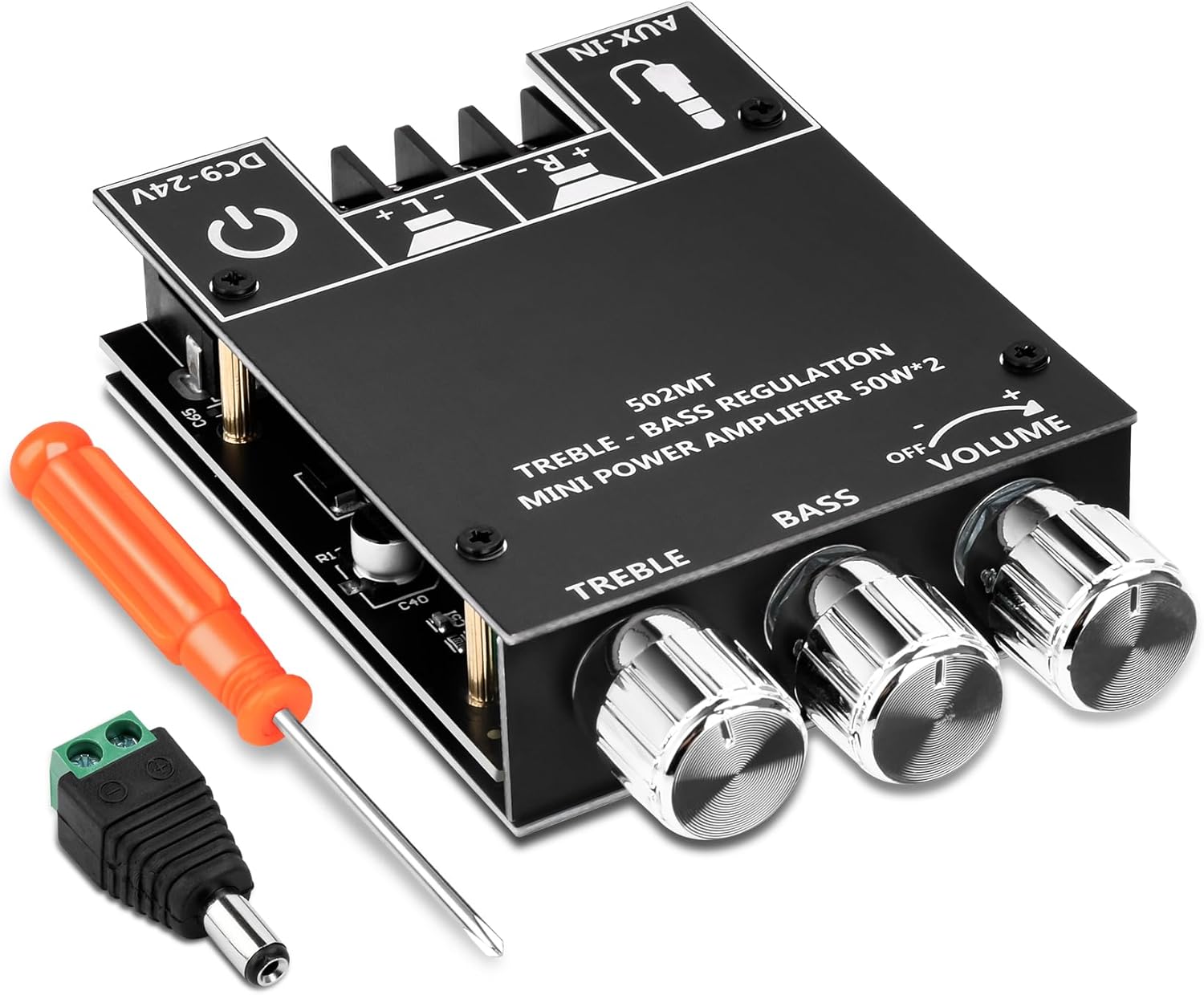
Image 1.1: The ZK-502MT Bluetooth Amplifier Board, including a screwdriver and a DC power adapter.
2. Karatteristiċi ewlenin
- Dual HiFi AmpĊippa lifier: Utilizes two HiFi amplifier chips with PurePath technology for ultra-high resolution, low distortion, and high-fidelity sound.
- 2.0 Konfigurazzjoni tal-Kanal: Supports left and right channel output, each providing 50W output power for an immersive sound experience.
- Dual Audio Input Modes: Seamlessly switch between Bluetooth 5.0 for wireless connectivity and traditional AUX input for wired audio sources.
- Applikazzjoni wiesgħa: Compatible with a wide input voltage range from 9V to 24V DC and suitable for 20-200W, 4-8Ω speakers.
- Protezzjoni Komprensiva: Built-in protection mechanisms include over-voltage, taħt il-voltage, over-temperature, short-circuit, and reverse connection protection.
- Kontroll tat-Treble u l-Bass: Independent knobs for adjusting treble and bass to customize your audio output.
3. X'hemm fil-Kaxxa
Malli tiftaħ il-pakkett, jekk jogħġbok ivverifika li l-komponenti kollha li ġejjin huma inklużi:
- ZK-502MT Bluetooth AmpBord aktar ħaj
- Top Plate with Control Labels
- Pjanċa tal-qiegħ
- Tornavit
- Konnettur tal-Adapter tal-Enerġija DC
- Sink tas-Sħana
- Mounting Hardware (Screws, Standoffs)
- Control Knobs (Volume, Treble, Bass)

Image 3.1: All components included in the ZK-502MT package.
4. Gwida ta' Setup
Follow these steps to properly set up your ZK-502MT Bluetooth AmpBord lifier.
4.1 Assemblaġġ tal-Komponenti
- Attach Heat Sink: Secure the provided heat sink to the main amplifier chip on the board. Ensure good contact for optimal heat dissipation.
- Assemble Casing: Use the provided standoffs and screws to attach the top and bottom plates to the amplifier board. The top plate has labels for controls and ports.
- Installa l-Pumi: Place the three control knobs onto their respective shafts for Volume, Bass, and Treble.


Image 4.1: Proper installation of the heat sink and control knobs.
4.2 Konnessjoni tal-Ispeaker
Qabbad il-kelliema tiegħek mal- amplifier board using the screw terminals. The board supports 2.0 channel output (Left and Right). Ensure correct polarity (+ and -) for each speaker.
- Connect the positive (+) terminal of your left speaker to the 'L+' terminal on the board.
- Connect the negative (-) terminal of your left speaker to the 'L-' terminal on the board.
- Connect the positive (+) terminal of your right speaker to the 'R+' terminal on the board.
- Connect the negative (-) terminal of your right speaker to the 'R-' terminal on the board.
Il- amplifier board is suitable for 20-200W, 4-8Ω speakers.

Image 4.2: Connection points for speakers, power, and AUX input.
4.3 Konnessjoni tal-Enerġija
Connect a DC power supply (9V-24V) to the power input terminal. The board includes a DC power adapter connector for convenience.
- Żgura l-provvista tal-enerġija tiegħek voltage is within the 9V to 24V DC range.
- Connect the power supply to the DC-IN port on the ampbord aktar ħaj.
- The board has built-in reverse connection protection, but always double-check polarity before powering on.

Image 4.3: Detail of the power input and speaker terminals.
5. Istruzzjonijiet Operattivi
This section details how to operate your ZK-502MT ampbord aktar ħaj.
5.1 Power On/Off
- To power on, ensure all connections are secure, then connect the power supply to a power outlet. The power indicator LED will illuminate.
- To power off, disconnect the power supply from the outlet.
5.2 Volume, Treble, and Bass Control
Il- amplifier board features three rotary knobs for audio adjustment:
- Volum: Rotate the "VOLUME" knob clockwise to increase volume and counter-clockwise to decrease.
- Bass: Rotate the "BASS" knob clockwise to increase bass frequencies and counter-clockwise to decrease.
- Treble: Rotate the "TREBLE" knob clockwise to increase treble frequencies and counter-clockwise to decrease.
5.3 Modi ta' Input tal-Awdjo
The ZK-502MT supports two audio input modes: Bluetooth and AUX.

Immaġni 5.1: L- amplifier board supports both Bluetooth and AUX input modes.
5.3.1 Modalità Bluetooth
- Tiżgura l- ampIl-bord tal-lifer huwa mixgħul.
- The board will automatically enter Bluetooth pairing mode. A voice prompt or indicator light may confirm this.
- On your audio source device (e.g., smartphone, tablet, computer), enable Bluetooth and search for available devices.
- Select "ZK-502MT" from the list of devices to pair. No password is required.
- Once paired, a confirmation sound will be heard, and you can begin playing audio wirelessly.

Image 5.2: Bluetooth connectivity range of the ZK-502MT.
5.3.2 Modalità tad-Dħul AUX
- Connect a 3.5mm audio cable from your audio source device (e.g., MP3 player, TV, laptop) to the "AUX-IN" port on the ampbord aktar ħaj.
- Il- amplifier board will automatically switch to AUX input mode when a cable is detected.
- Begin playing audio from your source device.
6. Speċifikazzjonijiet Tekniċi
| Karatteristika | Speċifikazzjoni |
|---|---|
| Numru tal-Mudell | ZK-502MT |
| Brand | Daakro |
| Numru ta 'Kanali | 2.0 (Stereo) |
| Qawwa tal-Ħruġ | 50W + 50W (Total 100W) |
| Input Voltage Firxa | DC 9V - 24V |
| Impedenza tal-Ispeaker | 4-8Ω |
| Speaker Power Compatibility | 20W - 200W |
| Verżjoni Bluetooth | 5.0 |
| Inputs tal-awdjo | Bluetooth, AUX (3.5mm) |
| Dimensjonijiet (L x W x H) | 3.54 x 2.36 x 0.83 pulzieri (9 x 6 x 2.1 ċm) |
| Piż tal-oġġett | 4.2 uqija (119 gramma) |

Image 6.1: Physical dimensions of the ZK-502MT ampbord aktar ħaj.

Image 6.2: Power Output Comparison Table for different input voltages and speaker impedances.
7 Issolvi l-problemi
| Problema | Kawża Possibbli | Soluzzjoni |
|---|---|---|
| Ebda output tal-ħoss |
|
|
| Il-Bluetooth mhux qed jgħaqqad |
|
|
| Distorsjoni tal-ħoss jew kwalità fqira |
|
|
| Amplifier board gets hot |
|
|
8. Manutenzjoni
To ensure the longevity and optimal performance of your ZK-502MT amplifier board, follow these simple maintenance guidelines:
- Tindif: Gently wipe the surface of the board with a soft, dry cloth. Do not use liquid cleaners or solvents, as they may damage the electronic components.
- Tneħħija tat-Trab: Periodically use compressed air to remove dust from the heat sink and other components to maintain proper cooling.
- Ħażna: Jekk taħżen il amplifier board for an extended period, disconnect it from power and store it in a cool, dry place away from direct sunlight and excessive humidity.
- Immaniġġjar: Always handle the board by its edges to avoid touching sensitive components or causing static discharge.
9. Garanzija u Appoġġ
Daakro is committed to providing high-quality products and excellent customer service.
- Garanzija: Dan il-prodott jiġi ma 'a 36-il xahar garanzija mid-data tax-xiri, li tkopri difetti fil-manifattura. Jekk jogħġbok żomm il-prova tax-xiri tiegħek għal talbiet ta' garanzija.
- Servizz tal-Klijent: For any questions, technical assistance, or warranty inquiries, please contact Daakro customer support.
- Appoġġ onlajn: Visit the official Daakro Store on Amazon for more information and support resources: Daakro Amazon Store.

Image 9.1: Daakro After-Sales Support information.


