1. Introduzzjoni
This manual provides detailed instructions for the proper use and maintenance of your OPPO Enco Air4 Wireless Bluetooth TWS Earbuds. Please read this manual thoroughly before using the product to ensure optimal performance and longevity. Keep this manual for future reference.
2. Kontenut tal-Pakkett
Ivverifika li l-oġġetti kollha huma preżenti fil-pakkett tal-prodott tiegħek:
- OPPO Enco Air4 Wireless Earbuds
- Kawża tal-Iċċarġjar bla Fili
- Kuxxini tal-widnejn (daqsijiet varji)
- Manwal għall-Utent (dan id-dokument)
3. Prodott Aktarview
The OPPO Enco Air4 earbuds are designed for a comfortable fit and high-quality audio experience, featuring Active Noise Cancellation and intuitive touch controls. The charging case provides extended battery life and convenient storage.
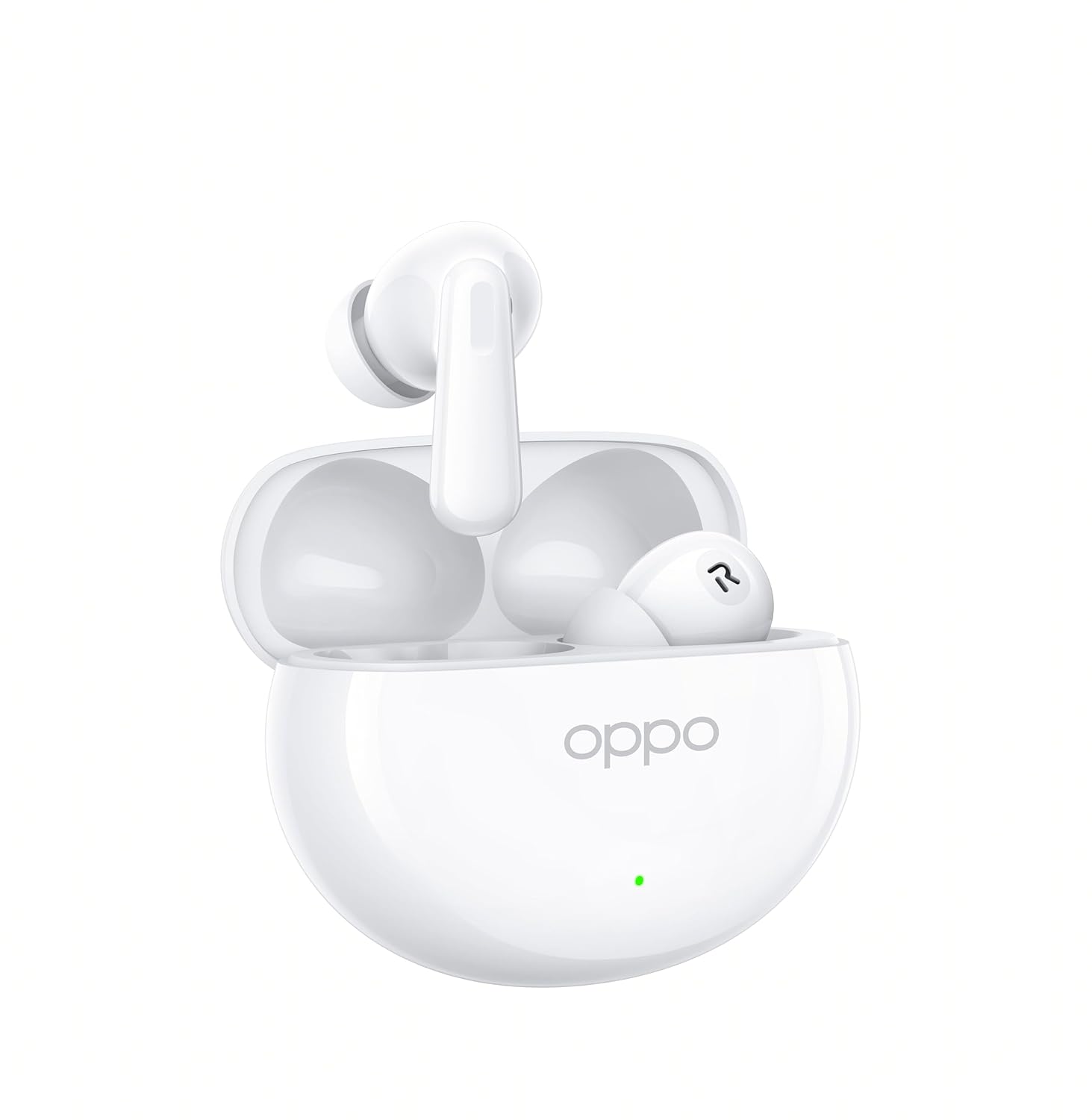
Figure 3.1: OPPO Enco Air4 Earbuds in their open charging case. The earbuds are white, with the OPPO logo visible on the case. A small LED indicator is also visible on the front of the case.

Figura 3.2: Quddiem view of the two OPPO Enco Air4 earbuds. They are white, with a stem design and silicone ear tips. The speaker grilles are visible.
4. Setup
4.1 Iċċarġjar tal-Earbuds u l-Kaxxa
Before first use, fully charge the earbuds and the charging case. The charging case acts as a portable power bank for your earbuds.
- Poġġi l-earbuds fil-kaxxa tal-iċċarġjar, waqt li tiżgura li jkunu f'posthom sew.
- Connect the charging case to a power source using a compatible USB-C cable (not included).
- The LED indicator on the case will show the charging status. A full charge is indicated when the LED remains solid.
Note: A USB-C charging cable is required and typically not included in the package. Use a standard 5V charger.
4.2 Tqabbil tal-Bluetooth
To connect your OPPO Enco Air4 earbuds to a device:
- Kun żgur li l-earbuds jinsabu fil-kaxxa tal-iċċarġjar u li l-għatu tal-kaxxa jkun miftuħ.
- Press and hold the function button on the charging case (usually located inside or on the back) for 2 seconds until the indicator light flashes white, indicating pairing mode.
- Fuq l-apparat tiegħek (smartphone, tablet, laptop), attiva l-Bluetooth u fittex apparati disponibbli.
- Select "OPPO Enco Air4" from the list of found devices.
- Once connected, the indicator light on the case will turn off or display a solid color.
Il-earbuds jerġgħu jikkonnettjaw awtomatikament mal-aħħar apparat imqabbad meta joħorġu mill-kaxxa, jekk il-Bluetooth ikun attivat fuq l-apparat.
5. Istruzzjonijiet Operattivi
5.1 Kontrolli touch
The OPPO Enco Air4 earbuds feature customizable touch controls. The default functions are:
| Azzjoni | Funzjoni |
|---|---|
| Double-tap (either earbud) | Daqq / Issospendi mużika, Tweġiba / Tmiem is-sejħa |
| Triple-tap (either earbud) | Binarju li jmiss |
| Press and hold (either earbud) | Switch Noise Control Mode (ANC On/Off/Transparency) |
| Press and hold (left earbud) | Activate Voice Assistant (e.g., Google Assistant) |
Note: Specific touch control functions may be customized via the HeyMelody app (if available for your region/model).
5.2 Kanċellazzjoni Attiva tal-Ħoss (ANC)
The OPPO Enco Air4 features 32dB Active Noise Cancellation to reduce ambient noise. To cycle through noise control modes (ANC On, ANC Off, Transparency Mode), press and hold either earbud for approximately 2 seconds. Transparency Mode allows you to hear your surroundings while still enjoying audio.
6. Manutenzjoni
Manutenzjoni xierqa tiżgura l-lonġevità u l-prestazzjoni tal-earbuds tiegħek.
- Tindif: Regularly clean the earbuds and charging case with a soft, dry, lint-free cloth. Do not use harsh chemicals or abrasive materials. Gently clean the ear tips and speaker grilles to prevent wax buildup.
- Ħażna: Meta ma tkunx qed tużahom, aħżen il-earbuds fil-kaxxa tal-iċċarġjar tagħhom biex tipproteġihom mit-trab u l-ħsara. Aħżen f'post frisk u niexef 'il bogħod mix-xemx diretta u minn temperaturi estremi.
- Reżistenza għall-Ilma: The earbuds have an IP55 rating for water and dust resistance. This means they are protected against limited dust ingress and low-pressure water jets. They are not designed for swimming or showering. Avoid submerging them in water.
7 Issolvi l-problemi
If you encounter issues with your OPPO Enco Air4 earbuds, refer to the following common solutions:
- Il-earbuds mhux qed jitqabbdu:
- Kun żgur li l-earbuds huma ċċarġjati.
- Place earbuds in the case, close the lid, then open it and press the function button to enter pairing mode.
- Iddiżattiva u erġa' attiva l-Bluetooth fuq l-apparat tiegħek.
- Try pairing with another device to rule out device-specific issues.
- L-ebda ħoss minn earbud wieħed:
- Kun żgur li ż-żewġ earbuds huma ċċarġjati.
- Naddaf il-kuntatti tal-iċċarġjar kemm fuq il-earbuds kif ukoll fuq il-kaxxa.
- Try resetting the earbuds (refer to the device's specific reset procedure, often involves holding the function button for an extended period).
- Volum baxx jew kwalità ħażina tal-ħoss:
- Aġġusta l-volum fuq it-tagħmir konness tiegħek.
- Ensure ear tips are correctly sized and form a good seal in your ear canal.
- Naddaf kwalunkwe debris mill-gradilji tal-ispiker tal-earbuds.
- Kaxxa tal-iċċarġjar mhux qed tiċċarġja:
- Ensure the USB-C cable is securely connected to both the case and the power adapter.
- Ipprova kejbil USB-C u adapter tal-enerġija differenti.
8. Speċifikazzjonijiet
| Karatteristika | Dettall |
|---|---|
| Isem tal-Mudell | Enco Air4 |
| Numru tal-Mudell | 110070330264 |
| Teknoloġija tal-Konnettività | Wireless (Bluetooth) |
| Verżjoni Bluetooth | 4.0 |
| Interface tal-Ħardwer | Bluetooth 5 |
| Kontroll tal-Ħoss | Kanċellazzjoni Attiva tal-Istorbju (32dB) |
| Tip ta' Sewwieq Awdjo | Sewwieq Dinamiku (12.4mm) |
| Ħajja tal-Batterija (Earbuds) | Sa 12-il Siegħa |
| Ħin Totali tal-Logħob (bil-Kaxxa) | Sa 43-il Siegħa |
| Metodu ta' Kontroll | Mess |
| Livell ta 'Reżistenza għall-Ilma | IP55 (Earbuds) |
| Piż tal-Oġġett (għal kull earbud) | 4.2 Gramm |
| Apparati Kompatibbli | Cellphones, Desktops, Laptops, Smart Watch, Tablets |
| Komponenti Inklużi | Ear Cushions, Wireless Charging Case |
9. Informazzjoni dwar is-Sigurtà
Jekk jogħġbok osserva l-linji gwida tas-sigurtà li ġejjin biex tevita ħsara lit-tagħmir tiegħek jew korriment lilek innifsek:
- Żarmax, isewwi, jew timmodifikax il-prodott.
- Żomm il-prodott 'il bogħod minn temperaturi estremi, umdità, u ambjenti korrużivi.
- Avoid exposing the product to open flames or direct sunlight for prolonged periods.
- Tużax il-prodott b'volum għoli għal perjodi twal biex tevita ħsara fis-smigħ.
- Żomm fejn ma jintlaħaqx mit-tfal u l-annimali domestiċi. Partijiet żgħar jistgħu joħolqu periklu ta’ fgar.
- Dispose of the product and its battery responsibly, following local regulations.
10. Garanzija u Appoġġ
For warranty information, technical support, or customer service inquiries, please refer to the official OPPO website or contact your local OPPO customer service center. Ensure you have your product model number and proof of purchase available when seeking support.
You can visit the official OPPO store for more information: OPPO Official Store


