1. Introduzzjoni
This manual provides instructions for the Shargeek 170 Power Bank and the CarbonMag Magsafe Power Bank. This bundle offers versatile charging solutions for multiple devices.

Image: The Shargeek 170 Power Bank (right, transparent design) and the CarbonMag Magsafe Power Bank (left, carbon fiber texture) are shown together, illustrating the product bundle.
2. Prodott Aktarview
Shargeek 170 Power Bank
- 170W Output Totali: Capable of charging three devices simultaneously via two USB-C ports and one USB-A port.
- 140W PD3.1 Two-way Charging: The USB-C port supports rapid recharging of the power bank itself.
- Wiri intelliġenti: Features a transparent design with a display that shows charging power, remaining time, and battery level.
CarbonMag Magsafe Power Bank
- Ultra-Light Carbon Fiber: Constructed with a lightweight carbon fiber material for enhanced portability.
- Iċċarġjar Mgħaġġel bil-Fili ta' 20W: Supports fast charging for compatible devices.
- Iċċarġjar bla fili 15W: Provides wireless charging capability.
3. Setup
Initial Charging of Shargeek 170 Power Bank
- Connect a 140W PD3.1 compatible charger (not included) to one of the USB-C ports on the Shargeek 170 Power Bank.
- Ensure the charging cable supports over 140W output (a compatible cable is typically included with the power bank).
- The smart display will show the charging status. A full recharge can be achieved in approximately 45 minutes with a 140W charger.

Image: The Shargeek 170 Power Bank's transparent display shows 140W fast charging in progress, indicating a rapid recharge time of less than one hour.
Initial Charging of CarbonMag Magsafe Power Bank
- Connect a USB-C cable to the CarbonMag power bank and a compatible power adapter.
- The power bank will begin charging.
4. Istruzzjonijiet Operattivi
Using the Shargeek 170 Power Bank
- Iċċarġjar bil-Wajer: Connect your devices to the USB-C or USB-A ports using appropriate charging cables. The power bank can charge up to three devices simultaneously with a total output of 170W.
- Monitoraġġ: Observe the smart display to view real-time charging power, remaining battery percentage, and estimated time until empty or full.

Image: The Shargeek 170 Power Bank highlights its 170W total output and 140W two-way fast charging capabilities, indicating its power delivery (PD 3.1) standard.

Image: The Shargeek 170 Power Bank is shown connected to a laptop, a tablet, and a smartphone, demonstrating its ability to fast charge three devices concurrently.
Using the CarbonMag Magsafe Power Bank
- Magsafe Wireless Charging: Align the CarbonMag power bank with the Magsafe area on the back of a compatible iPhone. The strong magnet will secure it in place, and wireless charging will begin automatically (up to 15W).
- Iċċarġjar bil-Wajer: Connect your device to the USB-C port on the CarbonMag power bank using a compatible cable for up to 20W wired fast charging.

Image: The CarbonMag Magsafe Power Bank is magnetically attached to the back of an iPhone, illustrating its 'Snap & Go' feature, ergonomic grip, and design that does not obstruct the phone's camera lenses.

Image: The CarbonMag Magsafe Power Bank is shown magnetically attracting to a smartphone, highlighting its strong magnetic force of 12.75N (1,300g).
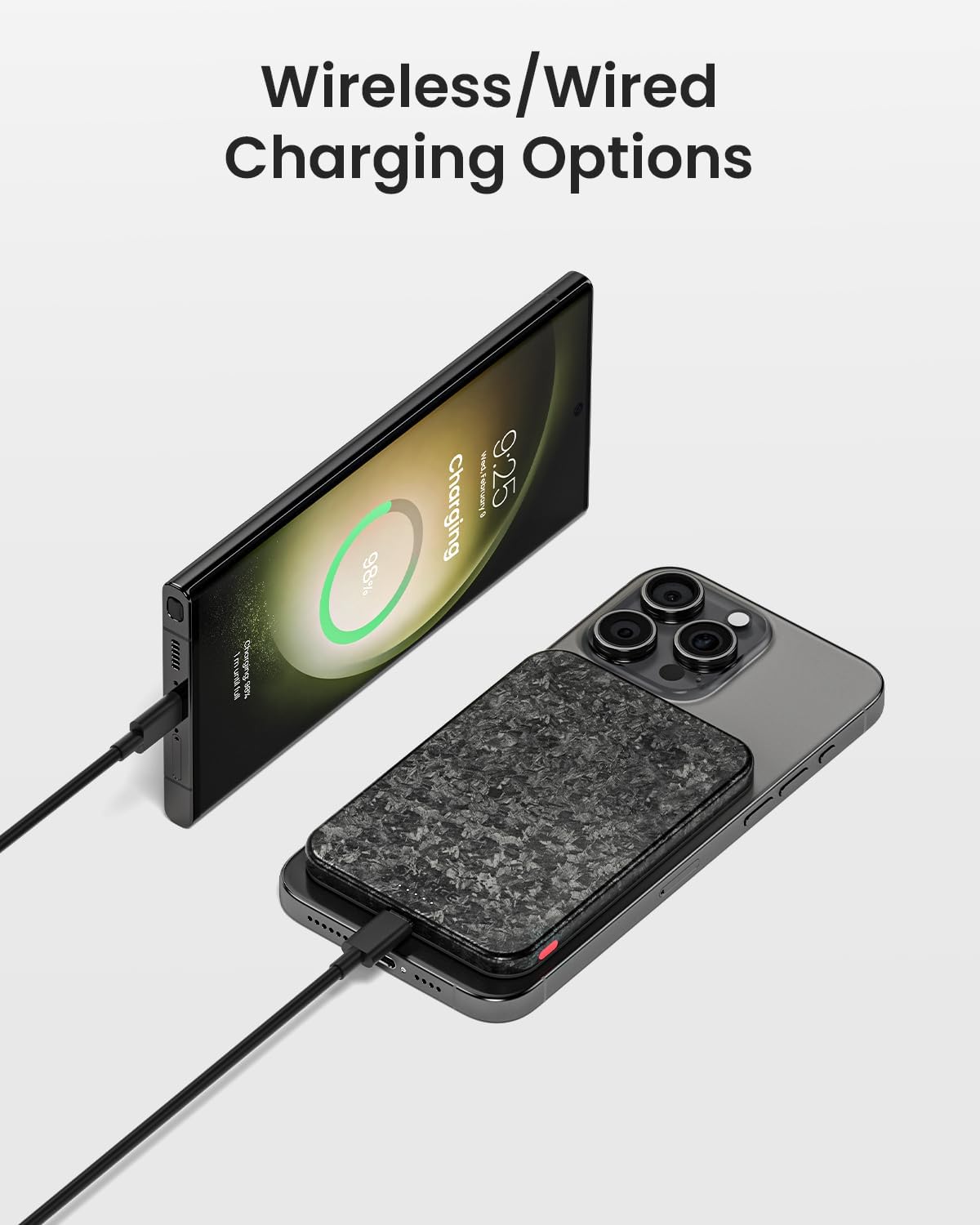
Image: The CarbonMag Magsafe Power Bank is depicted providing both wireless charging to an iPhone and wired charging to a Samsung smartphone, showcasing its dual charging capabilities.
5. Manutenzjoni
- Keep the power banks clean by wiping them with a dry, soft cloth.
- Evita li tesponi l-apparati għal temperaturi estremi, dawl tax-xemx dirett, jew umdità.
- Do not drop or subject the power banks to strong impacts.
- Aħżen f'post frisk u niexef meta ma tkunx qed tuża.
6 Issolvi l-problemi
Apparat Mhux Iċċarġja
- Kun żgur li l-power bank għandu biżżejjed ċarġ.
- Iċċekkja li l-kejbils kollha huma konnessi sew.
- Verify that the charging cable and adapter are compatible with your device and the power bank.
- For wireless charging, ensure proper alignment with the Magsafe area and that your device supports wireless charging.
Iċċarġjar bil-mod
- Confirm that your cables and adapters support fast charging protocols (e.g., PD3.1 for Shargeek 170).
- L-iċċarġjar ta' diversi apparati simultanjament jista' jqassam l-enerġija, u potenzjalment inaqqas il-veloċitajiet individwali tal-iċċarġjar.
- Ensure the power bank itself is fully charged.
7. Speċifikazzjonijiet
| Karatteristika | Deskrizzjoni |
|---|---|
| Brand | sharge |
| ASIN | B0DKWTWZXF |
| Tip ta' Konnettur | USB Tip A, USB Tip C |
| Special Feature (CarbonMag) | Lightweight, Magsafe Compatible |
| Shargeek 170 Output | 170W Total (2x USB-C, 1x USB-A) |
| Shargeek 170 Recharging | 140W PD3.1 Two-way Charging |
| CarbonMag Wired Charging | 20W Iċċarġjar Mgħaġġel |
| CarbonMag Wireless Charging | Iċċarġjar bla fili 15W |
| CarbonMag Weight | Approximately 4.23oz (120g) |
| CarbonMag Thickness | 8.8mm (0.35 pulzier) |

Image: The CarbonMag Magsafe Power Bank is shown from the side, emphasizing its slim profile of 0.35 inches (8.8mm).

Image: The CarbonMag Magsafe Power Bank is depicted on a scale balancing with an apple to illustrate its light weight (120g/0.26lb). Below, it is shown next to a thicker power bank, highlighting its 40% thinner design (8.8mm/0.35").
8. Informazzjoni dwar is-Sigurtà
- Żarmax, timmodifikax jew isewwi l-apparat.
- Avoid placing the power banks near heat sources, open flames, or in direct sunlight for extended periods.
- Żomm fejn ma jintlaħaqx mit-tfal.
- Do not use the power banks if they are damaged or show signs of swelling.
- Armi l-prodott skont ir-regolamenti lokali għall-iskart elettroniku.
9. Garanzija u Appoġġ
For warranty information and customer support, please refer to the official Sharge website or contact the seller directly. You can visit the Sharge Store on Amazon għal aktar dettalji.


