1. Introduzzjoni
Grazzi tax-xiriasing the Victrola Journey+ Bluetooth Suitcase Record Player. This manual provides essential information for the safe and efficient operation of your device. Please read it thoroughly before use and retain it for future reference.
2. Kontenut tal-Pakkett
Kun żgur li l-oġġetti kollha huma preżenti fil-pakkett:
- Victrola Journey+ Bluetooth Suitcase Record Player
- Adapter tal-Enerġija
- Manwal ta 'Istruzzjoni (dan id-dokument)
3. Komponenti tal-Prodott
Familiarize yourself with the main components of your record player.
3.1 Quddiem View
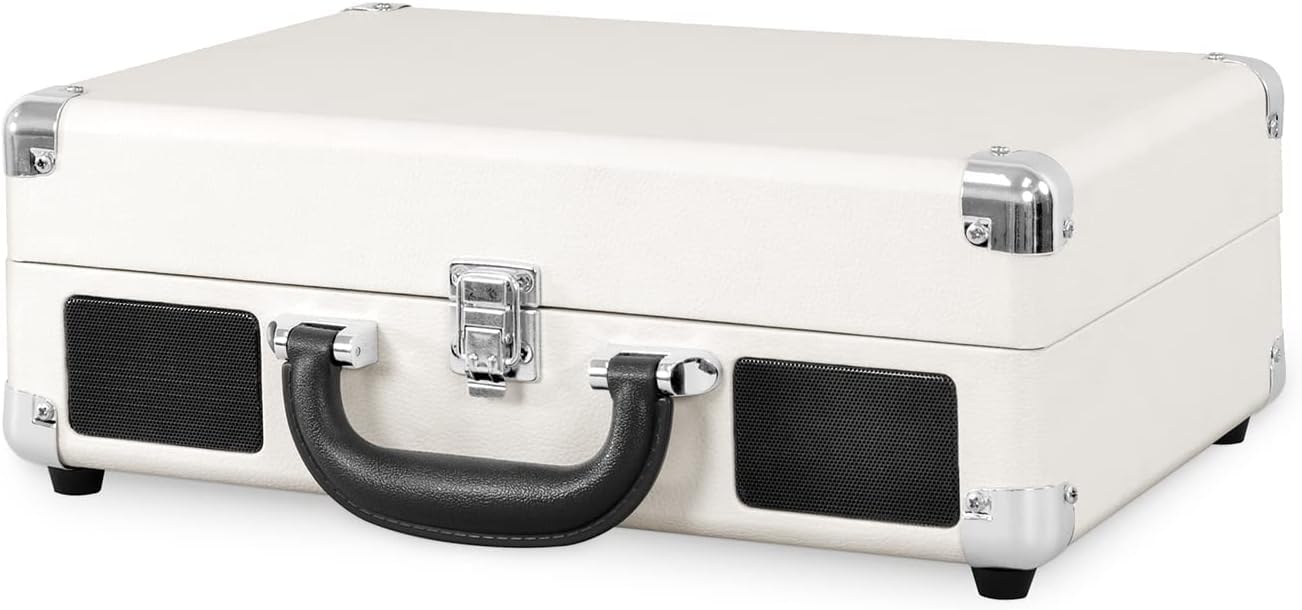
Figura 1: Quddiem view of the Victrola Journey+ Record Player in its closed, portable suitcase form.
3.2 Kontrolli tal-Panel ta' Fuq

Figure 2: Top panel with turntable, tonearm, and control interface.
- Platt Turntable: Fejn jitqiegħdu r-rekords.
- Arma tat-ton: Iżomm l-istilus (labra) biex idoqq ir-rekords.
- Lieva tad-Driegħ: Jgħolli u jbaxxi d-driegħ tat-tonearm.
- Selettur tal-veloċità: Jaġġusta l-veloċità tal-plejbek (33 1/3, 45, 78 RPM).
- Swiċċ tal-Waqfien Awtomatiku: Enables or disables automatic stopping of the platter when a record finishes.
- Pum tal-Funzjoni: Selects input source (BT for Bluetooth, Phono for vinyl, Line In).
- Pum tal-Qawwa/Volum: Jixgħel/jitfi l-unità u jaġġusta l-volum.
- Jack tal-headphone: Għal smigħ privat.
3.3 Konnessjonijiet tal-Panew ta' wara

Figure 3: Rear panel with RCA output and power input.
- Jacks tal-Ħruġ RCA: Qabbad ma' kelliema esterni jew ampaktar ħaj.
- Input ta' Enerġija DC: Jikkonnettja mal-adapter tal-enerġija inkluż.
4. Setup Inizjali
- Ippakkja: Neħħi r-rekord player mill-imballaġġ tiegħu bir-reqqa.
- Konnessjoni tal-Enerġija: Connect the power adapter to the DC Power Input on the rear of the unit and plug it into a wall outlet.
- Protezzjoni tal-Istilus: Remove the clear plastic stylus protector from the needle before use.
- Serratura tad-Driegħ tat-Tonearm: Release the tonearm lock to allow the tonearm to move freely.
5. Istruzzjonijiet Operattivi
5.1 Daqq ta' Rekord tal-Vinil
- Qawwa Mixgħul: Dawwar il-pum tal-Enerġija/Volum lejn l-arloġġ biex tixgħel l-unità.
- Agħżel il-Modalità Phono: Turn the Function knob to 'Phono'.
- Rekord tal-Post: Poġġi rekord tal-vinil fuq il-platter tat-turntable.
- Agħżel Veloċità: Set the Speed Selector to match the record's RPM (33 1/3, 45, or 78). For 45 RPM records, use the included 45 RPM adapter.
- Driegħ tat-Tonearm tal-Irfigħ: Use the Tonearm Lever to gently lift the tonearm.
- Pożizzjoni tad-Driegħ tat-Ton: Mexxi t-tonearm manwalment fuq it-track mixtieq fuq ir-rekord.
- Driegħ t'isfel: Use the Tonearm Lever to gently lower the tonearm onto the record. Playback will begin.
- Aġġusta Volum: Aġġusta l-volum billi tuża l-buttuna tal-Qawwa/Volum.
- Waqfien Awtomatiku: If the Auto Stop switch is ON, the platter will stop spinning when the record finishes. If OFF, it will continue to spin.
- Tmiem id-Daqq: When finished, use the Tonearm Lever to lift the tonearm, return it to its rest, and secure it with the tonearm lock. Turn the Power/Volume knob counter-clockwise to power off.
5.2 Streaming tal-Bluetooth
- Qawwa Mixgħul: Dawwar il-pum tal-Enerġija/Volum lejn l-arloġġ biex tixgħel l-unità.
- Select BT Mode: Turn the Function knob to 'BT' (Bluetooth). The indicator light will flash.
- Apparat Par: On your Bluetooth-enabled device (e.g., smartphone), search for 'Victrola Journey+' in the Bluetooth settings and select it to pair.
- Ibda l-Daqq: Once paired, the indicator light will stop flashing. You can now stream audio from your device to the record player's built-in speakers.
- Aġġusta Volum: Control volume using both your device and the record player's Power/Volume knob.
5.3 Konnessjoni Line-In
- Qawwa Mixgħul: Dawwar il-pum tal-Enerġija/Volum lejn l-arloġġ biex tixgħel l-unità.
- Agħżel il-Modalità Line In: Turn the Function knob to 'Line In'.
- Qabbad Apparat: Connect an external audio device (e.g., CD player) to the 'Line In' jack using a 3.5mm audio cable (not included).
- Ibda l-Daqq: Ibda daqq fuq it-tagħmir estern tiegħek.
- Aġġusta Volum: Control volume using both your external device and the record player's Power/Volume knob.
5.4 Użu tal-Headphones
For private listening, plug your headphones into the Headphone Jack on the top panel. The built-in speakers will automatically mute.
5.5 Dimostrazzjonijiet bil-Vidjo
Watch these videos for visual guidance on operating your Victrola Journey+ Record Player.
Vidjo 1: Fuqview of the Victrola Journey+ Record Player, demonstrating its features and controls.
Video 2: Detailed demonstration of the record player's functions, including tonearm operation and input selection.
6. Kura u Manutenzjoni
- Tindif tal-Istilus: Gently clean the stylus periodically with a soft brush, brushing from back to front.
- Tindif tal-Unità: Imsaħ il-barra b'ċarruta ratba u niexfa. Evita prodotti tat-tindif jew solventi li joborxu.
- Kura tar-Rekords: Keep records clean and free of dust to ensure optimal sound quality and prolong stylus life.
- Ħażna: When not in use, ensure the tonearm is locked in place and the unit is closed to protect components from dust and damage.
7 Issolvi l-problemi
| Problema | Kawża Possibbli | Soluzzjoni |
|---|---|---|
| Ebda qawwa | L-adapter tal-enerġija mhux imqabbad jew is-sokit mhux attiv. | Kun żgur li l-adapter tal-enerġija huwa konness sew u li s-sokit jaħdem. |
| L-ebda ħoss mill-kelliema | Volume too low, wrong function selected, or headphones connected. | Increase volume, select correct function (Phono/BT/Line In), or disconnect headphones. |
| Rekords jaqbeż | Record is dirty or scratched, stylus is worn, or unit is not on a stable surface. | Clean record, replace stylus, or place unit on a flat, stable surface. |
| Il-Bluetooth mhux qed jgħaqqad | Unit not in BT mode, device too far, or already paired to another device. | Ensure unit is in BT mode, keep device within range, or unpair from other devices. |
8. Speċifikazzjonijiet
- Dimensjonijiet tal-Prodott: 7.17 x 12.83 x 16.5 pulzieri
- Piż tal-oġġett: 6.78 liri
- Numru tal-Mudell: VSC-400SB-WSL
- Ditta: Victrola
- Veloċità ta' Rotazzjoni Massima: 78 RPM
- Komponenti Inklużi: Bluetooth Record Player
- Karatteristika Speċjali: Konnettività Bluetooth
- Materjal: Plastik
- Stil: Rekord Player
- Apparati Kompatibbli: Headphone, Smartphone, Speaker
- Tip ta' Mutur: Mutur AC
9. Garanzija u Appoġġ
For warranty information and customer support, please refer to the documentation included with your purchase or visit the official Victrola websit. Żomm l-irċevuta tax-xiri tiegħek bħala prova tax-xiri għal talbiet ta' garanzija.