1. Introduzzjoni
This user manual provides detailed instructions for the safe and efficient operation of your ALLPOWERS PB100 Laptop Power Bank and SP001 Portable Solar Charger. This combined system offers a versatile and powerful solution for charging a wide range of electronic devices, including laptops, smartphones, and cameras, whether you are at home or outdoors.
Jekk jogħġbok aqra dan il-manwal bir-reqqa qabel ma tuża l-prodott biex tiżgura l-funzjonalità xierqa u biex tevita l-ħsara.

Image: The ALLPOWERS PB100 Power Bank connected to the SP001 Portable Solar Charger, showcasinid-disinn kompatt.
2. Karatteristiċi tal-prodott
The ALLPOWERS PB100 Power Bank and SP001 Solar Charger system is designed with advanced features for reliable power on the go:
- 24000mAh Colossal Capacity: Equipped with a high-quality lithium-ion battery, the PB100 provides substantial power for multiple electronic devices, suitable for travel and outdoor activities.
- 100W Fast Charging (PB100): The USB-C port supports PD3.0 protocol, delivering up to 100W output for rapid charging of laptops, tablets, and phones. It also supports up to 100W input, allowing the power bank to be fully recharged in approximately 2 hours with a 65W+ charger.
- Versatile 4 Output Ports (PB100): Features one PD100W USB-C port, one PD60W USB-C port, and two QC18W USB-A ports, enabling simultaneous charging of various devices.
- High-Efficiency Solar Conversion (SP001): The monocrystalline solar cells convert up to 23.5% of solar power into electrical energy.
- Durable and Weatherproof Design (SP001): Constructed with PET thin-film solar material for flexibility and durability. The ports are protected by rubber covers, offering resistance against dust and water damage (IP67 rating).
- Fast Charging USB Ports (SP001): Includes one USB-A port (5V2A to 12V1.5A auto-adaptive) and one PD18W USB-C port for charging phones, tablets, drones, and cameras directly from the solar panel.

Image: The SP001 Solar Charger attached to a backpack, demonstrating its portability for outdoor use.

Image: The power bank and solar panel set up to charge various devices like smartphones, tablets, and fans, highlighting universal compatibility.
3. Kontenut tal-Pakkett
Jekk jogħġbok ivverifika li l-oġġetti kollha huma preżenti fil-pakkett tiegħek:
- ALLPOWERS PB100 100W Power Station (Power Bank)
- ALLPOWERS SP001 21W Solar Panel
- USB-C għal USB-C Cable
- Hanging Buckles (x2)
- User Manuals (for PB100 and SP001)

Image: A visual representation of all items included in the product packaging, including the solar panel, power bank, cables, and accessories.
4. Gwida ta' Setup
4.1 Initial Charging of PB100 Power Bank
Before first use, it is recommended to fully charge the PB100 Power Bank.
- Connect the provided USB-C to USB-C cable to the 100W USB-C input/output port on the PB100.
- Connect the other end of the cable to a compatible USB-C wall charger (not included, 65W+ recommended for fastest charging).
- The digital display on the PB100 will show the charging status and battery percentage. Charge until it reaches 100%.
4.2 Connecting SP001 Solar Charger to PB100
To charge the PB100 using the SP001 Solar Charger:
- Unfold the SP001 Solar Charger and place it in direct sunlight. Ensure no shadows are cast on the solar panels for optimal efficiency.
- Locate the output ports on the SP001 Solar Charger (USB-A and USB-C).
- Connect the USB-C to USB-C cable from the SP001's USB-C output port to the 100W USB-C input/output port on the PB100.
- The PB100 display will indicate that it is receiving power, and the battery percentagse tiżdied.
5. Istruzzjonijiet Operattivi
5.1 Charging Devices with PB100 Power Bank
The PB100 Power Bank can charge up to four devices simultaneously.
- Identify the appropriate charging cable for your device.
- Connect one end of the cable to your device and the other end to one of the available output ports on the PB100 (PD100W USB-C, PD60W USB-C, or QC18W USB-A ports).
- The PB100 will automatically detect the connected device and begin charging. The display will show the output voltage u kurrenti.
- Skonnettja t-tagħmir tiegħek ladarba tkun iċċarġjat kompletament.
5.2 Direct Charging with SP001 Solar Charger
The SP001 Solar Charger can directly charge small devices without the PB100.
- Unfold the SP001 Solar Charger and position it to receive maximum direct sunlight.
- Connect your device's charging cable to either the USB-A or USB-C output port on the SP001.
- Charging will begin automatically. Note that charging efficiency depends heavily on sunlight intensity.

Image: Depicts the versatility of the power bank and solar panel for activities like hiking, camping, cycling, and photography.
6. Manutenzjoni
- Tindif: Wipe the power bank and solar panel with a soft, dry cloth. Do not use abrasive cleaners or solvents. For the solar panel, ensure the surface is clean to maximize light absorption.
- Ħażna: Store the product in a cool, dry place away from direct sunlight and extreme temperatures. If storing for extended periods, charge the PB100 to approximately 50-70% every 3-6 months to preserve battery health.
- Immaniġġjar: Avoid dropping or subjecting the product to strong impacts. Do not disassemble the unit.
- Reżistenza għall-Ilma: While the SP001 solar panel has an IP67 rating for dust and water resistance, avoid submerging it in water. Ensure rubber covers on ports are securely closed when not in use, especially in wet conditions.

Image: The SP001 Solar Charger demonstrating its IP67 water and dust resistance.
7 Issolvi l-problemi
| Problema | Kawża Possibbli | Soluzzjoni |
|---|---|---|
| PB100 not charging devices. | Low battery on PB100; incorrect cable; device not compatible; cable loose. | Recharge PB100; ensure cable is functional and correctly connected; verify device compatibility; try a different cable. |
| PB100 not charging from wall adapter. | Wall adapter not powerful enough; faulty cable; wall outlet issue. | Use a 65W+ PD charger; try a different USB-C cable; test the wall outlet with another device. |
| SP001 solar panel not charging PB100 or devices. | Insufficient sunlight; panel not positioned correctly; dirty panel surface; faulty cable. | Move panel to direct sunlight; adjust angle for optimal exposure; clean panel surface; try a different cable. |
| Veloċità tal-iċċarġjar bil-mod. | Cable quality; device input limits; multiple devices charging simultaneously; low solar intensity. | Use high-quality cables; check device's maximum input; charge fewer devices at once; ensure optimal sunlight for solar charging. |
8. Speċifikazzjonijiet
| Karatteristika | Dettall |
|---|---|
| Mudell tal-Prodott | AP-SP-002-BLA |
| Battery Capacity (PB100) | 24000 mAh (86.4 Wh) |
| USB-C Output 1 (PB100) | PD100W (5V/3A, 9V/3A, 12V/3A, 15V/3A, 20V/5A) |
| USB-C Output 2 (PB100) | PD60W (5V/3A, 9V/3A, 12V/3A, 15V/3A, 20V/3A) |
| USB-A Output (PB100) | QC18W (5V/3A, 9V/2A, 12V/1.5A) x 2 |
| Input (PB100) | Up to 100W via USB-C |
| Solar Panel Power (SP001) | 21W |
| Solar Conversion Efficiency (SP001) | 22-25% |
| Solar Panel Output (SP001) | 1x USB-A (5V/2A to 12V/1.5A), 1x USB-C (PD18W) |
| Water Resistance (SP001) | IP67 |
| Dimensjonijiet tal-Prodott | 8.19 x 1 x 8.66 pulzieri |
| Manifattur | ALLPOWERS Industrial International Limited |

Image: Illustrates the layered construction of the solar panel, highlighting its high conversion efficiency.
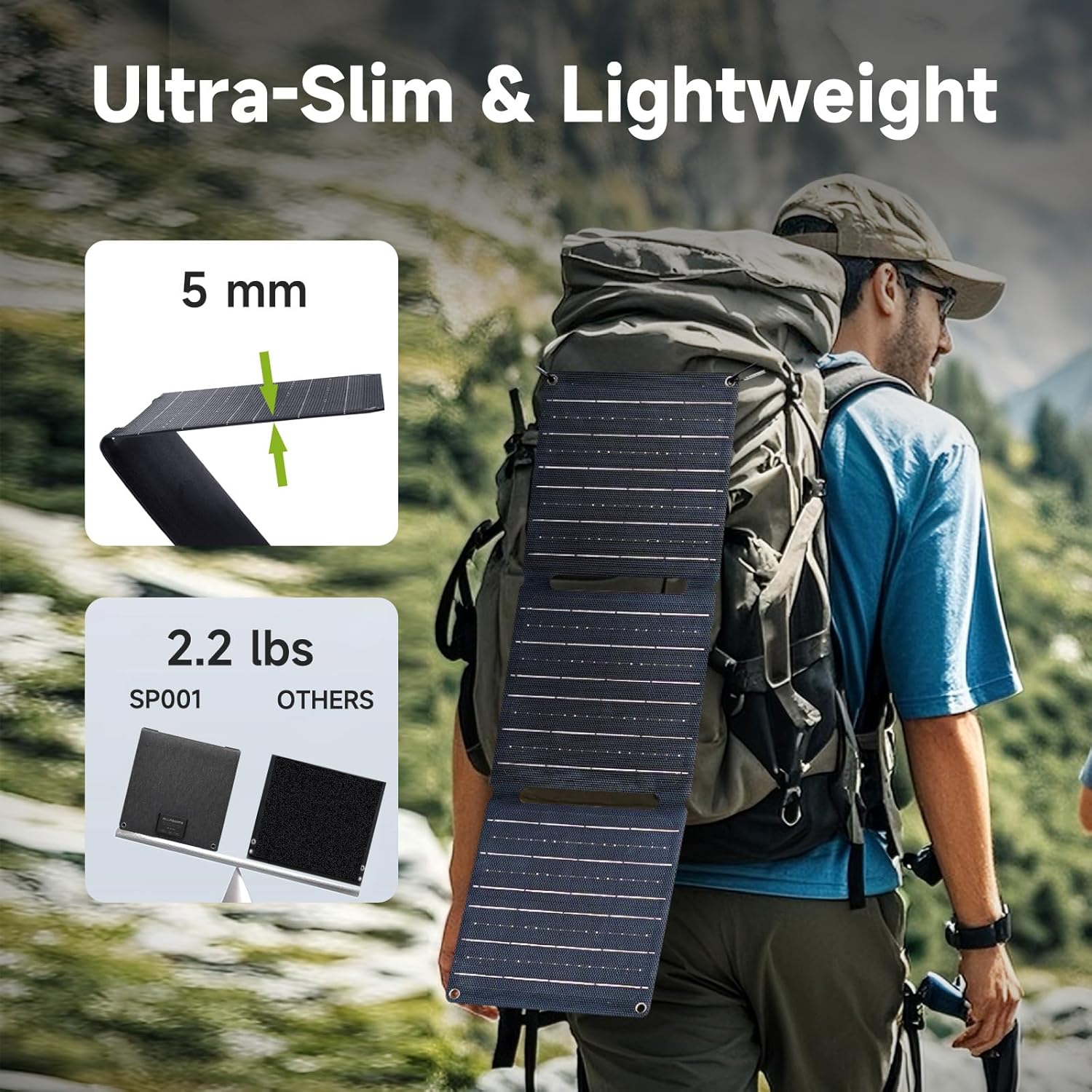
Image: The SP001 Solar Charger's ultra-slim and lightweight profile, making it easy to carry for outdoor adventures.
9. Garanzija u Appoġġ
For warranty information and customer support, please refer to the specific warranty card included with your product or visit the official ALLPOWERS website. You may also contact ALLPOWERS customer service directly for assistance with product inquiries, technical support, or warranty claims.
Manufacturer: ALLPOWERS Industrial International Limited
For the most up-to-date support contact information, please visit: www.allpowers.com


