Prodott Overview
The AT&T Essentials True Wireless Bluetooth Comfort Fit Stereo in-Ear Earbuds are designed for high-quality wireless audio. They feature extended battery life, advanced noise cancellation for clear calls, and intuitive smart controls. The earbuds and charging case are IPX4 water and dust resistant, making them suitable for various environments.

Image: The AT&T Essentials True Wireless Earbuds are shown in their open charging case, displaying the digital battery percentage and individual earbud charge indicators. The earbuds are black and fit snugly within the case.
Setup u Użu Inizjali
Iċċarġjar tal-Earbuds u l-Każ
Before first use, fully charge the earbuds and the charging case. Connect the charging case to a USB power source using the provided cable. The LED display on the case will indicate the charging status and battery level.

Image: A close-up of the AT&T Essentials charging case with the lid open, showing the digital battery display. The display shows "100" indicating a full charge, along with individual battery bars for the left and right earbuds.
Video: This video demonstrates the charging process and the LED battery display of the AT&T Essentials True Wireless Earbuds charging case. It shows the case being plugged in and the digital percentage inkrementasing, indicating the charge level.
Tqabbil ma' Apparat Bluetooth
- Kun żgur li l-earbuds jinsabu fil-kaxxa tal-iċċarġjar u li l-kaxxa għandha biżżejjed ċarġ.
- Iftaħ il-kaxxa tal-iċċarġjar. Il-earbuds jidħlu awtomatikament fil-modalità ta' tqabbil.
- Fuq l-apparat tiegħek (smartphone, tablet, eċċ.), mur fis-settings tal-Bluetooth.
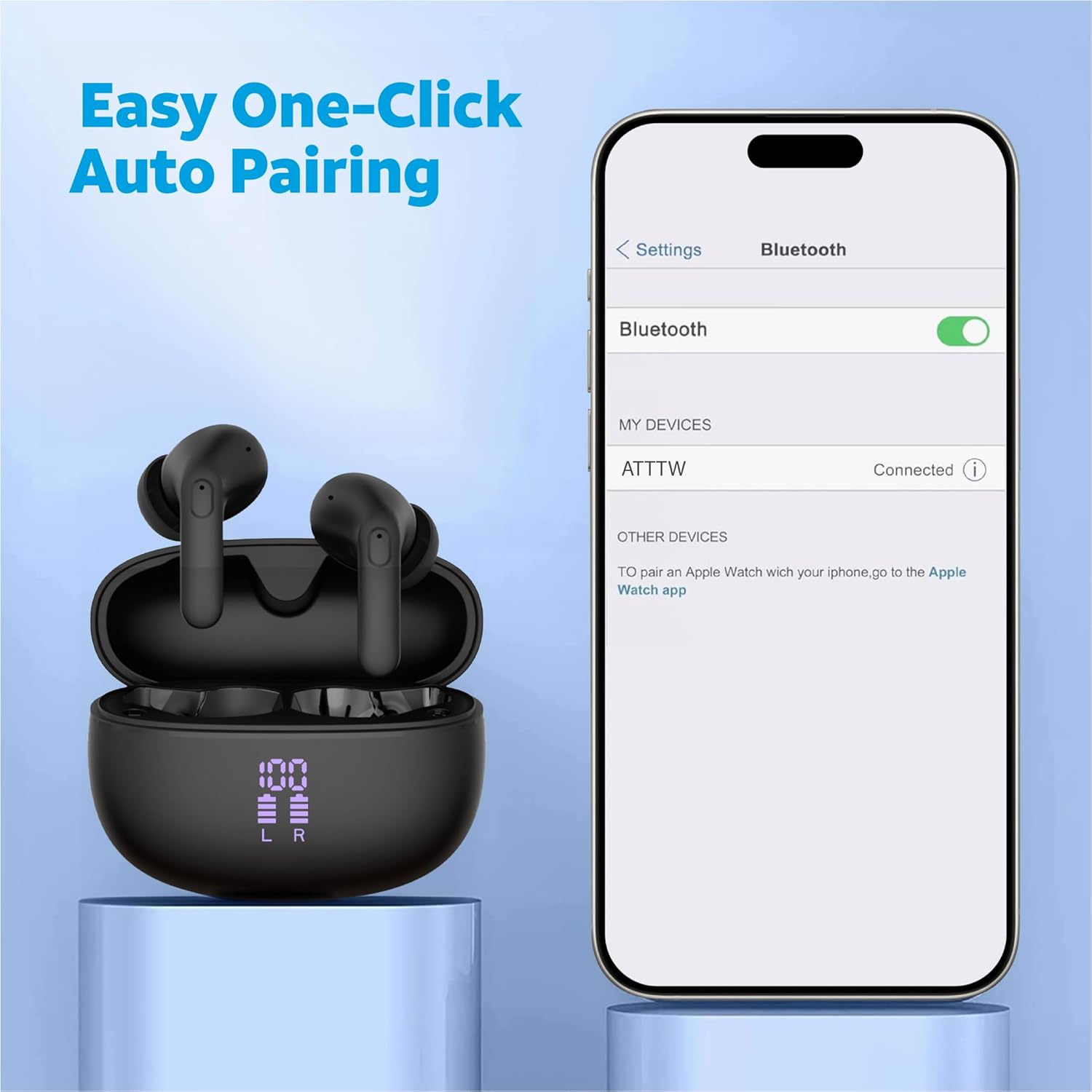
- Select "ATTTW" from the list of available devices.
- Once connected, a confirmation sound will play, and the device will show "Connected".

Image: The AT&T Essentials True Wireless Earbuds in their charging case are shown next to a smartphone screen displaying Bluetooth settings. The device name "ATTTW" is highlighted as connected, illustrating the pairing process.
Istruzzjonijiet Operattivi
Kontrolli Smart Touch
The earbuds feature responsive one-touch smart controls for easy management of audio playback and calls.
- Play/Pawsa: Tektek wieħed fuq kull earbud.
- Track li jmiss: Tektek darbtejn fuq il-earbud tal-lemin.
- Track preċedenti: Tektek darbtejn fuq il-earbud tax-xellug.
- Tweġiba/Tmiem Sejħa: Tektek waħda fuq kwalunkwe earbud waqt telefonata li dieħla jew telefonata attiva.
- Irrifjuta Sejħa: Agħfas u żomm kwalunkwe earbud għal żewġ sekondi waqt telefonata li tkun dieħla.
- Attiva l-Assistent tal-Vuċi: Tektek tliet darbiet fuq kull earbud.
Immaġni: Dettaljata view of an AT&T Essentials earbud, highlighting the touch control area with various icons representing functions like call management, music playback, and volume control, indicating its smart touch capabilities.
Kanċellazzjoni tal-Istorbju Ambjentali (ENC)
The built-in quad environmental noise cancellation technology ensures your voice is clear during phone calls, even in noisy environments. This feature automatically activates during calls to filter out background noise.

Immaġni: Sploda view of an AT&T Essentials earbud, showcasing its internal components, including the speaker driver and circuitry. Text overlays indicate "Built-In Quad Environmental Noise Cancellation" and "Experience Crystal-Clear Calls and Immersive Sound with Advanced ENC Technology."
Manutenzjoni u Kura
Manutenzjoni xierqa tiżgura l-lonġevità u l-prestazzjoni ottimali tal-earbuds tiegħek.
- Tindif: Naddaf il-earbuds u l-kaxxa tal-iċċarġjar regolarment b'ċarruta ratba, niexfa u mingħajr suf. Tużax prodotti tat-tindif jew solventi li joborxu.
- Tips tal-widnejn: Neħħi l-ponot tal-widnejn perjodikament u naddafhom b'adamp drapp. Kun żgur li jkunu niexfa għalkollox qabel ma terġa’ twaħħalhom.
- Reżistenza għall-Ilma u t-Trab: The earbuds and charging case are IPX4 rated, meaning they are resistant to splashing water from any direction. They are not waterproof and should not be submerged in water. Avoid exposure to excessive moisture or dust.
- Ħażna: Meta ma tkunx qed tużahom, aħżen il-earbuds fil-kaxxa tal-iċċarġjar tagħhom biex tipproteġihom u żżommhom iċċarġjati. Aħżen f'post frisk u niexef 'il bogħod mix-xemx diretta u minn temperaturi estremi.
Issolvi l-problemi
| Problema | Kawża Possibbli | Soluzzjoni |
|---|---|---|
| Earbuds ma jingħaqdux | Il-earbuds mhumiex fil-modalità ta' tqabbil; il-Bluetooth mitfi fuq l-apparat; apparat imqabbad qabel jinterferixxi. | Ensure earbuds are in case and lid is open. Turn Bluetooth off and on again on your device. Forget "ATTTW" from your device's Bluetooth list and re-pair. |
| L-ebda ħoss minn earbud wieħed | Low battery; earbud not properly connected; earbud settings. | Place both earbuds back in the charging case, close the lid for 5 seconds, then open. Ensure both earbuds are charged. Check device audio balance settings. |
| Każ tal-iċċarġjar mhux iċċarġjar | Kejbil jew adapter tal-enerġija difettuż; port tal-iċċarġjar maħmuġ. | Try a different USB-C cable and power adapter. Clean the charging port on the case gently with a dry cotton swab. |
| Kwalità fqira tas-sejħiet | Environmental noise; earbud placement; weak Bluetooth connection. | Ensure earbuds are properly seated in your ears. Move closer to your connected device. Avoid extremely noisy environments if possible. |
Speċifikazzjonijiet
| Karatteristika | Dettall |
|---|---|
| Isem tal-Mudell | True Wireless Comfort Fit Earbuds |
| Numru tal-Mudell | 4130T |
| Teknoloġija tal-Konnettività | Wireless (Bluetooth) |
| Ħajja tal-Batterija (Ħin tas-Smigħ) | Sa 35 Siegħa (bil-kaxxa tal-iċċarġjar) |
| Kontroll tal-Ħoss | Kanċellazzjoni Attiva tal-Istorbju (ENC għal telefonati) |
| Livell ta 'Reżistenza għall-Ilma | IPX4 (Reżistenti għall-Ilma) |
| Tip ta' Kontroll | Touch Control |
| Rispons ta' Frekwenza | 20 Hz - 20 KHz |
| Impedenza | 140 Ohm |
| Sensittività | 80 dB |
| Komponenti Inklużi | Kawża tal-Iċċarġjar bla Fili |
| Kulur | Iswed |
| Piż tal-oġġett | 2.64 uqija |
| UPC | 849944091350 |
Garanzija u Appoġġ
For warranty information and technical support, please refer to the official AT&T Accessories webis-sit jew ikkuntattja lis-servizz tal-konsumatur tagħhom direttament. Żomm il-prova tax-xiri tiegħek għal kwalunkwe talba ta' garanzija.
You can visit the AT&T Store online for more information: AT&T Store


