Introduzzjoni
This manual provides essential information for the setup, operation, maintenance, and troubleshooting of your NIMO 17.3" FHD Laptop. Please read this manual thoroughly before using your device to ensure proper functionality and longevity.

Figure 1: NIMO 17.3" FHD Laptop. This image shows the laptop's overall design, highlighting its large 17.3-inch Full HD display, Intel Core i3-1215U processor, 16GB RAM, 1TB PCIe SSD, Type-C PD Charger, Fingerprint reader, and Backlit keyboard features.
Kontenut tal-Pakkett
Ivverifika li l-oġġetti kollha huma preżenti fil-pakkett:
- 1 x Laptop Nimo N171
- 1 x Ċarġer Veloċi tat-Tip Ċ 65W PD
- 1 x Manwal tal-Utent (dan id-dokument)
- Sistema Operattiva Windows 11 Home (installata minn qabel)
Gwida ta' Setup
1. L-Ewwel Tixgħel u l-Iċċarġjar
- Qabbad l-Adapter tal-Enerġija: Plug the 65W Type-C PD Fast Charger into a power outlet and connect the Type-C connector to one of the USB Type-C ports on your laptop. It is recommended to fully charge the laptop before first use.
- Iftaħ il-Laptop: Carefully lift the display lid.
- Qawwa Mixgħul: Press the power button, typically located on the top right of the keyboard or side of the chassis.
- Konfigurazzjoni Inizjali tal-Windows: Segwi l-istruzzjonijiet fuq l-iskrin biex tlesti s-setup tal-Windows 11 Home, inkluż l-għażla tal-lingwa, ir-reġjun, il-konnessjoni tan-netwerk, u l-ħolqien tal-kont tal-utent.

Figure 2: 65W Type-C PD Charger. This image illustrates the versatility of the included 65W Type-C Power Delivery charger, capable of charging the laptop, tablets, and compatible smartphones, reducing the need for multiple chargers.
2. Konnessjoni Periferali
Your NIMO laptop features multiple ports for connecting external devices:
- Apparat USB: Connect USB 2.0 or USB 3.2 Gen1 devices (e.g., mouse, keyboard, external hard drive) to the available USB ports.
- Display Estern: Use the HDMI 2.1 port to connect to an external monitor or projector for extended display options.
- Apparat Awdjo: Ipplaggja l-headphones jew l-ispikers esterni fil-jack tal-awdjo ta' 3.5mm.
- Karta Micro SD: Insert a Micro SD card into the dedicated slot for additional storage or data transfer.

Figura 3: Portijiet tal-Laptop Fuqview. This diagram provides a clear view of the various input/output ports available on the NIMO laptop, facilitating connections for a wide range of peripherals and external devices.
Istruzzjonijiet Operattivi
Uża t-Tastiera u l-Touchpad
- Tastiera backlit: The keyboard features backlighting for comfortable typing in low-light conditions. The backlight can typically be toggled or adjusted using function keys (e.g., Fn + F key combination).
- Qarrej tal-marki tas-swaba': The built-in fingerprint sensor on the touchpad allows for secure and quick login without typing a password. Set up your fingerprint in Windows Settings > Accounts > Sign-in options.
- Tastiera numerika: The integrated numeric keypad provides convenience for data entry.

Figure 4: Backlit Keyboard and Fingerprint Reader. This image showcases the laptop's full-size backlit keyboard and the integrated fingerprint reader on the touchpad, designed for enhanced usability and security.
Wirja u Viżwali
The 17.3-inch Full HD (1920x1080) IPS anti-glare display provides a clear and immersive viewing experience with an 85% screen-to-body ratio and narrow bezels.

Figure 5: 17.3-inch FHD Widescreen Display. This image emphasizes the laptop's large, high-definition display, featuring IPS technology for wide viewing angles, bright visuals, and eye protection, along with its impressive screen-to-body ratio.
WebPrivatezza tal-kamera
The laptop is equipped with a physical switch for the webcam to ensure privacy. Slide the switch to cover or uncover the camera lens as needed.

Figura 6: Privatezza Webcam Feature. This image illustrates the physical privacy switch for the webcam, allowing users to easily enable or disable the camera for enhanced security and peace of mind.
Manutenzjoni
Tindif tal-Laptop Tiegħek
- Skrin: Uża drapp ratba u mingħajr ħelu ftit dampLaħlaħ bl-ilma jew b'tindif tal-iskrin. Tisprejjax likwidu direttament fuq l-iskrin.
- Tastiera u Chassis: Uża drapp artab u niexef. Għal ħmieġ iebes, neħħi ftit drapp.amp Jista' jintuża drapp, waqt li jiġi żgurat li l-ebda likwidu ma jidħol fil-fetħiet.
- Portijiet: Uża arja kkompressata biex tneħħi t-trab mill-portijiet.
Kura tal-batterija
The laptop's battery provides approximately 5-7 hours of usage on a full charge (53.58 Wh / 54 Wh capacity).

Figure 7: Large Capacity Battery. This image highlights the laptop's battery life, designed to support extended use for business or travel with its 53.58 Wh capacity.
- Evita temperaturi estremi.
- Tneħħix il-batterija kompletament ta' spiss.
- Għal ħażna fit-tul, iċċarġja l-batterija sa madwar 50-60%.
Aġġornamenti tal-Ħażna u l-Memorja
The laptop supports upgradeable RAM and SSD, allowing for future expansion of storage and memory to enhance performance.

Figure 8: Upgradeable Hard Drive and Memory. This image highlights the laptop's capability for storage and memory expansion, providing flexibility for users to boost performance and accommodate larger files or more demanding applications.
Issolvi l-problemi
| Ħruġ | Kawża Possibbli | Soluzzjoni |
|---|---|---|
| Il-laptop ma jixgħelx. | Low battery; power adapter not connected properly; hardware issue. | Ensure charger is securely connected and plugged into a working outlet. Allow to charge for at least 30 minutes. Try a different outlet. If issue persists, contact support. |
| Problemi bil-konnessjoni tal-Wi-Fi. | Wi-Fi disabled; incorrect password; router issue; driver issue. | Check Wi-Fi toggle in Windows settings. Verify password. Restart router. Update Wi-Fi drivers via Device Manager. |
| Prestazzjoni bil-mod. | Too many applications running; low disk space; malware; outdated drivers. | Close unnecessary applications. Free up disk space. Run a virus scan. Update drivers. Consider upgrading RAM or SSD if frequently experiencing slowdowns. |
| Id-dawl ta' wara tat-tastiera mhux qed jaħdem. | Backlight feature disabled or brightness set to minimum. | Press the dedicated function key combination (e.g., Fn + F key) to toggle or adjust backlight brightness. |
Speċifikazzjonijiet
| Karatteristika | Dettall |
|---|---|
| Isem tal-Mudell | NIMO N171 |
| Proċessur | Intel 6-Core i3-1215U (Up to 4.4 GHz) |
| RAM | 16 GB DDR4 (Upgradeable) |
| Ħażna | 1 TB PCIe SSD (Upgradeable) |
| Wiri | IPS ta' 17.3 pulzieri FHD (1920x1080) Anti-Glare |
| Grafika | Grafika Integrata Intel |
| Sistema Operattiva | Windows 11 Home |
| Konnettività bla fili | Wi-Fi 6 (802.11ax), Bluetooth 5.2 |
| Portijiet | 2x USB 3.2 Gen1, 1x USB 2.0, 1x USB Type-C 3.2 Gen1, 1x USB Type-C (Charge Only), 1x HDMI 2.1, 1x Micro SD Card Reader, 1x 3.5mm Audio Jack |
| Ħajja tal-batterija | Approx. 5-7 hours (53.58 Wh / 54 Wh capacity) |
| Ċarġer tal | Ċarġer Mgħaġġel tat-Tip Ċ PD ta' 65W |
| Webcam | 1080p HD Camera (with privacy switch) |
| Awdjo | Built-in Speakers (x2), Digital Microphone |
| Karatteristiċi tat-Tastiera | Tastiera b'dawl minn wara, Qarrej tal-marki tas-swaba', Tastiera Numerika |
| Dimensjonijiet (LxWxH) | 15.61 x 9.84 x 0.78 pulzieri |
| Piż | 5 liri |
| Kulur | Blu |
Garanzija u Appoġġ
NIMO is committed to providing excellent customer service and product reliability.
- Garanzija tal-Manifattur: Il-laptop NIMO tiegħek huwa kopert minn Garanzija tal-Manifattur ta' Sena provided by Nimo Direct Inc. This warranty covers defects in materials and workmanship under normal use.
- Hassle-Free Returns: Enjoy a Ritorn bla tbatija ta' 90 jum period, also offered by Manufacturer Nimo Direct Inc., allowing you to return the product if you are not satisfied.
- Appoġġ għall-Klijent: For any questions, technical assistance, or warranty claims, please contact our dedicated support team.
Informazzjoni ta' Kuntatt:
- Email: service@nimopc.com
- Disponibbiltà tas-Servizz: 24-hour service is available.
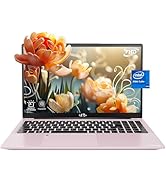
Figure 9: NIMO Support and Warranty Overview. This image summarizes the comprehensive support offered by NIMO, including a 2-year warranty, 90-day return policy, and accessible customer service via email.


