1. Introduzzjoni
This manual provides essential information for the safe and efficient use of your LEKATO 88 Keys Digital Piano. Please read it thoroughly before operating the instrument and retain it for future reference.
1.1 Karatteristiċi ewlenin
- Authentic Grand Piano Sound: German Grand Piano sampling with advanced sound chip and dual 15W stereo speakers for realistic tones.
- Professional 88-Key Keyboard: Full-size, velocity-sensitive semi-weighted keys with 5 touch levels for a realistic playing experience.
- Smart Performance Features: 25 voices (acoustic piano, organs, strings), Layer, Split, and Twinova Duet modes. Built-in metronome, reverb, and transpose functions.
- Konnettività flessibbli: Headphone jack for quiet practice, LINE OUT for amplifiers/mixers, AUX IN for backing tracks, and USB-B for MIDI/audio transfer to computers or phones.
- Disinn faċli għall-utent: Auto power-off after 30 minutes, simple controls, and 64-note polyphony.
1.2 X'hemm fil-Kaxxa
Upon unpacking, please ensure all items listed below are present and in good condition.

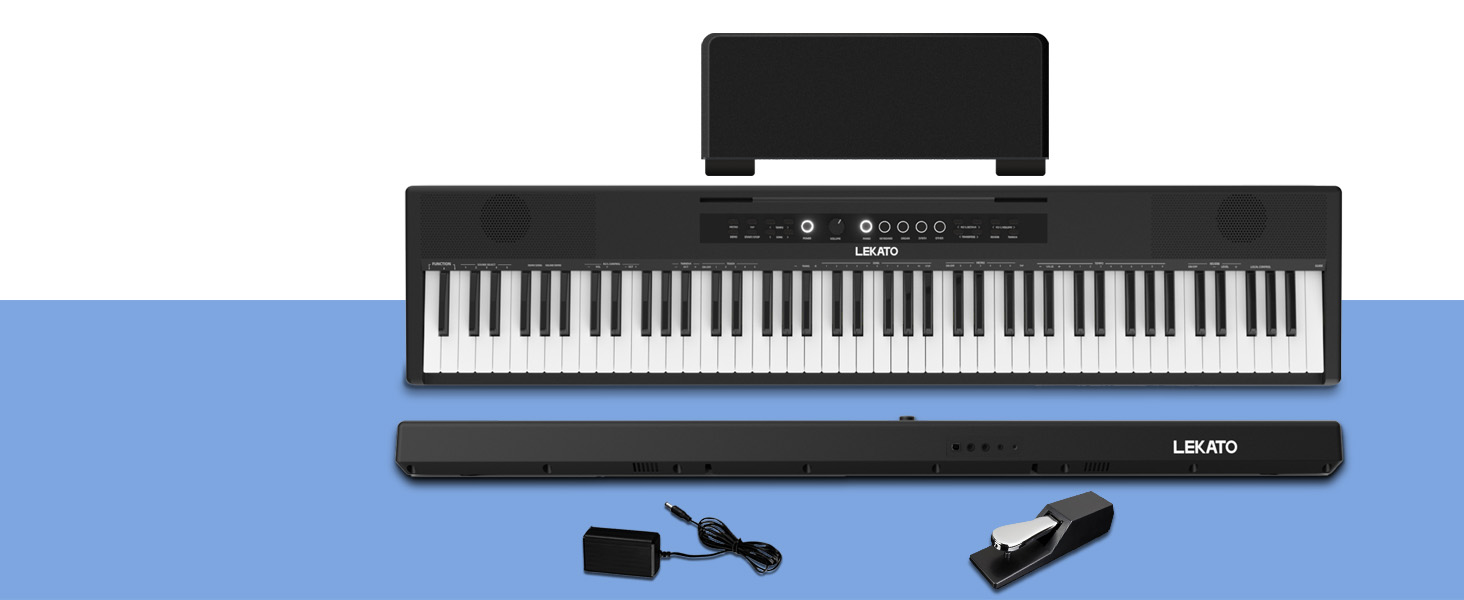
- LEKATO 88 Keys Digital Piano
- Full-back Music Rest
- Upgraded Sustain Pedal
- Adapter tal-Enerġija & Kurdun
- Manwal tas-Sid (dan id-dokument)
2. Setup
Follow these steps to set up your digital piano for first use.
2.1 Assembling the Music Rest
Gently slide the full-back music rest into the designated slot on the top panel of the piano. Ensure it is securely seated.
2.2 Konnessjoni tal-Enerġija
Connect the power adapter to the DC 12V input jack on the rear panel of the piano. Plug the adapter into a standard electrical outlet. The piano can also be powered by 6* R6 AA batteries (not included) for portable use.

2.3 Konnessjoni tal-Pedala tas-Sosteniment
Connect the upgraded sustain pedal to the 'Sustain' jack on the rear panel of the piano. This pedal allows for sustained notes, similar to an acoustic piano.
2.4 Optional: Connecting to a Stand
If using a separate keyboard stand, ensure it is stable and correctly assembled. The piano can be placed directly on the stand. Some stands may offer straps or screws for added stability; refer to your stand's manual for specific instructions.
Video 1: UISCOM 88 Key Full Size Semi-weighted Electronic Keyboard Piano. This short video demonstrates the physical setup and features of a similar 88-key semi-weighted electronic keyboard, including placement on a stand and basic operation.
3. Istruzzjonijiet Operattivi
This section details the primary functions and modes of your LEKATO Digital Piano.
3.1 Mixgħul/Mitfi u Kontroll tal-Volum
Press the 'Power' button to turn the piano on or off. Use the 'Volume' knob to adjust the master volume. Start at a low volume and increase gradually to a comfortable listening level.
3.2 Voice Selection (25 Voices)
The piano offers 25 different instrument voices. Use the dedicated 'Piano', 'Keyboard', 'Organ', 'Synth', and 'Other' buttons to select your desired voice. The selected voice will be indicated on the display.

3.3 Touch Sensitivity (5 Levels)
The semi-weighted keys feature 5 levels of touch sensitivity, allowing for expressive playing. Adjust this setting to match your playing style, from light to heavy touch response.

3.4 Metronomu
Activate the built-in metronome to assist with rhythm and timing during practice. The tempo can be adjusted to suit your needs.
3.5 Reverb and Transpose Functions
Utilize the reverb effect to add depth and ambiance to your sound. The transpose function allows you to shift the pitch of the entire keyboard up or down, useful for playing in different keys without changing your finger positions.
4. Karatteristiċi Avvanzati
Explore the advanced capabilities of your LEKATO Digital Piano to enhance your musical expression.
4.1 Layer Mode
In Layer mode, two different voices can be played simultaneously when you press a single key. This allows for rich, complex sounds. Refer to the manual for specific instructions on how to activate and select layered voices.
4.2 Modalità Split
Split mode divides the keyboard into two sections, each playing a different voice. This is ideal for duets or for practicing different parts of a song with each hand. The split point can usually be adjusted.

4.3 Twinova Duet Mode
Twinova mode is a specialized split mode that allows two players to play the same pitch range simultaneously, making it excellent for student-teacher interactions or collaborative learning.
4.4 USB MIDI Connectivity
The USB-B port enables MIDI and audio transfer, allowing you to connect the piano to Digital Audio Workstations (DAWs), learning apps, and recording software on computers or mobile devices.

Video 2: LEKATO 88 Keys Full-size Digital Piano ReviewDan il-filmat jipprovdi tagħrif dettaljat dwarview of the piano's features, including sound quality, key feel, and various modes like split and layer, demonstrating its versatility for different playing styles.
Video 3: LEKATO 88 Keys Digital Piano Full Size Keyboard. This video showcases the full-size digital piano, highlighting its sound capabilities and the feel of its keys, suitable for both beginners and advanced players.
5. Manutenzjoni
Proper maintenance ensures the longevity and optimal performance of your LEKATO Digital Piano.
- Tindif: Use a soft, dry cloth to wipe the surface of the piano. Avoid using abrasive cleaners, solvents, or waxes.
- Ħażna: Aħżen il-pjanu f'ambjent niexef u ħieles mit-trab 'il bogħod mix-xemx diretta u minn temperaturi estremi.
- Immaniġġjar: Always handle the piano with care. Avoid dropping or subjecting it to strong impacts.
6 Issolvi l-problemi
If you encounter any issues with your digital piano, refer to the following common problems and solutions.
| Problema | Kawża Possibbli | Soluzzjoni |
|---|---|---|
| L-ebda ħoss jew volum baxx | Volume too low; headphones connected; external device volume low. | Increase master volume; disconnect headphones; check external device volume. |
| Iċ-ċwievet ma jirrispondux | Power not connected; piano in demo mode. | Ensure power is on; exit demo mode. |
| Ħoss distort | Volume too high; faulty cables; interference from other electronics. | Lower volume; check/replace cables; move away from other devices. |
| MIDI not working | Incorrect USB connection; software issues. | Ensure correct USB-B connection; check software settings and drivers. |
If the problem persists after trying these solutions, please contact LEKATO customer support for further assistance.
7. Speċifikazzjonijiet
| Karatteristika | Dettall |
|---|---|
| Brand | LEKATO |
| Isem tal-Mudell | P866 88 Full Size Keys Digital Piano |
| Numru tal-Mudell tal-Oġġett | 3290 |
| Numru ta' Ċwievet | 88 |
| Tip taċ-ċavetta | Semi-weighted, Velocity-sensitive (5 touch levels) |
| Kelliema | Kelliema Stereo Doppji ta' 15W |
| Vuċijiet | 25 (Acoustic Piano, Organs, Strings, etc.) |
| Modi | Layer, Split, Twinova Duet |
| Effetti | Reverb, Transpose, Metronome |
| Konnettività | 3.5mm AUX In, 6.35mm Line Out, 6.35mm Headphone Jack (Front), USB Type B (MIDI/Audio) |
| Sors tal-Enerġija | Corded Electric (DC 12V) or 6* R6 AA Batteries (Not included) |
| Dimensjonijiet tal-Prodott | 10.8"D x 50.4"W x 3.1"H |
| Piż tal-oġġett | 21 liri |
| Kulur | Iswed Klassiku |
| Livell ta' Ħiliet | Beginner to Advanced |
8. Garanzija u Appoġġ
For warranty information and customer support, please refer to the documentation included in your product package or visit the official LEKATO websit. Żomm l-irċevuta tax-xiri tiegħek bħala prova tax-xiri.
For technical assistance or service inquiries, please contact LEKATO customer service directly.


