1. Introduzzjoni
The Cleer ARC Open Ear Headphones are designed to provide a unique audio experience that allows you to enjoy your music while remaining aware of your surroundings. Featuring an open-ear design, comfortable fit, and dynamic sound, these true wireless earbuds are ideal for various activities, from daily commutes to outdoor sports.
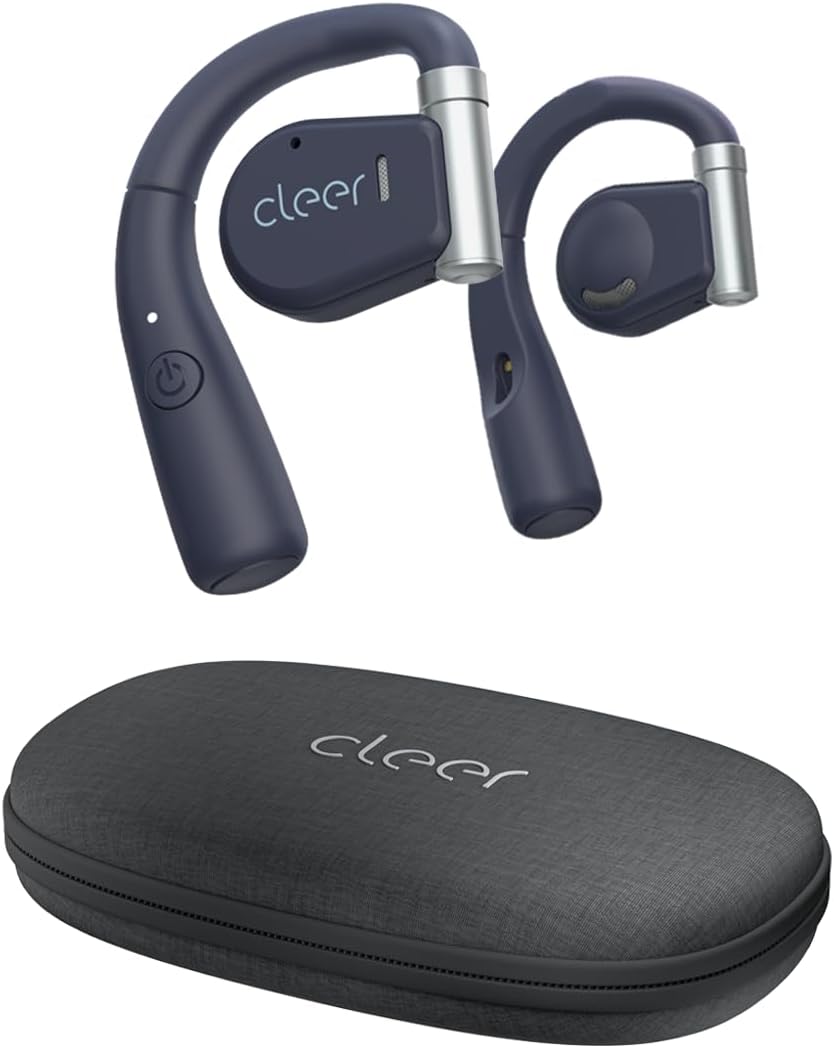
Image: Cleer ARC Open Ear Headphones and their compact charging case.
2. X'hemm fil-Kaxxa
- Cleer ARC Open Ear Headphones (Left and Right)
- Charging Case with integrated charging cable
3. Twaqqif u l-Ewwel Użu
3.1 Iċċarġjar tal-Headphones
Before first use, fully charge your Cleer ARC headphones. The charging case has an integrated charging cable. Connect the case to a USB power source. The indicator light on the headphones will show charging status.

Image: Cleer ARC headphones in their charging case. The headphones provide up to 18 hours of playtime, with an additional 11 hours provided by the charging case.
A full charge takes approximately 2 hours. The headphones offer up to 18 hours of playtime on a single charge, with the charging case providing an additional 11 hours of battery life.
3.2 Tqabbil tal-Bluetooth
- Ensure the headphones are properly charged.
- Open the charging case. The headphones will automatically enter pairing mode, indicated by a flashing LED light.
- On your mobile device (smartphone, tablet, or computer), go to Bluetooth settings.
- Agħżel "Cleer ARC" mil-lista ta' apparati disponibbli.
- Once connected, the LED indicator on the headphones will stop flashing.
The ARC headphones utilize Bluetooth 5.0 for a stable and extended connection range.
3.3 Installazzjoni tal-App Cleer+
For enhanced functionality and customization, download the free Cleer+ App from your device's app store (iOS or Android). The app allows you to personalize EQ settings, customize touch controls, and receive firmware updates.

Image: The Cleer+ App provides personalized EQ settings and customizable device controls.
4. Istruzzjonijiet Operattivi
4.1 L-Ilbies tal-Headphones
The ARC Open Ear headphones are designed to fit securely by twisting onto your ear without entering the ear canal. The flexible hinge design helps keep each bud in place comfortably.

Image: Proper wearing of Cleer ARC Open Ear Headphones for ergonomic comfort and situational awareness.
4.2 Kontrolli Intelliġenti tal-Messaġġ
The Cleer ARC headphones feature intuitive touch controls on the earbud surface:
- 1x Single Tap: Play/Pawsa mużika.
- 2x Double Tap: Next track / Answer/End calls.
- 3x Triple Tap: Track preċedenti.
- Stampa Twila: Activate voice assistant (customizable via Cleer+ App).

Image: Visual guide to the smart touch controls on the Cleer ARC headphones.
4.3 Audio Quality and EQ Settings
Experience dynamic, rich, and detailed audio thanks to the Arc's 16.2mm neodymium drivers. These drivers beam audio towards your ears, providing clear sound without sacrificing volume or bass. You can further personalize your listening experience by adjusting the EQ settings within the Cleer+ App.

Image: Internal components of the Cleer ARC headphone, showcasing the 16.2mm precision Hi-Fi driver and dynamic EQ technology.
4.4 Funzjonijiet ta' Sejħa
The ARC headphones support hands-free communication with enhanced call quality and improved voice pickup. Use the touch controls to answer or end calls.

Image: A user demonstrating the crystal clear call capabilities of the Cleer ARC headphones.
4.5 Għarfien tas-Sitwazzjoni
The open-ear design allows you to enjoy your audio content while still hearing your surroundings naturally. This feature is particularly useful for outdoor activities or when you need to remain aware of your environment, such as in an office or home setting.

Image: The open-ear design of Cleer ARC headphones allows for situational awareness, ideal for multitasking.
4.6 Vidjo Uffiċjali tal-Prodott
Watch this official video from Cleer for an overview of the ARC headphones' key features and benefits:
Video: Cleer Audio ARC talking points, provided by Cleer inc.
5. Manutenzjoni
5.1 Tindif
Gently wipe the headphones and charging case with a soft, dry, lint-free cloth. Do not use harsh chemicals or abrasive materials. Avoid getting moisture into any openings.
5.2 Ħażna
When not in use, always store your Cleer ARC headphones securely in their provided carrying case. This protects them from dust, damage, and helps maintain their condition.
6 Issolvi l-problemi
6.1 No Sound / Low Volume
- Kun żgur li l-headphones huma mqabbdin sew u konnessi mat-tagħmir tiegħek.
- Check the volume levels on both the headphones (via touch controls) and your connected device.
- Kun żgur li l-headphones huma ċċarġjati.
6.2 Kwistjonijiet ta' Tqabbil
- Kun żgur li l-Bluetooth huwa attivat fuq it-tagħmir tiegħek.
- Ensure the headphones are in pairing mode (flashing LED).
- Ipprova tinsa l-apparat fis-settings tal-Bluetooth tat-telefon tiegħek u erġa' waħħalh.
- Move closer to your device to ensure you are within Bluetooth range.
6.3 Tajbin Skomdu
- Adjust the flexible hinge to find the most comfortable and secure position on your ear.
- Ensure the headphones are correctly oriented for left and right ears.
7. Speċifikazzjonijiet
| Karatteristika | Dettall |
|---|---|
| Isem tal-Mudell | ARC |
| Teknoloġija tal-Konnettività | Mingħajr fili (Bluetooth 5.0) |
| Tqegħid tal-widnejn | Widna Miftuħa |
| Daqs tas-Sewwieq tal-Awdjo | 16.2 mm |
| Medda ta' Frekwenzi | 20 - 20,000 Hz |
| Ħajja tal-Batterija (Headphones) | Sa 18-il Siegħa |
| Ħajja tal-Batterija (bil-Kaxxa tal-Iċċarġjar) | Additional 11 Hours |
| Ħin tal-Iċċarġjar | Appross. 2 Sigħat |
| Tip ta' Kontroll | Mess, App |
| Livell ta 'Reżistenza għall-Ilma | Reżistenti għall-Ilma |
| Piż tal-oġġett | 3.36 uqija |
| Dimensjonijiet tal-Prodott | 6.61 x 3.31 x 7.6 pulzieri |
8. Garanzija u Appoġġ
Cleer products are designed and manufactured to the highest quality standards. For detailed warranty information, please refer to the official Cleer webis-sit jew il-karta tal-garanzija inkluża mal-prodott tiegħek.
For further assistance, troubleshooting, or to access the full user manual in PDF format, please visit the official Cleer support page or refer to the provided PDF document: Cleer ARC User Manual (PDF).
You can also visit the official Cleer Store on Amazon for more product information and support: Cleer Store.


