1. Introduzzjoni
Thank you for choosing the HTC True Wireless Earbuds 6. These earbuds are designed to provide a high-quality audio experience with advanced features such as Bluetooth 5.3 connectivity, smart touch controls, and a comfortable in-ear design. This manual will guide you through the setup, operation, maintenance, and troubleshooting of your new earbuds.
2. Prodott Aktarview
The HTC True Wireless Earbuds 6 offer immersive stereo sound, extended playtime, and robust connectivity, making them ideal for various activities from exercising to gaming.

Image: The HTC True Wireless Earbuds 6 in pink, shown with their clear charging case.
Karatteristiċi ewlenin:
- Immersive Stereo Sound: High-quality audio with powerful bass and dynamic treble.
- Kontroll Smart Touch: Intuitive controls for music playback, calls, and voice assistant.
- Ħin tal-logħob estiż: Up to 5 hours on a single charge, with 22 hours total playtime using the charging case.
- Bluetooth 5.3: Ensures instant pairing, stable connection, and low latency.
- IPX5 Sweatproof: Designed to resist sweat and light rain, suitable for workouts.
- Kompatibilità Wiesgħa: Works seamlessly with iOS and Android devices.
3. Setup
3.1 Iċċarġjar inizjali
Before first use, fully charge the earbuds and the charging case. Connect the provided USB-C cable to the charging case and a power source. The indicator light on the case will show charging status.
3.2 It-tqabbil mat-Tagħmir Tiegħek
- Kun żgur li l-earbuds jinsabu fil-kaxxa tal-iċċarġjar u li l-kaxxa għandha l-enerġija.
- Iftaħ l-għatu tal-kaxxa tal-iċċarġjar. Il-earbuds jidħlu awtomatikament fil-modalità ta' tqabbil.
- On your device (smartphone, tablet), go to Bluetooth settings and turn Bluetooth on.
- Select "HTC TWS6" from the list of available devices.
- Ladarba tkun konness, tisma' ton ta' konferma, u l-earbuds ikunu lesti għall-użu.

Image: Illustration of Bluetooth 5.3 technology, highlighting low latency, strong compatibility, and extended transmission range up to 10 meters.
3.3 L-Ilbies tal-Earbuds
Choose the ear tips that provide the most comfortable and secure fit for optimal sound quality and noise isolation. Gently insert the earbuds into your ear canal and twist slightly to secure them.
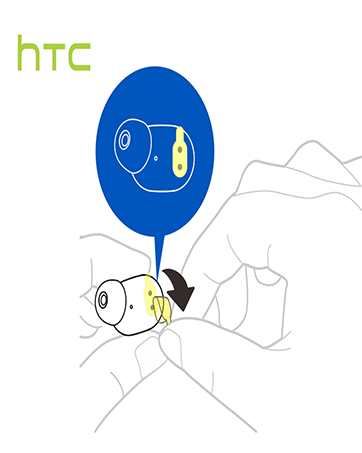

Image: Dimensions of the HTC True Wireless Earbuds 6 charging case, showing its compact size for portability.
4. Tħaddim tal-Earbuds Tiegħek
4.1 Kontrolli Intelliġenti tal-Messaġġ
The HTC True Wireless Earbuds 6 feature intuitive touch controls on each earbud. Refer to the table below for common functions:

Image: A visual guide to the smart touch controls on the HTC True Wireless Earbuds 6, detailing actions for playback, calls, volume, and voice assistant.
| Funzjoni | Azzjoni |
|---|---|
| Play/Pawsa | Tap left/right earbud once |
| Track li jmiss | Tap and hold right earbud for 2 seconds |
| Track Preċedenti | Tap and hold left earbud for 2 seconds |
| Volum Up | Tektek darbtejn fuq il-widna tax-xellug |
| Volum 'l isfel | Tektek l-earbud tal-lemin darbtejn |
| Wieġeb Sejħa | Tektek il-earbud tax-xellug darba |
| Ċempel Sejħa | Tektek il-earbud tal-lemin darba |
| Irrifjuta Sejħa | Tap and hold earbud for 2 seconds |
| Attiva l-Assistent tal-Vuċi | Tap right earbud three times |
4.2 Modalità Stereo u Mono
The earbuds can be used together for stereo sound or individually (mono mode) for calls or to save battery. Simply take one earbud out of the case to use it independently.

Image: The HTC True Wireless Earbuds 6 and charging case, demonstrating their use with smartphones for an HD stereo sound experience.
5. Manutenzjoni u Kura
Proper care will extend the lifespan of your HTC True Wireless Earbuds 6.
- Tindif: Uża drapp artab u niexef biex tnaddaf il-earbuds u l-kaxxa tal-iċċarġjar. Tużax kimiċi ħarxa jew materjali li joborxu.
- Reżistenza għall-Ilma: The earbuds are IPX5 sweatproof, meaning they can withstand splashes and sweat. Do not submerge them in water or expose them to heavy rain.
- Ħażna: Meta ma tkunx qed tużahom, aħżen il-earbuds fil-kaxxa tal-iċċarġjar tagħhom biex tipproteġihom u żżommhom iċċarġjati. Evita temperaturi estremi.
6 Issolvi l-problemi
Jekk tiltaqa' ma' problemi bil-earbuds tiegħek, ipprova s-soluzzjonijiet li ġejjin:
- Il-earbuds mhux qed jitqabbdu:
- Kun żgur li ż-żewġ earbuds huma ċċarġjati.
- Itfi l-Bluetooth fuq l-apparat tiegħek, imbagħad erġa' ixgħelu.
- Forget "HTC TWS6" in your device's Bluetooth settings and re-pair.
- Poġġi l-earbuds lura fil-kaxxa, agħlaq l-għatu, stenna ftit sekondi, imbagħad iftaħ biex tirrisettja.
- L-ebda ħoss minn earbud wieħed:
- Kun żgur li ż-żewġ earbuds huma ċċarġjati.
- Ipprova poġġi ż-żewġ earbuds lura fil-kaxxa u oħroġhom mill-ġdid.
- Naddaf il-kuntatti tal-iċċarġjar kemm fuq il-earbuds kif ukoll fuq il-kaxxa.
- Volum baxx jew kwalità ħażina tal-ħoss:
- Adjust the volume on your device and through the earbud touch controls.
- Ensure ear tips are properly seated and form a good seal in your ear.
- Naddaf kwalunkwe debris mill-malja tal-ispiker tal-earbud.
- Kwistjonijiet tal-iċċarġjar:
- Kun żgur li l-kejbil USB-C huwa konness sew kemm mal-kaxxa kif ukoll mas-sors tal-enerġija.
- Ipprova kejbil USB-C jew adapter tal-enerġija differenti.
- Naddaf il-kuntatti tal-iċċarġjar fuq il-earbuds u ġewwa l-kaxxa.
7. Speċifikazzjonijiet Tekniċi
| Karatteristika | Speċifikazzjoni |
|---|---|
| Isem tal-Mudell | TWS6 |
| Teknoloġija tal-Konnettività | Wireless (Bluetooth) |
| Verżjoni Bluetooth | 5.3 |
| Ħajja tal-Batterija (Earbuds) | Sa 5-il Siegħa |
| Ħin Totali tal-Logħob (bil-Kaxxa) | Sa 22-il Siegħa |
| Ħin tal-Iċċarġjar | Approximately 5 Hours (for full system charge) |
| Livell ta 'Reżistenza għall-Ilma | IPX5 Sweatproof |
| Metodu ta' Kontroll | Mess |
| Tqegħid tal-widnejn | Fil-widnejn |
| Apparati Kompatibbli | Smartphones, Tablets (iOS, Android) |
| Piż tal-oġġett | 3.03 uqija |
| UPC | 768649987938 |
8. Garanzija u Appoġġ
HTC stands behind the quality of its products.
- Garanzija: Your HTC True Wireless Earbuds 6 come with a 360 Days Warranty Extension. Please retain your proof of purchase for warranty claims.
- Appoġġ għall-Klijent: For any questions, technical assistance, or warranty inquiries, please contact our 7*24 Live Chat Support.
- Riżorsi onlajn: Visit the official HTC Store for more product information and support: HTC Official Store


