1. Introduzzjoni
The Fortinet FortiGate-30G is a compact, fanless network firewall designed for small businesses and distributed offices. It integrates firewalling, SD-WAN, and a wireless controller into a single appliance. Powered by Fortinet's secure processor, it delivers high performance and energy efficiency, offering automated and coordinated end-to-end protection across networks, users, and connected devices. The device features a user-friendly management console for centralized control and visibility, supporting zero-touch deployment for optimized onboarding.
2. Karatteristiċi ewlenin
- Sigurtà Integrata: Combines firewalling, SD-WAN, and a Wi-Fi controller in one appliance, reducing WLAN management complexity.
- Prestazzjoni Għolja: Built on a patented secure processor, offering 800 Mbps IPS and 500 Mbps threat protection.
- User-Friendly Management: Centralized control and simplified policy enforcement via an intuitive management console.
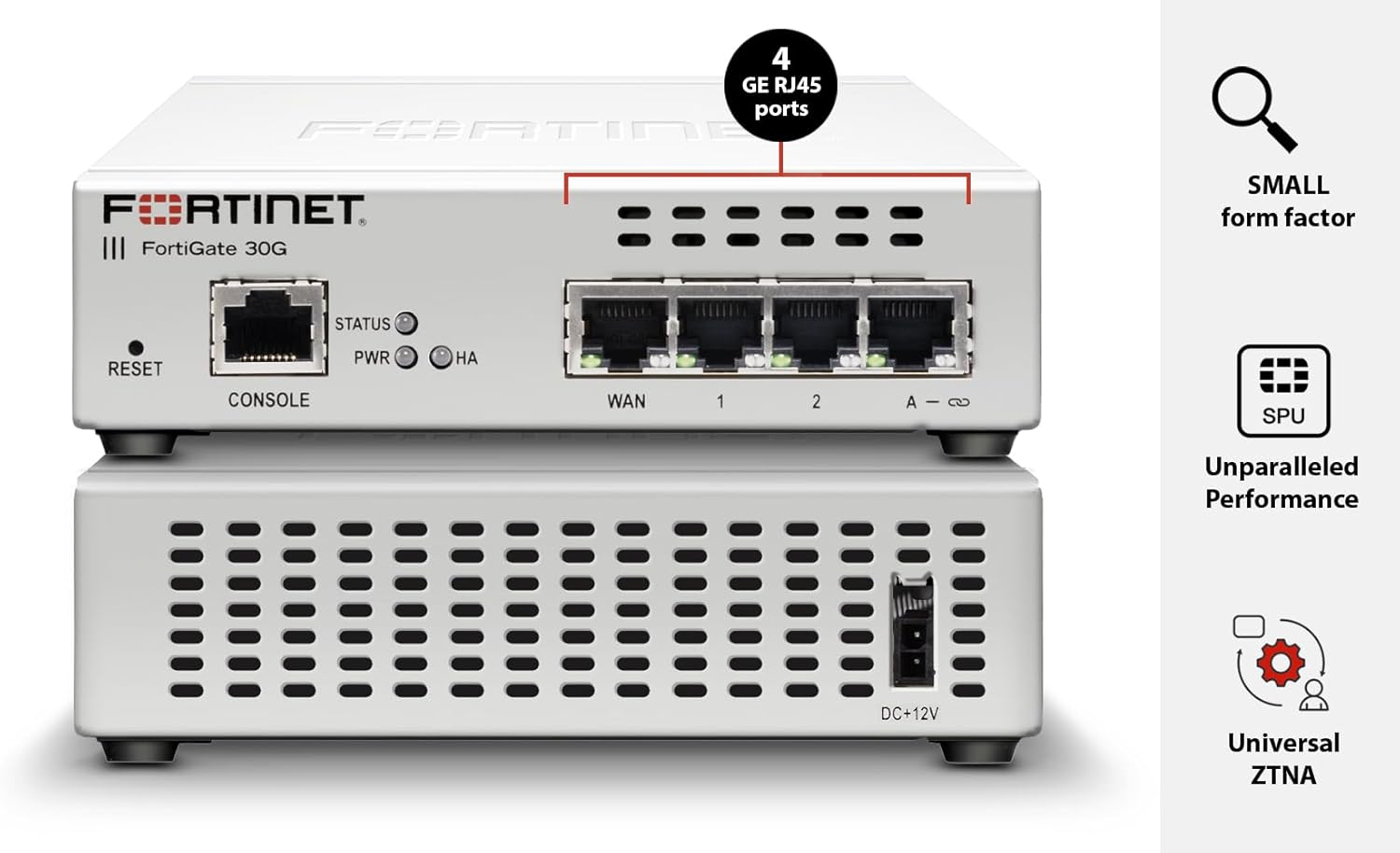
- Disinn kompatt: Fanless design with 4 GE RJ45 ports (1 WAN, 3 internal) for essential connectivity in small environments.
- Sigurtà Fdata: Backed by FortiGuard Labs, recognized as a firewall leader for 13 consecutive years by Gartner.
- Zero-Touch Deployment: Simplifies and optimizes the device onboarding experience.
3. Gwida ta' Setup
This section provides general guidelines for setting up your FortiGate-30G firewall. For detailed configuration, refer to the official Fortinet documentation.
3.1. Kontenut tal-Pakkett
Ivverifika li l-pakkett tiegħek fih l-oġġetti li ġejjin:
- FortiGate-30G Appliance
- Adapter tal-Enerġija
- Cable Ethernet
- CD (containing documentation and software)
3.2. Installazzjoni Fiżika
- Agħżel Post: Select a stable, dry, and well-ventilated location. Ensure adequate space for cable connections and airflow.
- Qabbad l-Enerġija: Connect the power adapter to the DC+12V port on the back of the FortiGate-30G and then to a power outlet.
- Qabbad Kejbils tan-Netwerk:
- Connect your internet service provider's modem/router to the WAN port bl-użu ta' kejbil Ethernet.
- Qabbad l-apparati tan-netwerk intern tiegħek (eż., swiċċijiet, kompjuters) mal- internal ports (1, 2, 3).
- Initial Access (Console): For initial configuration or troubleshooting, connect a console cable from your management computer to the KONSOLA port on the FortiGate-30G.


3.3. Konfigurazzjoni Inizjali
Upon powering on, the device will perform a self-test. Once the system is stable, you can access the management console via a web browser or the console port for initial configuration. Follow the on-screen prompts or refer to the detailed FortiGate documentation for specific steps on setting up network interfaces, security policies, and user accounts.
4. Istruzzjonijiet Operattivi
The FortiGate-30G operates using FortiOS, a comprehensive security operating system. Key operational aspects include:
- Dashboard: Id-daxxbord prinċipali jipprovdi overview tal-istatus tas-sistema, l-attività tan-netwerk, u l-avvenimenti tas-sigurtà.
- Konfigurazzjoni tan-Netwerk: Configure WAN and internal interfaces, VLANs, and routing.
- Politiki ta' Sigurtà: Define firewall rules, intrusion prevention (IPS), web filtering, and application control to protect your network.
- SD-WAN: Utilize SD-WAN features for optimized multi-WAN connectivity and application performance.
- Kontrollur bla fili: Manage connected FortiAP wireless access points for integrated WLAN security.
- VPN: Issettja Netwerks Privati Virtwali (VPNs) għal aċċess remot sigur jew konnettività minn sit għal sit.
- Logging & Reporting: Monitor logs and generate reports to track network activity and security incidents.
Regularly consult the FortiGate documentation for detailed instructions on specific features and configurations.
5. Manutenzjoni
To ensure optimal performance and security of your FortiGate-30G, regular maintenance is recommended:
- Aġġornamenti tal-Firmware: Keep the FortiOS firmware updated to the latest stable version to benefit from new features, performance improvements, and security patches.
- Aġġornamenti tas-Sigurtà: Ensure FortiGuard services (e.g., antivirus, IPS, web filtering) are active and updated to protect against the latest threats.
- Backups tal-Konfigurazzjoni: Regularly back up your device configuration to a secure location. This allows for quick recovery in case of unexpected issues.
- Spezzjoni Fiżika: Periodically check the device for dust accumulation, especially in ventilation areas. Ensure all cables are securely connected.
- Log Review: Regolarment mill-ġdidview system logs and security reports for any unusual activity or potential issues.
6 Issolvi l-problemi
If you encounter issues with your FortiGate-30G, consider the following basic troubleshooting steps:
- Kontroll tal-Enerġija: Ensure the device is powered on and the PWR LED is illuminated.
- Konnessjonijiet tal-kejbil: Verify all Ethernet cables are properly connected to their respective ports (WAN, internal, console).
- Indikaturi LED: Consult the device's LED indicators (PWR, STATUS, HA, WAN, internal ports) for diagnostic information. Refer to the official documentation for LED status meanings.
- Konnettività tan-Netwerk: Check if your internet service is active and if connected devices can obtain IP addresses from the FortiGate.
- Konfigurazzjoni Review: Access the management console to review your network and security configurations for any misconfigurations.
- Irristartja l-Apparat: As a first step for many issues, try restarting the FortiGate-30G.
- Irrisettja għall-Defaults tal-Fabbrika: If all else fails and you have a backup of your configuration, you may consider resetting the device to factory defaults using the RESET buttuna. Twissija: Dan se jħassar il-konfigurazzjonijiet kollha.
For advanced troubleshooting, refer to the Fortinet support websit jew ikkuntattja l-appoġġ tekniku.
7. Speċifikazzjonijiet
| Karatteristika | Dettall |
|---|---|
| Isem tal-Mudell | FG-30G |
| Brand | FORTINET |
| Dimensjonijiet tal-Pakkett | 12.32 x 8.43 x 2.8 pulzieri |
| Piż tal-oġġett | 3 liri |
| Teknoloġija tal-Konnettività | Ethernet, Wi-Fi |
| Portijiet | 4 Gigabit Ethernet RJ45 ports (1 WAN, 3 internal) |
| Karatteristika Speċjali | Aċċess mill-bogħod |
| Klassi ta' Banda ta' Frekwenza | Banda Unika |
| Komunikazzjoni mingħajr fili Standard | 802.11ax |
| Apparati Kompatibbli | Laptop, Kompjuter Personali, Smartphone, Tablet |
| Użi Rakkomandati | Negozju |
| Komponenti Inklużi | CD |
| Manifattur | Fortinet |
| L-ewwel Disponibbli | 1 ta’ Ottubru, 2024 |

8. Vidjows tal-Prodott
Below are official product videos that provide additional information about Fortinet firewalls and their capabilities.
FortiGate 90G Firewalls - Unparalleled Security Performance
This video introduces the FortiGate 90G series, highlighting its advanced security features and performance capabilities, including the FortiSP5 ASIC and its role in accelerating network and security functions. While focusing on the 90G, it provides relevant context for the FortiGate product line's core technologies.
9. Garanzija u Appoġġ
The Fortinet FortiGate-30G comes with standard manufacturer warranty. For specific warranty terms and conditions, please refer to the documentation included with your product or visit the official Fortinet websit.
For technical support, product registration, and access to the latest documentation and software updates, please visit the Fortinet Support Portal.
Additional protection plans may be available for purchase to extend coverage and support. Please check with your vendor for details.


