Prodott Overview
The Creative BT-W6 is a compact and powerful wireless Bluetooth audio transmitter designed to enhance your audio experience across various platforms. It supports the latest Bluetooth 5.4 and LE Audio standards, ensuring high-fidelity sound and stable connections. With support for advanced codecs like aptX Lossless and Snapdragon Sound, it delivers exceptional audio quality with minimal latency, making it ideal for gaming, movies, and music.
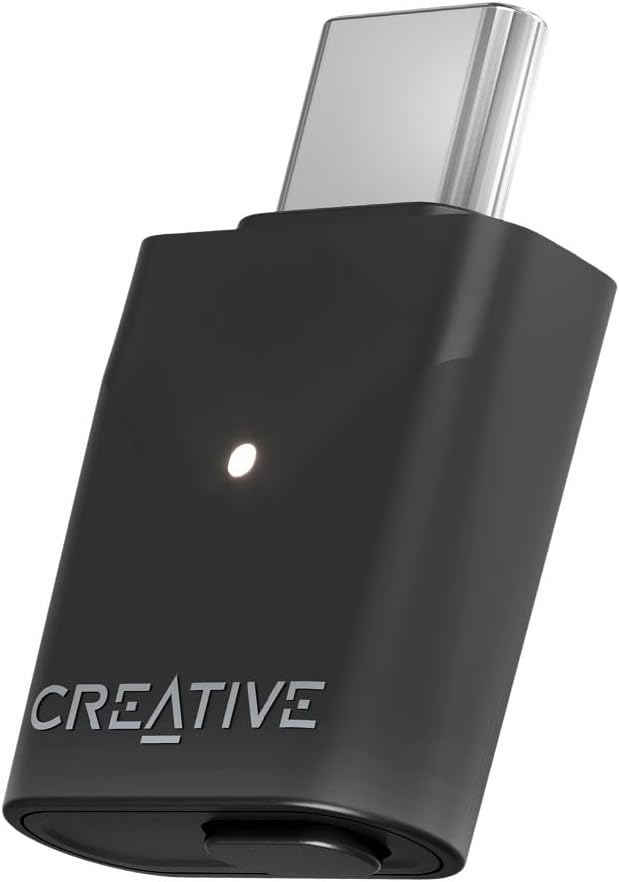
Image: The Creative BT-W6, a sleek black USB-C dongle with a white LED indicator and the 'CREATIVE' logo, designed for wireless audio transmission.
Gwida ta' Setup
1. Connecting the BT-W6
The BT-W6 features a USB-C connector for plug-and-play functionality. Simply insert the BT-W6 into an available USB-C port on your compatible device.
- PC/Mac: Plug the BT-W6 into a USB-C port. The system should automatically detect the device.
- Gaming Consoles (e.g., PlayStation, Nintendo Switch): Insert the BT-W6 into an available USB-C port. Ensure your console's audio output settings are configured to use the USB audio device.

Image: The Creative BT-W6 dongle surrounded by various compatible devices including a smartphone, headphones, a PlayStation controller, and a Nintendo Switch, illustrating its broad compatibility.
2. Tqabbil Inizjali
Once connected, the BT-W6 will enter pairing mode automatically (indicated by a blinking LED). To pair your Bluetooth headphones or speakers:
- Poġġi l-apparat tal-awdjo Bluetooth tiegħek fil-modalità ta 'tqabbil.
- The BT-W6 will automatically connect to the nearest available device in pairing mode.
- Once connected, the LED indicator on the BT-W6 will turn solid.
For subsequent connections, the BT-W6 will automatically reconnect to the last paired device when both are powered on and within range.
Istruzzjonijiet Operattivi
Appoġġ tal-Codec Awdjo
The BT-W6 supports a wide range of audio codecs to ensure optimal sound quality and performance:
- aptX Lossless: For uncompromised, bit-perfect audio transmission.
- aptX Adaptive: Dynamically adjusts audio quality and latency based on content and environment.
- aptX-HD: High-resolution audio for superior sound.
- aptX: Standard high-quality audio.
- SBCs: Basic Bluetooth audio codec.

Image: A graphical representation showing the Creative BT-W6 and a computer screen displaying Bluetooth device settings, highlighting the extensive range of supported audio codecs including aptX HD, aptX SBC, aptX Adaptive High Quality, aptX Lossless, and aptX Adaptive Low Latency.
Snapdragon Sound and High-Resolution Audio
Experience premium audio with Snapdragon Sound, delivering up to 24-bit/96 kHz high-resolution audio playback. This ensures rich, detailed, and immersive sound for all your media.

Image: A person playing a video game on a portable console, with the Creative BT-W6 plugged in, emphasizing the "Experience the difference with Snapdragon Sound" feature.
Prestazzjoni ta' Latenza Baxxa
The BT-W6 is engineered for low-latency audio, providing excellent audio-video synchronization. This is crucial for an optimal experience in gaming and watching videos, where delays can be distracting.

Image: A woman wearing orange headphones and typing on a laptop, with a "HI-DEF 24-bit / 96kHz" badge, illustrating the high-resolution and low-latency audio capabilities of the BT-W6.
Bluetooth LE Audio and Classic Bluetooth 5.4
The BT-W6 supports both the latest Bluetooth LE Audio for enhanced efficiency and multi-stream capabilities, as well as Classic Bluetooth 5.4 for broad compatibility with existing devices.

Image: An illustration showing the Creative BT-W6 transmitting audio to multiple headphones, representing its support for both next-generation Bluetooth LE Audio and Classic Bluetooth 5.4.
Creative App Integration
Unlock additional features and customization options by using the Creative App. This application allows you to fine-tune audio settings, manage devices, and optimize your listening experience.

Image: A laptop screen displaying the Creative App interface with the Creative BT-W6 dongle, indicating that the device's functionality can be enhanced through the dedicated application.
Manutenzjoni
To ensure the longevity and optimal performance of your Creative BT-W6, follow these simple maintenance guidelines:
- Tindif: Use a soft, dry, lint-free cloth to gently wipe the surface of the device. Avoid using abrasive cleaners, solvents, or strong chemicals, as these can damage the finish or internal components.
- Ħażna: When not in use, store the BT-W6 in a cool, dry place, away from direct sunlight and extreme temperatures.
- Immaniġġjar: Avoid dropping the device or subjecting it to strong impacts. Do not attempt to disassemble or modify the BT-W6, as this will void the warranty and may cause damage.
- Konnettività: Ensure the USB-C port on your device and the BT-W6 are free from dust and debris before connecting.
Issolvi l-problemi
If you encounter issues with your Creative BT-W6, please refer to the following common troubleshooting steps:
| Problema | Kawża Possibbli | Soluzzjoni |
|---|---|---|
| Ebda output awdjo. | BT-W6 not properly connected or recognized. L-output tal-awdjo ma ntgħażelx sew fuq l-apparat. Headphones/speakers not paired or powered on. | Ensure BT-W6 is fully inserted into the USB-C port. Check your computer/console's sound settings and select the BT-W6 as the output device. Verify your Bluetooth headphones/speakers are powered on and in pairing mode if not already connected. |
| Cannot pair Bluetooth device. | Bluetooth device not in pairing mode. Too many devices in range. Interferenza. | Ensure your Bluetooth headphones/speakers are in pairing mode (refer to their manual). Move closer to the BT-W6 and away from other Bluetooth devices. Try restarting both the BT-W6 (by unplugging and replugging) and your Bluetooth device. |
| Il-kwalità tal-awdjo hija fqira jew intermittenti. | Interferenza jew distanza. Codec mismatch. | Reduce distance between BT-W6 and audio device. Minimize obstacles. Ensure your audio device supports the desired high-quality codecs (aptX Lossless, aptX Adaptive, aptX HD). Check Creative App settings if applicable. |
| High latency during gaming/video. | Codec not optimized for low latency. Interferenza ambjentali. | Ensure your audio device supports aptX Adaptive (Low Latency mode) or aptX Low Latency. Reduce wireless interference from other devices. |
Speċifikazzjonijiet
| Karatteristika | Dettall |
|---|---|
| Brand | KREATTIV |
| Numru tal-Mudell | SA0210 |
| Kulur | Iswed |
| Tip ta' Konnettur | USB-C |
| Apparati Kompatibbli | PC, Mac, Gaming Consoles (e.g., PlayStation, Nintendo Switch) |
| Dimensjonijiet (L x W x H) | 26 x 16 x 7 millimetru |
| Piż | 3.2 Gramm |
| Codecs Awdjo appoġġjati | aptX Lossless, aptX Adaptive, aptX HD, aptX, SBC |
| Riżoluzzjoni Awdjo | Up to 24-bit/96 kHz |
| Verżjoni Bluetooth | Bluetooth 5.4 (Classic and LE Audio) |
Garanzija u Appoġġ
Informazzjoni dwar Garanzija
The Creative BT-W6 comes with a Garanzija LimitataGħal termini u kundizzjonijiet speċifiċi, jekk jogħġbok irreferi għall-karta tal-garanzija inkluża mal-prodott tiegħek jew żur is-sit uffiċjali ta' Creative Labs. websit. Żomm il-prova tax-xiri tiegħek għal talbiet ta' garanzija.
Return Policy: The product is subject to a 30-day refund/replacement return policy from the date of purchase, as per standard retail terms.
Appoġġ għall-Klijent
For technical assistance, product inquiries, or warranty support, please contact Creative Labs customer service:
- Appoġġ onlajn: Visit the official Creative Labs support websit għal FAQs, sewwieqa, u downloads ta' softwer.
- Informazzjoni ta' Kuntatt: Refer to the contact details provided on the Creative Labs websit għar-reġjun tiegħek.
Always ensure you have your product model number (SA0210) and purchase details ready when contacting support.


