1. Introduzzjoni
Thank you for choosing the Ulefone Note 18 Pro. This manual provides essential information on how to set up, operate, and maintain your device. Please read it carefully to ensure optimal performance and longevity of your smartphone.

Image: The Ulefone Note 18 Pro smartphone, showcasing id-disinn eleganti tiegħu kemm mill-perspettivi ta' quddiem kif ukoll ta' wara.
2. X'hemm fil-Kaxxa
Jekk jogħġbok iċċekkja l-kontenut tal-pakkett tiegħek biex tiżgura li l-oġġetti kollha huma preżenti:
- Smartphone Ulefone Nota 18 Pro
- 1x TPU Protective Case
- 1x Type-C to Type-C Charger Cable (1m)
- 1x AC Power Charger (18W/US Plug)
- 1x Protettur tal-Iskrin tal-Ħġieġ Ittemprat
- 1x Labra SIM
3. Gwida ta' Setup
3.1. Daħħal il-Karta(i) SIM u l-Karta MicroSD
The Ulefone Note 18 Pro supports dual SIM cards and expandable storage via a MicroSD card (up to 2TB). Use the provided SIM needle to open the SIM tray.
- Sib it-trej tas-SIM fuq il-ġenb tat-telefon.
- Daħħal il-labra tas-SIM fit-toqba ż-żgħira ħdejn it-trej biex tneħħiha.
- Place your Nano-SIM card(s) and/or MicroSD card into the designated slots on the tray. Ensure they are correctly oriented.
- Imbotta t-trej lura fit-telefon bir-reqqa sakemm ikun laħlaħ mal-qafas tal-apparat.
3.2. Iċċarġjar Inizjali u Tixgħel
Qabel l-ewwel użu, huwa rakkomandat li tiċċarġja t-tagħmir tiegħek kompletament.
- Qabbad il-kejbil tat-Tip Ċ mal-port tal-iċċarġjar fil-qiegħ tat-telefon.
- Connect the other end of the cable to the 18W AC power charger and plug it into a wall outlet.
- Ħalli t-telefon jiċċarġja sakemm l-indikatur tal-batterija juri 100%.
- To power on, press and hold the Power button (located on the right side) until the Ulefone logo appears.

Image: The Ulefone Note 18 Pro connected to its charger, illustrating its 5450mAh battery capacity and estimated usage times for talk, standby, and video playback.
4. Tħaddim tat-Tagħmir Tiegħek
4.1. Sistema Operattiva Android 14
Your Ulefone Note 18 Pro runs on Android 14, offering a personalized, private, and secure user experience. Navigate through the interface using touch gestures.
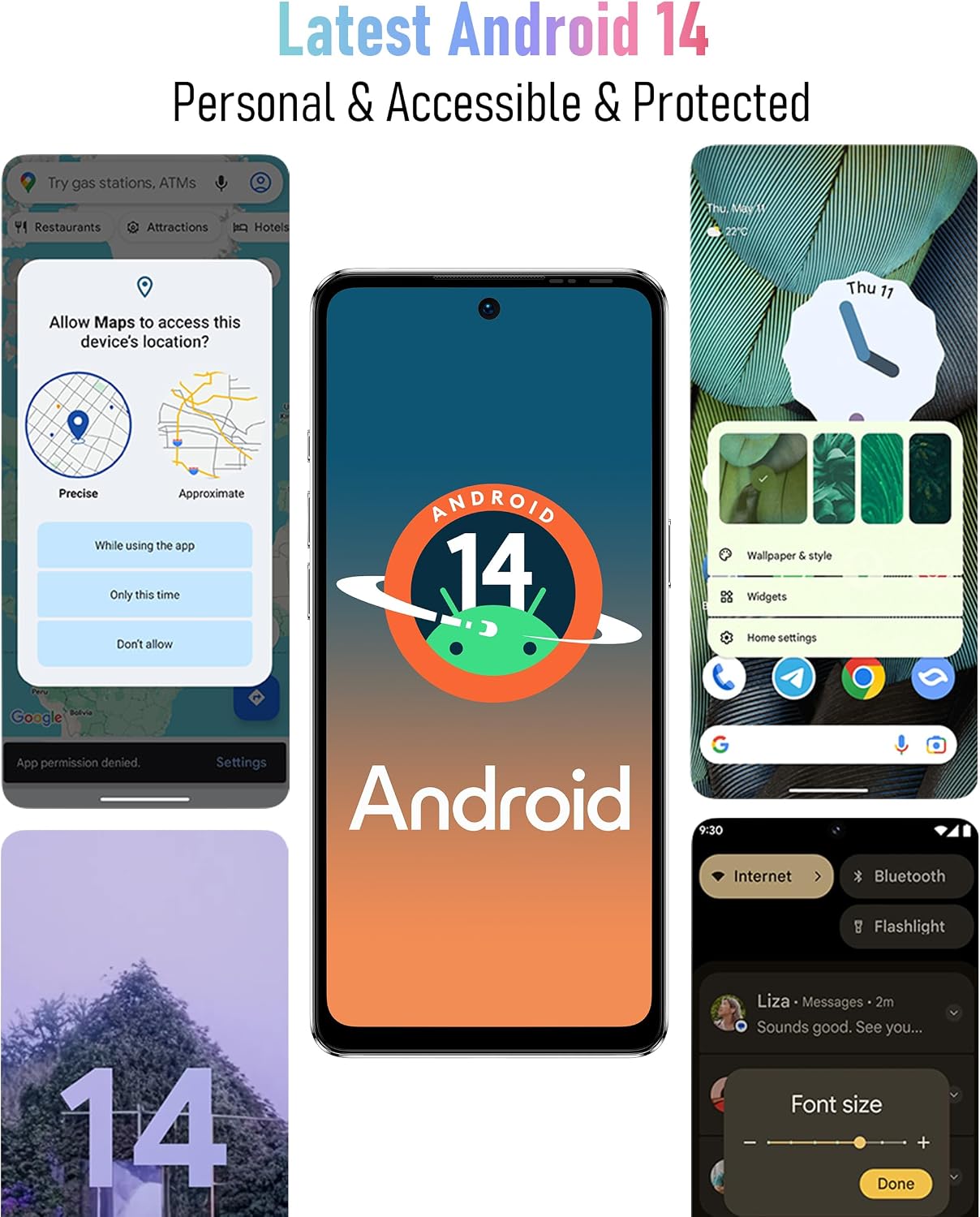
Image: Screenshots of the Android 14 interface, highlighting its features for personalization, privacy, and accessibility.
4.2. Wirja u Interazzjoni
The device features a 6.78-inch HD+ punch-hole display with a 90Hz refresh rate, protected by Corning Gorilla Glass.
- Ġesti mess: Tektek biex tagħżel, skrolla biex tiskrollja, aqbad biex tagħmel zoom.
- Lock Screen: Press the Power button to lock/unlock the screen. Use Fingerprint ID or Face Unlock for quick access.
- Navigazzjoni: Use on-screen navigation gestures or buttons (Home, Back, Recent Apps).

Image: The 6.78-inch HD+ display of the Ulefone Note 18 Pro, emphasizing its 90Hz refresh rate, punch-hole design, and Corning Gorilla Glass protection.
4.3. Funzjonijiet tal-Kamera
The Ulefone Note 18 Pro is equipped with a 64MP main camera, a 50MP ultra-wide-angle camera, and a 32MP selfie camera.
- Nieħdu Ritratti: Open the Camera app, select your desired mode (Photo, Portrait, Video, etc.), and tap the shutter button.
- Qlib tal-Kameras: Tektek l-ikona tas-swiċċ tal-kamera biex taqleb bejn il-kameras ta' quddiem u ta' wara.
- Modi: Explore various modes like AI Scene Recognition and Portrait Mode for enhanced photography.

Image: A visual representation of the Ulefone Note 18 Pro's camera system, detailing the 64MP main camera, 50MP ultra-wide-angle camera, and 32MP selfie camera capabilities.
4.4. Karatteristiċi Speċjali
- NFC u Google Pay: Enable NFC in settings to make contactless payments and use other NFC-enabled services.
- Kontroll mill-bogħod IR: Utilize the built-in IR blaster to control compatible home appliances like TVs, projectors, and air conditioners.
- Ċavetta tad-dwana: Assign frequently used functions (e.g., SOS, flashlight, screenshots, sound recording, opening specific apps) to the customizable physical button for quick access.

Image: The Ulefone Note 18 Pro demonstrating its NFC functionality for mobile payments and its IR Blaster feature for controlling various home electronics.

Image: An illustration of the Ulefone Note 18 Pro's innovative Custom Key, showing various functions that can be assigned to single click, double click, and long press actions.
5. Manutenzjoni
5.1. Tindif tal-Apparat Tiegħek
To keep your Ulefone Note 18 Pro in optimal condition, clean it regularly:
- Uża drapp artab u mingħajr suf biex timsaħ l-iskrin u l-qafas.
- Evita li tuża kimiċi ħarxa, prodotti tat-tindif li joborxu, jew sprejs tal-ajrusol.
- The device is splash-proof, but avoid submerging it in water.
5.2. Aġġornamenti tas-Software
Iċċekkja u installa aġġornamenti tas-softwer regolarment biex tiżgura li t-tagħmir tiegħek ikollu l-aħħar karatteristiċi, irqajja tas-sigurtà, u titjib fil-prestazzjoni. Mur fuq Settings > Sistema > Aġġornament tas-sistema.
5.3. Kura tal-batterija
Biex timmassimizza l-ħajja u l-prestazzjoni tal-batterija:
- Evita temperaturi estremi.
- Uża biss il-ċarġer u l-kejbil provduti.
- Tħallix il-batterija tixxotta kompletament qabel ma terġa' tiċċarġjaha ta' spiss.
6 Issolvi l-problemi
If you encounter issues with your Ulefone Note 18 Pro, try the following solutions:
| Problema | Soluzzjoni Possibbli |
|---|---|
| L-apparat mhux se jixgħel | Kun żgur li l-batterija hija ċċarġjata. Agħfas u żomm il-buttuna tal-Power għal mill-inqas 10 sekondi biex terġa' tibda taħdem bil-forza. |
| L-apps qed jiġġarraf jew jiffriżaw | Clear the app's cache (Settings > Apps > [App Name] > Storage > Clear cache). Restart the device. Update the app or the system software. |
| Sinjal tan-netwerk fqir | Check SIM card insertion. Restart the device. Ensure you are within network coverage. Note: Not compatible with AT&T, Cricket networks. |
| Il-batterija tiskula malajr | Close background apps. Reduce screen brightness. Disable unnecessary features like Wi-Fi, Bluetooth, GPS when not in use. Check battery usage in Settings to identify power-hungry apps. |
| Fingerprint/Face Unlock not working | Ensure your finger/face is clean and properly positioned. Re-register your fingerprint/face in Settings > Security. |
7. Speċifikazzjonijiet
Detailed technical specifications for the Ulefone Note 18 Pro:
| Karatteristika | Dettall |
|---|---|
| Isem tal-Mudell | Nota 18 Pro |
| Sistema Operattiva | Android 14 |
| Proċessur | MTK Helio G91 (Octa-core, up to 2.0GHz) |
| RAM | 12 GB (6GB fiżiku + 6GB virtwali) |
| Ħażna Interna | 256 GB |
| Ħażna espansibbli | Sa 2TB permezz ta' karta TF |
| Daqs tal-Wiri | 6.78 Pulzier |
| Riżoluzzjoni tal-Wiri | 720x1640 HD+ |
| Riffriskar Rata | 90 Hz |
| Protezzjoni tal-Wiri | Corning Gorilla Glass |
| Kamera ta' wara | 64MP Main (Sony IMX682) + 50MP Ultra Wide-angle |
| Kamera ta' Quddiem | Kamera Selfie 32MP |
| Kapaċità tal-batterija | 5450 mAh |
| Iċċarġjar | 18W Iċċarġjar Mgħaġġel |
| Konnettività | 4G Global Bands, Wi-Fi (2.4G/5G), Bluetooth 5.1, NFC, Infrared |
| Navigazzjoni | GPS, GLONASS, BeiDou, Galileo |
| Sensuri | ID tal-Marki tas-Swaba', Wiċċ Miftuħ |
| Awdjo Jack | 3.5 mm |
| Dimensjonijiet | 6.64 x 3.02 x 0.35 pulzieri |
| Piż | 7.8 uqija |
| Kulur | Griż |
8. Garanzija u Appoġġ
The Ulefone Note 18 Pro comes with a US Warranty. For specific warranty terms and conditions, please refer to the warranty card included in your package or visit the official Ulefone websit.
For technical support, troubleshooting assistance beyond this manual, or service inquiries, please contact Ulefone customer support through their official channels. Contact information can typically be found on the Ulefone websit jew fl-ippakkjar tal-prodott.
Manifattur: SHENZHEN GOTRON ELECTRONIC CO.,LTD
Ċentru A/S: +86 75583892089


