1. Introduzzjoni
This manual provides essential information for the proper use and maintenance of your Ulefone Note 18 Pro smartphone. Please read this manual carefully before using the device to ensure optimal performance and longevity.

Figure 1.1: Ulefone Note 18 Pro Smartphone Overview
The image displays the Ulefone Note 18 Pro smartphone in white. The front shows the display with "Android 14" and "12GB+256GB" text, indicating its operating system and memory configuration. The back highlights the triple camera setup and the Ulefone branding.
2. X'hemm fil-Kaxxa
Ivverifika li l-oġġetti kollha huma preżenti fil-pakkett tiegħek:
- Smartphone Ulefone Nota 18 Pro
- 1x Kaxxa Protettiva tat-TPU
- 1x Kejbil tal-Iċċarġjar tat-Tip-Ċ għal tat-Tip-Ċ (1m)
- 1x Ċarġer tal-Enerġija AC (18W/Plagg tal-Istati Uniti)
- 1x Protettur tal-Iskrin tal-Ħġieġ Ittemprat
- 1x Labra SIM
3. Setup Inizjali
3.1. Installazzjoni tal-Karta SIM u l-Karta TF
The device supports dual SIM dual standby and expandable storage via a TF card.
- Sib it-trej tal-kard SIM fuq il-ġenb tat-telefon.
- Insert the provided SIM needle into the small hole on the tray to eject it.
- Poġġi l-kard(s) Nano-SIM u/jew il-kard TF tiegħek fl-islottijiet apposta fuq it-trej. Kun żgur li l-orjentazzjoni hija korretta.
- Erġa' daħħal it-trej fit-telefon bir-reqqa.
3.2. Iċċarġjar tal-Apparat
Qabel l-ewwel użu, iċċarġja l-Ulefone Note 18 Pro tiegħek kompletament.
- Connect the Type-C end of the charger cable to the phone's charging port.
- Connect the other end of the cable to the 18W AC Power Charger.
- Plug the AC Power Charger into a wall outlet.
- L-indikatur tal-iċċarġjar se jidher fuq l-iskrin. Skonnettja l-ċarġer ladarba l-batterija tkun mimlija.

Figure 3.2.1: Charging the Ulefone Note 18 Pro
This image shows the Ulefone Note 18 Pro being charged via a USB-C cable. The screen displays a battery icon with a lightning bolt, indicating active charging, and a percentage of 98.17%. Text overlays highlight the 5450mAh battery and estimated usage times: 30 hours talk time, 295 hours standby, and 12 hours video playback.
4. Tħaddim tat-Tagħmir Tiegħek
4.1. Ixgħel/Itfi u Erġa' Ibda
- Qawwa Mixgħul: Agħfas u żomm il-buttuna tal-Power sakemm jidher il-logo ta' Ulefone.
- Itfi: Agħfas u żomm il-buttuna tal-Enerġija, imbagħad agħżel "Itfi" mill-għażliet.
- Ibda mill-ġdid: Agħfas u żomm il-buttuna tal-Enerġija, imbagħad agħżel "Restart" mill-għażliet.
4.2. Wiri u Navigazzjoni
The Ulefone Note 18 Pro features a 6.78-inch HD+ punch-hole display with a 90Hz refresh rate, protected by Corning Gorilla Glass.

Figura 4.2.1: Speċifikazzjonijiet tad-Displej
This image highlights the display features of the Ulefone Note 18 Pro. It shows a large smartphone screen with a snowboarder, emphasizing the 6.78-inch size. Key specifications listed are 1640*720 HD+ resolution, 90Hz refresh rate, punch-hole display design, and Corning Gorilla Glass protection.
4.3. Funzjonijiet tal-Kamera
L-apparat huwa mgħammar b'sistema ta' kamera versatili:
- Kamera Prinċipali: 64MP high-resolution with Sony IMX682 sensor.
- Ultra Wide-angle Camera: 50MP b'kamp ta' 117.3° ta' view.
- Selfie Camera: 32MP for clear front-facing photos.

Figura 4.3.1: Sistema tal-Kamera Fuqview
This image illustrates the camera capabilities of the Ulefone Note 18 Pro. It shows a close-up of the rear camera module, labeling the 64MP Main Camera and 50MP Ultra Wide-angle camera. Below, a smartphone screen displays a selfie being taken, with text indicating a 32MP Selfie Camera.
4.4. Prestazzjoni u Ħażna
Powered by the MTK Helio G91 chipset, the Note 18 Pro offers smooth performance. It comes with 12GB RAM (6GB physical + 6GB virtual) and 256GB internal storage, expandable up to 2TB via TF card.

Figure 4.4.1: Processor and Memory
This image depicts the internal components of the Ulefone Note 18 Pro, focusing on the MediaTek Helio G91 processor. Text highlights the memory configuration: Up to 12GB RAM (6GB physical + 6GB virtual), 256GB ROM, and support for up to 2TB TF card expansion.
4.5. Connectivity and Special Features
- NFC: Għal ħlasijiet mingħajr kuntatt u trasferiment tad-dejta.
- Kontroll mill-bogħod IR: Transforms your phone into a universal remote for compatible appliances.
- Global 4G Bands: Supports dual SIM dual standby. (Note: Not compatible with AT&T, Cricket).
- GPS: Built-in GPS, GLONASS, BeiDou, and Galileo for accurate navigation.
- Konnettività oħra: Bluetooth, Wi-Fi, 3.5 mm Audio Jack.
- Radju FM mingħajr headset: Gawdi r-radju mingħajr ma jkollok bżonn headphones bħala antenna.

Figure 4.5.1: NFC and IR Blaster
This image illustrates two key connectivity features. The top section shows a hand holding the Ulefone Note 18 Pro near a payment terminal, with the NFC and G Pay logos, indicating contactless payment capability. The bottom section shows the phone being used as an IR remote control for a television, with icons for various compatible appliances like TV, projector, fan, and air conditioner.
4.6. Custom Key
The programmable Custom Key allows you to assign various functions for quick access with a single click, double click, or long press.
- Ikklikkja waħda: Start Sound recording, Open flashlight, Screenshots, Open Zello, Open SOS, Open Game Mode.
- Ikklikkja darbtejn: Assignable to various functions.
- Stampa Twila: Assignable to various functions.

Figure 4.6.1: Custom Key Functionality
This image details the "Innovative Custom Key" feature of the Ulefone Note 18 Pro. It shows the side of the phone with the custom key, and a list of actions that can be assigned to "One Click", "Double Click", and "Long Press" gestures. Examples include "Start Soundrecording", "Open flashlight", "Screenshots", "Open Zello", "Open SOS", and "Open Game Mode".
4.7. Karatteristiċi tas-Sigurtà
The device supports both Face Unlock and Fingerprint ID for secure and convenient access.

Figure 4.7.1: Biometric Security
This image displays various features of the Ulefone Note 18 Pro. In the bottom right, it highlights "Fingerprint Reader + Face Recognition" with an icon of a face and a fingerprint, indicating the phone's biometric security options.
5. Manutenzjoni u Kura
- Tindif: Uża drapp artab u mingħajr suf biex tnaddaf l-iskrin u l-qafas. Evita kimiċi ħarxa.
- Protezzjoni: Utilize the provided TPU protective case and tempered glass screen protector to guard against drops and scratches.
- Temperatura: Evita li tesponi l-apparat għal temperaturi estremi (sħan jew kesħin).
- Reżistenza għall-Ilma: The device is splash-proof. Avoid submerging it in water or exposing it to high-pressure water jets.

Figure 5.1: Protection and Splash Resistance
This image showcases two protective aspects of the Ulefone Note 18 Pro. On the left, it displays the phone alongside a clear TPU protective case, labeled "Free TPU Phone Case". On the right, the phone is shown with water droplets on its surface, indicating its "Splash Waterproof" capability.
6 Issolvi l-problemi
Jekk tiltaqa' ma' problemi bit-tagħmir tiegħek, ipprova s-soluzzjonijiet komuni li ġejjin:
- Apparat mhux qed jixgħel: Kun żgur li l-batterija hija ċċarġjata. Qabbad mal-ċarġer għal mill-inqas 10 minuti qabel ma tipprova tixgħelha.
- L-iskrin iffriżat/ma jirrispondix: Agħfas u żomm il-buttuna tal-Qawwa għal madwar 10-15-il sekonda biex terġa' tibda.
- Sinjal tan-netwerk fqir: Check if your SIM card is properly inserted. Move to an area with better network coverage.
- L-apps jiġġarraf: Clear the cache of the problematic app or reinstall it. Ensure your system software is up to date.
- Batterija tisbat malajr: Reduce screen brightness, close unused apps, disable unnecessary background processes, and limit location services.
Għal kwistjonijiet aktar kumplessi, irreferi għall-appoġġ uffiċjali ta' Ulefone websit jew ikkuntattja lis-servizz tal-konsumatur.
7. Speċifikazzjonijiet
| Karatteristika | Speċifikazzjoni |
|---|---|
| Isem tal-Mudell | Nota 18 Pro |
| Sistema Operattiva | Android 14 |
| Proċessur | MTK Helio G91 (2 GHz CPU Speed) |
| RAM | 12 GB (6GB fiżiku + 6GB virtwali) |
| Ħażna Interna | 256 GB |
| Ħażna espansibbli | Karta TF sa 2TB |
| Daqs tal-Iskrin | 6.78 Pulzier |
| Riżoluzzjoni | 1640x720 HD+ (1080P Scanner Resolution) |
| Riffriskar Rata | 90 Hz |
| Kamera Prinċipali | 64MP |
| Ultra Wide-angle Camera | 50MP |
| Kamera ta' Quddiem | 32MP |
| Kapaċità tal-batterija | 5450 mAh |
| Iċċarġjar | 18W Iċċarġjar Mgħaġġel |
| Ħin tat-Tkellem | 30 Sigħat |
| Ħin ta' Standby | 295 Sigħat |
| Ħin tal-Daqq tal-Vidjo | 12 Sigħat |
| Konnettività | Bluetooth, Wi-Fi, Infrared, NFC, GPS, GLONASS, BeiDou, Galileo |
| Awdjo Jack | 3.5 mm |
| Dimensjonijiet | 6.65 x 3.02 x 0.35 pulzieri |
| Piż tal-oġġett | 7.8 uqija |
| Kulur | Abjad |
8. Garanzija u Appoġġ
Your Ulefone Note 18 Pro comes with a US Warranty. For specific warranty terms and conditions, please refer to the warranty card included in your product packaging or visit the official Ulefone websit.
For technical support, troubleshooting assistance, or service inquiries, please contact Ulefone customer support through their official channels. Keep your purchase receipt and product serial number (found on the device or packaging) handy when contacting support.
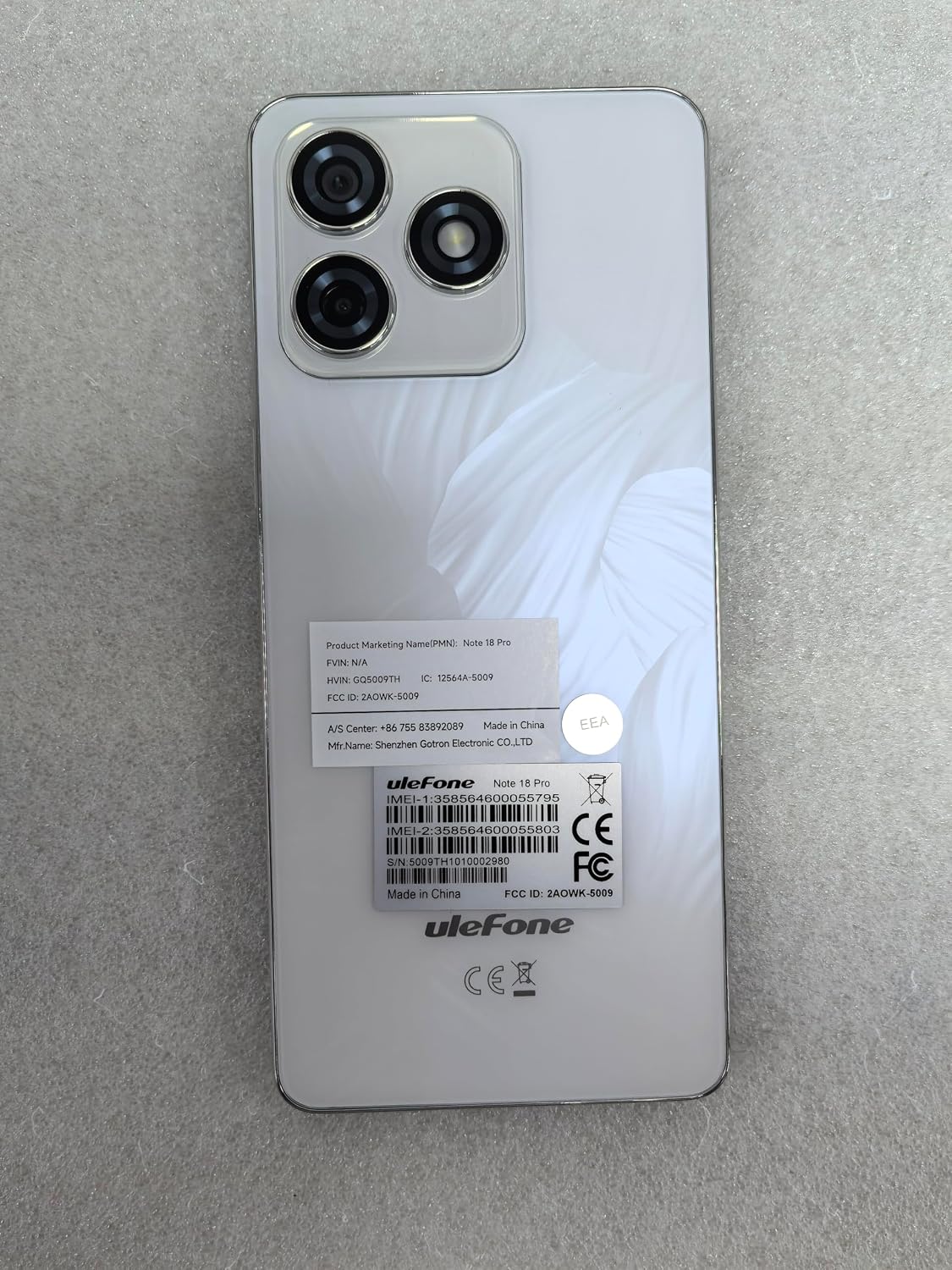
Figure 8.1: Product Information Labels
This image shows the back of the Ulefone Note 18 Pro smartphone, displaying various regulatory and product information labels. These labels include the product marketing name "Note 18 Pro", FCC ID, IC, IMEI numbers, and manufacturer details, which are important for warranty and support purposes.


