1. Prodott Aktarview
The Darmoshark M5PRO is a lightweight, tri-mode wireless gaming mouse designed for precision and versatility. It features a PAW3950 optical sensor, up to 30000 DPI, and 5 programmable buttons. The mouse supports 8K wireless, Bluetooth, and wired connections.

Image 1.1: The Darmoshark M5PRO mouse (red) and its 8K wireless receiver.

Image 1.2: Key features of the M5PRO mouse, including its sensor, polling rate, and microcontroller.
Vidjo 1.1: Overview of the Darmoshark M5PRO Wireless Gaming Mouse, showcasing its design and various color options.
2. Istruzzjonijiet ta' Setup
2.1 Iċċarġjar tal-Maws
Before initial use, ensure the mouse is fully charged. Connect the provided USB-C cable to the mouse and a power source (e.g., computer USB port, USB wall adapter). The LED indicator will show charging status.

Image 2.1: The M5PRO mouse is equipped with a 300mAh lithium battery for extended use.
2.2 Modi ta' Konnessjoni
The M5PRO mouse supports three connection modes: 8K wireless, Bluetooth, and wired USB-C.
2.2.1 8K Wireless Connection
- Connect the 8K wireless receiver to an available USB port on your computer.
- Turn on the mouse and select the 8K wireless mode using the switch on the bottom of the mouse.
- Il-maws għandu jgħaqqad awtomatikament mar-riċevitur.

Image 2.2: The 8K wireless receiver provides a high-speed connection for the M5PRO mouse.
2.2.2 Konnessjoni Bluetooth
- Turn on the mouse and select the Bluetooth mode using the switch on the bottom of the mouse.
- Fuq il-kompjuter jew l-apparat tiegħek, mur fis-settings tal-Bluetooth u fittex apparati ġodda.
- Select "Darmoshark M5PRO" from the list of available devices to pair.
2.2.3 Konnessjoni bil-Fili
- Connect the USB-C cable to the mouse and the other end to a USB port on your computer.
- Il-maws awtomatikament jaqleb għall-modalità bil-fili u jibda jiċċarġja.
3. Istruzzjonijiet Operattivi
3.1 Funzjonijiet tal-buttuni
The M5PRO mouse features 5 programmable buttons:
- Ikklikkja fuq il-buttuna tax-xellug
- Ikklikkja lemin Buttuna
- Rota tal-Iskrolljar (Tista' Tikklikkja)
- Buttuna 'l Quddiem (Fil-Ġenb)
- Buttuna lura (tal-ġenb)
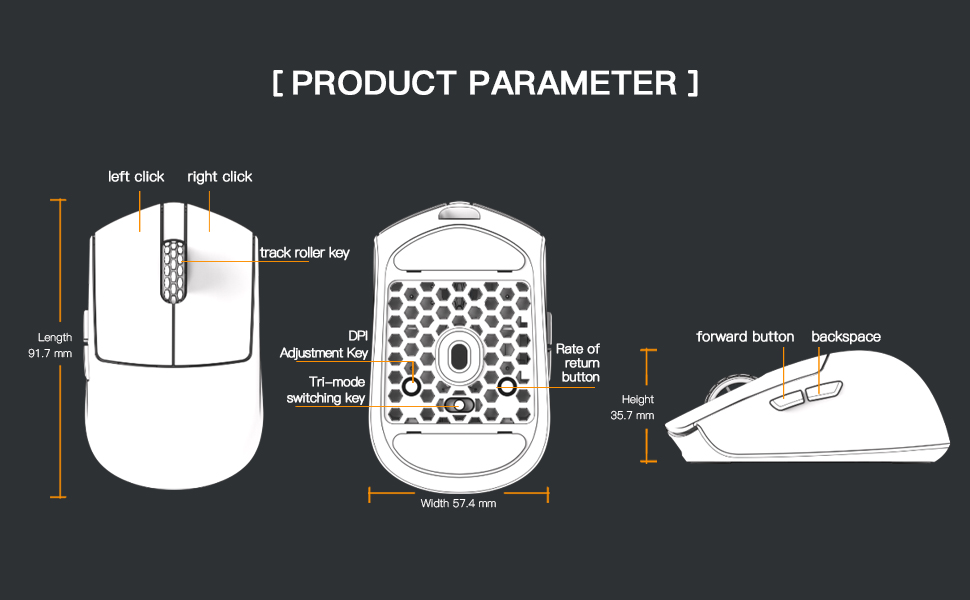
Image 3.1: Diagram illustrating the button layout and dimensions of the M5PRO mouse.
3.2 Aġġustament DPI
The DPI (Dots Per Inch) sensitivity can be adjusted using the dedicated DPI adjustment key located on the bottom of the mouse. Press the button to cycle through preset DPI levels. The current DPI level may be indicated by an LED color change (refer to software for specific mappings).
3.3 Qlib tal-Modalità
Use the switch on the bottom of the mouse to select between 8K wireless, Bluetooth, and wired modes.
3.4 Personalizzazzjoni tas-Softwer
For advanced customization, including button remapping, macro creation, and DPI fine-tuning, download the proprietary drivers from the official Darmoshark website. The software allows for personalized settings to optimize your experience.
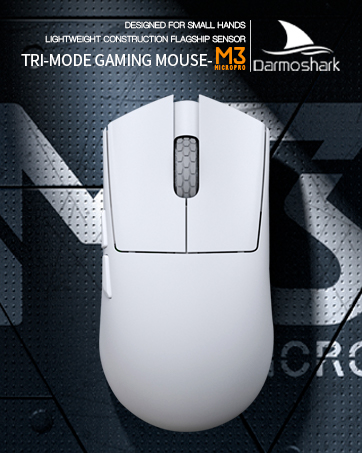
Image 3.2: The proprietary driver software allows for extensive customization of mouse settings.
4. Manutenzjoni
4.1 Tindif
Biex tnaddaf il-maws, uża drapp artab u niexef. Għal ħmieġ iebes, uża drapp ħafif.amp cloth can be used, but ensure no moisture enters the mouse. Avoid using harsh chemicals or abrasive materials.
4.2 Ħażna
Meta ma tkunx qed tużah għal perjodi twal, aħżen il-maws f'post frisk u niexef 'il bogħod mix-xemx diretta u minn temperaturi estremi. Kun żgur li l-maws ikun mitfi biex tikkonserva l-ħajja tal-batterija.

Immaġni 4.1: Splodiet view of the M5PRO mouse, highlighting its internal structure and lightweight components.
5 Issolvi l-problemi
5.1 Il-Maws Ma Jirrispondix
- Iċċekkja l-batterija: Kun żgur li l-maws huwa ċċarġjat. Qabbad permezz tal-kejbil USB-C biex jiċċarġja.
- Iċċekkja l-Konnessjoni: Verify the correct mode (8K wireless, Bluetooth, or wired) is selected on the mouse.
- Receiver/Cable: For 8K wireless, ensure the receiver is securely plugged into a working USB port. For wired, ensure the cable is properly connected.
- Erġa' qabbad il-Bluetooth: If using Bluetooth, try removing the device from your computer's Bluetooth settings and re-pairing it.
5.2 Cursor Movement Issues
- Sensor Nadif: Ensure the optical sensor on the bottom of the mouse is clean and free from debris.
- Wiċċ: Use the mouse on a suitable surface, preferably a mouse pad, for optimal tracking.
- Twaqqif DPI: Adjust the DPI sensitivity to a comfortable level.
5.3 Is-Softwer Mhux Qed Jiskopri l-Maws
- Konnessjoni bil-fili: Connect the mouse via USB-C cable to ensure the software can detect it.
- Erġa' installa s-Softwer: Try uninstalling and reinstalling the proprietary drivers.
- Aġġornament tal-Firmware: Check the Darmoshark website for any available firmware updates for the mouse.
6. Speċifikazzjonijiet
| Karatteristika | Speċifikazzjoni |
|---|---|
| Brand | Darmoshark |
| Mudell | M5PRO |
| Teknoloġija tal-Konnettività | 8K Wireless, Bluetooth, Wired (USB-C) |
| Teknoloġija ta 'Sejbien tal-Moviment | Senser Ottiku PAW3950 |
| DPI Massimu | 30000 DPI |
| Ir-Rata tal-Votazzjoni | Up to 8KHz (8K wireless mode) |
| Numru ta' Buttuni | 5 (Programmabbli) |
| Piż | Madwar 38 gramma |
| Batterija | 1 batterija tal-jone tal-litju (inkluża) |
| Kompatibilità | Windows, Apple Mac |
Image 6.1: The PAW3950 optical sensor is a core component for precise tracking.
7. Garanzija u Appoġġ
For warranty information and technical support, please refer to the official Darmoshark webis-sit jew ikkuntattja s-servizz tal-konsumatur tagħhom. Żomm il-prova tax-xiri tiegħek għal talbiet ta’ garanzija.
Darmoshark Uffiċjali Websit: Darmoshark Store


