1. Introduzzjoni
This manual provides instructions for the DROK Waterproof Battery Monitor, a versatile device designed to measure and display battery voltage, capacity, and remaining percentage. It is suitable for various battery types including lithium and lead-acid batteries, operating within an 8-100V range. This monitor is ideal for applications in motorcycles, golf carts, cars, marine vessels, RVs, boats, and solar generators.
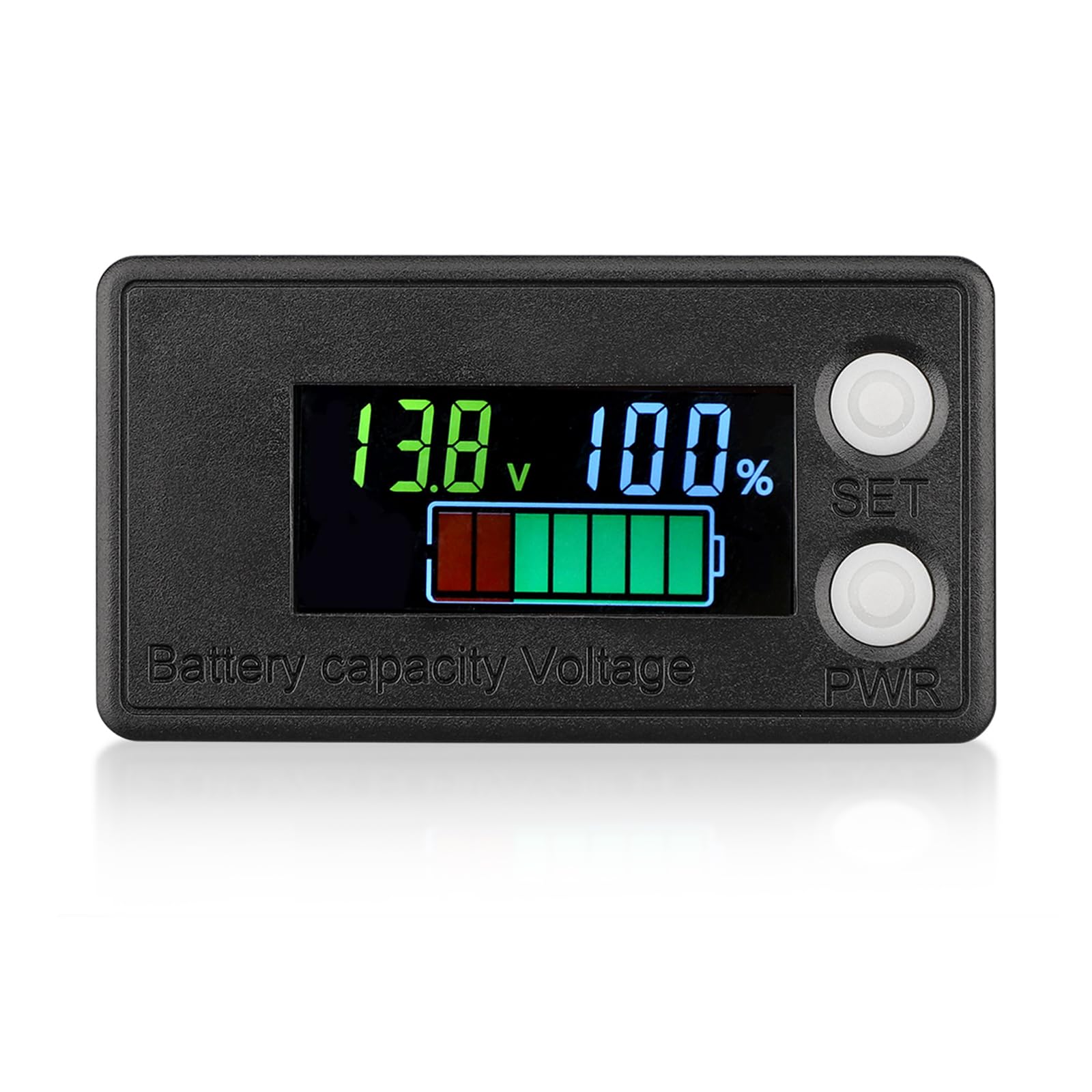
Figure 1: DROK Waterproof Battery Monitor displaying 13.8V and 100% capacity.
2. Karatteristiċi tal-prodott
- All-in-One Display: Simultaneously displays battery voltage, capacity, and remaining percentage on an upgraded LCD screen, eliminating the need to switch interfaces.
- Voltage Kompatibilità: Supports 8-100V systems, compatible with 12V, 24V, 36V, 48V, 72V, and 84V battery configurations.
- Broad Battery Type Support: Suitable for lithium batteries (ternary lithium, polymer lithium-ion), and lead-acid batteries.
- Disinn li ma jgħaddix ilma minnu: The panel is designed to protect internal components from moisture and corrosion, enhancing durability.
- Protezzjoni tal-Polarità Reverse: Safeguards the device and battery from damage due to incorrect wiring.
- Automatic Save on Power Outage: Retains settings and data even after power loss.
- Konsum ta 'Enerġija Baxxa: Efficient operation minimizes drain on the battery.
- Vol baxxtage Allarm: Provides an alert when battery voltage tinżel taħt limitu stabbilit.
- Voltage Kalibrazzjoni: Features a potentiometer on the back for precise voltagAġġustament.

Figure 2: Key features of the DROK Battery Monitor, including LCD display and various protections.
3. Istruzzjonijiet ta' Setup
3.1. Installazzjoni
- Ipprepara l-Post tal-Immuntar: Choose a suitable location for the monitor. The installation dimension is 58.5x28.5mm. Ensure adequate space behind the panel for wiring.
- Aqta' Ftuħ: Carefully cut an opening of 58.5mm x 28.5mm in the chosen panel using appropriate tools.
- Insert Monitor: Insert the DROK Battery Monitor into the cut opening.
- Monitor Sikur: Secure the monitor in place using the provided mounting mechanism or clips (if applicable).
3.2. Il-wajers
The monitor typically uses a two-wire connection for power and voltagsensing.
- Wajer Aħmar: Connect the red wire to the positive (+) terminal of the battery or power source.
- Wajer Iswed: Connect the black wire to the negative (-) terminal of the battery or power source.
Ensure connections are secure and observe reverse polarity protection. Incorrect wiring can damage the device, although the monitor has built-in protection.
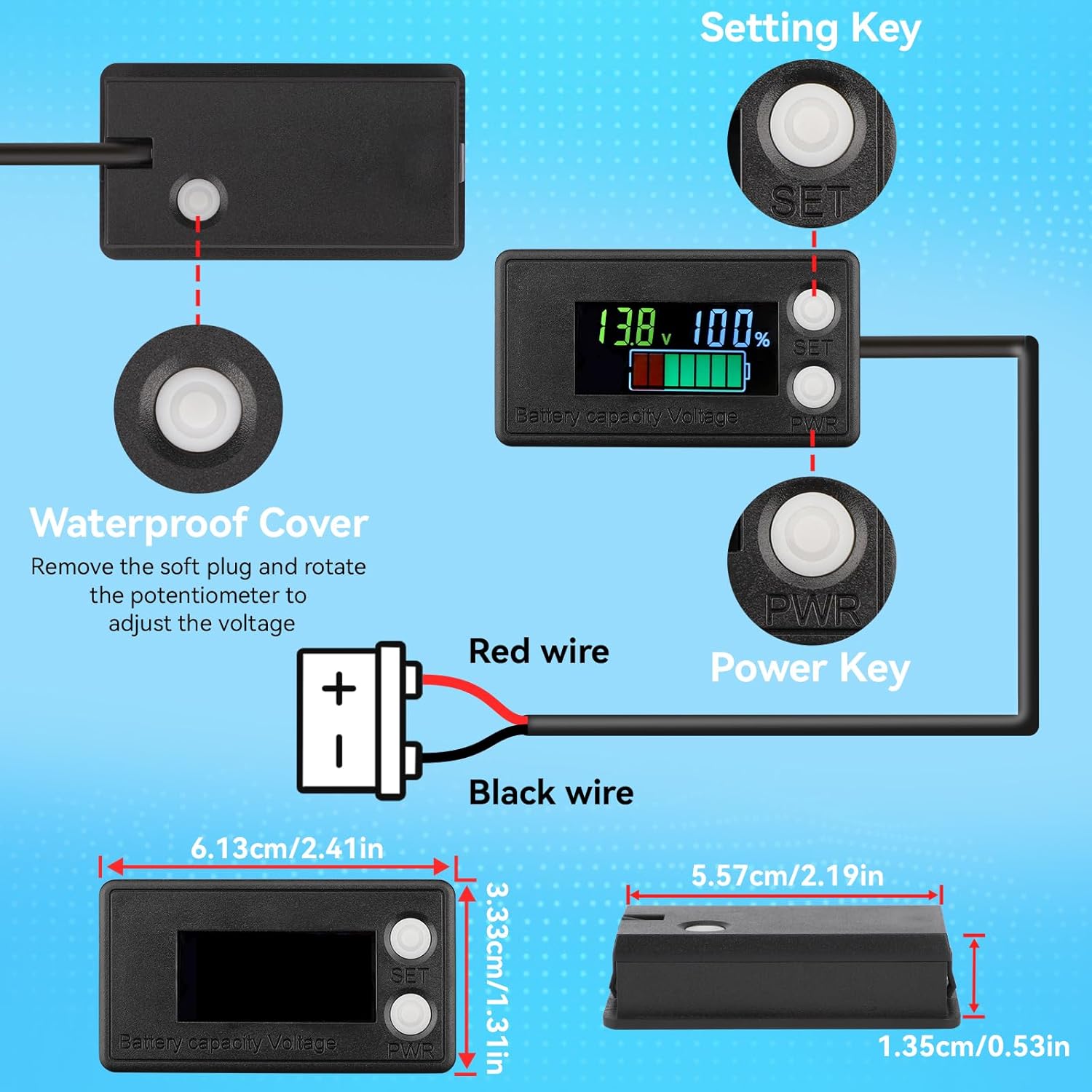
Figure 3: Wiring diagram and physical dimensions of the DROK Battery Monitor.
3.3. Titjiratage Kalibrazzjoni
For optimal accuracy, the monitor features a voltage calibration potentiometer.
- Locate Potentiometer: Remove the soft plug from the back of the monitor to access the voltage calibration potentiometer.
- Aġġusta Voltage: Using a small screwdriver, gently rotate the potentiometer to adjust the displayed voltage to match a known accurate voltage reading from a multimeter.
- Replace Plug: Once calibrated, replace the soft plug to maintain the waterproof seal.

Figure 4: Location of the voltage calibration potentiometer on the back of the monitor.
4. Istruzzjonijiet Operattivi
4.1. Tixgħil / Mitfi
- Qawwa Mixgħul: Once correctly wired, the monitor will power on automatically and display the battery status.
- Itfi: Disconnect the power supply to turn off the monitor. The device has low power consumption when idle.
4.2. Interpretazzjoni tal-Wiri
The LCD screen simultaneously displays three key parameters:
- Voltage (V): Juri l-volum attwali tal-batterijatage.
- Capacity Bar: A graphical representation of the remaining battery capacity.
- Perċenswalitage (%): Displays the remaining battery capacity as a percentage.

Figure 5: The monitor's "All in 1 Interface" displaying voltage, capacity bar, and percentage.
4.3. Setting Key (SET)
The "SET" button is used for configuration. Specific functions may vary based on firmware version. Refer to the detailed programming instructions for advanced settings, such as battery type selection or low voltage alarm thresholds. (Note: Detailed programming instructions are not provided in the product description and may require consulting the manufacturer's website or a separate guide.)
5. Manutenzjoni
- Tindif: Imsaħ id-displej u ċasing b'artab, damp drapp. Evita prodotti tat-tindif jew solventi li joborxu.
- Protezzjoni li ma jgħaddix ilma minnha: The monitor is waterproof. However, ensure the back soft plug for calibration is securely in place to maintain its waterproof integrity, especially in marine or outdoor environments.
- Kontroll tal-Konnessjoni: Periodically inspect wiring connections for corrosion or looseness to ensure stable transmission and accurate readings.
- Ħażna: If storing the device for an extended period, disconnect it from the battery.

Figure 6: The waterproof design protects internal components from moisture and corrosion.
6 Issolvi l-problemi
| Problema | Kawża Possibbli | Soluzzjoni |
|---|---|---|
| No Display / Monitor Not Powering On |
|
|
| Vol mhux preċiżtage/Capacity Reading |
|
|
| Display Flickers or is Unstable |
|
|
| Vol baxxtage Alarm Constantly Active |
|
|
7. Speċifikazzjonijiet
| Numru tal-Mudell | 517a0187-4aa5-418b-8754-c28afea22ac0 |
| Ħidma Voltage | 8-100V (12V, 24V, 36V, 48V, 72V, 84V compatible) |
| Kurrent Operattiv | ≤15mA |
| Tip ta 'Wiri | LCD Color Screen with Backlight (Multicolored/White/Blue/Green options) |
| Tip ta' Kejl | Voltmeter, Battery Capacity Meter |
| Protezzjonijiet | Waterproof, Reverse Polarity Protection, Automatic Save on Power Outage, Low Power Consumption, Low Voltage Allarm |
| Daqs tal-Prodott | 61.3mm x 33.3mm x 13.5mm (2.41in x 1.31in x 0.53in) |
| Dimensjoni tal-Installazzjoni | 58.5mm x 28.5mm |
| Piż tal-oġġett | 36 g |
| Komponenti Inklużi | 1x Battery Meter |

Figure 7: Wide application of the DROK Battery Monitor across different battery types and vehicles.
8. Garanzija u Appoġġ
8.1. Informazzjoni dwar Garanzija
Specific warranty details for the DROK Waterproof Battery Monitor are typically provided at the point of purchase or on the manufacturer's official website. Please retain your proof of purchase for warranty claims. The warranty generally covers manufacturing defects under normal use conditions.
8.2. Appoġġ għall-Klijent
For technical assistance, troubleshooting not covered in this manual, or warranty inquiries, please contact DROK customer support. Refer to the packaging or the official DROK webis-sit għall-aktar informazzjoni ta' kuntatt aġġornata.
Riżorsi onlajn: Visit the official DROK websit għal aġġornamenti tal-prodott, FAQs, u dokumentazzjoni ta' appoġġ addizzjonali.


