Introduzzjoni
Thank you for choosing the Ourlife Mini Drone. This drone is equipped with dual 4K cameras, offering high-quality photo and video capture, and can be controlled via a smartphone app for real-time viewing. Designed for ease of use, it features one-button takeoff/landing, altitude hold, headless mode, and gesture control, making it suitable for beginners and enthusiasts alike. Its compact, foldable design ensures portability for all your adventures. Please read this manual carefully before operation to ensure safe and optimal performance.
Linji Gwida dwar is-Sigurtà
Always prioritize safety when operating your drone. Failure to follow these guidelines may result in injury, damage to property, or legal issues.
- Aqra l-Manwal: Fully understand all instructions and warnings before first flight.
- Spazju Miftuħ: Always fly in open, unobstructed areas, away from people, animals, buildings, and power lines. Avoid flying in strong winds.
- Linja tal-Vista: Żomm il-linja viżwali tad-drone f'kull ħin.
- Sigurtà tal-batterija: Use only original batteries and charging cables. Do not overcharge or short-circuit batteries. Discontinue use if batteries are damaged or swollen.
- Sigurtà tal-Iskrun: Keep fingers, hair, and loose clothing away from rotating propellers. Always turn off the drone before handling propellers.
- Restrizzjoni tal-Età: Dan il-prodott huwa rakkomandat għal utenti ta' 14-il sena 'l fuq.
- Konformità Legali: Be aware of and comply with local laws and regulations regarding drone operation.
Kontenut tal-Pakkett
Ivverifika li l-oġġetti kollha huma preżenti fil-pakkett tiegħek:

Image: Contents of the Ourlife Mini Drone package, showing the drone, remote control, two rechargeable batteries, a screwdriver, four protective frames, four main propellers, a USB charging cable, and an instruction manual.
- Ourlife Mini Drone x 1
- Kontroll mill-bogħod x 1
- Rechargeable Drone Battery x 2
- Tornavit x 1
- Protective Frame x 4
- Main Propeller x 4 (spare)
- Cable tal-Iċċarġjar tal-USB x 1
- Manwal ta' Istruzzjoni x 1
Note: The remote control requires 3 AAA batteries, which are not included.
Prodott Overview
Familiarize yourself with the drone and remote control components.

Image: The Ourlife Mini Drone in its unfolded state, alongside its remote control, two drone batteries, and the drone in its folded, compact form.
Komponenti tad-drone
- Dirgħajn li jintwew: Għal ħażna kompatta u portabbiltà.
- Skrejjen: Erba' skrejjen ewlenin għat-titjira.
- Kameras Doppju: Front 4K camera (120° adjustable) and bottom optical flow lens for stable flight and diverse shooting angles.
- Kompartiment tal-batterija: Located at the rear of the drone.
- Dwal LED: Indicate drone status and orientation.

Immaġni: Close-up view of the Ourlife Mini Drone's dual camera system, highlighting the adjustable front camera and the lower lens for stable flight. The front camera can be adjusted by 120 degrees.
Layout tal-Kontroll mill-bogħod
- Joystick tax-Xellug: Jikkontrolla l-altitudni ('il fuq/'l isfel) u r-rotazzjoni (xellug/lemin).
- Joystick tal-lemin: Jikkontrolla l-moviment 'il quddiem/lura u lejn ix-xellug/il-lemin.
- Buttuna tat-Tluq/Inżul b'Ċavetta Waħda: Jibda t-tluq jew l-inżul awtomatiku.
- Buttuna tal-Modalità Bla Ras: Activates/deactivates headless mode.
- Buttuna tal-Iswiċċ tal-Veloċità: Toggles between different flight speeds (low, medium, high).
- Buttuna li ddur 360°: Executes a 360-degree flip.
- Detentur tat-Telefown: For mounting your smartphone to view FPV feed.
Setup
1. Iċċarġjar tal-Batterija tad-Drone
- Qabbad il-kejbil tal-iċċarġjar USB mal-batterija tad-drone.
- Plug the USB end into a 5V/1A USB adapter (not included) or a computer USB port.
- The indicator light on the cable will show charging status. It will turn off or change color when fully charged.
2. Installazzjoni tal-Batterija tad-Drone
- Kun żgur li d-drone huwa mitfi.
- Insert the charged battery into the battery compartment at the rear of the drone until it clicks into place.
3. Installazzjoni ta 'batteriji tal-kontroll mill-bogħod
- Iftaħ il-kompartiment tal-batterija fuq wara tal-kontroll remot.
- Daħħal 3 batteriji AAA (mhux inklużi) skont il-marki tal-polarità.
- Agħlaq l-għatu tal-kompartiment tal-batterija sew.
4. Twaħħil tal-Gwardji tal-Iskrun
- Carefully attach the four protective frames to each motor arm of the drone.
- Ensure they are securely fastened to prevent detachment during flight.
5. App Installation (KY UFO)
- Scan the QR code provided in the manual or search for "KY UFO" in your smartphone's app store (App Store for iOS, Google Play for Android).
- Niżżel u installa l-applikazzjoni.
- Turn on the drone, then go to your phone's Wi-Fi settings and connect to the drone's Wi-Fi network (usually named "KY-UFO-XXXXXX").
- Open the KY UFO app to access the real-time FPV feed and advanced controls.
Istruzzjonijiet Operattivi
1. It-tqabbil tad-Drone u l-Kontroll mill-Bogħod
- Poġġi d-drone fuq wiċċ ċatt u livell.
- Ixgħel is-swiċċ tal-enerġija tad-drone. Id-dwal indikatur tad-drone se jteptpu.
- Ixgħel il-kontroll mill-bogħod.
- Push the left joystick all the way up, then pull it all the way down. The drone's lights will stop flashing and remain solid, indicating successful pairing.
2. Kontrolli Bażiċi tat-Titjira
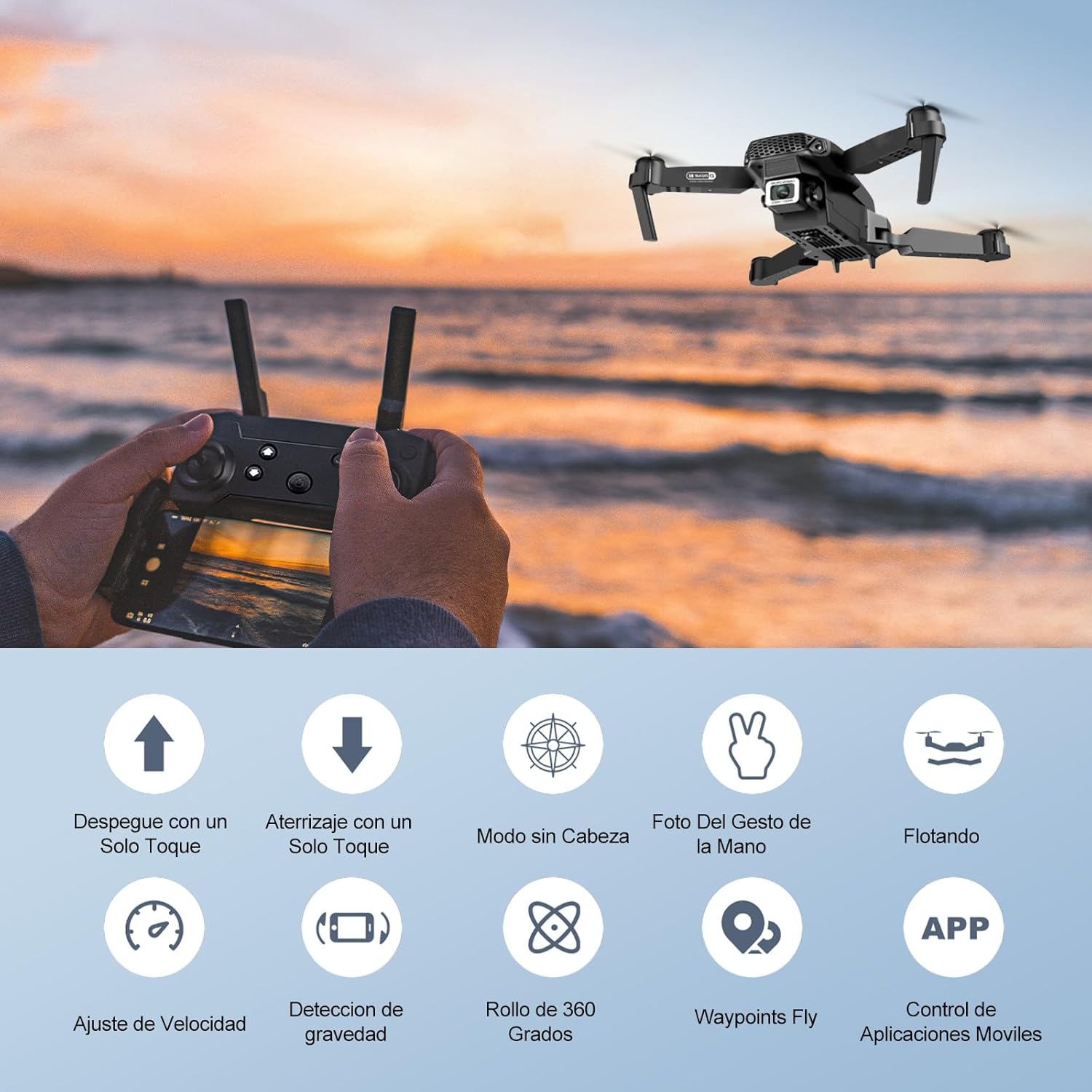
Image: Icons representing various flight features: One-touch takeoff, One-touch landing, Headless Mode, Hand Gesture Photo, Floating (Altitude Hold), Speed Adjustment, Gravity Detection, 360 Degree Roll, Waypoints Fly, and APP Control.
- Tluq b'Ċavetta Waħda: Agħfas il- Tluq/Inżul b'Ċavetta Waħda button. The drone will automatically ascend and hover at a certain altitude.
- Inżul b'ċavetta waħda: Agħfas il- Tluq/Inżul b'Ċavetta Waħda button again. The drone will automatically descend and land.
- Żamma tal-Altitudni: The drone maintains its current altitude automatically, allowing for stable hovering.
- Joystick tax-Xellug (Throttle/Yaw):
- Imbotta 'l fuq/'l isfel: Żid/tnaqqas l-altitudni.
- Push left/right: Rotate drone left/right.
- Right Joystick (Forward/Backward/Sideways):
- Push up/down: Fly forward/backward.
- Push left/right: Fly left/right (strafe).

Image: The Ourlife Mini Drone taking off or landing with a single button press, illustrating the ease of use for beginners.
3. Karatteristiċi Avvanzati tat-Titjira
- Modalità bla ras: Agħfas il- Modalità bla ras button. In this mode, the drone's orientation is relative to the pilot, regardless of the drone's actual front. This simplifies control, especially for beginners.
- Flip 360°: Fly the drone to a height of at least 2 meters. Press the Flip 360 ° button, then push the right joystick in any direction to perform a flip in that direction.
- Gesture Control (Photos/Videos): With the KY UFO app open, make specific hand gestures in front of the drone's camera to trigger photo or video recording.
- "V" Gesture: Triggers photo capture.
- Ġest tal-palm: Triggers video recording.
- Titjira Waypoint: In the KY UFO app, draw a desired flight path on your smartphone screen. The drone will automatically follow this path.
- Aġġustament tal-veloċità: Agħfas il- Swiċċ tal-veloċità button to cycle through low, medium, and high-speed modes. Adjust according to your skill level and environmental conditions.
- FPV Real-Time Transmission: Connect your smartphone to the drone's Wi-Fi. Open the KY UFO app to view live video feed from the drone's camera on your phone screen.
- Induzzjoni tal-Gravità: In the KY UFO app, activate gravity induction mode. You can then control the drone's movement by tilting your smartphone.

Image: The Ourlife Mini Drone performing a 360-degree flip in the air and demonstrating the Waypoints Fly feature, where the drone follows a pre-drawn path.

Image: Demonstrates 1080P FPV Real-Time Transmission, showing a live view from the drone. Also illustrates gesture control for taking photos (V-sign) and recording videos (palm gesture), and the 120-degree adjustable camera angle.
Manutenzjoni
- Tindif: Uża drapp artab u niexef biex tnaddaf id-drone u l-kontroll remot. Tużax kimiċi jew solventi ħarxa.
- Sostituzzjoni tal-iskrun: If propellers are damaged, replace them with spare ones provided. Ensure correct propeller (A or B) is installed on the corresponding motor.
- Kura tal-batterija: Aħżen il-batteriji f'post frisk u niexef. Taħżinx batteriji ċċarġjati kompletament jew kompletament skaduti għal perjodi twal. Iċċarġjahom sa madwar 50% għal ħażna fit-tul.
- Ħażna: When not in use, store the drone and its accessories in a safe, dry place, away from direct sunlight and extreme temperatures.
Issolvi l-problemi
| Problema | Kawża Possibbli | Soluzzjoni |
|---|---|---|
| Id-drone ma jirrispondix għall-kontroll mill-bogħod. | Mhux imqabbad; batterija baxxa (drone/remote); interferenza. | Re-pair drone and remote. Charge batteries. Move to an area with less interference. |
| Id-drone jittajjar waqt it-titjira. | Mhux kalibrat; wiċċ irregolari fit-tluq; riħ. | Calibrate the gyroscope (refer to app instructions). Take off from a flat surface. Avoid flying in windy conditions. |
| Camera feed is not showing in app. | Mhux konness mal-Wi-Fi tad-drone; problema bl-app. | Ensure phone is connected to the drone's Wi-Fi network. Restart the app and drone. |
| Ħin qasir tat-titjira. | Il-batterija mhix iċċarġjata għalkollox; batterija qadima. | Ensure battery is fully charged before flight. Consider replacing old batteries. |
| Drone crashes easily. | Lack of experience; strong wind; damaged propellers. | Practice in open areas. Avoid strong winds. Replace damaged propellers. |
Speċifikazzjonijiet

Image: Diagram showing the dimensions of the Ourlife Mini Drone (unfolded and folded) and its remote control in inches.
| Karatteristika | Dettall |
|---|---|
| Brand | Ourlife |
| Numru tal-Mudell | AF-E88-BK |
| Piż tal-Prodott | 430 g (madwar 0.95 libbra) |
| Dimensjonijiet tal-Prodott (Espansi) | 28 x 22 x 5 ċm (madwar 11 x 8.7 x 2 pulzieri) |
| Dimensjonijiet tal-Prodott (Mitwija) | 12.5 x 8.1 x 5.3 ċm (madwar 4.9 x 3.2 x 2.1 pulzieri) |
| Tip ta 'batterija | Jonju tal-litju (2 inkluża) |
| Riżoluzzjoni tal-Qbid tal-Vidjo | 4K (Dual Cameras) |
| Teknoloġija tal-Konnettività | Wi-Fi |
| Metodu ta' Kontroll | Kontroll mill-bogħod, App tal-ismartphone |
| Kulur | Iswed |
Garanzija u Appoġġ
Ourlife provides post-sale warranty support for this product. If you encounter any issues with the drone, remote control, or the KY UFO application during flight or operation, please do not hesitate to contact the seller directly for assistance.
For optimal performance and to minimize potential issues, it is recommended to conduct initial flight tests in an open space, especially when using the propeller protectors. Please note that wind interference may occur when operating outdoors.


