1. Prodott Aktarview
The Mobvoi Treadmill Ultra is a versatile 3-in-1 fitness device designed for walking, workstation use, and running. It features a powerful 2.5 HP motor, a 6% manual incline option, and an extended running surface for enhanced comfort. Integrated smart features allow for app control and virtual training experiences.

Figure 1: Mobvoi Treadmill Ultra in running mode.
Karatteristiċi ewlenin:
- Funzjonalità 3-in-1: Supports walking, workstation use, and running modes.
- Inklinazzjoni aġġustabbli: Manual 6% incline for varied workout intensity.
- Extended Running Surface: 42 x 102 cm for comfortable movement.
- Quiet and Powerful Motor: 2.5 HP motor with less than 60 dB noise output.
- Assorbiment ta' Xokk: 5-layer belt design protects joints.
- Kontroll intelliġenti: LED display, shortcut buttons, and app connectivity (ZWIFT, Kinomap).
2. Kontenut tal-Pakkett
Before assembly, please verify that all components are present in the package:
- Treadmill x1
- Safety Key x1
- Manwal għall-Utent x1
- Tool Kit x1 (includes open wrench, L-keys 5mm and 6mm, M8*12 hexagonal head screws x2, flat washers x2)
- Footrests x4
- Anti-slip Mat x1
- Cup Holder x1
- Żejt Lubrikanti x1
- Power Cord (5.9 feet) x1

Figure 2: All accessories included in the Mobvoi Treadmill Ultra package.
3. Setup u Assemblea
The Mobvoi Treadmill Ultra is designed for straightforward assembly. Follow these steps to prepare your treadmill for use:
- Spakkjar: Neħħi bir-reqqa l-komponenti kollha mill-imballaġġ.
- Pożizzjonament: Poġġi t-treadmill fuq wiċċ ċatt u stabbli. Kun żgur li hemm biżżejjed spazju madwar l-unità għal tħaddim sikur.
- Tiżvolġi (jekk applikabbli): If the treadmill is in a folded position, gently lift the console arm and secure it into the upright position. Refer to the specific instructions in the included User Manual for detailed folding/unfolding mechanisms, as some models may require loosening screws.
- Twaħħil Aċċessorji:
- Attach the cup holder to its designated slot on the console.
- Place the anti-slip mat under the treadmill if desired for floor protection.
- Konnessjoni tal-Enerġija: Connect the power cord to the treadmill and then to a grounded electrical outlet.
- Ċavetta tas-Sigurtà: Always attach the safety key to the console and clip the other end to your clothing before starting any workout.
- Lubrikazzjoni: Apply the provided lubricating oil to the running belt as instructed in the detailed user manual to ensure smooth operation and longevity.

Figure 3: Initial setup of the Mobvoi Treadmill Ultra.
4. Istruzzjonijiet Operattivi
4.1. Modi ta' Operazzjoni
The Mobvoi Treadmill Ultra offers three distinct modes to suit your fitness needs:
- Modalità Mixi: Speed range of 1 to 6 km/h. Ideal for light exercise or warm-ups.
- Workstation Mode: Speed range of 1 to 6 km/h. Designed for use while working, allowing for light activity.
- Mod ta 'Ġiri: Speed range of 1 to 12 km/h. Suitable for jogging and running workouts.

Figure 4: The three operational modes of the Mobvoi Treadmill Ultra.
4.2. Console Controls and Display
The treadmill's console provides intuitive control and real-time feedback:
- Wiri LED: Shows current speed, duration, distance, and calories burned, cycling every 5 seconds.
- Aġġustament tal-veloċità: Use the '+' and '-' buttons to fine-tune your speed.
- Buttuni ta' shortcut: Quickly adjust speed to 1 km/h or 6 km/h using dedicated shortcut buttons.
- Ibda/Waqqaf/Pawża: Control your workout with the dedicated start, stop, and pause buttons.
- Speaker Bluetooth: Connect your device via Bluetooth to play audio through the integrated speakers.
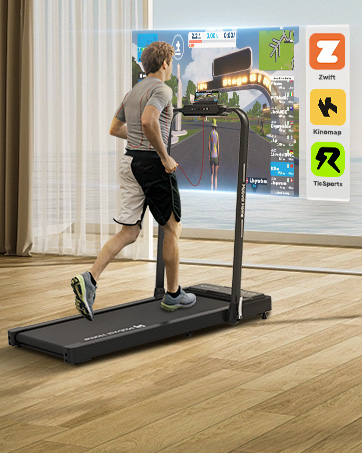
Figura 5: Dettaljat view tal-pannell tal-kontroll u d-displej.
4.3. Incline Adjustment
The treadmill features a manual 6% incline option. To engage the incline, you will need to adjust the support feet located at the rear of the treadmill. Refer to the detailed user manual for specific instructions on how to safely raise and lower the incline feet. Always ensure the treadmill is stable before use after adjusting the incline.

Figure 6: Visual representation of the 6% manual incline feature.
4.4. Virtual Training Integration
Enhance your workout experience by connecting your Mobvoi Treadmill Ultra to popular virtual training platforms:
- ZWIFT and Kinomap: Connect seamlessly via your smart device to access a variety of virtual running courses and competitive challenges.
- TicSports AI Coach: Utilize the TicSports app for personalized daily agendas and data-driven recommendations to optimize your performance.

Figure 7: Virtual training integration with ZWIFT, Kinomap, and TicSports.
5. Manutenzjoni
Regular maintenance ensures the longevity and optimal performance of your Mobvoi Treadmill Ultra:
- Lubrikazzjoni taċ-Ċinturin: Periodically lubricate the running belt with the provided oil to reduce friction and wear. Refer to the user manual for frequency and application instructions.
- Tindif: Imsaħ l-uċuħ tat-treadmill b'reklamiamp Ċarruta wara kull użu biex tneħħi l-għaraq u t-trab. Evita prodotti tat-tindif li joborxu.
- Tensjoni u Allinjament taċ-Ċinturin: Check the running belt tension and alignment regularly. Adjust as needed according to the instructions in the user manual to prevent slippage or uneven wear.
- Ħażna: When not in use, the treadmill can be folded for compact storage. Ensure it is securely folded to prevent accidental unfolding.

Figure 8: The 5-layer shock-absorbing running belt design.
6 Issolvi l-problemi
If you encounter any issues with your Mobvoi Treadmill Ultra, refer to the following common troubleshooting tips:
| Problema | Kawża Possibbli | Soluzzjoni |
|---|---|---|
| It-treadmill ma jibdax. | Il-korda tal-enerġija mhux imqabbda, iċ-ċavetta tas-sigurtà mhux f'postha, is-swiċċ tal-enerġija mitfi. | Ensure power cord is securely plugged in, safety key is correctly inserted, and power switch is on. |
| Iċ-ċinturin tal-ġiri jiżloq jew joqgħod lura. | Ċinturin laxk wisq, lubrikazzjoni insuffiċjenti. | Adjust belt tension (refer to manual), apply lubricating oil. |
| Storbju mhux tas-soltu waqt it-tħaddim. | Loose components, belt friction, motor issue. | Check for loose screws, lubricate belt. If noise persists, contact customer support. |
| Il-wiri ma jaħdimx sew. | Loose connection, electronic malfunction. | Ensure all connections are secure. If problem continues, contact customer support. |
For issues not listed here or if solutions do not resolve the problem, please contact Mobvoi customer support.
7. Speċifikazzjonijiet
Detailed technical specifications for the Mobvoi Treadmill Ultra:
- Numru tal-Mudell: Treadmill Ultra
- Ditta: Mobvoi
- Kulur: Iswed
- Materjal: Stainless Steel (frame material: Aluminum)
- Qawwa tal-Mutur: 2.5 HP
- Firxa tal-veloċità: 1 - 12 km/siegħa
- Tinklina: Manual 6%
- Running Surface Dimensions (L x W): 102 ċm x 42 ċm
- Dimensjonijiet tal-Prodott (L x W x H): 130 ċm x 60 ċm x 110 ċm
- Piż tal-oġġett: 25 kg
- Piż Massimu tal-Utent: 120 kg
- Tip ta' wiri: LED (12 Centimeters)
- Sors tal-Enerġija: Corded Elettriku
- Karatteristiċi: Compact design, integrated Bluetooth speaker.
- Komponenti Inklużi: Treadmill, Safety Key, User Manual, Tool Kit.

Figure 9: Dimensions of the extended running surface.

Figure 10: Motor specifications and noise level.
8. Garanzija u Appoġġ
The Mobvoi Treadmill Ultra comes with a garanzija ta 'sena. For any questions, technical assistance, or warranty claims, please contact Mobvoi customer support. Keep your proof of purchase for warranty validation.
For further assistance, please refer to the official Mobvoi websit jew ikkuntattja lid-dipartiment tas-servizz tal-konsumatur tagħhom.


