1. Introduzzjoni
Grazzi tax-xiriasing the Homary Modern Narrow White Nightstand. This manual provides detailed instructions for assembly, operation, maintenance, and troubleshooting to ensure safe and efficient use of your new nightstand. Please read this manual thoroughly before assembly and use, and retain it for future reference.

Image 1: Homary Modern Narrow White Nightstand, showcasing its design and features like the USB port and sensor light.
2. Informazzjoni dwar is-Sigurtà
Caution: This product requires assembly. Follow the instructions carefully to avoid injury.
- Dejjem arma l-prodott fuq wiċċ artab u nadif biex tevita l-grif.
- Kun żgur li l-viti u l-qafliet kollha huma ssikkati sew qabel l-użu.
- Tgħabbix iżżejjed il-kxaxen jew l-ixkafef.
- Żomm partijiet żgħar 'il bogħod mit-tfal waqt l-assemblaġġ.
- Toqgħodx bilwieqfa jew titlax fuq il-komodina.
- Disconnect from power outlet before cleaning or moving the unit.
3. Kontenut tal-Pakkett
Qabel tibda l-assemblaġġ, ivverifika li l-partijiet kollha elenkati hawn taħt huma preżenti u mhux imħassra. Jekk xi partijiet huma nieqsa jew imħassra, jekk jogħġbok ikkuntattja l-appoġġ għall-klijenti.
- Nightstand panels (top, bottom, sides, back)
- Komponenti tal-kexxun (quddiem, wara, ġnub, qiegħ)
- Slajds tal-kexxun
- Modulu tal-iċċarġjar tal-USB
- Sensor light module
- Nightlight module
- Hardware pack (screws, dowels, cam locks, etc.)
- Wheels (pre-installed or separate)
- Manwal ta' struzzjonijiet
4. Istruzzjonijiet tal-Assemblea
Assembly typically requires two people. Please follow the step-by-step diagrams provided in the separate assembly guide included in your package. The following tools are recommended for assembly:
- Allen Key (often included)
- Martell
- Tornavit (ras Phillips)
- Wrench
Passi tal-Assemblea Ġenerali:
- Iftaħ il-komponenti kollha mill-pakkett u vverifika mal-lista tal-partijiet.
- Attach drawer slides to the side panels of the nightstand.
- Assemble the main frame of the nightstand (side panels, top, bottom, back).
- Assemble the drawers and install them onto the drawer slides.
- Install the USB charging module into the designated slot on the top panel.
- Install the sensor light module within the drawer area.
- Install the nightlight module on the top surface.
- Connect all electrical components as per the wiring diagram in the assembly guide.
- Ensure all connections are secure and all fasteners are tightened.
5. Istruzzjonijiet Operattivi
5.1. Port tal-Iċċarġjar tal-USB
The nightstand is equipped with a built-in USB charging station. To use:
- Plug the nightstand's main power cord into a standard wall outlet.
- Connect your electronic devices (e.g., smartphone, tablet) to the USB ports using their respective charging cables.
- Ensure devices are charging correctly.

Image 2: Close-up of the nightstand's top surface showing a smartphone charging via the integrated USB port.
5.2. Sensor Light for Drawers
The drawers feature an automatic sensor light that illuminates when the drawer is opened, providing visibility for stored items.
- The sensor light activates automatically when the drawer is pulled open.
- The light will turn off automatically when the drawer is closed.
- No manual operation is required for the drawer sensor light.

Image 3: An open drawer of the nightstand, showing the sensor light illuminating the interior.
5.3. Top Nightlight with Switch
A nightlight is integrated into the top surface of the nightstand, providing a gentle ambient glow. It is operated by a manual switch.
- Locate the switch on the nightlight module on the top surface.
- Press the switch to turn the nightlight ON or OFF.

Image 4: Illustration of both the top nightlight with its switch and the sensor light within the drawer.
6. Manutenzjoni
- Tindif: Imsaħ l-uċuħ b'artab, damp drapp. Evita kimiċi ħarxa jew prodotti tat-tindif li joborxu.
- It-tfarfir: Naddaf it-trab regolarment b'ċarruta niexfa u ratba.
- Tixrid: Immediately wipe up any spills to prevent staining, especially on the wood surfaces. The product is not stain resistant.
- Qafliet: Iċċekkja l-viti u l-qafliet kollha perjodikament biex tiżgura li jibqgħu ssikkati. Erġa' ssikka jekk meħtieġ.
- Komponenti elettriċi: Ensure the power cord and USB ports are free from damage. Do not attempt to repair electrical components yourself.
7 Issolvi l-problemi
| Problema | Kawża Possibbli | Soluzzjoni |
|---|---|---|
| Il-portijiet USB mhux qed jiċċarġjaw. |
|
|
| Drawer sensor light not working. |
|
|
| Top nightlight not turning on. |
|
|
| Drawers are stiff or difficult to open/close. |
|
|
8. Speċifikazzjonijiet
| Karatteristika | Dettall |
|---|---|
| Brand | awwisti |
| Numru tal-Mudell | JJ763B905B |
| Dimensjonijiet (W x D x H) | 17W x 17D x 23H inches (Approx. 43.2W x 43.2D x 58.4H cm) |
| Materjal tal-qafas | Injam |
| Tip ta 'Materjal ta' Fuq | Injam |
| Kulur | White (Off-White) |
| Numru ta 'Kxaxen | 2 |
| Karatteristiċi tal-Iċċarġjar | Port USB inkorporat |
| Karatteristiċi tad-Dawl | Sensor Light for Drawers, Top Nightlight with Switch |
| Mobilità | Hidden Wheels for Smooth Movement |
| Sostenibbiltà | Injam iċċertifikat mill-FSC |
| Reżistenti għat-Tbajja ' | Nru |
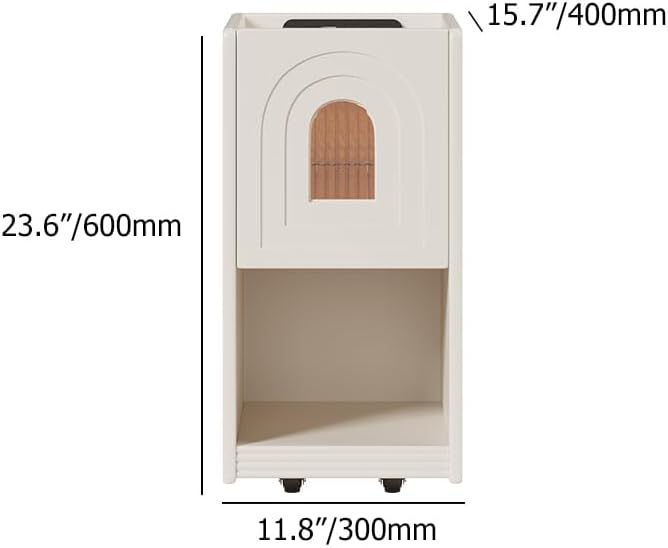
Image 5: Diagram illustrating the dimensions of the nightstand (23.6" H x 11.8" W x 15.7" D).

Immaġni 6: Mill-qrib view of the hidden wheels at the base of the nightstand, indicating easy mobility.
9. Garanzija u Appoġġ
Homary products are designed for quality and durability. For warranty information, please refer to the warranty card included with your product or visit the official Homary website. For any questions, missing parts, or technical support, please contact Homary customer service:
- Email: service@homary.com
- Ħin tas-Servizz: Reply within 24 hours (excluding public holidays).
- Please provide your order number when contacting customer service.


