Introduzzjoni
This manual provides essential information for the safe and efficient operation of your VONYX VMA106 6-Channel Powered PA Mixer. Please read these instructions carefully before use and retain them for future reference.
The VMA106 is a versatile 6-channel powered mixer designed for live performances, public speaking, and various audio applications. It features an integrated Class D amplifier, wireless microphones, Bluetooth connectivity, and a USB MP3 player, all housed in a durable ABS casing.
Istruzzjonijiet tas-Sigurtà
- Tiżgura l-provvista tal-enerġija voltage jaqbel mal-klassifikazzjoni fuq l-unità.
- Tesponix l-unità għax-xita jew għall-umdità biex tevita xokk elettriku.
- Evita li tpoġġi l-unità ħdejn sorsi ta’ sħana jew fid-dawl tax-xemx dirett.
- Tiftaħx is-casing; irreferi s-servizz kollu lil persunal kwalifikat.
- Disconnect the power cord before cleaning or if the unit will not be used for an extended period.
- Uża biss aċċessorji speċifikati mill-manifattur.
Kontenut tal-Pakkett
Ivverifika li l-oġġetti kollha huma preżenti u f'kundizzjoni tajba:
- VONYX VMA106 Powered PA Mixer
- 2x UHF Wireless Handheld Microphones
- Kejbil tal-Enerġija
- Manwal għall-Utent (dan id-dokument)
Prodott Overview

Figure 1: VONYX VMA106 Powered PA Mixer in its durable ABS case, showcasing the mixer unit and the two included wireless microphones.

Figura 2: Dettaljat view of the VMA106 mixer's control panel, including channel faders, EQ knobs, and the integrated media player. The two wireless microphones are securely stored in their dedicated compartments within the case.
Front Panel Controls and Connections:
- Channels 1-4 (MIC/INST): Combo Jack/XLR inputs for microphones, instruments, or line-level signals. Each channel includes gain, high, low, pan, and FX controls.
- Kanali 5-6: Stereo input for line-level devices.
- Riżultat Prinċipali: Stereo balanced outputs for connecting to external PA speakers.
- Media Player: Integrated USB MP3 player and Bluetooth receiver with display and control buttons.
- Wireless Microphone Receivers: Built-in UHF receivers for the included wireless microphones.
- Kontrolli ewlenin: Volume controls for main output, FX send, and media player.

Figure 3: The two UHF wireless handheld microphones included with the VMA106 mixer, featuring power switches and VONYX branding.
Konnessjonijiet tal-Panew ta' wara:
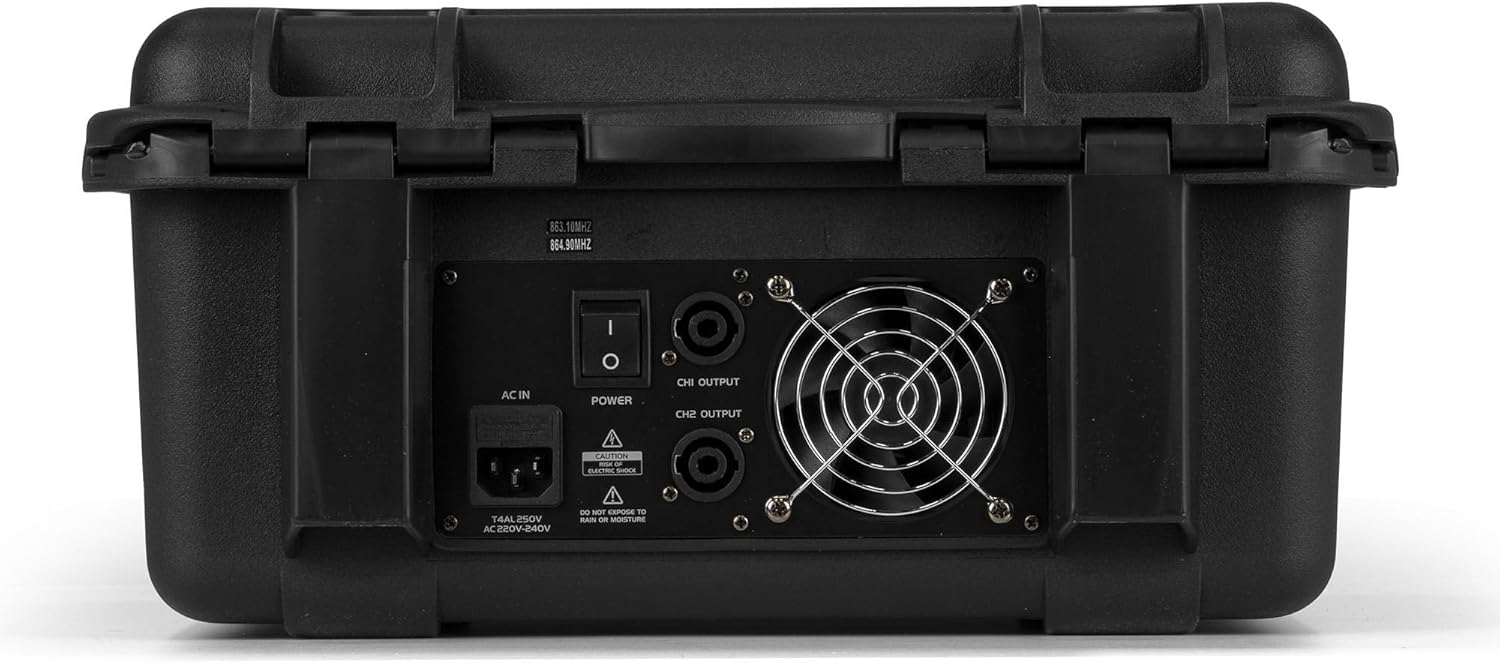
Figure 4: Rear panel of the VMA106 mixer, displaying the AC power input, main power switch, and CH1/CH2 speaker outputs. Safety warnings regarding electric shock and moisture are also visible.
- AC IN: Power input for the included power cable.
- Swiċċ POWER: Main power on/off switch.
- CH1/CH2 OUTPUT: Speaker outputs for connecting passive PA speakers.
Setup
- Pjazzament: Place the mixer on a stable, flat surface, ensuring adequate ventilation around the unit.
- Konnessjoni tal-Enerġija: Connect the supplied power cable to the AC IN port on the rear panel and then to a suitable power outlet. Ensure the POWER switch is in the OFF position before connecting.
- Konnessjoni tal-Ispeaker: Connect your passive PA speakers to the CH1 OUTPUT and CH2 OUTPUT ports on the rear panel using appropriate speaker cables. Ensure correct polarity.
- Apparat tad-dħul:
- Mikrofoni/Strumenti: Connect wired microphones or instruments to the Combo Jack/XLR inputs on Channels 1-4.
- Apparati fil-Livell tal-Linja: Connect line-level sources (e.g., keyboards, media players) to Channels 1-6.
- Mikrofoni bla fili: Insert batteries into the wireless microphones. Ensure they are switched off during initial setup.
- Qawwa Inizjali Mixgħula: Once all connections are secure, switch the POWER button to the ON position.
Istruzzjonijiet Operattivi
Basic Mixing:
- Qligħ tal-Kanal: Adjust the GAIN knob for each input channel to achieve an optimal input level without clipping (indicated by the PEAK LED).
- Ekwalizzazzjoni (EQ): Use the HIGH and LOW knobs on each channel to adjust the treble and bass frequencies.
- Ħobż: Adjust the PAN knob to position the sound source in the stereo field.
- Ibgħat FX: Use the FX knob to send a portion of the channel signal to the internal effects processor.
- Faders tal-Kanal: Adjust the individual channel faders to set the volume balance between different inputs.
- Riżultat Prinċipali: Use the MAIN OUT faders to control the overall volume of the mix.
Mikrofoni bla fili:
- Switch on the wireless microphones using their power switches.
- The mixer's built-in receivers will automatically pair with the microphones.
- Adjust the volume for the wireless microphones using the dedicated volume controls (VOLUME A and VOLUME B) on the mixer.
Konnettività Bluetooth:
- Press the MODE button on the media player until "BT" (Bluetooth) is displayed.
- On your Bluetooth-enabled device, search for "VONYX" or a similar device name and pair with it.
- Once paired, you can stream audio from your device to the mixer. Adjust the media player volume using its dedicated control.
USB MP3 Player:
- Daħħal flash drive USB li fih awdjo MP3 files into the USB port on the media player.
- The player will automatically switch to USB mode or can be selected using the MODE button.
- Use the media player controls (Play/Pause, Next, Previous) to navigate and play tracks. Adjust the media player volume using its dedicated control.
Manutenzjoni
- Tindif: Use a soft, dry cloth to clean the exterior of the mixer. Do not use abrasive cleaners or solvents.
- Ħażna: When not in use, store the mixer in its durable ABS case in a cool, dry place, away from direct sunlight and extreme temperatures.
- Sostituzzjoni tal-batterija: Replace batteries in the wireless microphones when their performance degrades. Dispose of used batteries responsibly.
- Ventilazzjoni: Kun żgur li l-fetħiet tal-ventilazzjoni huma nodfa mit-trab u l-fdalijiet biex tevita li jisħnu żżejjed.
Issolvi l-problemi
| Problema | Kawża Possibbli | Soluzzjoni |
|---|---|---|
| Ebda qawwa | Power cable disconnected; power switch off; faulty outlet. | Check power cable connection; ensure power switch is ON; test outlet with another device. |
| L-ebda ħoss mill-kelliema | Speaker cables disconnected; main output faders down; channel faders down; speaker volume low. | Check speaker connections; raise MAIN OUT faders; raise individual channel faders; ensure speakers are powered and volume is up. |
| Il-mikrofonu mingħajr fili mhux qed jaħdem | Microphone off; low batteries; out of range. | Switch microphone ON; replace batteries; move closer to the mixer. |
| Il-Bluetooth mhux qed jgħaqqad | Mixer not in BT mode; device not searching; incorrect pairing. | Press MODE button to select BT; ensure device Bluetooth is ON and searching; re-pair the device. |
| USB MP3 not playing | Id-drajv tal-USB mhux imdaħħal sew; mhux appoġġjat file format; media player not in USB mode. | Re-insert USB drive; ensure files are MP3 format; press MODE button to select USB. |
Speċifikazzjonijiet
| Karatteristika | Dettall |
|---|---|
| Numru tal-Mudell | 172.670 |
| Brand | VONYX |
| Numru ta 'Kanali | 6 |
| Ampitwal Tip | Class D (600W per channel at 8 Ohms, as per product description) |
| Teknoloġija tal-Konnettività | XLR, Jack, Bluetooth, USB |
| Input Awdjo | XLR, 6.35 mm jack |
| Tip ta' Konnettur tal-Output | XLR (for speakers) |
| Sors tal-Enerġija | Kejbil Elettriku |
| Voltage | 220 Volts |
| Dimensjonijiet tal-Prodott (L x W x H) | 25 x 39.5 x 46.5 ċm |
| Piż tal-oġġett | 8.65 Kilogrammi |
| Mikrofoni bla fili | 2x UHF Handheld |
| Materjal tad-Djar | ABS durabbli |
Garanzija u Appoġġ
Specific warranty information is typically provided at the point of purchase or on the manufacturer's official website. Please refer to your purchase documentation for details regarding warranty coverage and terms.
For technical support or service inquiries, please contact your retailer or visit the official VONYX websit għal informazzjoni ta' kuntatt.


