1. Introduzzjoni
This manual provides detailed instructions for the proper use and maintenance of your UHPPOTE RF Wireless Remote Control Transmitter, Model HBK-T01. This device is designed to operate compatible UHPPOTE RF remote control systems, such as gate openers, door access controls, and other 433.92MHz RF receivers. Please read this manual thoroughly before operation to ensure safe and effective use.

Figure 1.1: UHPPOTE HBK-T01 RF Wireless Remote Control Transmitters (3-Pack)
2. Prodott Aktarview
2.1 Karatteristiċi ewlenin
- Frekwenza tat-Trażmissjoni: 433.92MHz. This remote is only compatible with UHPPOTE RF remote control systems operating on this frequency.
- Fixed Code: The remote utilizes a fixed code system, allowing for straightforward programming.
- Programmabbli: This remote control is shipped with an empty code and requires user programming to function with your specific receiver.
- Sors tal-Enerġija: Powered by 2pcs CR2016 batteries (included).
- Ħajja tal-batterija: Tested for approximately 50,000 cycles.
2.2 Komponenti
Each package includes:
- UHPPOTE HBK-T01 RF Wireless Remote Control Transmitter
- 2 x Batteriji CR2016 (installati minn qabel jew inklużi separatament)

Figure 2.1: Ergonomic Design and Wireless Signal Transmission

Figure 2.2: Compact Remote with Integrated Keychain Loop
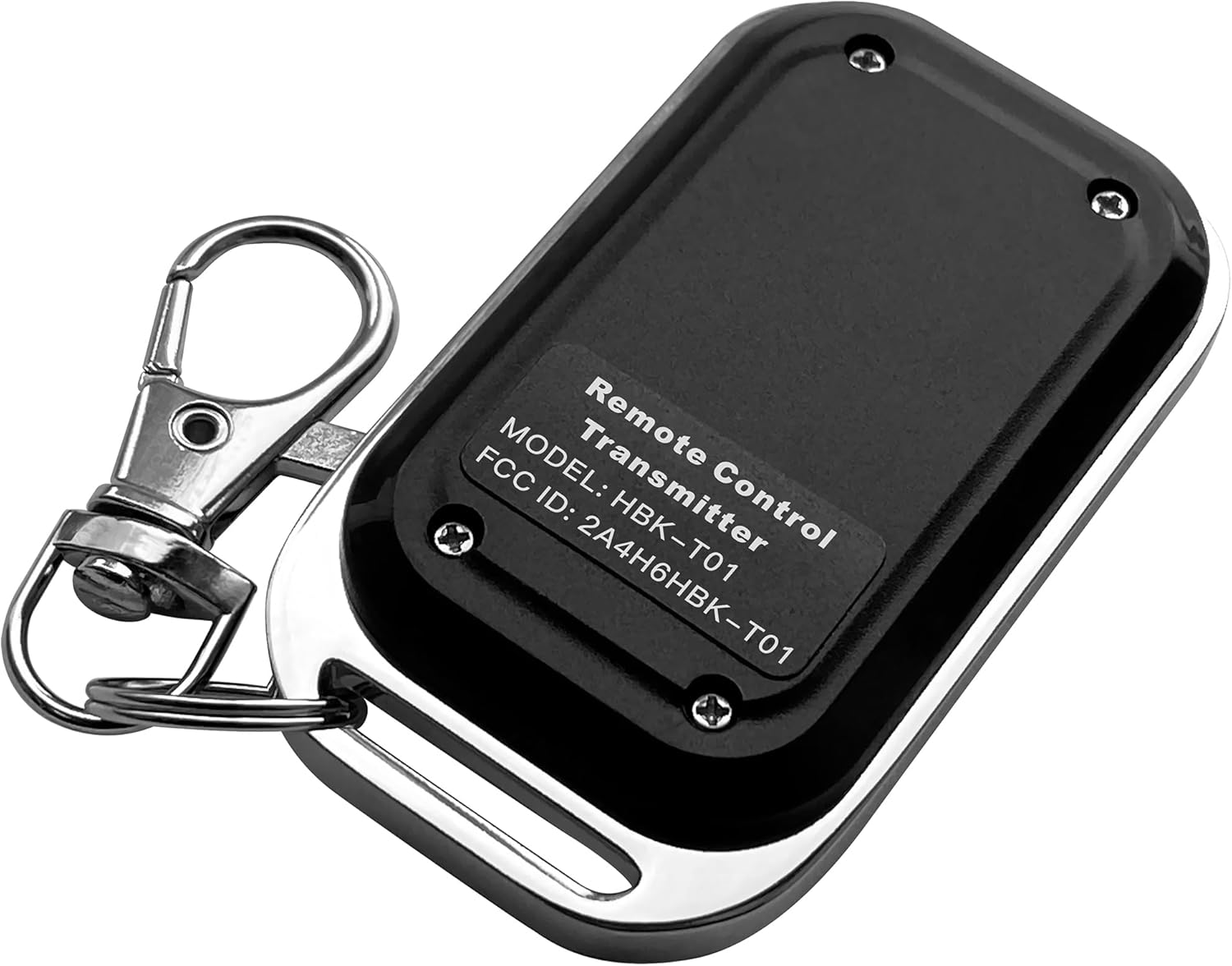
Figura 2.3: Wara View Showing Model Number HBK-T01 and FCC ID
3. Twaqqif u Programmazzjoni
3.1 Installazzjoni/Sostituzzjoni tal-Batterija
The remote control is powered by two CR2016 batteries. If the remote is not responding or the indicator light is dim, the batteries may need replacement.
- Locate the small screws on the back of the remote control.
- Using a small screwdriver, carefully remove the screws and open the casing.
- Neħħi l-batteriji qodma CR2016.
- Insert two new CR2016 batteries, ensuring correct polarity (+ and -).
- Agħlaq il-ċasing and secure it with the screws.
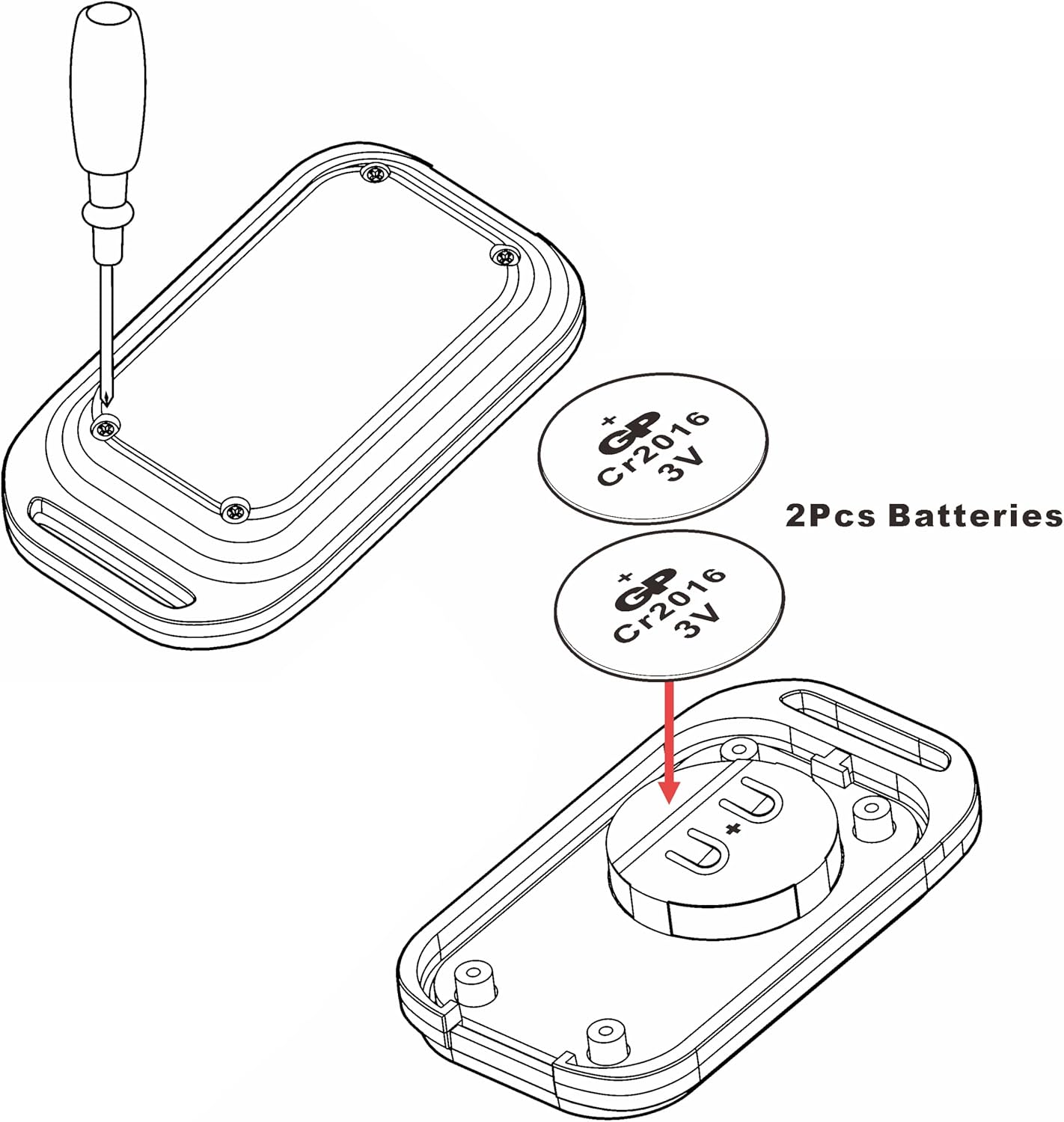
Figure 3.1: Battery Replacement Guide for CR2016 Batteries
3.2 Ipprogrammar tal-Kontroll mill-bogħod
The HBK-T01 remote control is shipped with an empty code and għandhom jiġu pprogrammati to your specific UHPPOTE receiver unit before use. The programming procedure is typically performed on the receiver unit itself, not on the remote control.
Importanti: Programming instructions vary depending on the specific UHPPOTE receiver model you are using. Please refer to the instruction manual provided with your UHPPOTE receiver for detailed programming steps. If you do not have the receiver's manual or require further assistance, please contact UHPPOTE customer support.

Figure 3.2: Integration with Electric Lock Systems (Receiver required)
4. Istruzzjonijiet Operattivi
Once the HBK-T01 remote control is successfully programmed to your UHPPOTE receiver, operation is straightforward:
- Ensure the receiver unit is powered on and within range.
- Press the button on the HBK-T01 remote control.
- The remote will transmit an RF signal to the programmed receiver.
- The receiver will then activate the connected device (e.g., open a gate, unlock a door, turn on a light).
The blue LED indicator on the remote will illuminate when the button is pressed, indicating signal transmission.

Figure 4.1: Versatile Applications of the HBK-T01 Remote Control
5. Manutenzjoni
- Tindif: Imsaħ il-kontroll remot b'ċarruta ratba u niexfa. Tużax prodotti tat-tindif jew solventi li joborxu.
- Iċċekkja tal-batterija: If the remote's performance degrades, check and replace the batteries as described in Section 3.1.
- Ħażna: Aħżen il-kontroll mill-bogħod f'post frisk u niexef 'il bogħod mid-dawl tax-xemx dirett u temperaturi estremi.
- Evita l-Impatt: Do not drop or subject the remote control to strong impacts, as this may damage internal components.
6 Issolvi l-problemi
| Problema | Kawża Possibbli | Soluzzjoni |
|---|---|---|
| Remote does not respond / No LED light | Batteriji mejta jew installati ħażin. | Replace batteries (CR2016) and ensure correct polarity. |
| Remote LED lights up, but device does not respond | Remote not programmed to receiver, or receiver is out of range/powered off. | Verify programming with receiver's manual. Ensure receiver is powered and within operating range. Check receiver's status. |
| Firxa operattiva limitata | Obstructions (walls, metal structures), radio interference, low battery. | Move closer to the receiver. Remove obstructions. Check for sources of interference. Replace batteries. |
| Remote jaħdem b'mod intermittenti | Low battery, intermittent interference. | Replace batteries. Try operating from a different location to rule out interference. |
7. Speċifikazzjonijiet
- Ditta: UHPPOTE
- Numru tal-Mudell: HBK-T01
- Kulur: Iswed
- Sors tal-Enerġija: Mħaddma bil-batterija
- Batteriji: 2 x CR2016 (inkluż)
- Voltage: 6 Volts
- Frekwenza tat-Trażmissjoni: 433.92MHz
- Teknoloġija tal-Konnettività: Wireless (RF)
- Metodu ta' Kontroll: Remote
- Apparati Kompatibbli: UHPPOTE's RF remote control receivers
- Dimensjonijiet tal-oġġett (L x W x H): 2.3 x 1.3 x 0.5 pulzieri (5.84 x 3.30 x 1.27 ċm)
- Piż tal-oġġett: 4.6 uqija (130 gramma)
- Tip ta' Installazzjoni: DIY mingħajr fili
- Tip ta' Twissija: Entry Only (refers to typical application with entry systems)
8. Garanzija u Appoġġ
8.1 Informazzjoni dwar Garanzija
For detailed warranty information regarding your UHPPOTE HBK-T01 remote control, please refer to the warranty card included with your purchase or visit the official UHPPOTE websit. It-termini u l-kundizzjonijiet tal-garanzija jistgħu jvarjaw skont ir-reġjun u l-bejjiegħ bl-imnut.
8.2 Appoġġ għall-Klijent
If you encounter any issues, have questions about programming, or require technical assistance, please contact UHPPOTE customer support. You can typically find contact information on the product packaging, the UHPPOTE official webis-sit, jew permezz tal-punt tax-xiri tiegħek.
UHPPOTE Official Websit: Visit UHPPOTE Store on Amazon


