1. Introduzzjoni
Thank you for choosing the EvoFox Ronin Wired Mechanical Gaming Keyboard. This manual provides detailed instructions for setting up, operating, and maintaining your keyboard to ensure optimal performance and longevity. The EvoFox Ronin is designed for a superior typing and gaming experience, featuring advanced sound dampening, customizable switches, and dynamic RGB lighting.

Image 1.1: EvoFox Ronin Wired Mechanical Gaming Keyboard (Black)
Karatteristiċi ewlenin:
- 9-Layer Gasket Structure: Advanced design for reduced noise, improved stability, and enhanced tactile feedback.
- Hot-Swappable Outemu Red Silent Switches: Customizable, durable, and smooth typing experience with included switch puller.
- Dawl ta' wara RGB għal kull ċavetta: 21 effects and Audio Sync Mode for personalized and immersive lighting.
- Dedicated Volume Knob: Convenient control over audio levels.
- Powerful Windows Software: Program keys, create macros, control backlighting, and manage profiles with onboard memory.
- Kompatibilità bejn il-Pjattaformi: Easily switch between Windows and Mac modes.
- Detachable Braided USB-C Cable: Robust 1.5m cable with EMI ring for reliable connection and portability.
2. Kontenut tal-Pakkett
Jekk jogħġbok ivverifika li l-oġġetti kollha huma preżenti fil-pakkett tiegħek:
- 1 x EvoFox Ronin Mechanical Gaming Keyboard
- 1 x Keycap Puller
- 4 x Outemu Red Switches (Spare)
- 1 x Manwal għall-Utent
3. Prodott Aktarview
3.1 Struttura tal-Gasket
The EvoFox Ronin features an advanced 9-layer gasket structure. This design incorporates silicone gaskets, a mounting plate, and multiple layers of vibration and sound dampening materials to provide a stable, quiet, and comfortable typing experience by minimizing unwanted noise and resonance.
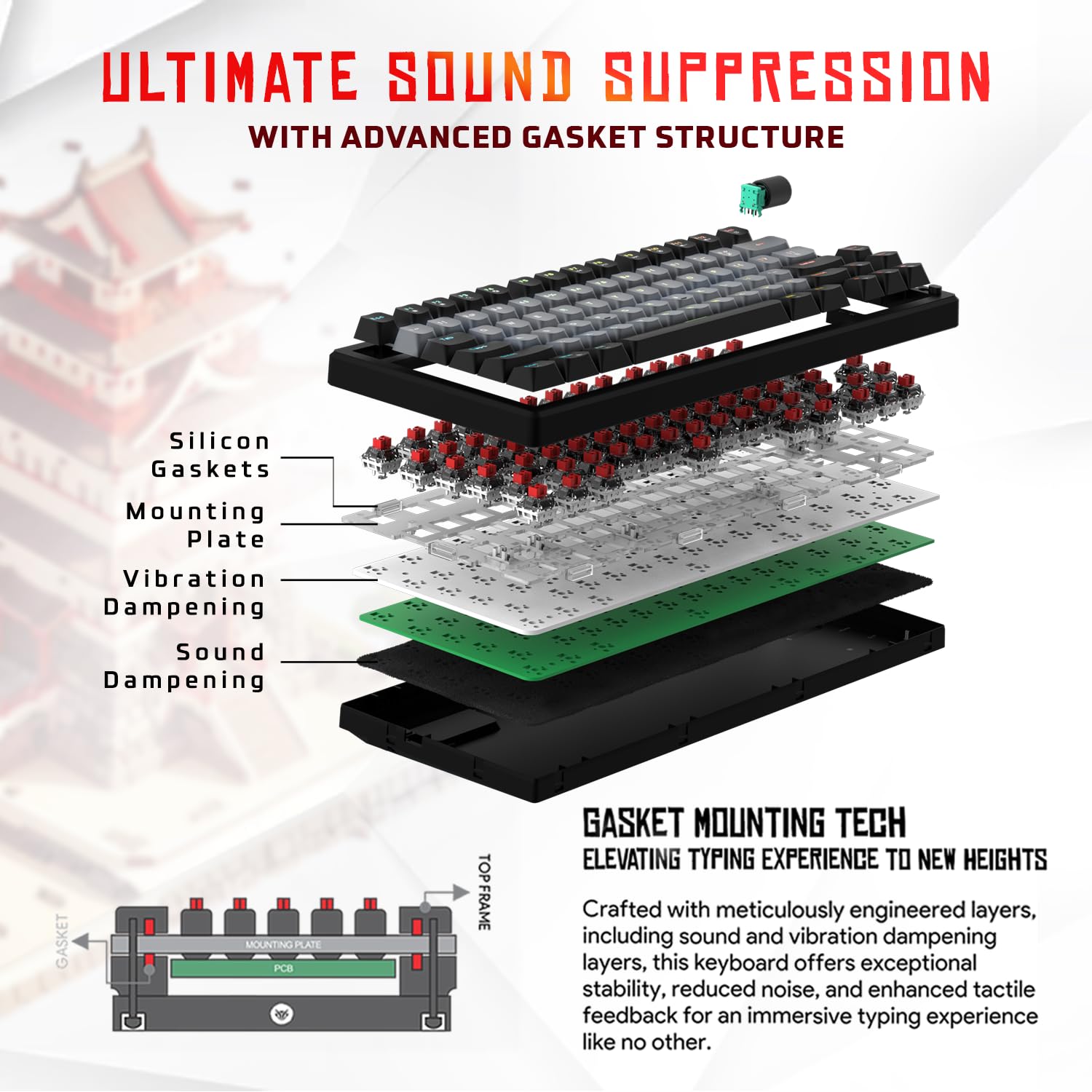
Immaġni 3.1: Splodiet view of the 9-layer gasket structure, showing silicone gaskets, mounting plate, and dampsaffi ta' għeluq.
3.2 Outemu Red Silent Switches
The keyboard is equipped with Outemu Red Dust Proof Switches, known for their linear and silent operation. These switches are hot-swappable, allowing users to easily replace them with other compatible 3-pin mechanical switches without soldering, enabling full customization of the typing feel.
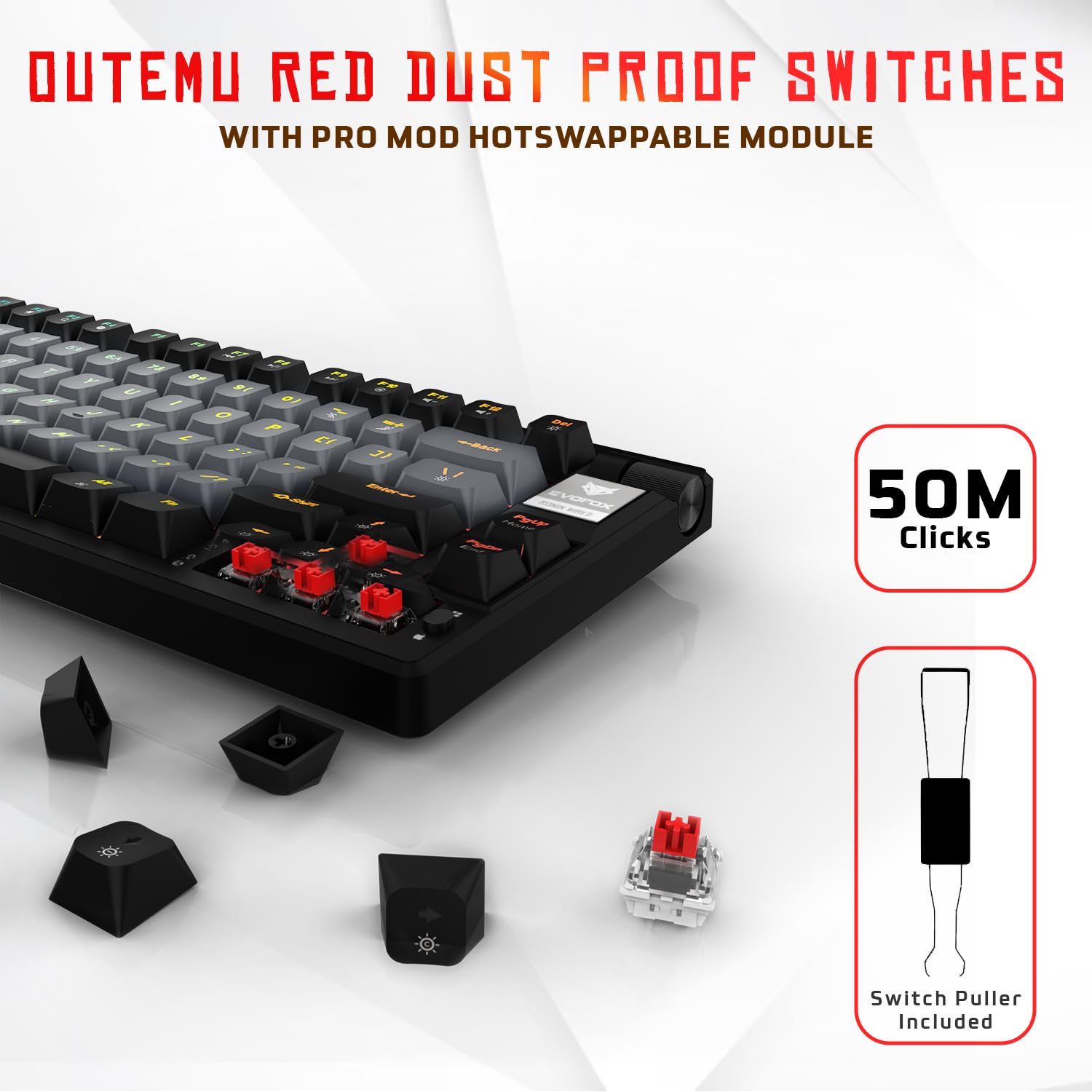
Image 3.2: Close-up of Outemu Red switches and the included switch puller, demonstrating hot-swappable functionality.
3.3 Per-Key RGB Backlighting
Each key on the EvoFox Ronin features individual RGB backlighting, offering 16 million colors and 21 pre-set lighting effects. The lighting can be customized directly on the keyboard or through the dedicated software, including an Audio Sync Mode that reacts to sound.

Image 3.3: The EvoFox Ronin keyboard showcasing its customizable per-key RGB backlighting.
3.4 Dedicated Volume Knob
A metal volume knob is integrated into the keyboard for quick and precise audio adjustments. Rotate to change volume, and press to mute/unmute.
3.5 Detachable USB-C Cable
The keyboard connects via a robust 1.5-meter braided USB-C cable, which is detachable for easy portability and storage. The cable includes an EMI ring to minimize signal interference.

Image 3.4: Features of the EvoFox Ronin, including the volume knob, detachable USB-C cable, and double-height adjustable legs.
4. Istruzzjonijiet ta' Setup
Follow these steps to set up your EvoFox Ronin keyboard:
- Ħoll it-Tastiera: Oħroġ bir-reqqa t-tastiera u l-aċċessorji kollha mill-imballaġġ.
- Qabbad il-Kejbil USB-C: Daħħal it-tarf USB-C tal-kejbil ipprovdut fil-port fuq wara tat-tastiera.
- Qabbad mal-Kompjuter: Plug the USB-A end of the cable into an available USB port on your computer (PC or Mac).
- Installazzjoni tas-sewwieq: The keyboard is plug-and-play. Your operating system should automatically detect and install the necessary drivers.
- Installazzjoni ta' Softwer Fakultattiv: For advanced customization, download the dedicated Windows software from the official EvoFox websit.
5. Istruzzjonijiet Operattivi
5.1 Funzjonijiet Bażiċi tat-Tastiera
The EvoFox Ronin functions as a standard TKL (Tenkeyless) keyboard. All keys perform their labeled functions. The keyboard supports N-Key Rollover, ensuring every key press is registered accurately, even during rapid input.
5.2 Ċwievet Multimedia u tal-Funzjoni
Access multimedia and additional functions by pressing the Fn key in combination with the designated F-keys or other keys. Refer to the keycap legends for specific functions (e.g., Fn + F1 for media player, Fn + F2 for volume down).
5.3 Kontroll tad-Dawl RGB
You can control the RGB lighting directly from the keyboard:
- Effetti tal-Bidla: Użu Fn + \| biex tiċċikla minn 21-il effett tad-dawl differenti.
- Aġġusta l-luminożità: Użu Fn + Vleġġa 'l fuq biex tiżdied il-luminożità u Fn + Vleġġa 'l isfel biex tnaqqas il-luminożità.
- Aġġusta Veloċità: Użu Fn + Vleġġa tax-Xellug to decrease effect speed and Fn + Vleġġa Lemin to increase effect speed.
- Audio Sync Mode: Activate specific modes that react to audio input.
5.4 Personalizzazzjoni tas-Softwer
The dedicated Windows software allows for comprehensive customization:
- Programmazzjoni Ewlenin: Immarka mill-ġdid kwalunkwe ċavetta għal funzjoni differenti.
- Ħolqien ta' Makro: Irreġistra u assenja sekwenzi ta' ċwievet kumplessi lil ċavetta waħda.
- Backlighting Effects: Fine-tune RGB colors, effects, brightness, and speed.
- Profile Ġestjoni: Oħloq u ssejvja diversi profiles għal applikazzjonijiet jew logħob differenti.
- Rata tal-votazzjoni: Aġġusta r-rata tal-polling sa 1000Hz.

Image 5.1: Screenshot of the EvoFox Ronin's dedicated software, showing options for light settings, button settings, and macro management.
5.5 Cross-Platform Compatibility
The keyboard supports both Windows and Mac operating systems. Use the designated key combination (typically Fn+Win or similar, refer to keycap legends) to switch between modes, ensuring correct key mapping for your OS.
6. Manutenzjoni
6.1 Tindif tat-Tastiera
Biex iżżomm id-dehra u l-funzjonalità tat-tastiera tiegħek:
- Skonnettja t-tastiera mill-kompjuter tiegħek qabel ma tnaddafha.
- Uża bott ta' arja kkompressata biex tneħħi t-trab u l-fdalijiet minn bejn il-keycaps.
- Imsaħ il-keycaps u l-wiċċ tat-tastiera b'ċarruta ratba u ħafifa.amp drapp. Evita umdità eċċessiva.
- Tużax kimiċi ħarxa jew tindif li joborxu.
6.2 Sostituzzjoni tas-Swiċċijiet
The EvoFox Ronin features hot-swappable switches, allowing for easy replacement without soldering:
- Skonnettja t-tastiera mill-kompjuter tiegħek.
- Uża l-puller tal-keycap inkluż biex tneħħi bil-mod il-keycap mixtieq.
- Use the included switch puller to carefully grip the top and bottom clips of the switch and pull it straight up.
- Align the pins of the new switch with the holes on the PCB and gently press it down until it clicks into place. Ensure the pins are not bent.
- Ibdel il-għatu taċ-ċwievet.

Image 6.1: A keycap being removed from the keyboard using a keycap puller.
7 Issolvi l-problemi
If you encounter issues with your EvoFox Ronin keyboard, refer to the following common solutions:
- It-Tastiera Mhux Tirrispondi:
- Kun żgur li l-kejbil USB-C huwa konness sew kemm mat-tastiera kif ukoll mal-kompjuter.
- Ipprova qabbad it-tastiera ma' port USB differenti fuq il-kompjuter tiegħek.
- Ittestja t-tastiera fuq kompjuter ieħor biex teskludi problema speċifika tal-kompjuter.
- Ibda mill-ġdid il-kompjuter tiegħek.
- Dawl RGB Mhux Jaħdem/Mhux Korrett:
- Check the on-board lighting controls (Fn key combinations) to ensure brightness is not set to zero or an effect is not disabled.
- If using the software, ensure it is running and the correct profile hija attiva.
- Reinstall the keyboard software if issues persist.
- Ċwievet Mhux Reġistrazzjoni:
- Kun żgur li ma jkun hemm l-ebda debris taħt il-keycap jew is-swiċċ.
- If a specific key is not working, try replacing its switch (refer to Section 6.2).
- Check for bent pins on the switch if you recently replaced one.
- Software Issues (e.g., Antivirus Flagging):
- Ensure you download the software from the official EvoFox website to avoid unofficial versions.
- If your antivirus flags the software, you may need to add an exception for the software's executable file. Proceed with caution and only if you trust the source.
- Contact EvoFox support for the latest software version or assistance.
8. Speċifikazzjonijiet
| Karatteristika | Dettall |
|---|---|
| Brand | EvoFox |
| Isem tal-Mudell | EvoFox Ronin TKL Wired |
| Deskrizzjoni tat-Tastiera | Mekkaniċi |
| Teknoloġija tal-Konnettività | USB-C (Bil-fili) |
| Swiċċijiet | Outemu Red Silent Dust Proof Switches (Hot-Swappable) |
| Backlighting | Per-Key RGB (16 Million Colors, 21 Effects, Audio Sync Mode) |
| Ir-Rata tal-Votazzjoni | Sa 1000Hz |
| Qlib taċ-ċavetta | N-Key Rollover (All Anti-Ghosting Keys) |
| Karatteristiċi Speċjali | Advanced Gasket Structure, Compact TKL Design, Multimedia Keys, Pro Mod Hotswap Module, Powerful Windows Software, Dedicated Volume Controller |
| Apparati Kompatibbli | Laptop, PC |
| Pjattaforma tal-Ħardwer | PC/Mac/Linux/Unix |
| Tul tal-Cable | 1.5m Detachable Braided Type-C with EMI Ring |
| Materjal | Plastik |
| Dimensjonijiet tal-Prodott | 32 x 13.5 x 2.6 ċm |
| Piż tal-oġġett | 640 g |
| Pajjiż ta' Oriġini | Iċ-Ċina |
9. Garanzija u Appoġġ
The EvoFox Ronin Mechanical Gaming Keyboard comes with a standard manufacturer's warranty. Please refer to the warranty card included in your package for specific terms and conditions, including warranty period and coverage details.
For technical support, troubleshooting assistance, or warranty claims, please contact EvoFox customer support. You can find contact information on the official EvoFox website or through the manufacturer, Allied Electronics & Magnetics Private Limited.
Manifattur: Elettronika Alleata u Manjetiċi Privati Limitati
Indirizz: C-64/4, Okhla Fażi - 2, New Delhi - 110020


