1. Introduzzjoni u Fuqview
The MECHEER JK-PM07-US Watt Meter is designed to monitor the electricity usage of home appliances, helping users track power consumption and manage energy costs. This device offers multiple display modes and features for comprehensive energy monitoring.
- Various Monitoring Parameters: Monitors power (W), energy (kWh), volts, amps, hertz, power factor, cost, minimum and maximum power (W), and cumulative days and time.
- Materjal Premium: Constructed from high-quality PC material for durability, heat resistance, and fall resistance. Features a standard US socket and plug.
- Protezzjoni ta' tagħbija żejda: Alerts users with flashing display and a buzzer when appliance power exceeds the set overload limit. Adjustable from 0 to 3680W (default 3680W, recommended 1800W).
- KWH Alarm: Provides an alarm when accumulated power consumption reaches a user-defined threshold.
- Data Memory Function: Automatically saves power consumption data, including setting data and cumulative data (electricity quantity, cost, unit price, time), even after removal from the socket or power failure.
- Display tad-dawl ta' wara: Features a white backlight with black text for clear readability in various lighting conditions. Backlight automatically turns off after 10 minutes of inactivity but can be manually controlled.
- Adjustable Backlight Time: Offers 5 options for backlight duration (10 minutes, 1 hour, 4 hours, 8 hours, normally on).
2. Speċifikazzjonijiet tal-Prodott
| Speċifikazzjoni | Valur |
|---|---|
| Vol Operattivtage | 120 V/60 Hz |
| Firxa tal-Wiri tal-Qawwa | 0.5W-2900W |
| Operazzjoni Kurrenti | Max 13A |
| Wiri tal-Qawwa Totali | 0.0kWh-9999kWh |
| Wiri tal-Ispiża Totali | 0.0£-9999£ (Note: Currency symbol may vary based on region/firmware) |
| Voltage Preċiżjoni | ±1% |
| Eżattezza Kurrenti | ±2% |
| Preċiżjoni tal-Enerġija | ±2% |
| Electrical Cost Setting Range | 00.00£/kWh - 99.99£/kWh (Note: Currency symbol may vary based on region/firmware) |
| Piż tal-oġġett | 13.4 uqija |
| Dimensjonijiet tal-Prodott | 5.2 x 2.7 x 2.4 pulzieri |

3. Setup
- Unpack the MECHEER Watt Meter from its packaging.
- Plug the watt meter into a standard 120V/60Hz wall outlet.
- Plug the appliance you wish to monitor into the watt meter's socket.
- The display will illuminate, and the device is ready for use.
4. Istruzzjonijiet Operattivi
4.1. 8 Display Modes
The watt meter features 8 display modes to show different measured data. Press the "MODE" button to cycle through the modes.
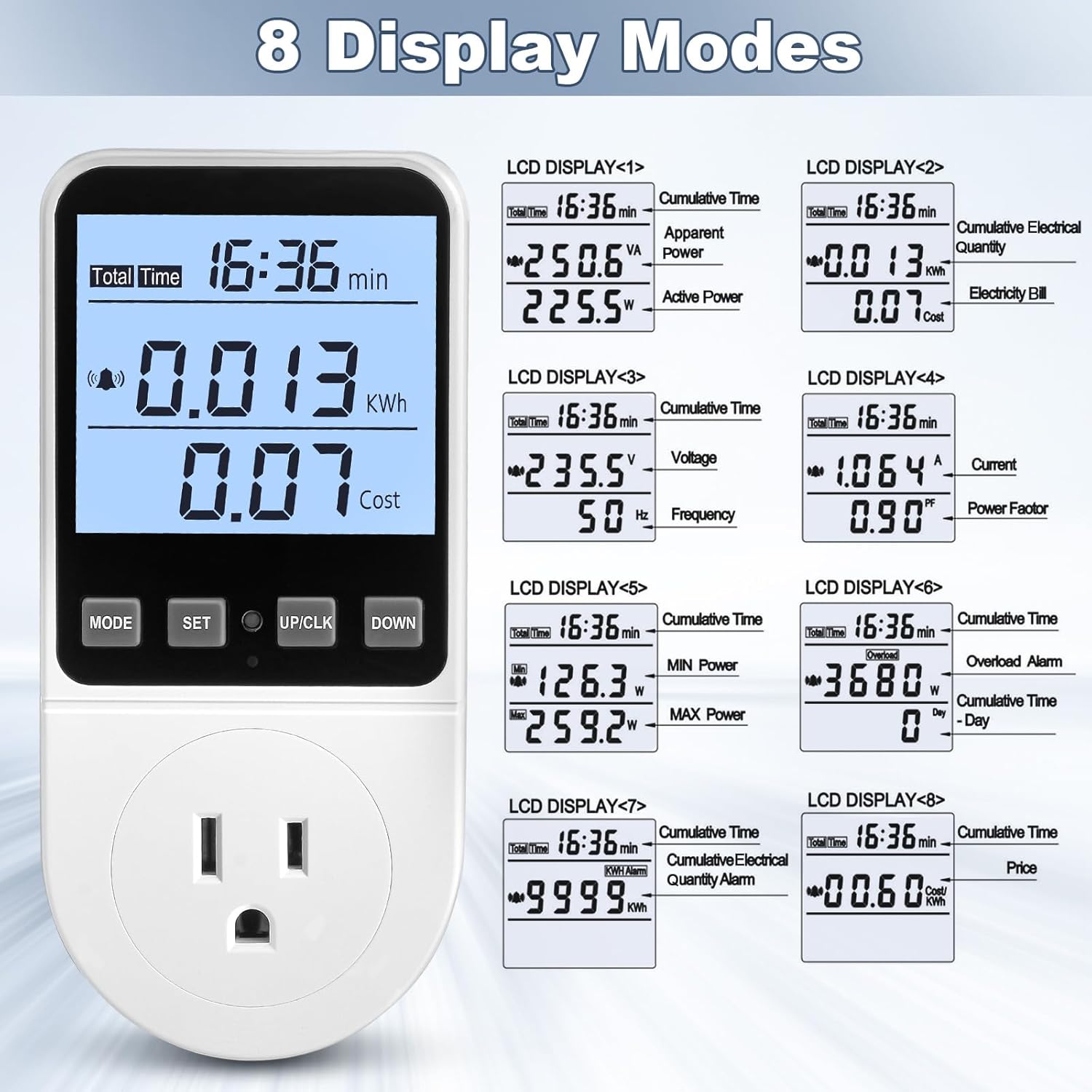
- Mod 1: Cumulative Time, Apparent Power (VA), Active Power (W)
- Mod 2: Cumulative Time, Cumulative Electrical Quantity (kWh), Electricity Bill (Cost)
- Mod 3: Cumulative Time, Voltage (V), Frequency (Hz)
- Mod 4: Cumulative Time, Current (A), Power Factor (PF)
- Mod 5: Cumulative Time, Minimum Power (W), Maximum Power (W)
- Mod 6: Cumulative Time, Overload Alarm (W), Cumulative Time (Day)
- Mod 7: Cumulative Time, KWH Alarm (kWh)
- Mod 8: Cumulative Time, Price (Cost/kWh)
4.2. Overload Settings
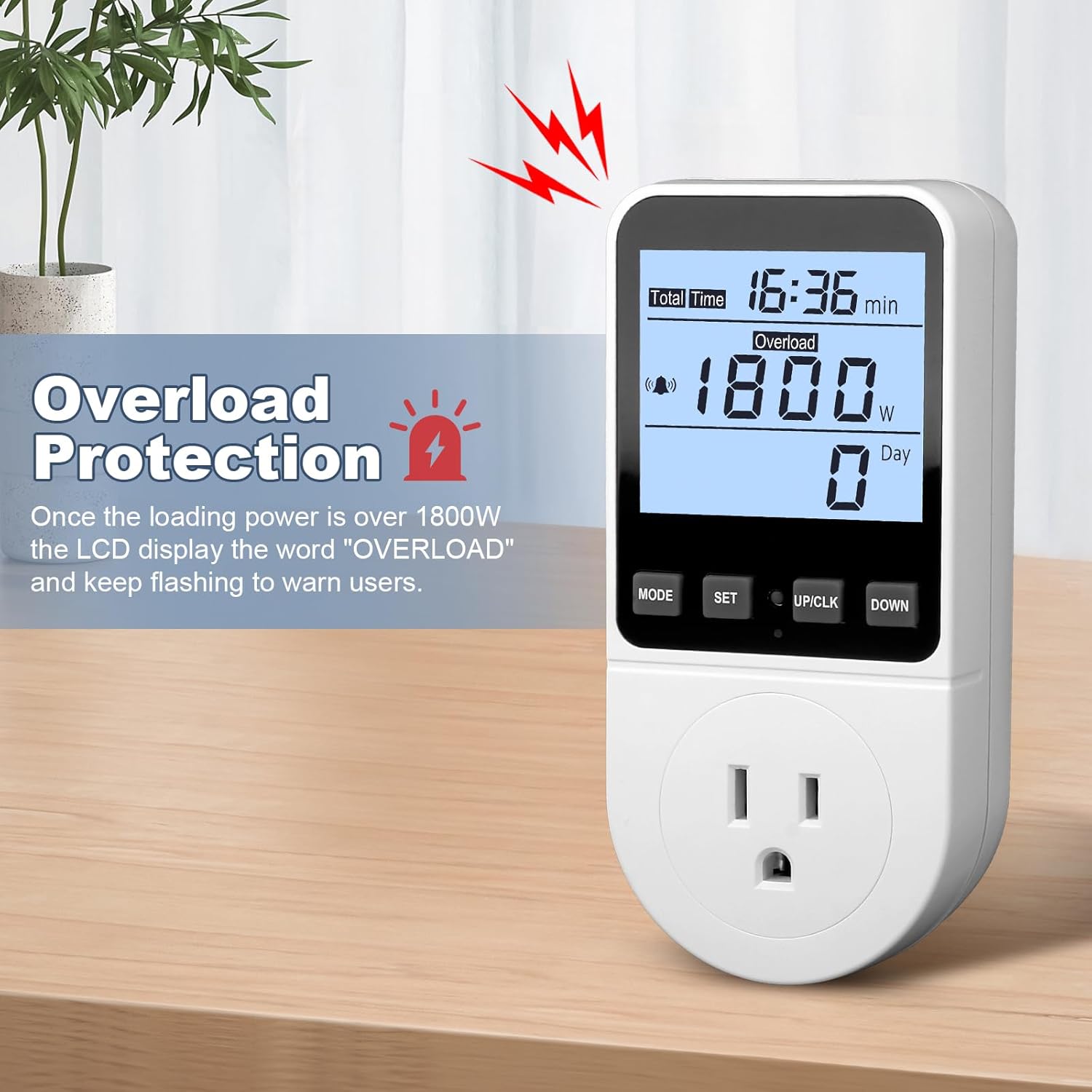
The default overload power is 3680W. It is recommended to set this to 1800W for typical US household use to prevent overloading circuits.
- Press and hold the "MODE" button for more than 3 seconds to enter the overload settings.
- Press the "MODE" button to select the digit location you wish to change.
- Use the "UP/CLK" and "DOWN" buttons to adjust the digits to the desired overload value (e.g., 1800W).
- Press the "SET" button to save the overload setting.
4.3. Electricity Price Settings
Set the cost per kilowatt-hour (kWh) to accurately calculate electricity bills.
- Press and hold the "SET" button for 3 seconds to enter the electricity price setting mode.
- Press the "MODE" button to select the digit location.
- Use the "UP/CLK" and "DOWN" buttons to set the numbers for your electricity cost per kWh.
- Press the "SET" button to save the price settings.

4.4. KWH Alarm Settings
Configure an alarm to be notified when a specific cumulative kWh consumption is reached.
- Press and hold the "DOWN" button for 3 seconds to enter the KWH alarm setting mode.
- Press the "MODE" button to select the digit location.
- Use the "UP/CLK" and "DOWN" buttons to set the desired KWH alarm value.
- Press the "SET" button to save the KWH alarm settings.
4.5. Button Sound Settings
Ixgħel jew itfi l-ħoss meta tagħfas il-buttuna.
- Press the "MODE" button and the "DOWN" button simultaneously to toggle the button sound on or off.
4.6. Backlight On/Off and Time Settings
Control the backlight for better visibility and adjust its duration.
- Manwal mixgħul/mitfi: Press the "DOWN" button to manually turn the backlight on or off.
- Adjust Backlight Time: Press and hold the "UP/CLK" and "DOWN" buttons simultaneously to enter backlight time setting. Use "UP/CLK" and "DOWN" to select the duration (bL-0 = 10 minutes, bL-1 = 1 hour, bL-2 = 4 hours, bL-3 = 8 hours, bL-4 = normally on). Press "SET" to save.

4.7. Data Memory Function
The device automatically saves all cumulative data and settings.
- When the meter is removed from the socket or the appliance is unplugged, all setting data and cumulative data (electricity quantity, cost, unit price, time) are saved.
- Upon reconnection, the last saved data will be displayed (excluding current, voltage, power, power factors, which are real-time readings).
- This function also protects data during sudden power failures.

4.8. Data Clear Function
Clear all cumulative data (kWh, cost, and total time data).
- Press and hold the "MODE" button and the "UP/CLK" button simultaneously for 3 seconds.
- All cumulative data will be cleared to zero.
4.9. Reset Funzjoni
Reset the power meter to its default factory settings, clearing all data.
- Locate the small reset hole on the device.
- Insert a thin, pointed object (like a paperclip or the provided reset pin) into the hole and press gently.
- All data will be cleared, and settings will revert to default.
4.10. Gwida għall-Operazzjoni bil-Vidjo
For a visual guide on operating the MECHEER Watt Meter, please watch the official video below:
5. Manutenzjoni
- Keep the device clean by wiping it with a dry, soft cloth.
- Evita li tuża tindif jew solventi li joborxu.
- Tesponix l-apparat għal temperaturi jew umdità estremi.
- Aħżen f'post frisk u niexef meta ma tkunx qed tuża.
6 Issolvi l-problemi
- Id-displej mhux qed jixgħel: Ensure the meter is securely plugged into a live outlet. Check if the outlet is functioning correctly with another device.
- Qari mhux korrett: Verify that the electricity price settings are accurate according to your utility bill. Ensure the appliance is fully plugged into the meter.
- Overload alarm constantly flashing: The connected appliance may exceed the set overload limit. Unplug the appliance, adjust the overload setting to a higher value if appropriate for your circuit, or use a lower-power appliance.
- Buttuni ma jirrispondux: Try resetting the device using the reset pin. If the issue persists, ensure the device is not in an alarm state that locks button input.
- Data not saving: The data memory function is automatic. If data is not retained after power loss, perform a reset. If the problem continues, contact customer support.
7. Informazzjoni dwar is-Sigurtà
- Żarmax jew timmodifikax l-apparat.
- Tużax f'ambjenti mxarrbin jew ħdejn l-ilma.
- Ensure the total power of connected appliances does not exceed the maximum rated power (2900W or 13A) to prevent damage or fire hazards.
- Żomm fejn ma jintlaħaqx mit-tfal.
- If the device is damaged, discontinue use immediately and contact customer support.
8. Garanzija u Appoġġ
MECHEER products are designed for reliability and performance. For warranty information, technical support, or service inquiries, please refer to the contact information provided with your purchase or visit the official MECHEER websit.
Jekk jogħġbok żomm il-prova tax-xiri tiegħek għal pretensjonijiet ta' garanzija.


