1. Introduzzjoni
Thank you for choosing Blackview Smart Glasses. These innovative sunglasses combine stylish design with advanced audio technology, allowing you to enjoy music, make calls, and interact with your voice assistant while staying aware of your surroundings. This manual provides detailed instructions for setup, operation, and maintenance to ensure optimal performance and longevity of your device.

Figura 1: Quddiem view tal-Iswedview Smart Glasses.
2. Karatteristiċi tal-prodott
- Teknoloġija Bluetooth 5.3: Ensures faster and more stable signal transmission with low latency, offering a connection range of up to 12 meters.
- Klassifikazzjoni IP65 li ma jgħaddix ilma minnha: Protects against sweat and small raindrops, suitable for outdoor activities and gym use.
- Tqabbil f'pass wieħed: After initial pairing, the glasses automatically reconnect to the last paired device upon opening.
- Kompatibilità Wiesgħa: Compatible with various devices including smartphones and computers.
- Immersive Open Ear Sound: Features an open headphone speaker design, dynamic drivers, and ultra-sensitive polymer diaphragms for rich, balanced audio without isolating you from your environment.
- Unparalleled Call Clarity: Advanced microphone design with noise reduction technology suppresses up to 90% of background noise for clear communication.
- Kontrolli touch intuwittivi: Manage playback, volume, calls, and voice assistant activation directly from the glasses.
- Ħinijiet tax-Xogħol Estiżi: Equipped with 80mAh+80mAh rechargeable batteries, providing approximately 7 hours of communication, 6 hours of music playback, and 160 hours of standby time.
3. Prodott Aktarview
Familiarize yourself with the components of your Blackview Nuċċali Intelliġenti:

Figure 2: Key components of the Smart Glasses.
- Lenti: TAC+UV400 (UV resistant)
- Nose Bridge: Provides comfortable fit.
- Buttuna tat-Tmiss: For various control functions.
- Stereo-speaker: Delivers open-ear audio.
- Mic built-in: Għal kwalità ċara tas-sejħa.
- Charging Indicator Port: For magnetic charging.
- Qafas tal-mera: PC+light steel construction.
4. Speċifikazzjonijiet
Refer to the following specifications for your Blackview Nuċċali Intelliġenti:
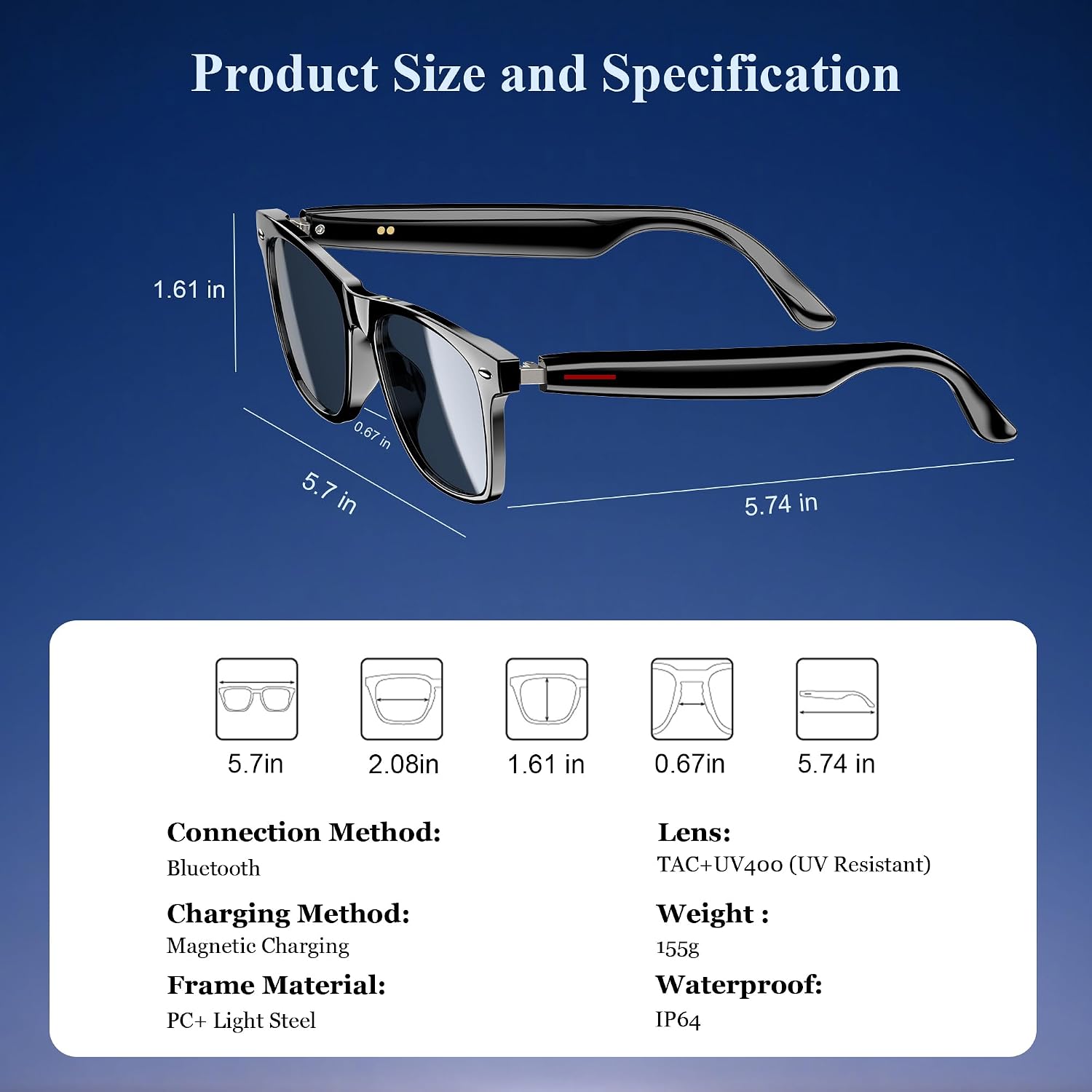
Figura 3: Dimensjonijiet tal-prodott u speċifikazzjonijiet ewlenin.
| Speċifikazzjoni | Valur |
|---|---|
| Verżjoni Bluetooth | 5.3 |
| Klassifikazzjoni li ma jgħaddix ilma minnha | IP65 |
| Kapaċità tal-batterija | 80mAh+80mAh |
| Ħin tal-Komunikazzjoni | Appross. 7 sigħat |
| Ħin ta 'Daqq tal-Mużika | Appross. 6 sigħat |
| Ħin ta' Standby | Appross. 160 sigħat |
| Ħin tal-Iċċarġjar | Approx. 1.2 hours (magnetic charge) |
| Tip ta' Lenti | TAC+UV400 (UV Resistant) |
| Materjal tal-qafas | PC + Light Steel |
| Piż tal-oġġett | 4.6 uqija |
| Dimensjonijiet tal-Pakkett | 6.65 x 2.36 x 1.93 pulzieri |
5. X'hemm fil-Kaxxa
L-Iswed Tiegħekview Smart Glasses package includes:
- Nuċċalijiet tax-Xemx Intelliġenti
- Kejbil tal-Iċċarġjar Manjetiku
- Drapp tat-Tindif
- Manwal għall-Utent
6. Setup
6.1. Iċċarġjar tan-Nuċċali
Qabel l-ewwel użu, iċċarġja kompletament il-Black tiegħekview Smart Glasses. Use the provided magnetic charging cable.
- Connect the magnetic charging cable to the charging port on the temple of the glasses.
- Qabbad it-tarf l-ieħor tal-kejbil ma 'sors ta' enerġija USB (eż., kompjuter, adapter tal-ħajt).
- The charging indicator light will illuminate (usually red) during charging and turn off or change color (usually blue/green) when fully charged.
- Ċarġ sħiħ jieħu madwar 1.2 sigħat.

Figure 4: Magnetic charging connection.
6.2. Power On/Off
- Qawwa Mixgħul: Long touch the touch button on the temple for 5 seconds until you hear a power-on prompt.
- Itfi: Long touch the touch button for 5 seconds until you hear a power-off prompt.
6.3. Tqabbil tal-Bluetooth
- Kun żgur li l-nuċċali huma ċċarġjati u mixgħula.
- Fuq l-ismartphone jew it-tagħmir tiegħek, ippermetti l-Bluetooth u fittex tagħmir disponibbli.
- Agħżel "Iswedview Smart Glasses" (or similar name) from the list to pair.
- Once paired, the glasses will automatically reconnect to your device when powered on and within range.
7. Istruzzjonijiet Operattivi
L-Iswed Tiegħekview Smart Glasses feature intuitive touch controls located on the temples:

Figure 5: Touch control functions.
- Ilgħab/Pawża Mużika: One-tap the touch button on either temple.
- Track li jmiss: Twice-tap the touch button on the right temple.
- Track preċedenti: Twice-tap the touch button on the left temple.
- Volum 'il fuq/Niżżel: (Specific gesture not detailed in image, typically long press or swipe, refer to quick start guide if included).
- Tweġiba/Hang Up Call: One-tap the touch button on either temple.
- Attiva l-Assistent tal-Vuċi: Long touch the touch button for 2 seconds.
- Fotografija mill-bogħod: Double click the touch button to trigger your phone's camera shutter.

Figure 6: Voice assistant activation example.
8. Kura u Manutenzjoni
Biex tiżgura l-lonġevità u l-prestazzjoni ottimali tan-nuċċalijiet intelliġenti tiegħek, segwi dawn il-linji gwida għall-kura:
- Tindif: Use the provided cleaning cloth to gently wipe the lenses and frame. Avoid using abrasive materials or harsh chemicals.
- Reżistenza għall-Ilma: The glasses have an IP65 rating, meaning they are resistant to sweat and light splashes of water. Do not submerge them in water or expose them to heavy rain.
- Ħażna: Store the glasses in a protective case when not in use to prevent scratches and damage. Avoid exposing them to extreme temperatures.
- Evita l-Impatt: While the lenses are strong, avoid dropping the glasses or subjecting them to strong impacts.

Figure 7: Smart Glasses demonstrating water resistance.
9 Issolvi l-problemi
Jekk tiltaqa' ma' xi problemi bil-Black tiegħekview Smart Glasses, refer to the following common solutions:
- Ebda Qawwa: Ensure the glasses are fully charged. Connect them to the magnetic charger and check the indicator light.
- Ma tistax tqabbad:
- Kun żgur li l-Bluetooth huwa attivat fuq l-apparat tiegħek u li n-nuċċalijiet jinsabu fil-modalità ta' tqabbil (ġeneralment indikat minn dawl li jteptep).
- Make sure the glasses are not already connected to another device. Turn off Bluetooth on other nearby devices.
- Erġa' ibda kemm in-nuċċalijiet kif ukoll l-apparat tiegħek, imbagħad erġa' pprova tqabbadhom.
- Ebda Ħoss/Volum Baxx:
- Iċċekkja l-livelli tal-volum kemm fuq in-nuċċalijiet kif ukoll fuq l-apparat konness tiegħek.
- Ensure the glasses are properly positioned on your ears for optimal open-ear audio.
- Verify that the glasses are correctly paired and selected as the audio output device on your phone.
- Kwistjonijiet ta' Kwalità tas-Sejħiet:
- Kun żgur li l-mikrofonu mhux ostakolat.
- Mexxi lejn żona b'inqas storbju fl-isfond.
- Check your phone's signal strength.
- Kontrolli tal-mess li ma jirrispondux:
- Kun żgur li subgħajk huma nodfa u niexfa.
- Erġa ibda n-nuċċalijiet.
If these steps do not resolve the issue, please contact Blackview appoġġ għall-klijenti għal aktar assistenza.
10. Vidjo Uffiċjali tal-Prodott
Ara l-filmat uffiċjali tal-prodott għal aktar minnview tal-Iswedview Smart Glasses features and usage:
Vidjo 1: Iswedview Polarized Sport Smart Sunglasses for Men and Women. This video highlights the design and features of the smart sunglasses, including their polarized lenses and smart capabilities.


