1. Introduzzjoni
The FREEWOLF A2 is a transparent wireless gaming mouse designed for versatility and performance. It features dual-mode connectivity (2.4G wireless and Bluetooth 5.0), a PixArt 3212 optical sensor with adjustable DPI, a built-in rechargeable battery with a digital display, and customizable RGB backlighting. Its ergonomic design ensures comfort during extended use across various operating systems like Windows, Mac, and Linux.

Image 1.1: The FREEWOLF A2 Transparent Wireless Gaming Mouse, showcasing its transparent shell and internal components.
2. Kontenut tal-Pakkett
Jekk jogħġbok ivverifika li l-oġġetti kollha huma preżenti fil-pakkett:
- FREEWOLF A2 Wireless Gaming Mouse
- USB Receiver (2.4G dongle)
- Cable tal-Iċċarġjar tal-USB-C
- Manwal għall-Utent (dan id-dokument)
3. Prodott Aktarview
Familiarize yourself with the various components and features of your FREEWOLF A2 mouse.

Image 3.1: Exploded diagram illustrating the internal components of the FREEWOLF A2 mouse, including the transparent shell, battery, PCB board, and switches.

Immaġni 3.2: Minn fuq għal isfel view of the FREEWOLF A2 mouse with key components labeled, including the 2.4G receiver storage, DPI switch, power switch, and dimensions.
Karatteristiċi ewlenin:
- Konnessjoni b'Modalità Doppja: 2.4G Wireless and Bluetooth 5.0.
- PixArt 3212 Sensor: High sensitivity and accuracy.
- DPI aġġustabbli: 5 levels up to 4000 DPI.
- Batterija rikarikabbli: Built-in 400 mAh battery with USB-C charging.
- Skrin Diġitali: Juri l-perċentwali tal-batterijatage and DPI level.
- Dawl ta' wara RGB: Effetti tad-dawl li jistgħu jiġu personalizzati.
- Disinn Ergonomiku: Comfortable for various grip styles.
4. Setup
4.1. Iċċarġjar tal-Maws
Before first use, it is recommended to fully charge the mouse. Connect the provided USB-C charging cable to the mouse's charging port and the other end to a USB power source (e.g., computer USB port, USB wall adapter). The digital screen will display the battery percentage waqt l-iċċarġjar.
Note: The USB-C cable is for charging only and does not provide a wired connection for mouse operation.

Image 4.1: Close-up of the FREEWOLF A2 mouse showing the digital screen displaying battery percentage.
4.2. Connecting via 2.4G Wireless
- Locate the USB receiver (dongle) stored in the compartment on the underside of the mouse.
- Ipplaggja r-riċevitur USB f'port USB disponibbli fuq il-kompjuter tiegħek.
- Slide the power switch on the underside of the mouse to the '2.4G' position.
- The mouse should connect automatically. Your computer will typically install the necessary drivers.
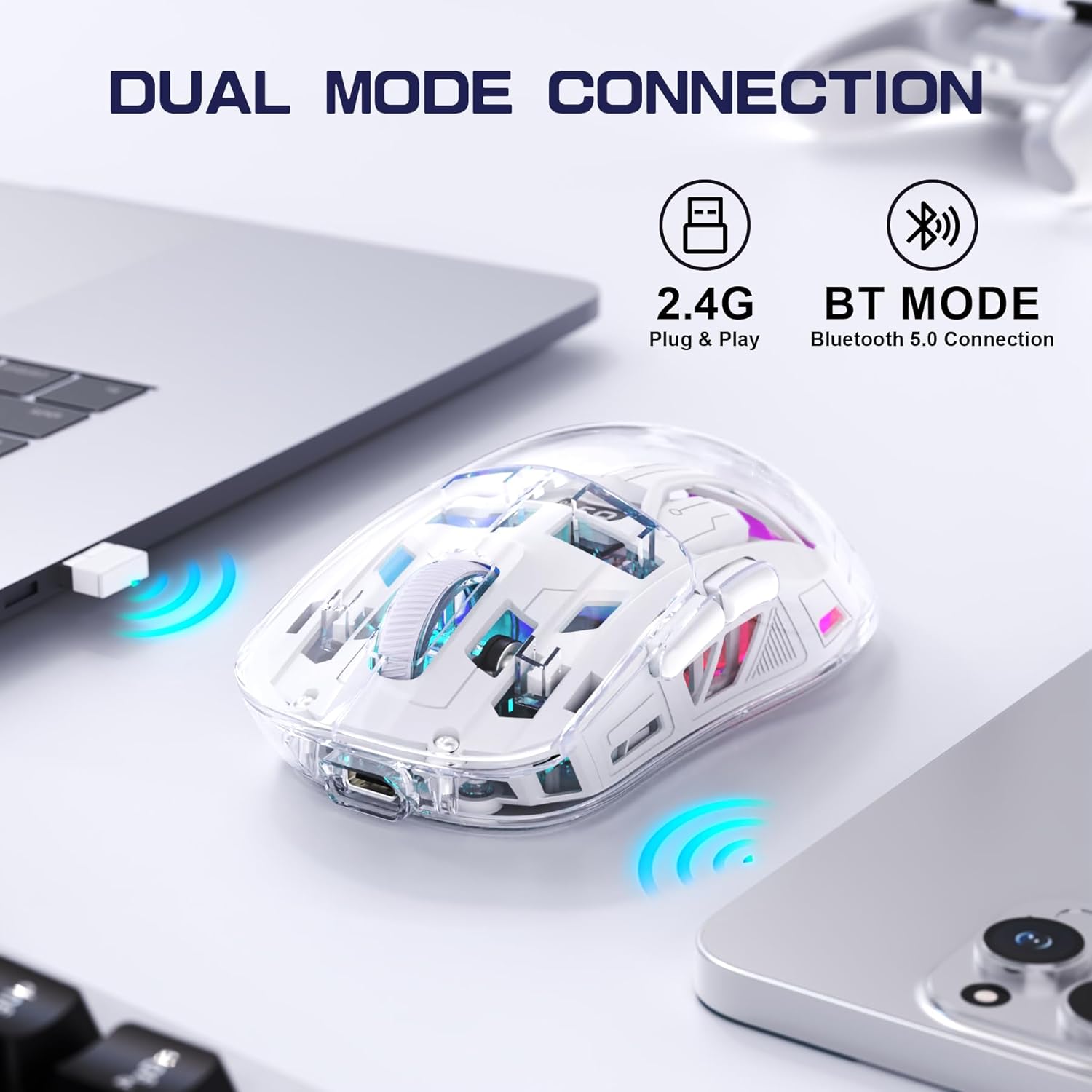
Image 4.2: The FREEWOLF A2 mouse connected to a laptop via its 2.4G wireless USB receiver.
4.3. Konnessjoni permezz tal-Bluetooth 5.0
- Slide the power switch on the underside of the mouse to the 'BT' (Bluetooth) position.
- Fuq il-kompjuter jew l-apparat tiegħek, iftaħ is-settings tal-Bluetooth.
- Fittex għal new devices. The mouse should appear as 'FREEWOLF A2' or similar.
- Select the mouse to pair. Follow any on-screen prompts.
5. Istruzzjonijiet Operattivi
5.1. Aġġustament tad-DPI
The mouse features 5 adjustable DPI levels (1200-4000 DPI) to suit different tasks and preferences. To change the DPI, press the DPI button located on the underside of the mouse. The digital screen will briefly display the current DPI setting.

Image 5.1: Diagram illustrating the 5 adjustable DPI levels (1200, 1600, 2000, 2400, 4000) available on the FREEWOLF A2 mouse.
5.2. Kontroll tad-Dawl ta' Wara RGB
The FREEWOLF A2 mouse features vibrant RGB backlighting. To cycle through different lighting effects or turn the backlight off, press and hold the scroll wheel button for a few seconds.

Image 5.2: Two FREEWOLF A2 mice on a desk, showcasing their cool RGB lighting effects in a low-light environment.
5.3. Wiri tal-batterija
The integrated digital screen on the mouse continuously displays the current battery percentage, allowing you to monitor power levels and recharge as needed.
5.4. Disinn Ergonomiku
The mouse is designed to conform to various hand grip styles (Palm Grip, Fingertip Grip, Claw Grip), reducing discomfort during prolonged use.
Image 5.3: A hand demonstrating a comfortable grip on the FREEWOLF A2 mouse, highlighting its ergonomic design.
6. Manutenzjoni
- Tindif: Uża drapp artab u niexef biex tnaddaf il-maws. Evita li tuża kimiċi ħarxa jew materjali li joborxu.
- Ħażna: When not in use, store the mouse in a cool, dry place. If storing for an extended period, ensure the mouse is fully charged and turn off the power.
- Kura tal-batterija: To prolong battery life, avoid fully discharging the mouse frequently. Recharge when the battery level is low.
7 Issolvi l-problemi
- Il-maws ma jirrispondix:
- Ensure the mouse is powered on and the correct connection mode (2.4G or BT) is selected.
- Check battery level on the digital screen and recharge if necessary.
- For 2.4G mode, ensure the USB receiver is securely plugged into a working USB port. Try a different USB port.
- For Bluetooth mode, ensure Bluetooth is enabled on your device and the mouse is paired correctly. Try unpairing and re-pairing.
- Erġa' ibda l-kompjuter jew l-apparat tiegħek.
- Cursor movement is erratic or frozen:
- Naddaf is-senser ottiku fuq in-naħa ta' taħt tal-maws.
- Kun żgur li qed tuża l-maws fuq wiċċ adattat (mhux riflettiv ħafna jew trasparenti).
- Iċċekkja għal interferenza minn apparat ieħor mingħajr fili.
- Adjust DPI settings to see if it resolves the issue.
- RGB backlight not working:
- Kun żgur li l-maws għandu biżżejjed ċarġ tal-batterija.
- Press and hold the scroll wheel button to cycle through lighting modes or turn the backlight on/off.
- Kwistjonijiet tal-iċċarġjar:
- Ensure the USB-C cable is properly connected to both the mouse and the power source.
- Ipprova kejbil USB-C jew adapter tal-enerġija differenti.
- Ikkonferma li s-sors tal-enerġija huwa funzjonali.
8. Speċifikazzjonijiet
| Karatteristika | Dettall |
|---|---|
| Numru tal-Mudell | A2 |
| Teknoloġija tal-Konnettività | 2.4G bla fili, Bluetooth 5.0 |
| Teknoloġija ta 'Sejbien tal-Moviment | Ottiċi (PixArt 3212) |
| DPI aġġustabbli | 1200-4000 (5 levels) |
| Kapaċità tal-batterija | 400 mAh (inkorporat) |
| Port tal-Iċċarġjar | USB-C |
| Karatteristiċi Speċjali | Ergonomic Design, LED Lights (RGB), Portable, Rechargeable, Digital Battery Display |
| Dimensjonijiet tal-Prodott | 6.89 x 4.53 x 0.04 pulzieri |
| Piż tal-oġġett | 4.9 uqija |
| Manifattur | FREEWOLF |
9. Garanzija u Appoġġ
Specific warranty information for the FREEWOLF A2 Transparent Wireless Gaming Mouse is not provided in the available product data. Please refer to the product packaging or the retailer's website for details regarding warranty coverage.
For technical support or further assistance, please contact the manufacturer or your point of purchase. Contact information may be available on the product packaging or the official FREEWOLF websit.


