1. Introduzzjoni
This manual provides detailed instructions for the setup, operation, maintenance, and troubleshooting of your Deli ET521 Digital Safe Box. Please read this manual thoroughly before using the safe to ensure proper function and security. Keep this manual for future reference.
2. Informazzjoni dwar is-Sigurtà
- Do not store the emergency override keys inside the safe. Keep them in a secure location outside the safe.
- Keep your personal access code confidential and do not share it with unauthorized individuals.
- Ensure the safe is securely mounted or placed to prevent unauthorized removal.
- Replace batteries promptly when the 'LO-BAT' indicator appears to avoid being locked out.
- This safe is designed for security and fire resistance. However, it is not completely fireproof or waterproof.
3. Kontenut tal-Pakkett
Ivverifika li l-oġġetti kollha huma preżenti fil-pakkett:
- 1 x Deli ET521 Digital Safe Box
- 2 x Ċwievet ta' Override ta' Emerġenza
- 1 x Manwal għall-Utent
- Mounting Hardware (bolts)
4. Prodott Aktarview
The Deli ET521 Digital Safe Box offers secure storage with a digital keypad and emergency key access. It features a reinforced solid steel body, felt interior, and LED lighting for convenience.

Figura 4.1: Quddiem view of the Deli ET521 Digital Safe Box, showcasing the keypad and overall design.
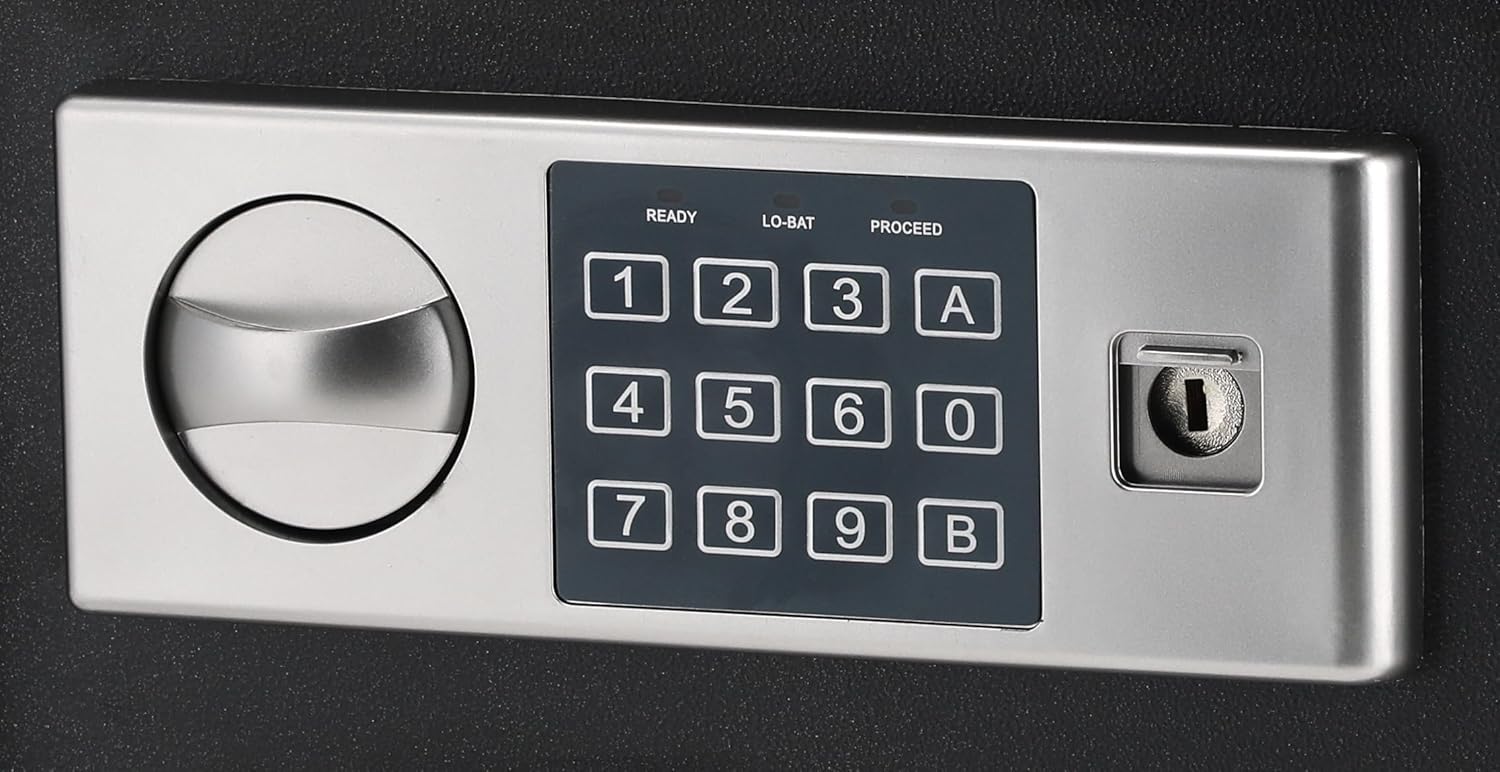
Figure 4.2: Close-up of the digital keypad with number buttons, 'A' and 'B' buttons, and the emergency keyhole.

Figura 4.3: Intern view of the safe, showing the felt lining and internal space.
5. Setup
5.1 Installazzjoni tal-batterija
The digital keypad requires 4 AA batteries (not included) for operation. The battery compartment is typically located on the inside of the safe door.
- Open the safe using the emergency override key (refer to Section 6.3 if needed).
- Locate the battery compartment cover on the inside of the door.
- Remove the cover and insert 4 new AA batteries, ensuring correct polarity (+/-).
- Ibdel l-għatu tal-kompartiment tal-batterija.
5.2 Initial Code Setting
Mal-ewwel użu, ser ikollok bżonn tissettja l-kodiċi ta' aċċess personali tiegħek.
- With the safe door open, press the red reset button located on the inside of the door (usually near the hinge). You will hear a beep.
- Within 5 seconds, enter a new 3-8 digit code on the keypad.
- Press the 'A' or 'B' button to confirm. The safe will beep twice, indicating the code is set.
- Ittestja l-kodiċi l-ġdid bil-bieb miftuħ qabel ma tagħlaqha.
5.3 Immuntar tas-Sejf
The Deli ET521 is designed for floor-standing mounting. Securely mounting the safe is recommended to prevent theft.
- Choose a suitable location, preferably on a solid surface.
- Mark the drilling points through the pre-drilled holes at the bottom or back of the safe.
- Drill pilot holes into the floor or wall using an appropriate drill bit.
- Position the safe and secure it using the provided mounting bolts.
6. Istruzzjonijiet Operattivi
6.1 Opening the Safe with Your Code
- Enter your 3-8 digit personal access code on the keypad.
- Press the 'A' or 'B' button.
- If the code is correct, the 'PROCEED' light will illuminate, and you will hear a beep.
- Within 5 seconds, turn the knob clockwise to open the door.
6.2 Locking the Safe
To lock the safe, simply close the door and turn the knob counter-clockwise. The safe will automatically lock.
6.3 Using the Emergency Override Key
In case of forgotten code or dead batteries, the emergency override key can be used.
- Locate the keyhole cover on the keypad panel.
- Neħħi l-għatu.
- Insert the emergency override key and turn it clockwise while simultaneously turning the knob clockwise to open the door.
- Once open, you can replace batteries or reset the code.
6.4 Changing Your Access Code
You can change your access code at any time with the door open.
- Iftaħ il-bieb sikur.
- Press the red reset button on the inside of the door. You will hear a beep.
- Within 5 seconds, enter your new 3-8 digit code.
- Press the 'A' or 'B' button to confirm. The safe will beep twice.
- Ittestja l-kodiċi l-ġdid bil-bieb miftuħ qabel ma tagħlaqha.
7. Manutenzjoni
7.1 Tindif
Imsaħ il-barra tas-sejf b'ċarruta ratba u damp cloth. Avoid using abrasive cleaners or solvents that could damage the finish or keypad.
7.2 Sostituzzjoni tal-batterija
When the 'LO-BAT' indicator light illuminates on the keypad, it is time to replace the batteries. Follow the steps in Section 5.1 to replace the 4 AA batteries.
8 Issolvi l-problemi
- Safe does not open with code:
- Ensure batteries are not low (check 'LO-BAT' indicator). Replace if necessary.
- Erġa' daħħal il-kodiċi bir-reqqa.
- Use the emergency override key to open the safe and reset the code.
- It-tastiera ma tirrispondix:
- Check battery installation and replace batteries.
- Door does not lock:
- Ensure the door is fully closed before turning the knob.
- Check for any obstructions preventing the door from closing completely.
9. Speċifikazzjonijiet

Figure 9.1: Diagram illustrating the approximate dimensions of the Deli ET521 Digital Safe Box.
| Karatteristika | Dettall |
|---|---|
| Numru tal-Mudell | ET521 |
| Dimensjonijiet Esterni (D x W x H) | 25 ċm x 35 ċm x 25 ċm |
| Piż tal-oġġett | 5.7 Kilogrammi |
| Tip Lock | Electronic Combination Lock, Key Lock |
| Materjal | Azzar Liga |
| Kulur | Iswed |
| Karatteristiċi Speċjali | Fire Resistant, Digital Lock, LED Lighting |
| Tip ta 'Immuntar | Wieqaf fuq l-art |
| Batteriji Meħtieġa | 4 x AA (for keypad, not included) |
10. Garanzija u Appoġġ
For warranty information or technical support, please contact Deli customer service through their official webis-sit jew il-bejjiegħ bl-imnut minn fejn inxtara l-prodott. Żomm l-irċevuta tax-xiri tiegħek bħala prova tax-xiri.


