Introduzzjoni
This manual provides comprehensive instructions for the installation, operation, and maintenance of your OREI BK-401C 8K 4x1 USB-C/HDMI 2.1 Switch. Please read this manual thoroughly before using the device to ensure proper functionality and to prevent damage.
The OREI BK-401C is designed to allow seamless switching between multiple video sources (three HDMI and one USB-C) to a single HDMI display, supporting high-resolution video and advanced audio formats.
Kontenut tal-Pakkett
Ivverifika li l-oġġetti kollha huma preżenti fil-pakkett:
- 1x OREI BK-401C USB-C / HDMI Switcher
- Provvista ta 'Enerġija 1x 5V/1A
- 1x IR Remote Control (with 1 Lithium Ion battery included)
- 1x Manwal għall-Utent

Image: Icons representing the contents of the OREI BK-401C package, including the switch unit, power adapter, IR remote control, and user manual.
Karatteristiċi
The OREI BK-401C switch offers advanced capabilities for high-definition audio and video distribution:
- Appoġġ għal Riżoluzzjoni Għolja: Supports video resolutions up to 8K@60Hz, 4K@120Hz, and 1080p@240Hz.
- Konformità mal-HDMI 2.1: Fully compliant with HDMI 2.1, HDCP 2.3/2.2/1.4 standards.
- Advanced HDR Formats: Compatible with HDR10+, HDR10, Dolby Vision, and HLG.
- Wisa' ta' Faxxa Għolja: Features 48Gbps video bandwidth for optimal performance.
- Titjib fil-logħob: Supports Variable Refresh Rate (VRR), Auto Low-Latency Mode (ALLM), and Fast VActive (FVA) functions.
- Input Multipli: Provides three HDMI inputs and one USB-C input for versatile connectivity.
- Swiċċjar Flessibbli: Allows switching between sources via the included IR remote control or the button on the front panel. Supports automatic switching.
- Appoġġ Awdjo: Compatible with LPCM 7.1, Dolby TrueHD, Dolby Atmos, DTS-HD Master Audio, and DTS:X Audio.
- CEC Functionality: Consumer Electronics Control (CEC) is supported for HDMI ports.

Image: Key features of the OREI BK-401C switch, including supported resolutions, HDR formats, and audio technologies.
Setup
Follow these steps to connect your OREI BK-401C switch:
- Apparat mitfi: Ensure all source devices (e.g., gaming consoles, PCs, Blu-ray players) and your display (TV, monitor, projector) are powered off before making connections.
- Qabbad Apparat Sors:
- Connect up to three HDMI source devices to the HDMI IN 1, IN 2, and IN 3 ports on the switch using high-quality HDMI 2.1 cables.
- Connect one USB-C source device (e.g., laptop) to the USB-C IN 4 port on the switch using a compatible USB-C to HDMI cable or adapter if necessary.
- Qabbad id-Displej: Connect your HDMI display (TV, monitor, projector) to the HDMI OUT port on the switch using a high-quality HDMI 2.1 cable.
- Qabbad l-Enerġija: Connect the included 5V/1A power supply to the DC 5V port on the switch, then plug the power adapter into a wall outlet.
- Qawwa Mixgħul: Power on your display and then your source devices.
Nota: For optimal performance, it is recommended to use high-quality HDMI cables under 25 feet (7.6 meters) in length. For longer distances, OREI Fiber Optic HDMI cables are recommended.

Image: Illustrates how to connect various source devices and a display to the OREI BK-401C switch.
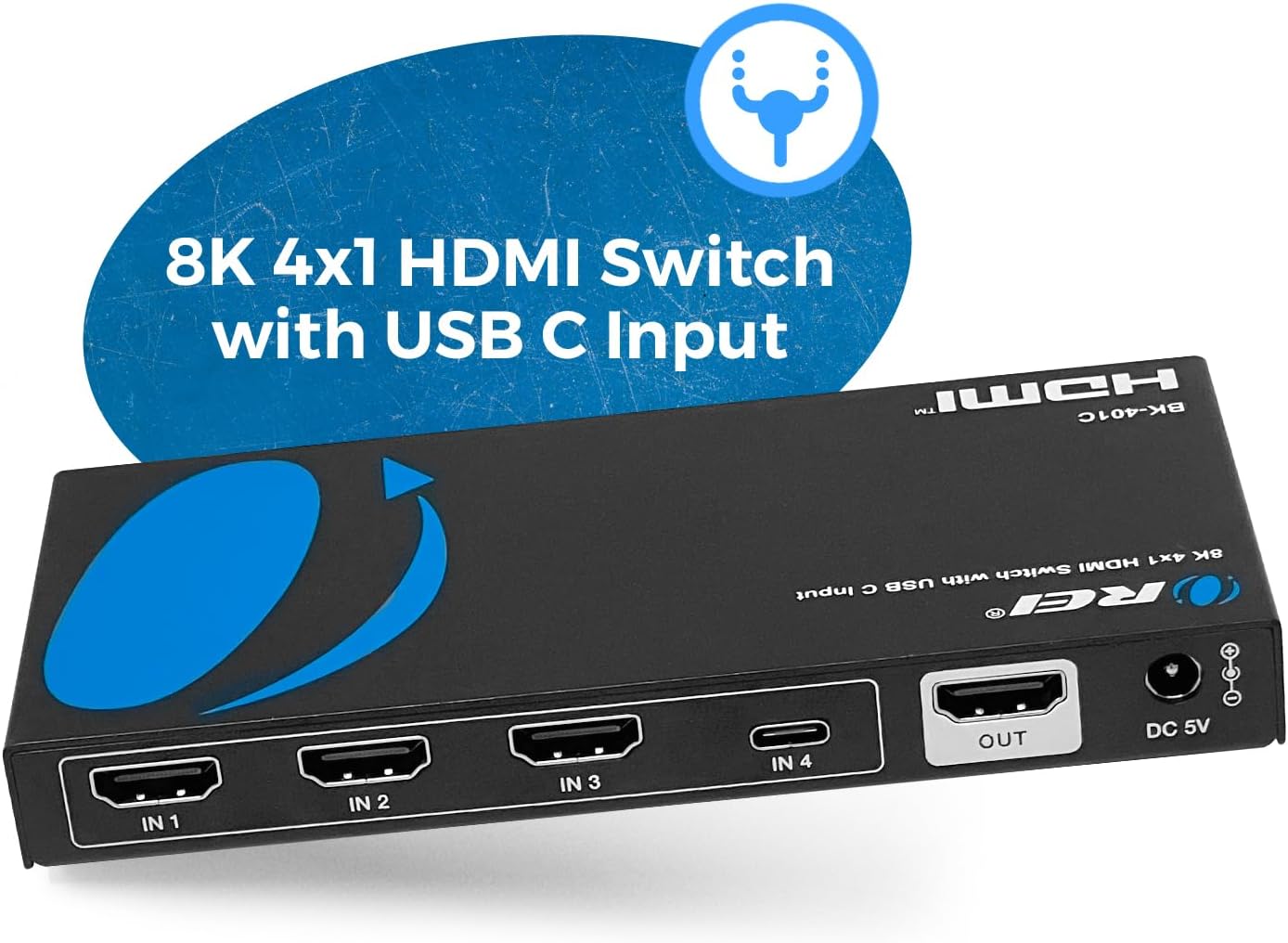
Immaġni: Dettaljata view of the input and output ports on the OREI BK-401C switch.
Istruzzjonijiet Operattivi
The OREI BK-401C switch offers both manual and automatic input switching options.
Swiċċjar manwali
- Using the Front Panel Button: Press the "SWITCH" button on the front panel of the device to cycle through the available inputs (IN 1, IN 2, IN 3, IN 4).
- Using the IR Remote Control: Point the IR remote control towards the switch and press the corresponding input button (1, 2, 3, or C for USB-C) to select your desired source.
Qlib Awtomatiku
The switch supports automatic input detection. When a new active source is connected or an active source is powered on, the switch can automatically switch to that input. This feature can be enabled or disabled using the "AUTO" button on the remote control or the switch itself.

Image: Demonstrates the manual switching methods using the front panel button and the IR remote control.

Image: The OREI BK-401C switch with its remote, illustrating the control options for selecting inputs.
Speċifikazzjonijiet
| Karatteristika | Dettall |
|---|---|
| Numru tal-Mudell | BK-401C |
| Verżjoni HDMI | HDMI 2.1 |
| Konformità HDCP | HDCP 2.3/2.2/1.4 |
| Riżoluzzjoni tal-vidjo | Up to 8K@60Hz, 4K@120Hz, 1080p@240Hz |
| Appoġġ HDR | HDR10+, HDR10, Dolby Vision, HLG |
| Vidjo tal-Bandwidth | 48Gbps |
| Karatteristiċi tal-Logħob | VRR, ALLM, FVA |
| Inputs | 3x HDMI, 1x USB-C |
| Output | 1x HDMI |
| Formati Awdjo | LPCM 7.1, Dolby TrueHD, Dolby Atmos, DTS-HD Master Audio, DTS:X |
| Kontroll | Front panel button, IR remote, Auto-switching |
| Dimensjonijiet (L x W x H) | 5.7 x 2.67 x 0.7 pulzieri (madwar 14.5 x 6.8 x 1.8 ċm) |
| Piż | 9.1 uqija (madwar 258g) |
| Provvista tal-Enerġija | DC 5V/1A |
| Kulur | Iswed |

Image: Physical dimensions and weight of the OREI BK-401C switch.
Issolvi l-problemi
If you encounter issues with your OREI BK-401C switch, refer to the following common troubleshooting steps:
- Ebda Output tal-Vidjo:
- Ensure all cables (HDMI, USB-C, power) are securely connected.
- Verify that the correct input source is selected on the switch.
- Check that your display is set to the correct HDMI input.
- Ipprova qabbad l-apparat tas-sors direttament mad-displej biex teskludi problemi bil-kejbil jew bis-sors.
- Restart all connected devices, including the switch, source, and display.
- Ensure HDMI cables are high-quality and within recommended length (under 25 feet).
- Vidjo/Awdjo Intermittenti:
- Iċċekkja għal konnessjonijiet tal-kejbil maħlula.
- Ittestja b'kejbils HDMI differenti.
- Ensure the power adapter is providing stable power to the switch.
- Il-Kontroll mill-bogħod Mhux Jaħdem:
- Kun żgur li m'hemm l-ebda ostaklu bejn ir-remote u r-riċevitur IR tas-swiċċ.
- Iċċekkja l-batterija fil-kontroll remot u ibdelha jekk meħtieġ.
- Ensure the remote is pointed directly at the switch.
- Kwistjonijiet ta' Riżoluzzjoni/Rata ta' Aġġornament:
- Verify that your source device and display both support the desired resolution and refresh rate.
- Ensure you are using HDMI 2.1 compliant cables for 8K@60Hz or 4K@120Hz.
If problems persist after following these steps, please contact OREI customer support.
Manutenzjoni
To ensure the longevity and optimal performance of your OREI BK-401C switch, follow these maintenance guidelines:
- Tindif: Uża drapp artab u niexef biex tnaddaf il-barra tal-apparat. Tużax prodotti tat-tindif likwidi jew aerosols.
- Ventilazzjoni: Kun żgur li l-apparat jitqiegħed f'żona ventilata sew biex tevita li jisħon iżżejjed. Timblokkax xi fetħiet tal-ventilazzjoni.
- Ambjent: Avoid exposing the device to extreme temperatures, humidity, dust, or direct sunlight.
- Qawwa: Always use the provided 5V/1A power adapter. Disconnect power during electrical storms or when unused for long periods.
Garanzija u Appoġġ
The OREI BK-401C switch comes with a 1-Sena Garanzija Sħiħa mingħand il-manifattur. Din il-garanzija tkopri difetti fil-materjali u l-abbilità taħt użu normali.
OREI also provides Appoġġ Tekniku tul il-ħajja for this product. If you require assistance with setup, troubleshooting, or have any questions, please contact OREI customer support through their official channels.
For warranty claims or technical support, please visit the OREI webis-sit jew irreferi għall-informazzjoni ta' kuntatt ipprovduta fl-imballaġġ tal-prodott tiegħek.


