Introduzzjoni
This instruction manual provides comprehensive guidance for the setup, operation, and maintenance of your Wireless Express Retro Boombox Speaker. Designed for portability and powerful sound, this speaker combines nostalgic aesthetics with modern audio technology, featuring Bluetooth connectivity, FM radio, and LED light effects. Please read this manual thoroughly to ensure proper use and to maximize your enjoyment of the product.
Informazzjoni dwar is-Sigurtà
- Tesponix l-unità għal temperaturi estremi, umdità, jew dawl tax-xemx dirett.
- Evita li twaqqa’ jew tissuġġetta lill-kelliem għal impatti qawwija.
- Żomm il-kelliem 'il bogħod mill-ilma u likwidi oħra.
- Tippruvax tiżżarma jew issewwi l-unità int stess. Irreferi għal kull manutenzjoni f'idejn persunal kwalifikat.
- Uża biss il-kejbil tal-iċċarġjar ipprovdut.
- Żgura ventilazzjoni xierqa madwar l-ispiker waqt it-tħaddim.
X'hemm fil-Kaxxa
- Kelliem Boombox Retro Wireless Express
- Iċċarġjar Cable
- Manwal ta 'Istruzzjoni (dan id-dokument)
Prodott Overview
Familiarize yourself with the various components of your Retro Boombox Speaker:
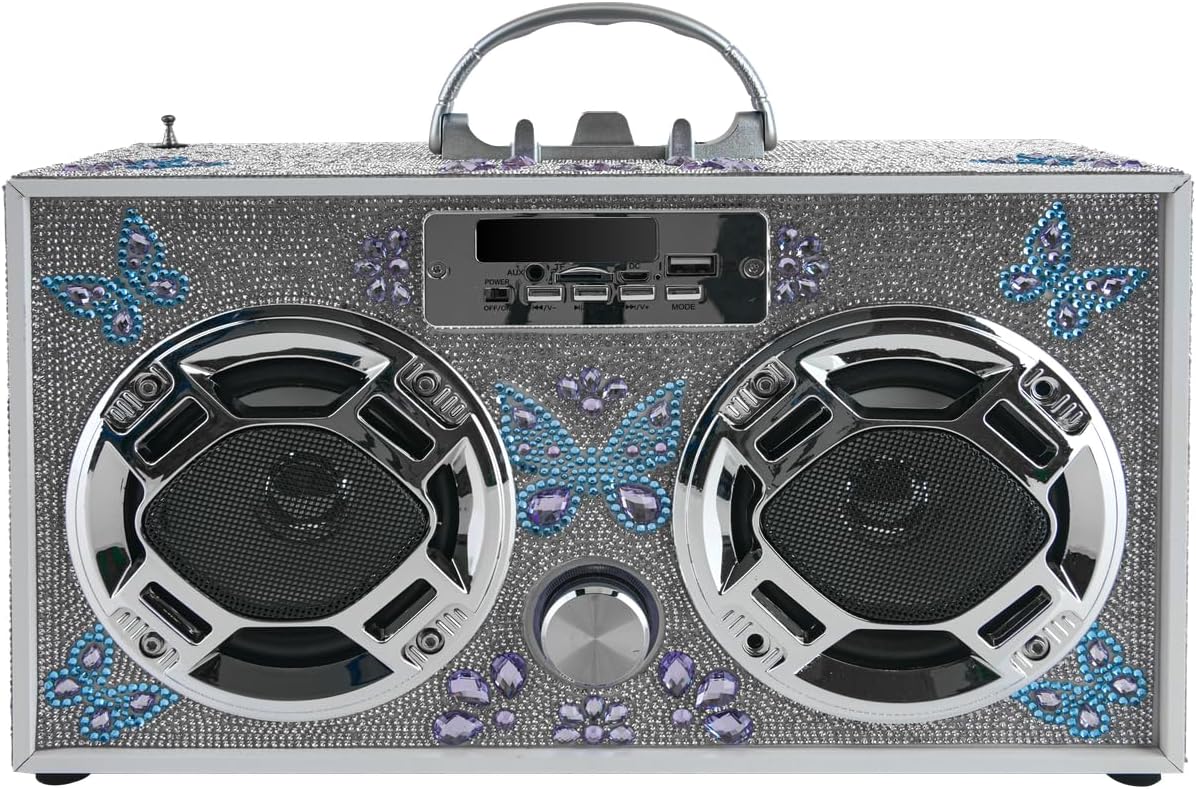
Figura 1: Quddiem view of the Butterfly Silver Bling Retro Boombox Speaker. It features a silver bling exterior with blue and purple butterfly accents, two large speaker grilles, and a central control panel with various buttons and ports.

Figure 2: Feature diagram highlighting key functionalities including Bluetooth connectivity, LED speaker lights, FM radio, stereo sound, built-in phone holder, SD/USB input, remote control, LED light-up dancing speakers, and rechargeable battery with charging cord included.

Figura 3: Angolat view of the Butterfly Silver Bling Retro Boombox Speaker, showcasing its portable handle and the detailed bling finish on the top and sides.
Tqassim tal-Panew tal-Kontroll:
- Swiċċ tal-Enerġija: Toggle ON/OFF.
- Buttuna tal-Modalità: Switches between Bluetooth, FM Radio, USB, and SD card modes.
- Buttuna Play/Pause: Jikkontrolla l-plejbek tal-midja.
- Buttuni tal-Track ta' Preċedenti/Li jmiss: Navigates through tracks or radio stations.
- Buttuna tal-Volum: Jaġġusta l-livell tal-ħruġ tal-awdjo.
- Port USB: Għall-plejbek minn USB drive.
- Slot tal-Kard SD: For SD card playback.
- Input AUX: For connecting external audio devices via 3.5mm cable.
- Port tad-dħul DC 5V: Għall-iċċarġjar tal-ispiker.
- Telescoping Antenna: Għal riċezzjoni mtejba tar-radju FM.
- Detentur tat-Telefon inkorporat: Located on top for convenient device placement.
Setup
1. Iċċarġja l-Ispeaker
- Locate the DC 5V IN port on the control panel.
- Connect the provided charging cable to the speaker and a compatible USB power adapter (not included) or a USB port on a computer.
- Id-dawl indikatur tal-iċċarġjar jixgħel. Ladarba jkun iċċarġjat kompletament, id-dawl jista’ jibdel il-kulur jew jintefa.
- A full charge provides several hours of continuous playtime.
2. Tixgħil / Mitfi
- To power on, slide the Power Switch to the "ON" position.
- To power off, slide the Power Switch to the "OFF" position.
Istruzzjonijiet Operattivi
1. Tqabbil tal-Bluetooth
- Power on the speaker. It will automatically enter Bluetooth pairing mode, indicated by a flashing LED light or an audible prompt.
- Fuq l-apparat mobbli tiegħek (smartphone, tablet, eċċ.), attiva l-Bluetooth u fittex apparati disponibbli.
- Select "WE-BB" or similar from the list of devices.
- Once paired, the speaker will confirm with an audible sound, and the LED light may become solid.
- You can now stream audio from your device to the speaker.
2. Operazzjoni tar-Radju FM
- Press the "Mode" button until "FM" or the radio frequency is displayed.
- Estendi l-antenna teleskopika għal riċeviment ottimali.
- Agħfas u żomm il-buttuna "Play/Pause" biex tiskennja awtomatikament u ssalva l-istazzjonijiet FM disponibbli.
- Use the "Previous/Next Track" buttons to navigate through saved stations.
3. Daqq tal-Karta USB/SD
- Daħħal USB drive jew SD card (b'awdjo kompatibbli) files) fil-port/slott rispettiv.
- The speaker will automatically switch to USB or SD card mode and begin playing audio. If not, press the "Mode" button to select the correct source.
- Use the "Play/Pause" and "Previous/Next Track" buttons to control playback.
4. Input AUX
- Connect an external audio device to the AUX input port using a 3.5mm audio cable (not included).
- Press the "Mode" button until "AUX" is displayed or selected.
- Audio will now play through the speaker from your connected device. Control playback from the external device.
5. Spettaklu tad-Dawl LED
- The speaker features dynamic LED lights that pulse and change to the beat of your music.
- The LED lights are typically activated automatically when the speaker is powered on and playing music.
- Refer to the product's specific controls for any dedicated light mode buttons, if available (not explicitly listed in provided data, so general statement).
6. Kontroll tal-Volum
- Rotate the Volume Knob on the front panel clockwise to increase volume and counter-clockwise to decrease volume.
Manutenzjoni
- Tindif: Use a soft, dry cloth to wipe the exterior of the speaker. Do not use abrasive cleaners or solvents.
- Ħażna: Meta ma tkunx qed tużah għal perjodi twal, aħżen l-ispiker f'post frisk u niexef 'il bogħod mix-xemx diretta.
- Kura tal-batterija: Biex ittawwal il-ħajja tal-batterija, evita li tiċċarġja kompletament il-batterija ta' spiss. Iċċarġja l-ispiker regolarment, anke jekk ma jkunx qed jintuża b'mod attiv.
Issolvi l-problemi
| Problema | Kawża Possibbli | Soluzzjoni |
|---|---|---|
| L-ispiker ma jixgħelx. | Il-batterija hija baxxa jew eżawrita. | Iċċarġja l-ispiker billi tuża l-kejbil tal-iċċarġjar provdut. |
| L-ebda ħoss. | Il-volum huwa baxx wisq; intgħażlet modalità żbaljata; l-apparat mhux imqabbad (Bluetooth). | Increase volume; press "Mode" button to select correct input; re-pair Bluetooth device. |
| L-apparat Bluetooth ma jistax jingħaqad. | L-ispiker mhux fil-modalità ta' tqabbil; l-apparat huwa 'l bogħod wisq; interferenza. | Ensure speaker is in Bluetooth mode; move device closer to speaker; turn off other Bluetooth devices. |
| Riċeviment ħażin tar-radju FM. | Antenna mhux estiża; sinjal dgħajjef. | Fully extend the telescoping antenna; try repositioning the speaker. |
| Il-karta USB/SD mhux qed tilgħab. | Mhux appoġġjat file format; card/drive not inserted correctly. | Żgura l-awdjo files are in a compatible format (e.g., MP3); re-insert the USB drive/SD card firmly. |
Speċifikazzjonijiet
- Ditta: Wireless Express
- Numru tal-Mudell: WE-BB
- Dimensjonijiet tal-Prodott: 13 x 5 x 8 pulzieri
- Piż tal-oġġett: 3.39 liri
- Teknoloġija tal-Konnettività: Bluetooth
- Kulur: Butterfly Silver Bling
- Tip ta' Kelliem: Librerija
- Manifattur: Wireless Express
- L-Ewwel Disponibbli: 4 ta’ Settembru, 2024
Garanzija u Appoġġ
For warranty information or technical support, please refer to the contact details provided on the product packaging or visit the official Wireless Express websit. Żomm l-irċevuta tax-xiri tiegħek bħala prova tax-xiri għal kwalunkwe talba ta' garanzija.


