1. Istruzzjonijiet Importanti dwar is-Sigurtà
Please read all instructions carefully before using the Genesis Designs GM1-B massage chair. Retain this manual for future reference.
- Sigurtà Elettrika: Ensure the power cord is securely connected to a grounded outlet. Do not operate the chair with a damaged cord or plug. Keep the power cord away from heated surfaces.
- Kundizzjonijiet Mediċi: Consult a physician before use if you have medical conditions, are pregnant, have a pacemaker, or are undergoing medical treatment. Discontinue use if you experience discomfort.
- Tfal u Pets: Keep children and pets away from the massage chair, especially during operation. This appliance is not intended for use by persons with reduced physical, sensory, or mental capabilities unless supervised.
- Użu xieraq: Use the chair only for its intended purpose as described in this manual. Do not stand on or place heavy objects on the chair. Avoid prolonged use in one area to prevent over-stimulation.
- Ambjent: Tużax is-siġġu f'damp or wet environments. Keep it away from direct sunlight and heat sources.
2. Prodott Aktarview
The Genesis Designs GM1-B is a smart full-body massage chair designed for comprehensive relaxation and therapeutic massage. It features advanced 2D SL-Track rollers, zero gravity recline, voice activation, Bluetooth connectivity, and targeted heating.
Karatteristiċi ewlenin:
- Rombli tal-binarji 2D SL: Provides massage from the neck down to the glutes, following the natural curve of your spine.
- Funzjoni ta' Gravità Żero: Reclines the chair to distribute body weight evenly, reducing pressure on the spine and enhancing relaxation.
- Attivazzjoni tal-Vuċi: Control various functions using simple voice commands.
- Kelliema Bluetooth: Connect your personal device to enjoy audio during your massage.
- Funzjoni Lumbari Msaħħan: Gentle heat therapy for the lower back to soothe muscles.
- Massaġġi tal-Airbag: Compression massage for shoulders, arms, waist, legs, and feet.
- Rombli tas-saqajn: Targeted massage for the soles of your feet.
- Programmi Multipli: 12 auto pre-programmed modes and 6 manual massage techniques.
- Tablet Remote Control & Quick Start Buttons: Intuitive control options for ease of use.
- Port tal-Iċċarġjar tal-USB: Convenient charging for your mobile devices.
Komponenti:
- Massage Chair Main Unit
- Handheld Tablet Remote Control
- Korda tal-Enerġija
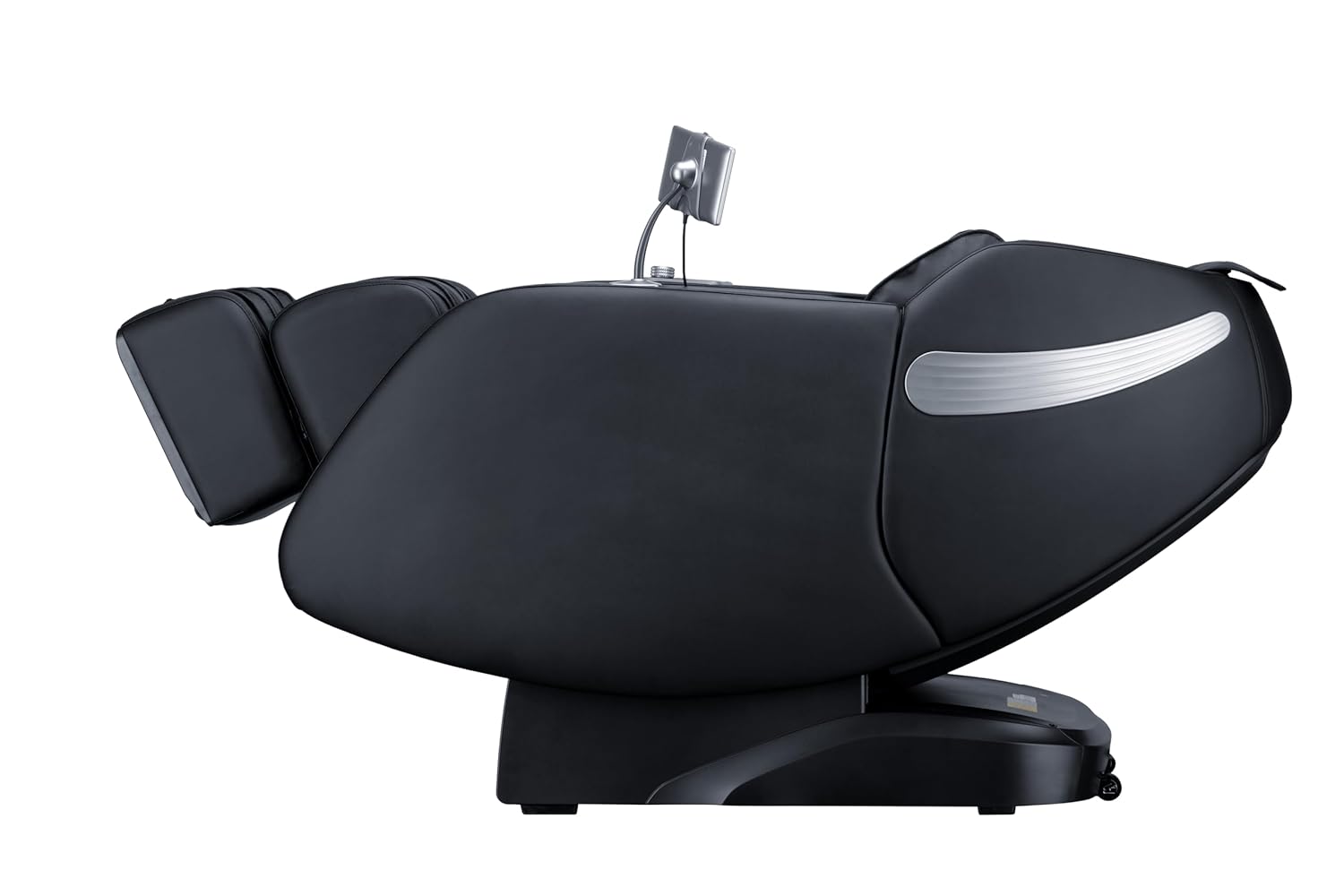
Figura 2.1: Quddiem view of the Genesis Designs GM1-B Smart Full Body Massage Chair.

Figura 2.2: Ġenb view of the Genesis Designs GM1-B Smart Full Body Massage Chair.

Figure 2.3: Key features of the GM1-B Massage Chair.
3. Setup
The Genesis Designs GM1-B massage chair requires minimal assembly. Follow these steps to prepare your chair for use.
3.1 Spakkjar u Tqegħid
- Carefully remove all packaging materials from the chair.
- Place the massage chair on a flat, stable surface. Ensure there is sufficient space around the chair for reclining, especially for the zero gravity function.
- Avoid placing the chair in direct sunlight or near heat sources.

Figura 3.1: Eżample of chair placement in a room.
3.2 Konnessjoni tal-Enerġija
- Sib il-port tad-dħul tal-enerġija fuq wara jew taħt is-siġġu.
- Connect the power cord securely to the chair and then plug it into a standard grounded electrical outlet.
- Kun żgur li s-swiċċ tal-enerġija (jekk preżenti) ikun fil-pożizzjoni 'MITFI' qabel ma tgħaqqad.
3.3 Tablet Remote Control Setup
- Connect the handheld tablet remote control to its designated port or stand on the chair.
- Ensure the tablet is charged or connected for power if it is not battery-operated.

Figure 3.2: Handheld tablet remote control.
4. Istruzzjonijiet Operattivi
Familiarize yourself with the control methods to fully utilize your massage chair's features.
4.1 Power On/Off
- Press the power button on the quick start panel (right armrest) or the tablet remote to turn the chair on.
- Press again to turn off the chair. The chair will return to its upright position.
4.2 Using the Tablet Remote Control
The tablet provides detailed control over all massage functions.
- Programmi Auto: Select from 12 pre-programmed massage modes tailored for different needs (e.g., relaxation, recovery, sleep).
- Manual Techniques: Choose from 6 massage techniques (e.g., Kneading, Tapping, Shiatsu) and adjust intensity, speed, and roller width.
- Massaġġi mmirati: Select specific body areas for massage (e.g., neck, back, lumbar, feet).
- Kontroll tal-Airbag: Adjust the intensity of airbag compression for shoulders, arms, waist, legs, and feet.
- Funzjoni tas-Sħana: Activate or deactivate the lumbar heating.
- Gravità Żero: Adjust the recline angle to one of the zero gravity positions.
4.3 Buttuni ta' Bidu Mgħaġġel
Located on the right armrest, these buttons offer quick access to essential functions:
- Qawwa mixgħul/mitfi
- Reclin ta' Gravità Żero
- Auto Program Start/Stop
- Legrest Up/Down
4.4 Voice Activation
To use voice control, ensure the feature is enabled via the tablet. Speak clearly and directly towards the chair's microphone.
- Activation Phrase: Say "Hello, Genesis" or a similar designated phrase to activate voice control.
- Kmandi: Follow with commands such as "Start auto massage," "Recline to zero gravity," "Increase intensity," "Turn on heat," or "Stop massage."
4.5 Konnettività Bluetooth
- Activate Bluetooth on your personal device (smartphone, tablet).
- On your device, search for available Bluetooth devices and select "Genesis Massage Chair" (or similar name).
- Once paired, audio from your device will play through the chair's built-in speakers.
4.6 Zero Gravity Function
The zero gravity feature elevates your legs above your heart, promoting circulation and deeper relaxation.
- Press the Zero Gravity button on the tablet or quick start panel.
- The chair will recline to a preset zero gravity position. You may have options to adjust to different levels of recline.

Figure 4.1: Zero Gravity recline progression.
4.7 Foot Massage
The footrest features rollers and airbags for comprehensive foot and calf massage.
- The legrest can extend up to 6.25 inches to accommodate different user heights. Adjust manually or via the tablet.
- Foot rollers will activate during foot massage programs or can be manually controlled.

Figure 4.2: Footrest with foot rollers.
5. Manutenzjoni
Proper care ensures the longevity and optimal performance of your massage chair.
5.1 Tindif
- Barra: Wipe clean the leather and plastic surfaces with a soft, damp drapp. Tużax prodotti tat-tindif li joborxu, solventi, jew kimiċi ħarxa.
- Intern: Perjodikament vacuum cleaner kwalunkwe trab jew debris mix-xquq.
- Kun żgur li s-siġġu jkun skonnettjat qabel ma tnaddaf.
5.2 Ħażna
- Meta ma tkunx qed tużaha għal perjodi twal, aqla’ s-siġġu mill-plagg u aħżnu f’post frisk u niexef ’il bogħod mix-xemx diretta.
- Avoid placing heavy objects on the chair during storage.
6 Issolvi l-problemi
If you encounter issues with your massage chair, refer to the following common problems and solutions.
| Problema | Kawża Possibbli | Soluzzjoni |
|---|---|---|
| Is-siġġu ma jixgħelx. | Il-korda tal-enerġija mhux imqabbda; Is-swiċċ tal-enerġija mitfi; Is-sokket ma jaħdimx sew. | Ensure power cord is securely plugged in. Check if the main power switch is on. Test the outlet with another device. |
| Ir-rombli tal-massaġġi mhux qed jiċċaqalqu. | Program not selected; Safety sensor activated. | Select an auto program or manual massage technique. Ensure no obstructions are blocking the rollers. |
| Il-kontroll tal-vuċi mhux qed jirrispondi. | Voice activation disabled; Microphone obstructed; Incorrect commands. | Check tablet settings to ensure voice activation is enabled. Speak clearly and ensure no objects are covering the microphone. Refer to the manual for correct commands. |
| Il-Bluetooth mhux qed jiġi mqabbla. | Bluetooth not enabled on device; Chair not in pairing mode; Interference. | Ensure Bluetooth is active on your device. Restart both the chair and your device. Move closer to the chair. |
| Is-siġġu jagħmel ħsejjes mhux tas-soltu. | Normal operational sounds; Loose component; Obstruction. | Some mechanical sounds are normal. Check for any loose parts or foreign objects. If the noise is persistent or loud, discontinue use and contact support. |
7. Speċifikazzjonijiet
Detailed technical specifications for the Genesis Designs GM1-B massage chair.
| Karatteristika | Dettall |
|---|---|
| Numru tal-Mudell | GM1-B |
| Dimensjonijiet tal-Prodott (Wieqaf) | 57.67 x 29.72 x 44.33 pulzieri (L x W x H) |
| Product Dimensions (Zero Gravity) | 66.33 x 29.72 x 38.77 pulzieri (L x W x H) |
| Piż tal-oġġett | 165 Liri |
| Tip ta' Materjal | Leather (Upholstery), Foam (Fill), Metal (Frame) |
| Trakka tal-Massaġġi | 2D SL-Track |
| Tekniki tal-Massage | 6 Manual Techniques, 12 Auto Programs |
| Estensjoni tas-Serħan tas-Saqajn | Sa 6.25 pulzier |
| Provvista tal-Enerġija | Standard AC (Voltage not specified, refer to product label) |
| Ċertifikazzjonijiet | ETL Ċertifikat |
| Assemblea Meħtieġa | No (Minimal setup required) |

Figure 7.1: Chair dimensions in upright and zero gravity positions.
8. Garanzija u Appoġġ
For warranty information, product support, or service inquiries, please refer to the warranty card included with your purchase or contact Genesis Designs customer service directly. Contact details are typically available on the manufacturer's official websit jew permezz tal-bejjiegħ bl-imnut tiegħek.
Please have your model number (GM1-B) and purchase date available when contacting support.


