1. Introduzzjoni
Il-Canyon DVR40 hija kamera tad-daxxbord iddisinjata biex tirrekordja l-ispinta tas-sewqantage. Għandu sensor Sony Starvis 415 għal reġistrazzjoni ta' vidjow 4K, kamp wiesa' ta' 140° view, u touchscreen kapaċittiv IPS ta' 3 pulzieri. L-apparat jinkludi superkapaċitatur għal tħaddim affidabbli u jappoġġja konnettività Wi-Fi għall-kontroll permezz ta' applikazzjoni mobbli.

Stampa 1.1: Quddiem view tal-Canyon DVR40 Dash Camera, li turi l-lenti u l-branding.
2. Kontenut tal-Pakkett
Iċċekkja li l-oġġetti kollha elenkati hawn taħt huma preżenti fl-imballaġġ tal-prodott.

Immaġni 2.1: L-oġġetti kollha inklużi fil-pakkett tal-Canyon DVR40 Dash Camera.
- Kamera tad-Dash Canyon DVR40
- Gwida Quick Start
- Karta ta' Garanzija
- Aċċessorji għall-Installazzjoni tal-Kejbils
- Qarrej tal-Kard
- Detentur manjetiku tat-tazza tal-ġbid b'konnettur USB tat-Tip Ċ
- Adapter tal-enerġija tal-karozza (2 konnetturi tal-ħruġ USB Tip-A)
- Kejbil USB Tip-C (tul tal-kejbil 3.6 m)
- Filtru CPL
- Drapp għat-tindif tal-iskrin
- Kaxxa tat-tessuti
3. Prodott Aktarview
Iffamiljarizza ruħek mal-komponenti ewlenin tal-kamera tad-dash DVR40.

Immaġni 3.1: Il-Kamera tad-Dash Canyon DVR40, li tenfasizza d-disinn kompatt tagħha.
Karatteristiċi ewlenin:
- Reġistrazzjoni 4K UltraHD: Jaqbad vidjow bi 30 frejm kull sekonda għal immaġni ċaratage.
- Sensor tas-Sony Starvis 415: Ittejjeb il-prestazzjoni f'dawl baxx bil-modalità tal-viżjoni bil-lejl.
- 140° Qasam ta View: Jipprovdi kopertura wiesgħa tat-triq.
- Skrin tattili IPS Kapaċittiv ta' 3 pulzieri: Għal kontroll dirett u daqq.
- Supercapacitor: Joffri durabilità u reżistenza għat-temperatura mtejba meta mqabbla ma' batteriji tradizzjonali.
- Muntaġġ manjetiku: Jiffaċilita installazzjoni u tneħħija faċli permezz ta' provvista ta' enerġija integrata.
- Konnettività Wi-Fi: Jippermetti kontroll u ikeltagĠestjoni elettronika permezz tal-applikazzjoni mobbli Canyon Eye.
- G-Sensor: Jidentifika awtomatikament l-impatti u jissakkar il-vidjo files biex jipprevjenu l-kitba fuq wara.
4. Setup
4.1 Immuntar tal-Kamera tad-Dash
Id-DVR40 juża muntatura manjetika għal twaħħil sigur mal-windskrin tal-vettura tiegħek.
- Naddaf iż-żona fuq il-windskrin tiegħek fejn bi ħsiebek twaħħal il-kamera.
- Waħħal id-detentur tat-tazza tal-ġbid manjetiku mal-windskrin. Kun żgur li jkun pożizzjonat biex jipprovdi viżibilità mingħajr ostakli. view tat-triq.
- Qabbad il-kejbil tal-enerġija USB Type-C mal-muntatura manjetika.
- Allinja l-kamera tad-dashboard mal-muntatura manjetika. Il-kamera se tidħol f'postha b'mod mgħaġġel, u b'hekk tistabbilixxi l-konnessjoni tal-enerġija.

Immaġni 4.1: Il-muntatura manjetika b'provvista tal-enerġija integrata għal installazzjoni faċli.
4.2 Konnessjoni tal-Enerġija
Uża l-adapter tal-enerġija tal-karozza u l-kejbil USB tat-Tip C provduti biex tħaddem il-kamera tad-dashboard.
- Ipplaggja l-adapter tal-enerġija tal-karozza fis-sokit tal-enerġija ta' 12V tal-vettura tiegħek (sokit tal-lajter tas-sigaretti).
- Qabbad il-kejbil USB tat-Tip C mill-adapter tal-enerġija tal-karozza mal-muntatura manjetika.
- Ladarba l-ignition tal-vettura tinxtegħel, il-kamera tad-dashboard tixgħel awtomatikament u tibda tirrekordja.
4.3 Is-Setup Inizjali u l-Kard tal-MicroSD
Qabel l-ewwel użu, daħħal kard MicroSD kompatibbli (mhux inkluża) u fformattjaha.
- Daħħal kard MicroSD b'veloċità għolja (Klassi 10 jew ogħla, sa 128GB rakkomandat) fl-islott apposta fuq il-kamera tad-dashboard.
- Ixgħel il-kamera.
- Aċċessa s-settings tal-kamera permezz tat-touchscreen jew l-app mobbli.
- Sib l-għażla "Format SD Card" u kkonferma biex tifformattja l-kard. Dan jipprepara l-kard għar-reġistrazzjoni u jiżgura prestazzjoni ottimali.
5. Istruzzjonijiet Operattivi
5.1 Reġistrazzjoni Bażika
Id-DVR40 jibda awtomatikament ir-reġistrazzjoni f'linja meta jinxtegħel.
- Reġistrazzjoni Loop: Il-kamera tirrekordja l-vidjow f'segmenti (eż., 1, 3, jew 5 minuti). Meta l-kard tal-MicroSD tkun mimlija, l-eqdem karta mhux protetta files huma miktuba fuqhom.
- Reġistrazzjoni manwali: Agħfas il-buttuna tar-reġistrazzjoni fuq il-kamera (jekk disponibbli) jew uża l-app mobbli biex tibda/twaqqaf ir-reġistrazzjoni manwalment.
- Kwalità tal-Vidjo: Il-kamera tirrekordja f'4K UltraHD bi 30 frejm kull sekonda.

Immaġni 5.1: Rappreżentazzjoni viżwali tal-kapaċitajiet tal-vidjow ta' kwalità għolja tad-DVR40.
5.2 G-Sensor għar-Reġistrazzjoni ta' Inċidenti
Is-Sensor G integrat jinduna b'impatti f'daqqa jew aċċelerazzjoni/deċelerazzjoni mgħaġġla.
- Meta jiġi skopert avveniment, is-segment tal-vidjo kurrenti jiġi msakkar awtomatikament u ssejvjat f'folder protett fuq il-kard MicroSD.
- Dawn protetti files mhux se jiġu miktuba fuq il-loop recording.
- Aġġusta s-sensittività tal-G-Sensor fis-settings tal-kamera jekk meħtieġ.

Immaġni 5.2: Illustrazzjoni tal-funzjoni tal-G-Sensor fir-reġistrazzjoni tal-inċidenti.
5.3 Display tat-Touch Screen
It-touchscreen kapaċittiv IPS ta' 3 pulzieri jippermetti interazzjoni diretta mal-kamera.
- Innaviga l-menus, aġġusta s-settings, u erġa'view irreġistrat footage direttament fuq l-apparat.
- Id-displej tal-IPS joffri wisa' viewangoli ta' inklinazzjoni u viżibilità ċara.

Immaġni 5.3: Id-displej tat-touch screen li qed jintuża fuq id-DVR40.
5.4 Kontroll tal-Applikazzjonijiet Wi-Fi u Mobbli
Qabbad id-DVR40 mal-ismartphone tiegħek permezz tal-Wi-Fi billi tuża l-applikazzjoni mobbli Canyon Eye.
- Niżżel l-applikazzjoni "Canyon Eye" mill-app store tal-ismartphone tiegħek.
- Ippermetti l-Wi-Fi fuq id-DVR40 permezz tal-menù tas-settings tiegħu.
- Fuq l-ismartphone tiegħek, qabbad man-netwerk Wi-Fi tad-DVR40 (l-SSID u l-password se jintwerew fuq l-iskrin tal-kamera).
- Iftaħ l-app Canyon Eye. Issa tista' view foo ħajtage, aċċessa vidjows irreġistrati, ibdel is-settings, u niżżel filedirettament fuq it-telefon tiegħek.
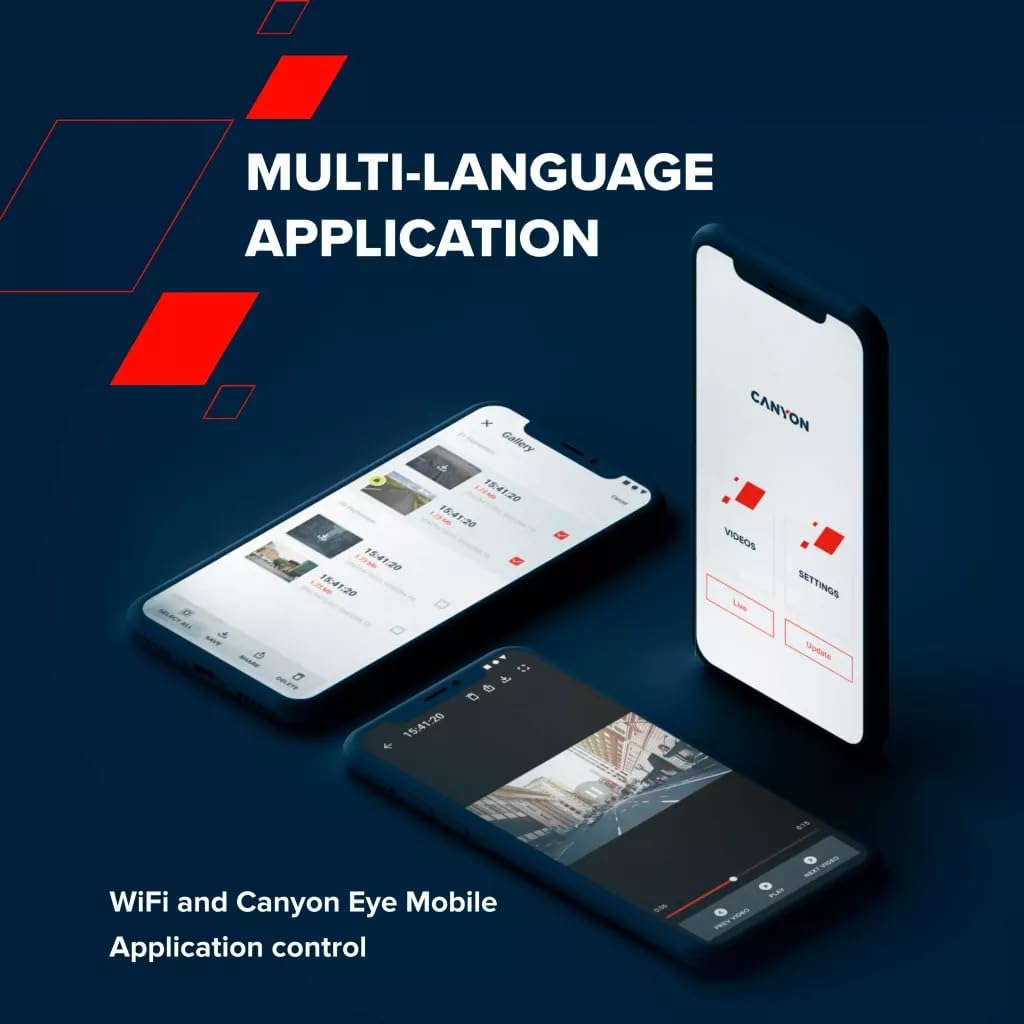
Immaġni 5.4: L-interfaċċja tal-applikazzjoni mobbli Canyon Eye għall-kontroll remot u file ġestjoni.
6. Manutenzjoni
6.1 Superkapaċitatur
Id-DVR40 huwa mgħammar b'superkapaċitatur minflok batterija tradizzjonali tal-jone tal-litju.
- Is-superkapaċitaturi joffru durabilità mtejba u firxa usa' ta' temperatura operattiva (-30°C sa 80°C).
- Huma inqas suxxettibbli għal sħana żejda u għandhom ħajja itwal, u dan jagħmilhom adattati għal ambjenti tal-karozzi.
- Is-superkapaċitatur jipprovdi biżżejjed enerġija biex isalva b'mod sikur l-aħħar reġistrazzjoni meta l-enerġija esterna tiġi skonnettjata.

Immaġni 6.1: Is-superkapaċitatur tad-DVR40 jiżgura tħaddim affidabbli f'firxa wiesgħa ta' temperaturi.
6.2 Tindif u Ħażna
- Uża d-drapp tat-tindif provdut biex timsaħ bil-mod l-iskrin u l-lenti. Evita materjali li joborxu jew prodotti tat-tindif kimiċi.
- Kun żgur li l-kamera tkun nadifa u niexfa qabel ma taħżinha.
- Meta ma tkunx qed tużaha għal perjodi twal, aħżen il-kamera f'post frisk u niexef, 'il bogħod mix-xemx diretta.
7 Issolvi l-problemi
Irreferi għat-tabella t'hawn taħt għal kwistjonijiet komuni u s-soluzzjonijiet tagħhom.
| Problema | Kawża Possibbli | Soluzzjoni |
|---|---|---|
| Il-kamera ma tixgħelx. | Ebda provvista tal-enerġija; kejbil/adapter difettuż. | Iċċekkja l-konnessjoni tal-adapter tal-enerġija tal-karozza. Kun żgur li l-ignition tal-vettura hija mixgħula. Ipprova port USB jew adapter differenti jekk disponibbli. |
| Ir-reġistrazzjoni tieqaf ħesrem. | Karta MicroSD mimlija jew korrotta; karta MicroSD b'veloċità baxxa. | Ifformattja l-kard tal-MicroSD. Ibdelha b'kard tal-MicroSD b'veloċità għolja (Klassi 10 jew U3). |
| Video footage hija mċajpra jew mhux ċara. | Film protettiv fuq il-lenti; lenti maħmuġa; ostruzzjoni fil-windskrin. | Neħħi kwalunkwe film protettiv. Naddaf il-lenti tal-kamera u l-windskrin. Kun żgur li l-kamera hija mmuntata sew. |
| Problemi bil-konnessjoni tal-Wi-Fi. | Password tal-Wi-Fi mhux korretta; il-Wi-Fi tal-kamera mhux attivat; problemi bl-app. | Kun żgur li l-Wi-Fi huwa attivat fuq il-kamera. Ivverifika l-password tal-Wi-Fi. Erġa' ibda kemm il-kamera kif ukoll l-ismartphone. Erġa' installa l-app Canyon Eye. |
| Is-Sensor-G huwa sensittiv wisq/mhux sensittiv biżżejjed. | Issettjar tas-sensittività tas-Sensor-G. | Aġġusta l-livell tas-sensittività tal-G-Sensor fis-settings tal-kamera. |
8. Speċifikazzjonijiet
Speċifikazzjonijiet tekniċi dettaljati għall-Canyon DVR40 Dash Camera.
| Karatteristika | Speċifikazzjoni |
|---|---|
| Brand | CANYON |
| Isem tal-Mudell | DVR40 |
| Numru tal-Mudell | CND-DVR40 |
| Kulur | Iswed |
| Riżoluzzjoni ta' Reġistrazzjoni tal-Vidjo | 2160p (4K UltraHD) |
| Gwarniċi Per Sekondi | 30 fps (f'4K) |
| Teknoloġija tas-Sensor Ottiku | CMOS (Sony Starvis 415) |
| Daqs tas-Sensor tar-Ritratti | 1/2.86'' |
| Qasam ta View | 140° |
| Karatteristiċi Speċjali | Superkapaċitatur Integrat, Touch Screen, Modalità ta' Viżjoni bil-Lejl, Wi-Fi, G-Sensor |
| Wiri | Skrin tattili IPS Kapaċittiv ta' 3 pulzieri |
| Tip ta 'Immuntar | Muntatura manjetika |
| Sors tal-Enerġija | Adapter tal-enerġija tal-karozza (USB Tip-C) |
| Firxa tat-Temperatura Operattiva | -30°C sa 80°C (minħabba s-Supercapacitor) |
| Komponenti Inklużi | Kamera tad-Dashboard, Muntatura Manjetika, Adapter tal-Enerġija tal-Karozza, Kejbil USB-C, Qarrej tal-Kards, Filtru CPL, Drapp tat-Tindif, Kaxxa tat-Tessut, Gwida ta' Bidu Mgħaġġel, Karta tal-Garanzija, Aċċessorji għall-Installazzjoni tal-Kejbil |
| Batteriji Inklużi | Le (juża Supercapacitor) |
9. Informazzjoni dwar is-Sigurtà
- Tħaddimx il-kamera jew taġġustax is-settings waqt is-sewqan. Dejjem waqqaf il-karozza f'post sigur.
- Kun żgur li l-kamera hija mmuntata sew u ma tostakolax il-vista tiegħek. view tat-triq.
- Uża biss l-adapter tal-enerġija u l-kejbils provduti biex tevita li tagħmel ħsara lill-apparat.
- Tesponix il-kamera għal umdità jew likwidi estremi.
- Evita li żżarma l-apparat. Irreferi għal persunal tas-servizz kwalifikat għat-tiswijiet.
- Żomm il-kamera u l-aċċessorji fejn ma jintlaħqux mit-tfal.
10. Garanzija u Appoġġ
Għal informazzjoni dwar il-garanzija u appoġġ tekniku, jekk jogħġbok irreferi għall-karta tal-garanzija inkluża fil-pakkett tiegħek jew żur is-sit uffiċjali ta' Canyon. websit.
Appoġġ onlajn: https://canyon.eu/support/