1. Introduzzjoni
Grazzi tax-xiriasing the CHOETECH Mini Mobile Battery B740. This compact and powerful portable charger is designed to provide fast and efficient charging for your USB Type-C compatible devices, including smartphones, tablets, and portable gaming consoles. Please read this manual carefully before use to ensure proper operation and to maximize the lifespan of your device.
2. Informazzjoni dwar is-Sigurtà
Biex tiżgura tħaddim sikur u tevita ħsara, jekk jogħġbok osserva l-prekawzjonijiet li ġejjin:
- Tesponix l-apparat għal temperaturi estremi, dawl tax-xemx dirett, jew umdità għolja.
- Evita li twaqqa', tħalli impatt fuq, jew tiżżarma l-apparat.
- Żomm 'il bogħod mill-ilma u likwidi oħra.
- Do not use if the device is damaged or shows signs of overheating.
- Żomm fejn ma jintlaħaqx mit-tfal.
- Armi l-batterija skont ir-regolamenti lokali.

The CHOETECH B740 is equipped with 10 layers of protection for its PCBA circuit, including over-heat, over-voltage, over-charge, and short-circuit protection, ensuring enhanced charging safety.
3. Kontenut tal-Pakkett
Jekk jogħġbok iċċekkja li l-oġġetti kollha huma preżenti fil-pakkett:
- CHOETECH Mini Mobile Battery B740 Main Unit ×1
- USB Type-C Cable ×1
- Manwal ta 'Istruzzjoni × 1
4. Prodott Aktarview u Karatteristiċi
The CHOETECH B740 is a compact and versatile portable power bank designed for convenience and efficiency.

The CHOETECH B740 is available in Black, White, and Light Blue, featuring a compact design and a convenient built-in stand.
4.1 Karatteristiċi ewlenin
- Direct Plug-in Fast Charging: Simply plug the power bank directly into your smartphone's Type-C port for rapid charging. No need for extra cables.
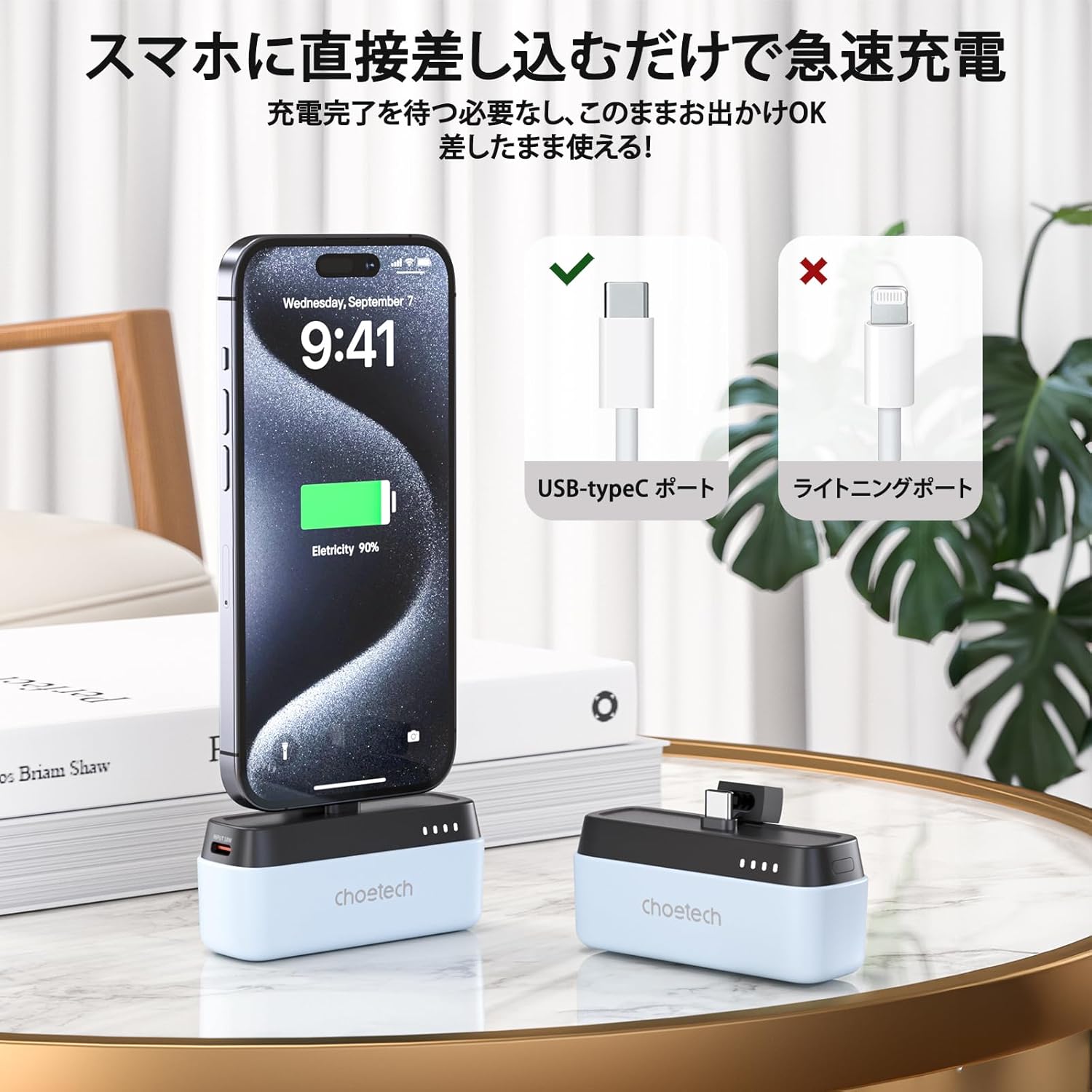
Figure 4.2: Direct Plug-in Charging
The B740 features a direct USB Type-C plug for convenient and fast charging without external cables. - Miniature and Portable Design: Weighing approximately 100g and designed to be as compact as a lipstick, it easily fits into small bags, making it ideal for travel and daily use.

Figure 4.3: Compact Size
Its miniature design allows for easy portability, comparable to the size of a lipstick. - 5000mAh Capacity with PD20W Output: Provides a 5000mAh battery capacity and supports PD20W fast charging, ensuring your devices are quickly powered up.

Figure 4.4: 5000mAh Capacity
The power bank features a 5000mAh battery, providing ample power for on-the-go charging.
Figure 4.5: PD20W Fast Charging
Experience faster and more efficient charging with the PD20W output capability. - Wide USB Type-C Compatibility: Compatible with a broad range of Type-C devices, including iPhone 15/16 series, Samsung, Huawei, iPads, Nintendo Switch, and more.

Figure 4.6: Broad Compatibility
The B740 supports charging for a wide array of USB Type-C enabled devices. - Stand inkorporat: Features a convenient integrated stand, allowing you to watch videos or stream content comfortably while your device charges, in both portrait and landscape orientations.

Figure 4.7: Built-in Stand Functionality
The integrated stand allows for hands-free viewing waqt iċċarġjar.
5. Setup
Before first use, it is recommended to fully charge your CHOETECH B740 power bank.
- Connect the provided USB Type-C cable to the input port of the power bank.
- Qabbad it-tarf l-ieħor tal-kejbil USB tat-Tip C ma' adapter tal-enerġija USB kompatibbli (mhux inkluż) jew mal-port USB tal-kompjuter.
- The LED indicators will flash to show the charging status. Once all four LEDs are solid white, the power bank is fully charged.
6. Istruzzjonijiet Operattivi
6.1 Iċċarġjar tat-Tagħmir Tiegħek
- Ensure your CHOETECH B740 is sufficiently charged.
- Carefully plug the USB Type-C connector of the power bank directly into the Type-C charging port of your smartphone or compatible device.
- Il-power bank jibda jiċċarġja t-tagħmir tiegħek awtomatikament. L-indikaturi LED juru l-livell tal-batterija li jkun fadal fil-power bank.
- To stop charging, simply unplug the power bank from your device.
- Note: If your device has a thick protective case, it may prevent the power bank's connector from fully engaging. Please remove the case if charging issues occur.
6.2 Gwida tal-Indikatur LED
The CHOETECH B740 features four LED lights to indicate battery status:
- Wiri tal-Livell tal-Batterija: The four white LEDs illuminate according to the remaining battery level. During fast charging, the LEDs will glow green.
- Indikazzjoni tal-Iċċarġjar: During the charging process (from low to high power), the current power level is indicated by flashing LEDs. When all four LEDs are continuously lit, it signifies that the power bank is fully charged.
- Discharge Indication: During the discharge process (from high to low power), the LEDs continuously display the current power level. When discharge is complete, the LEDs will turn off.
- Twissija ta' Batterija Baxxa: One white LED will flash to indicate a low battery level, prompting you to recharge the power bank.
7. Manutenzjoni
Kura xierqa testendi l-ħajja tal-power bank tiegħek:
- Naddaf l-apparat b'ċarruta ratba u niexfa. Tużax kimiċi ħarxa jew materjali li joborxu.
- Aħżen f'post frisk u niexef meta ma tkunx qed tuża.
- Evita espożizzjoni fit-tul għax-xemx diretta jew temperaturi estremi.
- Recharge the power bank at least once every three months if not used regularly to maintain battery health.
8 Issolvi l-problemi
| Problema | Kawża Possibbli | Soluzzjoni |
|---|---|---|
| Il-power bank mhux qed jiċċarġja. | Cable not properly connected; faulty cable or adapter; power bank fully discharged. | Ensure cable is securely connected. Try a different USB Type-C cable or power adapter. Allow a few minutes for the power bank to respond if completely drained. |
| L-apparat mhux qed jiċċarġja mill-power bank. | Power bank low on battery; device not Type-C compatible; thick phone case preventing connection; power bank malfunction. | Recharge the power bank. Verify your device has a Type-C port. Remove phone case. Contact customer support if the issue persists. |
| Iċċarġjar bil-mod. | Device not supporting fast charging; cable quality; power bank not fully charged. | Ensure your device supports PD20W. Use the original or a high-quality USB Type-C cable. Fully charge the power bank. |
| L-indikaturi LED mhux qed jaħdmu. | Il-power bank niżel għalkollox; ħsara interna. | Charge the power bank for at least 30 minutes. If still unresponsive, contact customer support. |
9. Speċifikazzjonijiet
| Karatteristika | Dettall |
|---|---|
| Numru tal-Mudell | B740 |
| Kuluri | Black, White, Light Blue |
| Materjal | ABS+PC Fireproof V0 material |
| Interface | USB Tip-Ċ |
| Metodu ta 'ċċarġjar | USB Type-C direct plug-in charging |
| Dimensjonijiet (madwar) | 81.3 × 34.5 × 28 mm |
| Piż (madwar) | 100.5 g |
| Kapaċità tal-batterija | 5000mAh / 3.7V (18.5Wh) |
| Input (USB-C) | 5V≈2A, 9V≈2A (18W) |
| Output (USB-C Plug) | 5V≈2.4A, 9V≈2.22A, 12V≈1.67A (20W) |
| Output Totali | 20W (Mass) |
| Protokolli Appoġġjati | QC3.0, QC2.0, PD3.0, PD2.0, AFC, FCP, Apple 2.4A |
| Ċertifikazzjonijiet | PSE, FCC, CE, RoHS |
| Manifattur | CHOETECH |
| Pajjiż ta' Oriġini | Iċ-Ċina |
10. Garanzija u Appoġġ
This product comes with a 24-month warranty from the date of purchase. If you encounter any issues or have questions regarding your CHOETECH Mini Mobile Battery B740, please contact our customer support team. For faster assistance, please have your model number (B740) and purchase details ready.
Notifying Business Operator Name (PSE Certification): Earth Reborn Co., Ltd.
For more information and support, please visit the official CHOETECH websit jew ikkuntattja lill-bejjiegħ bl-imnut tiegħek.


