Introduzzjoni
The RadioShack Dual-Mode Wireless Bluetooth Mouse offers versatile connectivity and ergonomic comfort for various computing needs. This manual provides instructions for setting up, operating, and maintaining your mouse to ensure optimal performance.

Figura 1: Naħa ta' quddiem view of the RadioShack Dual-Mode Wireless Bluetooth Mouse.
Kontenut tal-Pakkett
- RadioShack Dual-Mode Wireless Bluetooth Mouse
- Riċevitur USB (maħżun fil-maws)
- Cable tal-Iċċarġjar tal-USB
- Manwal għall-Utent (dan id-dokument)
Setup
1. Iċċarġjar tal-Maws
The mouse features a built-in rechargeable battery. Before first use, or when the battery is low, connect the mouse to a USB power source using the provided USB charging cable. The charging port is located on the front side of the mouse.

Figura 2: Ġenb view of the mouse highlighting the USB charging port.

Figure 3: The mouse being charged via a USB connection to a laptop.
2. Konnessjoni tal-Maws
The mouse supports dual-mode connectivity: 2.4G Wireless (via USB receiver) and Bluetooth 3.0. You can switch between these modes using the switch on the bottom of the mouse.
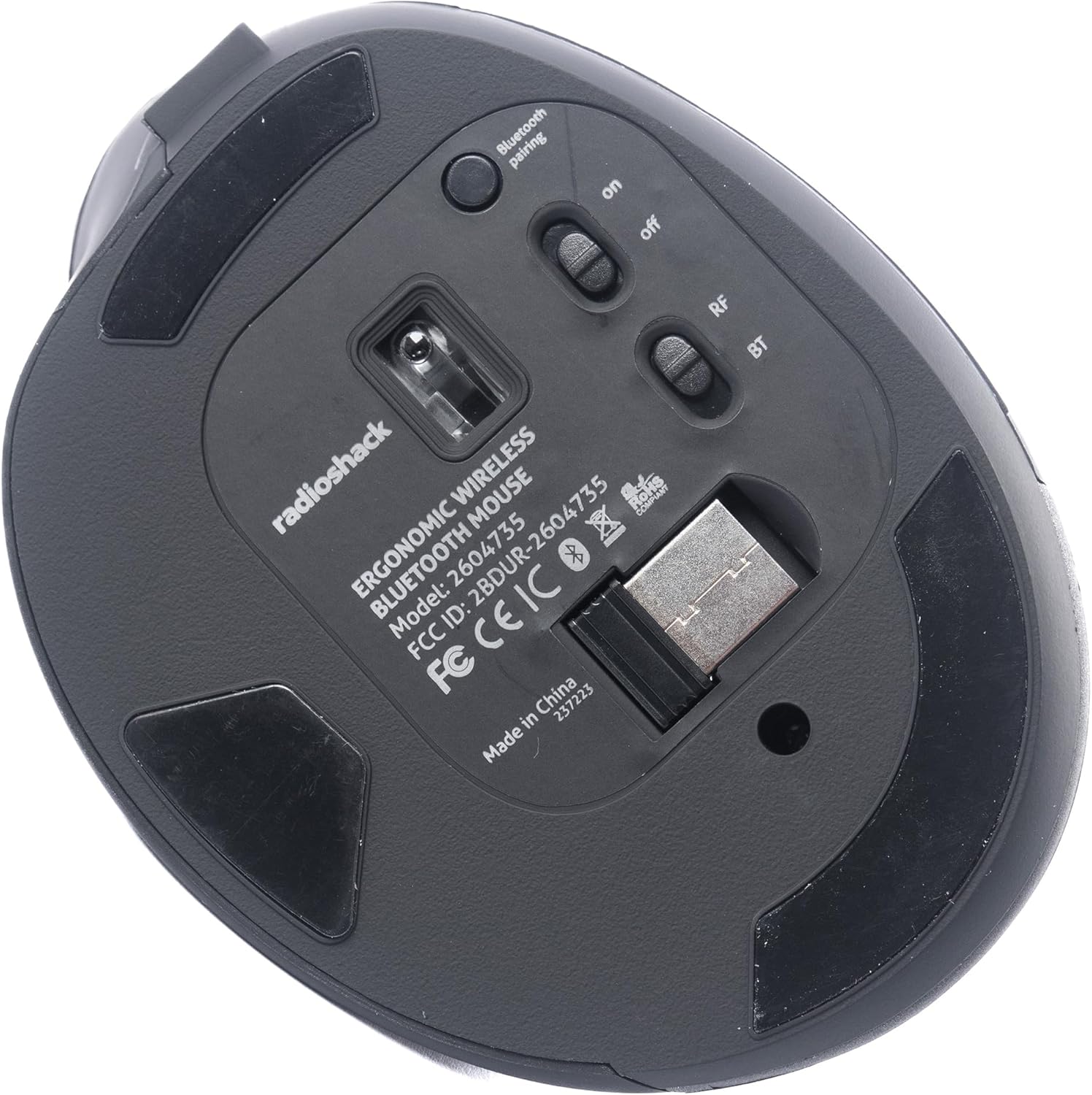
Figura 4: Qiegħ view of the mouse, indicating the power switch, mode switch (RF/BT), and USB receiver compartment.
2.1. 2.4G Wireless Mode (USB Receiver)
- Sib ir-riċevitur USB maħżun fil-kompartiment fil-qiegħ tal-maws.
- Daħħal ir-riċevitur USB f'port USB disponibbli fuq il-kompjuter tiegħek.
- Slide the mode switch on the bottom of the mouse to the "RF" position.
- Turn on the mouse using the ON/OFF switch. The mouse should connect automatically.
2.2. Modalità Bluetooth
- Żerżaq is-swiċċ tal-modalità fil-qiegħ tal-maws għall-pożizzjoni "BT".
- Ixgħel il-maws billi tuża s-swiċċ ON/OFF.
- Press and hold the Bluetooth pairing button (usually located near the mode switch) for 3-5 seconds until the indicator light flashes, indicating it is in pairing mode.
- Fuq il-kompjuter jew l-apparat tiegħek, mur fis-settings tal-Bluetooth u fittex apparati ġodda.
- Select "RadioShack Mouse" (or similar name) from the list of available devices to pair.
- Ladarba jkun imqabbad, id-dawl indikatur jieqaf iteptep.

Figure 5: The mouse positioned wirelessly next to a laptop, ready for use.
Tħaddim tal-Maws
Funzjonijiet Bażiċi
- Buttuna tax-Xellug: Funzjoni tal-ikklikkja primarja.
- Buttuna tal-lemin: Secondary click function (context menu).
- Scroll Wheel: Scroll up/down, and can also function as a middle click button.
- Buttuni 'l Quddiem/Lura: Located on the side, these buttons allow for quick navigation in web browsers u file esploraturi.
Taqleb Bejn Modi
To switch between 2.4G Wireless and Bluetooth modes, simply slide the mode switch on the bottom of the mouse to the desired position (RF for 2.4G, BT for Bluetooth).
Disinn Ergonomiku
The mouse is designed with a contoured shape and rubber grips to provide comfortable support for your hand and wrist, reducing strain during extended use.

Figure 6: A hand demonstrating the ergonomic grip on the mouse.
Manutenzjoni
Tindif
- Itfi l-maws qabel ma tnaddaf.
- Uża drapp artab u niexef biex timsaħ il-wiċċ tal-maws.
- Għal ħmieġ iebes, neħħi ftitampNaddaf id-drapp bl-ilma jew b'soluzzjoni ħafifa tat-tindif, imbagħad nixxef immedjatament.
- Evita li tuża kimiċi ħarxa jew materjali li joborxu.
Kura tal-batterija
- Iċċarġja l-maws regolarment biex iżżomm il-batterija f'saħħitha.
- Evita li tiċċarġja l-batterija kompletament ta' spiss.
- If storing the mouse for an extended period, charge it to about 50% capacity.
Issolvi l-problemi
- Il-maws ma jirrispondix:
- Kun żgur li l-maws huwa mixgħul.
- Iċċekkja l-livell tal-batterija u iċċarġja jekk meħtieġ.
- For 2.4G mode, ensure the USB receiver is securely plugged into the computer and the mode switch is set to "RF".
- For Bluetooth mode, ensure Bluetooth is enabled on your device, the mouse is in "BT" mode, and it is properly paired. Try re-pairing if necessary.
- Try connecting the mouse to a different USB port or a different device to rule out port or device issues.
- Il-moviment tal-cursor huwa irregolari jew bil-mod:
- Kun żgur li s-senser tal-maws huwa nadif u ħieles minn ostakli.
- Uża l-maws fuq wiċċ nadif u li ma jirriflettix.
- Iċċekkja għal interferenza minn apparat ieħor mingħajr fili.
- Il-maws mhux qed jiċċarġja:
- Ensure the charging cable is securely connected to both the mouse and the power source.
- Ipprova kejbil tal-iċċarġjar USB jew adapter tal-enerġija differenti.
- Kun żgur li s-sors tal-enerġija huwa attiv.
Speċifikazzjonijiet
| Karatteristika | Dettall |
|---|---|
| Numru tal-Mudell | 2604735 |
| Teknoloġija tal-Konnettività | 2.4G Wireless, Bluetooth 3.0 (Dual-Mode) |
| Teknoloġija ta 'Sejbien tal-Moviment | Ottiċi |
| Kulur | Iswed u Griż |
| Sors tal-Enerġija | Batterija tal-jone tal-litju rikarikabbli (inkluża) |
| Piż tal-oġġett | 9.1 uqija |
| Dimensjonijiet tal-Pakkett | 8.66 x 6.3 x 2.95 pulzieri |
| Manifattur | RadioShack |
Garanzija u Appoġġ
Għal informazzjoni dwar il-garanzija u appoġġ għall-klijenti, jekk jogħġbok irreferi għall-websajt uffiċjali ta' RadioShack. website or contact their customer service directly. Details regarding product registration, warranty claims, and technical assistance can typically be found on the manufacturer's support pages.


