1. Informazzjoni dwar is-Sigurtà
- Aqra l-istruzzjonijiet kollha bir-reqqa qabel l-installazzjoni u l-użu.
- Tippruvax tiżżarma jew issewwi s-serratura int stess. Ikkuntattja l-appoġġ għall-klijenti għall-għajnuna.
- Keep keys in a safe place, separate from the lock.
- Kun żgur li l-qafas tal-bieb u l-bieb huma strutturalment sodi qabel l-installazzjoni.
- For exterior doors, install under a covered entry to protect from direct rain exposure.
2. Kontenut tal-Pakkett
Iċċekkja li l-komponenti kollha huma preżenti qabel tibda l-installazzjoni:
- Front Lock Assembly
- Rear Lock Assembly
- Lukkett Deadbolt
- Pjanċa tal-Immuntar
- Strike Plate
- Viti (daqsijiet varji)
- Ċwievet tal-Backup (2)
- Cable tal-Iċċarġjar tal-USB
- Manwal għall-Utent
3. Prodott Aktarview
The GeekTale F08 Smart Deadbolt Lock offers multiple access methods and smart features for enhanced security and convenience.

Image: The GeekTale F08 Smart Deadbolt Lock, showing the fingerprint sensor and keyhole.
Karatteristiċi ewlenin:
- Rikonoxximent tal-marki tas-swaba': Fast and accurate one-touch unlocking. Supports up to 50 unique user profiles.
- Kontroll tal-App: Manage users, unlock via Bluetooth, and review access logs through the dedicated mobile application.
- Kapaċità tal-Kontroll mill-bogħod: When paired with a separate gateway (sold separately), enables remote unlocking and real-time notifications.
- Batterija rikarikabbli: Built-in battery provides up to 8 months of use on a 2-hour charge. Features low-battery alerts and emergency USB power access.
- Metodi Multipli ta' Ftuħ: Fingerprint, App, and Physical Key.

Image: Illustration showing the three unlocking methods: App Unlock, Fingerprint Unlock, and Key Unlock.
4. Gwida għall-Installazzjoni
The GeekTale F08 Smart Deadbolt Lock is designed for easy installation. Please refer to the following steps and the installation video for a smooth process.
Video: Demonstrates the installation process for the F08 Deadbolt Lock, highlighting its quick 15-minute setup.
Door Preparation and Measurement:
Kun żgur li l-bieb tiegħek jissodisfa l-ispeċifikazzjonijiet li ġejjin:
- Dijametru tat-Toqba tal-Bieb: 2-1/8 pulzieri (54mm)
- Ħxuna tal-Bieb: 1-3/8 inches to 2-1/8 inches (35mm to 54mm)
- Dahar lura: Adjustable for 2-3/4 inches (70mm) or 2-3/8 inches (60mm). Pull out the face plate to extend if your backset is 2-3/4 inches (70mm).
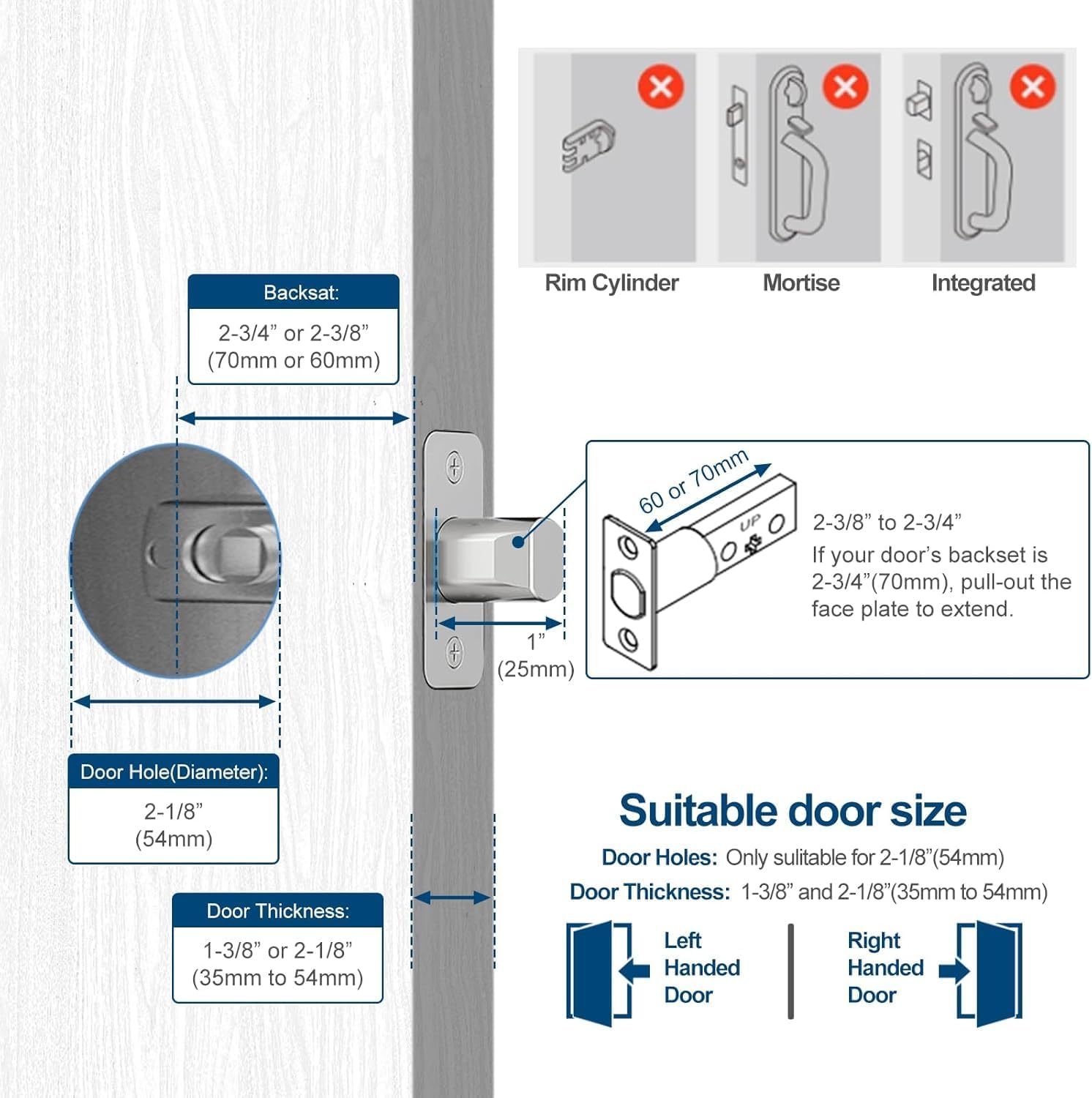
Image: Diagram illustrating required door hole diameter, thickness, and backset measurements for installation.
Passi ta' Installazzjoni:
- Remove Existing Hardware: Carefully remove your old deadbolt and any associated hardware.
- Installa Deadbolt Latch: Insert the new deadbolt latch into the door edge. Ensure it is oriented correctly for your door's swing (left-handed or right-handed). Secure with screws.
- Qabbad Wajers: Connect the wire from the front lock assembly to the wire from the rear lock assembly.
- Install Front and Rear Assemblies: Align the front and rear lock assemblies with the deadbolt latch and secure them to the door using the provided screws. Ensure the wires are not pinched.
- Installa l-Istrike Plate: Install the strike plate on the door frame, aligning it with the deadbolt latch.
- Operazzjoni tat-Test: Manually test the lock and unlock mechanism to ensure smooth operation.
5. Setup
Tniżżil u Konnessjoni tal-App:
- Download the dedicated GeekTale app from your smartphone's app store.
- Oħloq kont jew idħol.
- Follow the in-app instructions to add your F08 Smart Deadbolt Lock. This typically involves selecting the lock model and pairing via Bluetooth.
Video: Guide on how to connect the lock to the app and add fingerprints for control.
Fingerprint Enrollment:
- Within the app, navigate to 'Member Management' or 'Fingerprint Settings'.
- Select 'Add Fingerprint' and follow the on-screen prompts.
- Place your finger on the lock's fingerprint sensor multiple times as instructed until enrollment is complete.
- Test the enrolled fingerprint to ensure it unlocks the deadbolt.

Image: A hand demonstrating the 0.3-second fingerprint recognition speed for unlocking the deadbolt.
Ġestjoni tal-Utenti:
- The app allows you to add, modify, or delete user fingerprints.
- You can assign names to each enrolled fingerprint for easy identification in access logs.
- Access logs can be viewed in the app to track entry and exit times.

Image: A person using the smart app to manage the lock, showing options for user management, Bluetooth unlock, and checking unlock records. A gateway is shown as a separate purchase for remote unlock.
6. Istruzzjonijiet Operattivi
Kif tiftaħ id-Deadbolt:
- By Fingerprint: Place an enrolled finger on the fingerprint sensor. Once recognized (indicated by a green light), twist the deadbolt knob to unlock.
- By App (Bluetooth): Open the GeekTale app on your smartphone. Ensure Bluetooth is enabled and you are within range (approx. 10 meters). Tap the 'Unlock' button in the app.
- By Physical Key: Insert one of the provided backup keys into the keyhole and turn to unlock.
Video: Demonstrates the three unlocking methods for the F08 Deadbolt Lock: fingerprint, app, and physical key.
Illokkjar tad-Deadbolt:
- Qfil Manwali: From the inside, twist the deadbolt knob to the locked position. From the outside, after closing the door, twist the deadbolt knob to the locked position.
- App Locking (Bluetooth): Open the GeekTale app and tap the 'Lock' button.
- Auto-Lock (Configurable): The lock can be configured via the app to automatically lock after a set period.

Image: Diagram showing the 'Twist to Unlock' and 'Twist to Lock' actions for the keyless entry deadbolt.
7. Manutenzjoni
Iċċarġjar tal-batterija:
- The lock features a built-in rechargeable battery.
- When the battery is low, the lock will provide an audible and visual alert, and the app will display a low battery notification.
- Connect the provided USB charging cable to the charging port on the lock (typically located on the underside of the exterior unit) and to a standard USB power source.
- A full charge takes approximately 2 hours and provides up to 8 months of use.
- In case of a completely drained battery, you can temporarily power the lock using a portable power bank connected via the USB port.

Image: Illustration of the built-in rechargeable battery and low battery alert feature, indicating 30 minutes of charge for 8 months of use.
Tindif:
- Imsaħ il-wiċċ tas-serratura b'ċarruta ratba u damp drapp.
- Evita li tuża prodotti tat-tindif jew solventi li joborxu, għax dawn jistgħu jagħmlu ħsara lill-finitura.
- Keep the fingerprint sensor clean and free of debris for optimal performance.
8 Issolvi l-problemi
- Is-serratura ma tirrispondix: Check battery level. Recharge if necessary. Ensure the lock is properly installed and all connections are secure.
- Marka tas-swaba' mhux rikonoxxuta: Ensure your finger is clean and dry. Try re-enrolling the fingerprint. Ensure the sensor is clean.
- Problemi bil-konnessjoni tal-app: Ensure Bluetooth is enabled on your phone and you are within range of the lock. Restart the app and/or your phone.
- Remote unlock not working: Verify that the optional gateway is properly installed, connected to Wi-Fi, and paired with the lock. Check internet connectivity.
- Il-bolt mhux qed jestendi/jirtira kompletament: Check for obstructions in the door frame or strike plate. Ensure the deadbolt latch is correctly aligned.
9. Speċifikazzjonijiet
| Brand | GeekTale |
| Isem tal-Mudell | F08 |
| Tip Lock | Keyless Entry Deadbolt |
| Materjal | Aluminju |
| Kulur | Iswed |
| Protokoll tal-Konnettività | Bluetooth |
| Metodu ta' Kontroll | App, Touch (Fingerprint) |
| Piż tal-oġġett | 0.62 Kilogrammi (1.37 libbra) |
| Tip ta 'batterija | Lithium Ion (Rikarikabbli) |
| Użi Rakkomandati | Under an awning residential front doors, back door, garage door |
10. Garanzija u Appoġġ
GeekTale products are covered by a limited warranty. For specific warranty details, please refer to the warranty card included with your product or visit the official GeekTale websit.
For technical support, troubleshooting assistance, or to inquire about replacement parts, please contact GeekTale customer service through their official channels. Contact information can typically be found on the product packaging or the GeekTale websit.


