1. Prodott Aktarview
The RadioShack USB Type-C Headset is designed for clear audio communication and comfortable listening on computers and laptops. It features 40mm drivers for quality sound and an omnidirectional microphone for effective voice capture. The headset connects via a USB Type-C port, offering a stable and reliable connection.
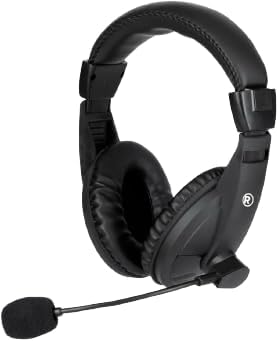
Stampa 1.1: Quddiem view of the RadioShack USB Type-C Headset, showcasing its over-ear design and integrated microphone.

Stampa 1.2: Ġenb view of the headset, highlighting the adjustable headband and the flexible microphone arm.
2. Istruzzjonijiet ta' Setup
- Qabbad il-Headset: Locate an available USB Type-C port on your computer or laptop. Insert the USB Type-C connector of the headset firmly into the port.
- Installazzjoni tas-sewwieq: The headset is plug-and-play. Your operating system (Windows, macOS, Linux) should automatically detect and install the necessary drivers. This process typically takes a few seconds.
- Ivverifika s-Settings tal-Awdjo: After connecting, open your computer's sound settings. Ensure the RadioShack USB Headset is selected as the default playback and recording device.

Stampa 2.1: A close-up view of the USB Type-C connector, which plugs into your device.
3. It-Tħaddim tal-Headset
3.1 Wearing and Adjusting
- L-aġġustament tal-Faxxa tar-ras: Estendi jew irtira l-islajds tal-faxxa tar-ras fuq iż-żewġ naħat biex tikseb qagħda komda fuq rasek.
- Positioning the Ear Pads: Ensure the soft, cushioned ear pads fully cover your ears for optimal sound isolation and comfort.

Stampa 3.1: A person wearing the headset, demonstrating the ergonomic design and comfortable fit for extended use.
3.2 L-Użu tal-Mikrofonu
- Tqegħid tal-mikrofonu: Gently bend the flexible microphone arm to position the omnidirectional microphone approximately 1-2 inches (2.5-5 cm) from your mouth for clear voice pickup.
- Ixekkel/Ixekkel: If your headset features an in-line remote control, use the designated button to mute or unmute the microphone as needed.
3.3 Kontroll tal-Volum
- Kontroll mill-bogħod: Utilize the remote control integrated into the cable to adjust the volume up or down.
- Volum tas-Sistema: Alternatively, adjust the volume directly through your computer's operating system sound settings.
4. Manutenzjoni
- Tindif: Use a soft, dry cloth to wipe down the headset, ear pads, and microphone. Avoid using harsh chemicals or abrasive materials.
- Ħażna: Aħżen il-headset f'post nadif u niexef 'il bogħod minn temperaturi estremi u dawl tax-xemx dirett. Evita li tħabbel il-kejbil.
- Kura tal-Cable: The 110cm (3.5 feet) cable provides ample length. Avoid sharp bends or excessive pulling on the cable to prevent damage.

Stampa 4.1: The headset displaying its 110cm (3.5 feet) cable, offering broad length for comfortable movement.
5 Issolvi l-problemi
- Ebda Ħsejjes mill-Headset:
- Ensure the USB Type-C connector is fully inserted into the port.
- Check your computer's sound settings to confirm the RadioShack USB Headset is selected as the default playback device.
- Increase the volume using the in-line remote control or your computer's system volume.
- Try connecting the headset to a different USB Type-C port or another computer to rule out port or device issues.
- Mikrofonu Mhux Jaħdem:
- Verify the microphone is not muted via the in-line remote or your computer's sound settings.
- Confirm the RadioShack USB Headset is selected as the default recording device in your computer's sound settings.
- Adjust the microphone's physical position closer to your mouth.
- Check privacy settings on your operating system that might restrict microphone access for certain applications.
- Awdjo Mgħawġ:
- Lower the volume to see if distortion reduces.
- Ensure the audio source is not the cause of the distortion.
- Update your computer's audio drivers if available.
6. Speċifikazzjonijiet
| Karatteristika | Dettall |
|---|---|
| Numru tal-Mudell | 2604800 |
| Teknoloġija tal-Konnettività | USB Tip-Ċ |
| Tip ta' Sewwieq Awdjo | Sewwieq Dinamiku (40mm) |
| Tip ta 'mikrofonu | Omnidirezzjonali |
| Forma tal-widna | Fuq il-widnejn |
| Tul tal-Cable | 110 ċm (3.5 pied) |
| Metodu ta' Kontroll | Remot (fil-linja) |
| Apparati Kompatibbli | Kompjuters, Laptops |
| Materjal | Acrylonitrile Butadiene Styrene (ABS) |
| Piż tal-oġġett | 10.6 uqija (0.66 Libbra) |
| Kulur | Iswed |
7. Garanzija u Appoġġ
For warranty information and customer support, please refer to the official RadioShack webis-sit jew ikkuntattja lis-servizz tal-konsumatur tagħhom direttament. Żomm l-irċevuta tax-xiri tiegħek bħala prova tax-xiri għal kwalunkwe talba ta' garanzija.
Appoġġ onlajn: Żur www.radioshack.com for FAQs, product registration, and contact options.


